
pi-openspec-status
v0.7.0
Published
Pi coding agent extension that displays OpenSpec change status — active change, artifact completion, and task progress — as a persistent TUI widget.

Maintainers
 mattoopie
Readme
pi-openspec-status


A pi coding agent extension that displays the active OpenSpec change status as a persistent TUI widget above the editor, with an interactive dialog for detailed views.
Features
- Persistent TUI widget — always visible above the editor in interactive mode, automatically suppressed in non-interactive modes (
-p,--json, headless RPC) - Single-change detailed view — when one active change exists, shows the change name, schema, per-artifact status (proposal, design, specs, tasks), and a task progress bar with apply dependency hints
- Multi-change overview — when multiple active changes exist, shows a header with the active count followed by one condensed line per change with artifact initials, task counters, and blocked-dependency hints
- Artifact status indicators — uses filled circle (●) for done, open circle (○) for ready, and dotted circle (◌) for blocked, each colored with theme-aware success/muted/warning colors
- Interactive dialog — press
Ctrl+Alt+Oto open a scrollable dialog with full change details, task breakdowns, and dependency info - Automatic data refresh — event-driven refreshes fetch from the
openspecCLI on session start, after each agent turn/end (debounced 500ms), and when tools write toopenspec/or bash commands reference openspec; a bounded fallback safety poll starts at 30 seconds and backs off to at most 120 seconds when unchanged - Error resilience — gracefully shows "CLI not found" when openspec is unavailable, silently no-ops when not in an OpenSpec project, and retains last-known state with a muted error indicator on CLI failures
Screenshots
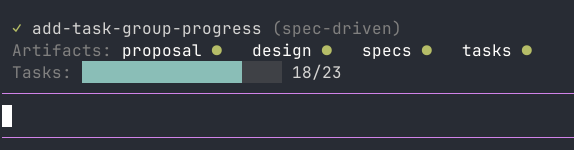
Widget showing a single active change with artifact status and task progress
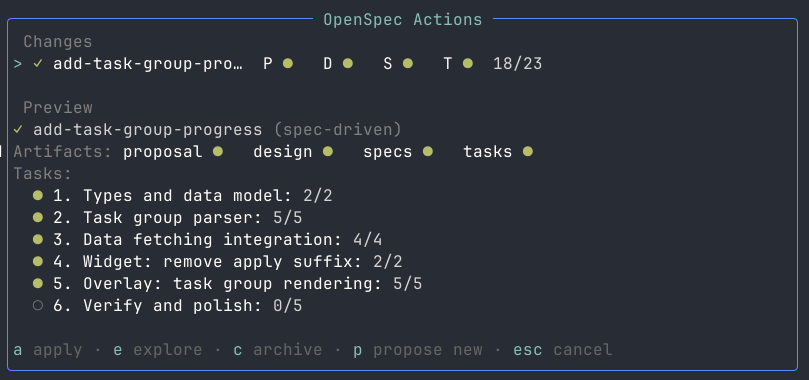
Interactive overlay dialog showing detailed change breakdown and dependencies
Install
From npm (recommended)
pi install npm:pi-openspec-statusOr with a specific version:
pi install npm:[email protected]From GitHub
pi install git:github.com/mattoopie/pi-openspec-statusOr with a specific version:
pi install git:github.com/mattoopie/[email protected]Usage
Once installed, the widget appears automatically when you're in a project that has an openspec/changes/ directory with active change subdirectories.
Interactive dialog
Press Ctrl+Alt+O in interactive mode to open a scrollable dialog displaying the full OpenSpec change status. The dialog shows:
- All active changes with their artifact completion status
- Task breakdowns with completed/total counts per change
- Dependency information for blocked artifacts
This is useful when the compact widget above the editor doesn't show enough detail, or when you want to browse through changes in a larger view.
Note: The dialog is only available in interactive mode (it is suppressed in
-p,--json, and headless RPC sessions).
Requirements
- A project using OpenSpec with changes in
openspec/changes/ - Each change directory may contain:
.openspec.yaml— with aschemafield (optional, defaults to"spec-driven")proposal.md,design.md,tasks.md— artifacts tracked as "done" when presentspecs/— directory tracked as "done" when non-empty
Display
The widget renders different layouts depending on the number of active changes and available terminal width.
No active changes
No active OpenSpec changesSingle active change (3-line detailed view)
◷ add-auth (spec-driven)
Artifacts: proposal ● design ○ specs ○ tasks ○
Tasks: ████░░░░░░ 3/7- Line 1: Status icon (
✓when fully complete,◷in-progress,✗blocked/error), change name, and schema name in parentheses - Line 2: Each artifact (proposal, design, specs, tasks) with a status icon —
●done (success),○ready (muted),◌blocked (warning) - Line 3: Task progress bar with completed/total count
Multiple active changes (header + condensed lines)
OpenSpec (2 active)
◷ add-auth  P ● D ○ S ○ T ○  3/7
✗ bugfix P ● D ◌ S ○ T ○ 0/0 (blocked: design)- Header: "OpenSpec (N active)" in accent color
- Per change (one line): Status icon, truncated change name, artifact initials (
P=proposal,D=design,S=specs,T=tasks) each with a status icon, task counter (completed/total), and a blocked-dependency hint when applicable
Error states
| Condition | Display |
|-----------|---------|
| OpenSpec CLI not installed | OpenSpec CLI not found (warning color, single line) |
| Not an OpenSpec project | Widget does not render (no-op) |
| CLI invocation fails | Retains last known state with muted error indicator |
Development
# Clone and install dependencies
git clone https://github.com/mattoopie/pi-openspec-status.git
cd pi-openspec-status
npm install

# Test locally with pi
pi -e ./extension/index.ts
License
MIT