
pi-overwatch
v0.2.0
Published
Minimal TUI observability for Pi sessions, with tmux session awareness and cwd fallback

Maintainers
 denismrvoljak
Readme
pi-overwatch
pi install npm:pi-overwatchMinimal observability for your Pi sessions.
I built pi-overwatch because I wanted a simple way to see what my Pi sessions were doing while multitasking.
I use tmux with a "one session per project" setup, so Overwatch uses the tmux session name as the main target label when Pi is running inside tmux. If you're not using tmux, it falls back to the directory where you launched Pi.
There are already agent control-center tools and tmux dashboards out there, but I wanted something smaller and calmer: a lightweight TUI that gives me live status for Pi instances without changing how I work.
You can run it anywhere in your terminal setup — inside a tmux pane, in a separate terminal window, or in something like Ghostty.
Demo
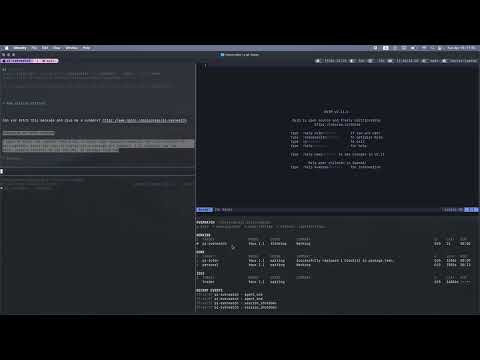
Watch the demo video on YouTube:
- https://www.youtube.com/watch?v=Y33AkG2fl8Q
Screenshot

What it shows
- current Pi session status at a glance
- tmux-session-aware target labels
- cwd fallback when tmux is not available
- current phase or tool activity
- queue counts, heartbeat age, and runtime
- stale-session detection
- simple local config in
~/.pi/overwatch/config.json
Demo
https://github.com/user-attachments/assets/fda9077b-3a37-4d1a-8adc-827d17dc7f53
Install
From npm
pi install npm:pi-overwatchFrom GitHub
pi install https://github.com/denismrvoljak/pi-overwatchProject-local install
pi install -l npm:pi-overwatchOne-off test
pi -e npm:pi-overwatchRun Overwatch
Open another terminal pane or window and run:
pi-overwatchIf you want to run it directly from the repo:
node /absolute/path/to/pi-overwatch/bin/pi-overwatch.jsHow targeting works
Overwatch is tmux-aware, not tmux-dependent.
Target resolution is:
- tmux session name
- Pi session name
- cwd basename
That means if you use a tmux workflow like "one tmux session per project", the dashboard naturally follows that naming. If you are not using tmux, it still works fine and identifies sessions from the directory where Pi was launched.
Dashboard columns
S— status iconTARGET— main identity for the Pi instanceWHERE— source context, usually tmux pane info liketmux 1.1DOING— current phase or toolSUMMARY— short activity summaryQ— steering/follow-up queue countsLAST— seconds since last heartbeatRUN— elapsed runtime for the current or most recent task
Status icons:
●working✓done!stale✕error○offline
Configuration
Overwatch reads config from:
~/.pi/overwatch/config.jsonYou can start from the example file:
mkdir -p ~/.pi/overwatch
cp /absolute/path/to/pi-overwatch/config.example.json ~/.pi/overwatch/config.json
Example:
{
  "dashboard": {
    "identity": "auto",
    "showColumnHeader": true
  }
}
dashboard.identity
Supported values:
"auto"— tmux session name, then Pi session name, then cwd basename"tmux"— prefer tmux session name"cwd"— show cwd basename only"both"— show tmux session name plus cwd basename when they differ, for exampleapi · my-monorepo
dashboard.showColumnHeader
true— show headersfalse— hide headers
tmux
notify— show a tmuxdisplay-messagewhen an agent finishes or errors while its pane is not visible (defaulttrue)bell— also ring the terminal bell on finish, somonitor-bell/ your terminal can flag it (defaultfalse)
tmux integration
Status line
pi-overwatch statusline prints a one-line, tmux-styled summary of all live Pi sessions, meant for embedding in the tmux status bar:
set -g status 2
set -g status-format[1] "#[align=left] #(pi-overwatch statusline)"
Flags:
--plain— no tmux style markup (for use outside tmux)--session NAME— only show agents in that tmux session--max N— max entries before collapsing to+N(default 6)--theme dark|light|auto— color palette (defaultauto)
Colors and light/dark themes
With auto (the default), the theme is resolved from tmux options:
@pi_overwatch_theme— settmux set -g @pi_overwatch_theme light(ordark) to pin it@powerkit_theme_variant—lattemaps to light, anything else to dark- falls back to dark
Pin a theme or override individual colors in the config:
{
  "statusline": {
    "theme": "light",
    "colors": {
      "done": "#40a02b"
    }
  }
}
Color keys: working, stale, done, error, idle, dim, sep.
Finished and idle entries drop off after 10 minutes (PI_OVERWATCH_STATUS_TTL_MS to change).
When two agents resolve to the same label (for example two Pi sessions in one tmux session), the statusline disambiguates them with the tmux window name and pane index: personal:api.2 · personal:blog.1. Unique labels stay unsuffixed.
Dashboard keybindings
# floating pane (tmux >= 3.7, non-modal — keeps working underneath)
bind o new-pane "pi-overwatch"

# popup fallback (tmux >= 3.2, modal)
bind O display-popup -E -w 85% -h 70% "pi-overwatch"
Notifications
When running inside tmux, the extension shows a display-message on every attached client when an agent finishes or errors — but only if the agent's pane is not currently visible. Disable with "tmux": { "notify": false } in the config.
Controls
qquitftoggle working-only viewatoggle offline rowsrforce refresh
State directory
By default, Overwatch stores data in:
~/.pi/overwatchStructure:
~/.pi/overwatch/
├── agents/
│   └── <agent-id>.json
├── config.json
└── events.jsonl
Override the root directory with:
export PI_OVERWATCH_DIR=/some/other/pathOther environment overrides:
export PI_OVERWATCH_REFRESH_MS=1000
export PI_OVERWATCH_STALE_MS=30000
Pi command
The extension also registers:
/overwatchThat command shows the current state file path for the active Pi instance.
Package structure
pi-overwatch/
├── bin/
│   └── pi-overwatch.js
├── extensions/
│   └── overwatch.ts
├── config.example.json
├── LICENSE
├── package.json
└── README.md
Notes
- best results come from launching Pi inside the tmux pane you want associated with the row
- Overwatch does not rename tmux sessions or take over your workspace
- it is intentionally minimal and focused on observability
- Pi loads the extension directly from TypeScript
- there is no build step