
pi-reverse
v0.17.7
Published
Reverse mode for pi: the prompt pinned to the top, Q&A pairs stacked newest first, long answers and questions in their own scrollable windows.

Maintainers
 panbergco
Readme
pi-reverse
Reverse mode for the pi coding agent: the prompt pinned to the top, Q&A pairs stacked downward, newest first — and each pair still reads normally, question then answer.
v0.17.7 · tested with pi 0.87.1, the current release (September 2026). Every feature below works on stock pi — no fork and no patch. See Compatibility.
Named after Warp's reverse mode, which does the same for command blocks. VS Code declined the equivalent request for Copilot Chat (issue #12321, closed as out of scope, December 2025).
  [ status bar ]
  [ prompt ]
  ━━━ 10:55 AM · 1m ago ━━━━━━━━━━━━━━━━━━━━━   ← seam: when the question below was asked
  add a retry with backoff to fetchForecast
  ────────────────────────────────────────────   ← where the question ends
  ⋯ 24 lines above · wheel on the left half
  …the end of its answer, in its own window…
  ━━━ 2h later · 10:08 AM ━━━━━━━━━━━━━━━━━━━   ← the previous pair, and the pause before it
Why
1. Your eyes belong at the top of the screen
The prompt sits at the bottom of a terminal because that is where a shell leaves the cursor, not because it is a good place to look. On a tall window you spend the day glancing down at the last two rows, and the taller the terminal, the worse the angle.
pi-reverse pins the prompt near the top. You read straight ahead, the prompt never moves while a reply streams, and the status bar sits with it.
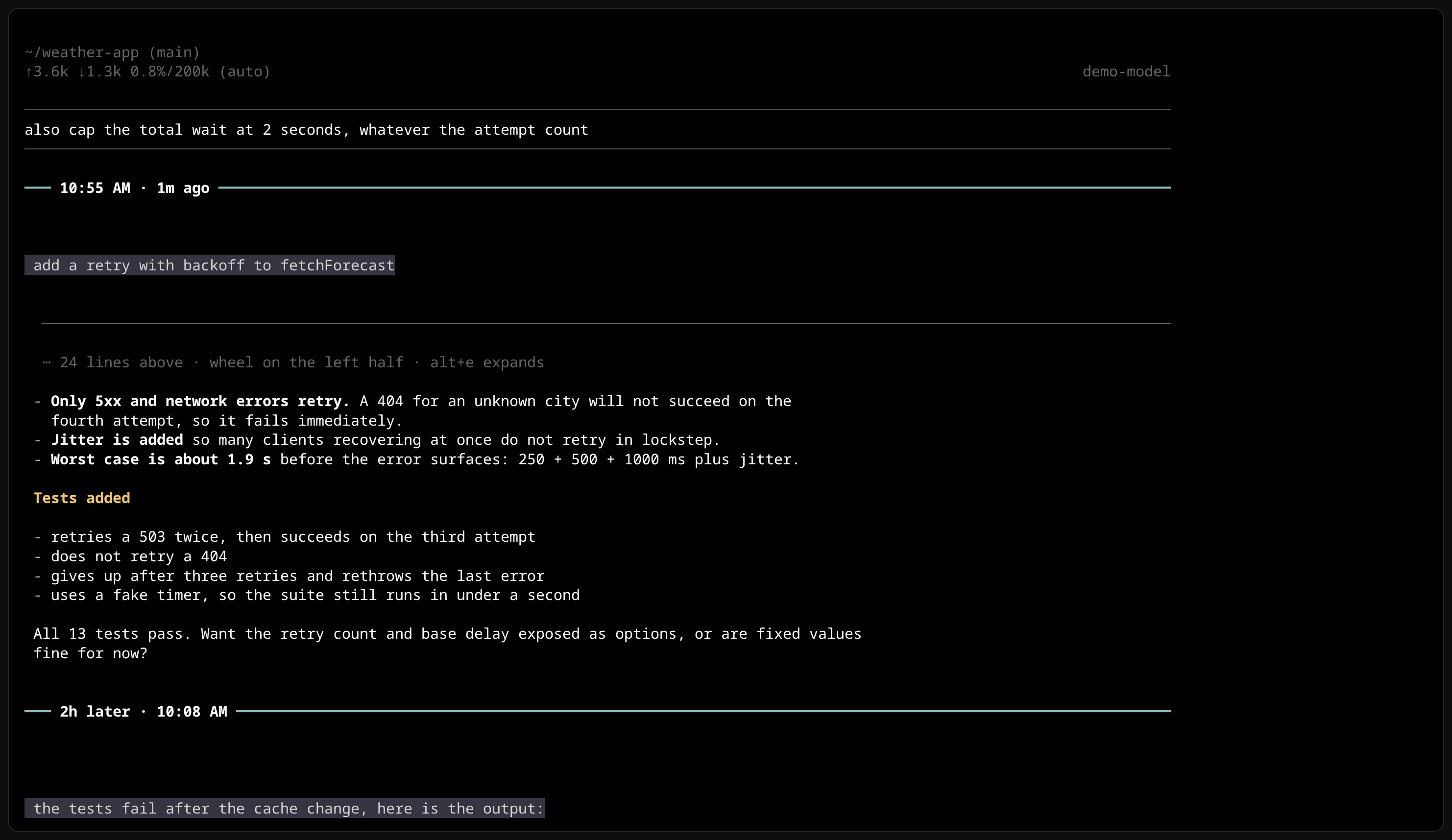
2. In a long session, the question is gone
A reply runs for a hundred lines; by the time you reach its end, the question that produced it has left the screen. Scroll back and you lose your place in the answer; scroll forward and you lose the question again.
The same demo session in stock pi: the end of an answer, nothing on screen saying what was asked, and the prompt at the very bottom.
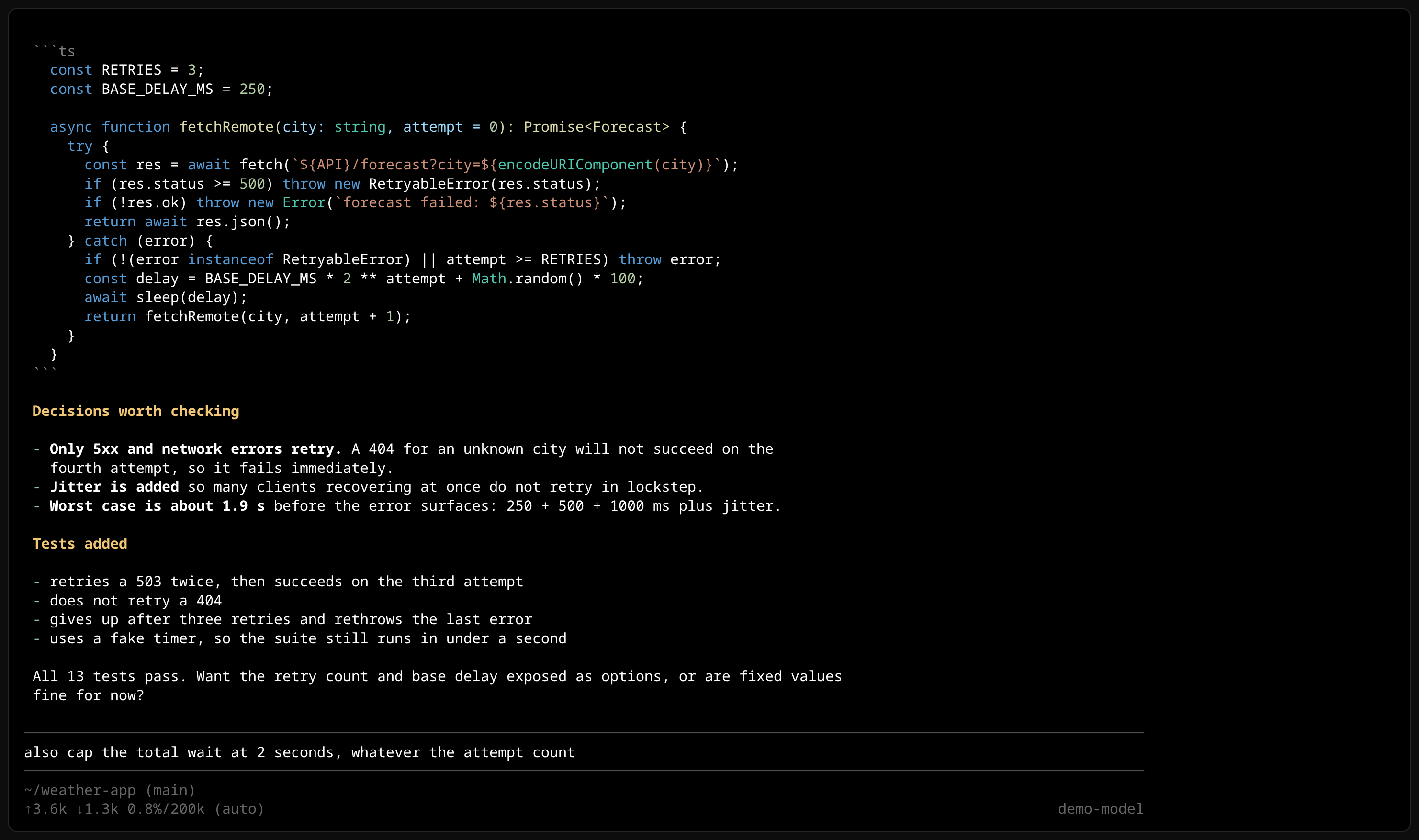
3. Question and answer stay one block
The same session with pi-reverse. Each turn is a unit, framed by a timestamped seam. A long pasted
question is capped at its share of the pair (⋯ 6 more lines), the answer gets the rest in its own
window (⋯ 28 lines above), and the previous pair follows — 07:43 AM · 3h ago. Two complete
exchanges fit on one screen, and nothing loses its question.
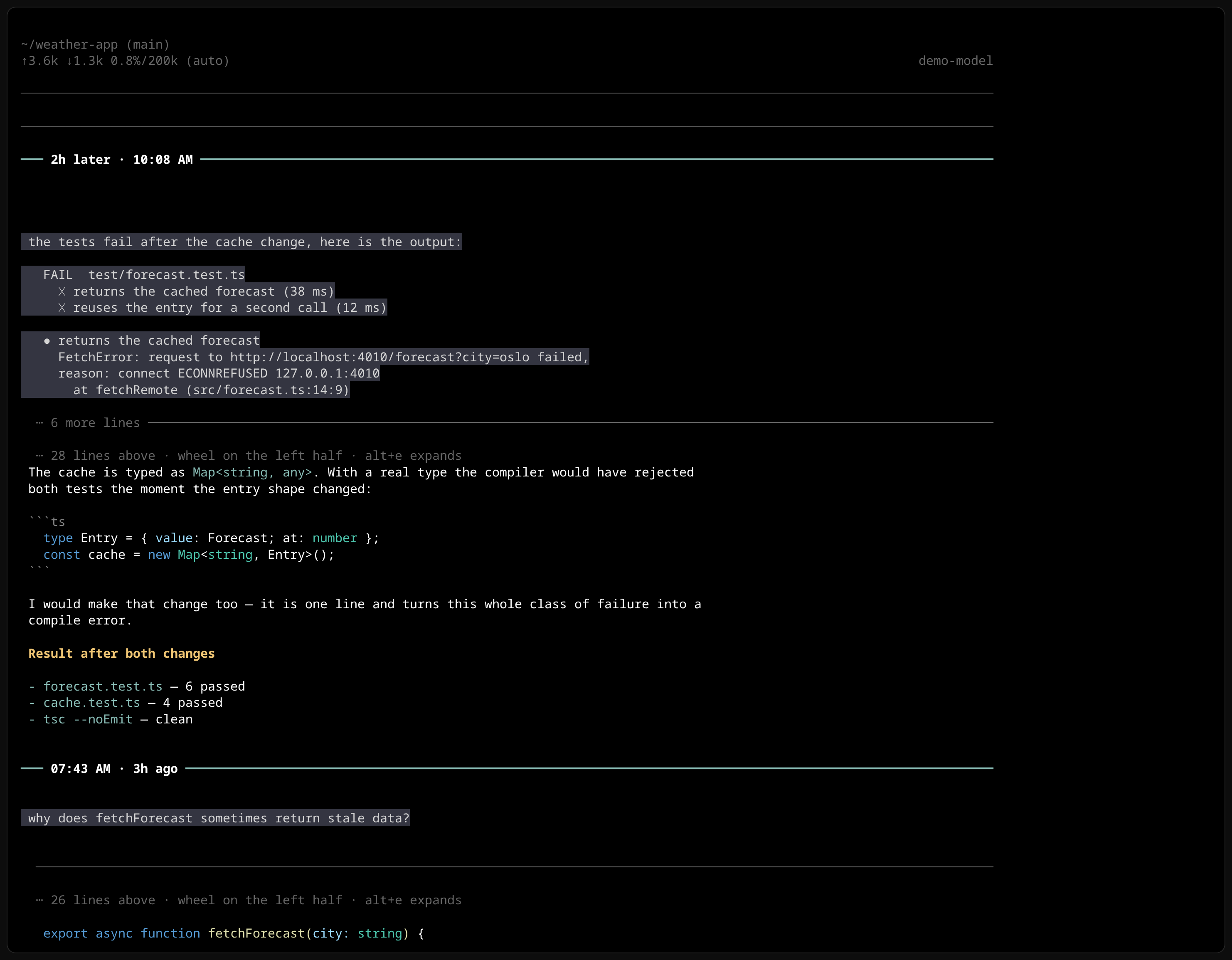
Old sessions open like this too: pi --session <file> on a months-old transcript and it is readable
pair by pair. The session file is never modified; pi-reverse changes rendering only.
The screenshots are from a scripted demo project, recorded on stock pi 0.87.1.
Install
pi install npm:pi-reverseor straight from GitHub: pi install git:github.com/panbergco/pi-reverse
or, to also switch pi to fullscreen mode in one step:
curl -fsSL https://raw.githubusercontent.com/panbergco/pi-reverse/main/install.sh | bashpi-reverse needs fullscreen mode: {"tuiMode": "fullscreen"} in ~/.pi/agent/settings.json,
or pi --tui-mode fullscreen. In regular mode pi writes into the terminal's own scrollback, which can
only grow at the bottom, so no extension can pin anything to the top; pi-reverse declines with a
warning rather than half-applying.
Compatibility
| pi | layout, pairs, seams, keys | mouse wheel inside answers and questions |
|---|---|---|
| 0.87.1 (latest) | ✅ tested | ✅ tested |
| 0.85.1 | ✅ tested | ✅ tested |
| 0.84.x | ✅ layout observed; keys not re-tested | ❌ this release does not deliver mouse events into the transcript — use alt+, / alt+. |
The 0.87.1 check covered: the layout applying without a warning, turn stacking and seams, the question split, answer windows, the inner wheel with its hard stops, the wheel over the prompt, keyboard navigation, and a streamed reply followed to its end.
Moving around
Mouse — the pointer decides, like two panes side by side:
- Left half scrolls inside the answer or question under the pointer. At its end it stops; the conversation behind it does not move.
- Right half scrolls the conversation.
- Over the prompt, the wheel scrolls a long prompt and stops at its first and last line. A prompt that is already showing everything is left untouched, so the wheel can never alter what you typed.
Keys
| | |
|---|---|
| alt+j / /reverse next | top of the next (older) pair |
| alt+k / /reverse prev | top of the previous pair; mid-pair, back to its question first |
| alt+l / /reverse tail | end of the answer being written |
| /reverse question | back to the newest question |
| alt+, / alt+. | scroll inside the newest answer |
| alt+e / /reverse expand | show that answer at full height, or window it again |
| alt+w / /reverse window | answer windows on or off |
How a pair is laid out
The seam above each pair carries when its question was asked (10:55 AM · 1m ago). After a long
pause it says so instead (2h later · 10:08 AM), which is how you find where you picked a session
back up. It is heavy and in the theme accent, with the time in bright white, so it outranks any border
inside an answer; divider-style line gives a thin one. Resumed and compacted sessions are labelled
correctly: each visible question is matched to its own record, including prompts repeated many times.
The answer gets 70% of the pane, so the next pair stays in sight below it. A longer answer shows its end — the conclusion sits next to the question — with a marker for what is folded above. While a reply streams the window follows it, and stops following the moment you scroll; scroll back to the end and following resumes. Heights are measured from the terminal every frame, so resizing a tmux pane resizes the windows with it.
A long question takes at most question-lines of the pair (40% by default) and the answer keeps
the rest, so a pasted log cannot squeeze the answer down to a few lines. The question shows its
first lines, since that is where reading one starts, and a light rule marks where it ends.
Scrolling inside either never moves the pair below it by a single row.
Settings
/reverse lists them all; changes apply immediately and persist to <agent-dir>/pi-reverse.json.
| option | values | default | what it does |
|---|---|---|---|
| dock | top bottom | top | which screen edge the prompt sits on |
| order | newest-first oldest-first | newest-first | conversation direction |
| status-bar | above-prompt below-prompt | above-prompt | status bar side |
| spinner | below-prompt above-prompt | below-prompt | where the working spinner and queued messages go |
| answer-lines | 70%, screen, or 3..200 | 70% | height of a whole pair |
| question-lines | full, 40%, or 3..200 | 40% | most of that pair the question may take |
| older-lines | same or 3..200 | same | height of answers in older pairs |
| wheel-zone | left right full off | left | which half of the pane scrolls inside a pair |
| wheel-chain | on off | off | hand the wheel to the conversation at a window's end |
| sticky-question | on off | on | keep the question on screen once it scrolls away |
| turn-divider | on off | on | seam between pairs |
| divider-time | on off | on | label the seam with when the question was asked |
| divider-style | line heavy | heavy | weight of the seam |
| follow-tail | on off | on | follow a streaming answer |
| tail-margin | 0..5 | 1 | lines kept below the streaming line |
| pad-outer | 0..5 | 1 | blank lines at the screen edge |
| pad-transient | 0..5 | 1 | space around the spinner |
/reverse flip swaps top and bottom; /reverse reset restores the defaults.
How it works
pi's fullscreen layout is a vertical stack of seven regions (transcript, pending messages, status, widgets above and below, editor, footer). pi-reverse rebuilds that stack in the order you configure, and gives the transcript a mirror that groups the chat into turns — a turn starts at each question — and reverses the groups, never their contents. It reads pi's state and never writes to it.
Performance
Cost per frame is proportional to what is on screen, not to the length of the session:
- Off-screen turns keep the lines they last rendered, and are rendered again before they can come into view, so nothing stale is ever shown.
- Mouse hit-testing uses the layout from the last frame instead of re-rendering to find the target.
- The index that matches seams to their timestamps is built once and extended as the session grows.
On a session with over 9,000 questions: 2.4 ms per frame and 38 ms of rendering per submitted message. Wheel-to-repaint on a 1,165-component session: 25–28 ms, against 45–73 ms for stock pi.
Known limits
- Depends on pi's internal layout — the seven regions, and the user-message component as the start of a turn. If a pi release changes that shape, pi-reverse refuses to apply and prints a warning rather than breaking the screen.
- Flipping resets the scroll position, because a fresh scroll view is built.
- pi's startup "Update available" notice renders its lines in reverse order; it arrives as separate pieces after the layout is applied.
Tests
node test.mjs # 12 groups: layout order, turns, jumps, config, seams, timestamps, windows, wheelHistory
The first release moved the prompt and reversed individual messages. Since then:
- Pairs, not messages — newest pair first, each still reading question then answer.
- Answer windows with their own scroll, and a pointer-split wheel.
- Timestamped seams, correct on resumed and compacted sessions.
- Long questions capped, so they cannot squeeze their answer.
- Hard stops at the end of every window, and a prompt that scrolls itself.
- Long-session performance: the working spinner went from 4.9 s to 18 ms after Enter on a large session, and per-frame work from 80 ms to 2.4 ms.
Future ideas
Parked work, the research behind it, and who else has asked for this: IDEAS.md.