
pi-secrets
v0.1.1
Published
Pi extension: the agent requests secrets via a masked local prompt. Values become env vars for bash, never enter the model context, and are redacted from tool output.

Maintainers
 liamvinberg
Readme
pi-secrets


A pi extension for handing secrets to the agent without them ever entering the model's context window.
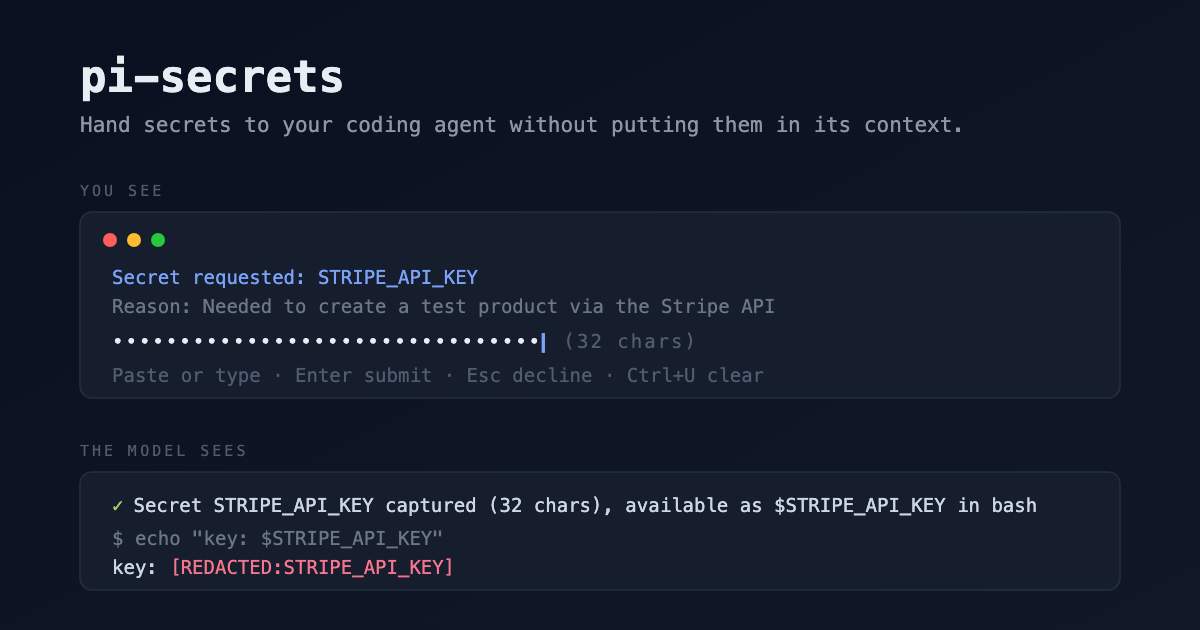
When a task needs an API key, token, or password, the model calls the request_secret tool. You get a masked prompt in the TUI, paste the value, and the model only learns the secret's name and length. The value itself becomes an environment variable available to every subsequent bash command, and a redaction layer scrubs the value from all tool output as a backstop.
Install
pi install npm:pi-secretsOr try it ephemerally: pi -e npm:pi-secrets
How it works
- Capture:
request_secret({ name, reason })pops a masked single-line input. The value goes straight into the agent process's memory; nothing is written to disk, chat, or session files. - Delivery: pi's bash tool builds its child environment from the agent's
process.env, so the captured value is available as$NAMEin every subsequent command. Need it in a file? The model runsecho "NAME=$NAME" >> .env, still without seeing the value. - Redaction: every tool result (and
!user-bash output) is scrubbed before it reaches the model or the session file: the exact value plus its base64 and URL-encoded variants are replaced with[REDACTED:NAME]. If the model runsecho $NAME, it sees the redaction marker, not the secret. - Subagents: child pi processes inherit the environment.
PI_SECRETS_NAMEScarries the names (never values), so a child running this extension rebuilds its own redaction map.
Reuse rules
| Situation | Behavior |
|---|---|
| Name already captured this process | Silent reuse; the model is told it's available |
| Name in your shell environment at pi startup | Confirm dialog; allowing also registers the value for redaction |
| Name in environment, headless (pi -p) | Silent reuse + redaction (the model could read the env there anyway) |
| Nothing anywhere, headless | Tool errors with guidance to export the variable or run interactively |
| You press Esc / decline | Tool errors telling the model not to re-ask |
Lifetime
Secrets live for the pi process lifetime: they survive session switches (/new), and vanish when pi exits. Nothing persists to disk. After a restart the model simply asks again.
Commands
/secrets: list held secrets (name · source · length), interactively clear one or all/secrets clear <NAME|all>: clear directly
Clearing a captured secret also removes it from the agent environment; clearing an inherited one only stops tracking/redaction.
Security model (read this)
This is cooperative, not adversarial (see ADR-0002). It protects against accidental disclosure: secrets pasted into chat, echoed by commands, or persisted in session transcripts. It does not defend against a malicious model: one that can run bash can exfiltrate anything the process can reach. Known gaps, accepted by design:
- Transformations beyond exact/base64/URL-encoded (hex, JWTs signed with the secret, etc.) are not caught.
- Values shorter than 4 chars are rejected at capture; 4 to 7 chars are accepted with a warning (short values risk redaction over-matching).
- Multi-line secrets (PEM keys, service-account JSON) are rejected; point the agent at a file path instead. Planned for a later version.
- MCP servers spawned at pi startup never see secrets captured later (ADR-0001).
Claude Code?
This extension is pi-native on purpose (ADR-0003). The equivalent for Claude Code is a different build: an MCP server using elicitation (responses stay server-side), env delivery via a CLAUDE_ENV_FILE SessionStart/hook, and a PostToolUse redaction hook. Same design, different code. Contributions welcome.
Development
npm install
npm run check   # tsc --noEmit
npm test        # bun test (pure logic: validation, scrubbing, seeding)
pi -e .         # try the extension in an ephemeral pi run
License
MIT