
pi-session-todo
v0.1.3
Published
Session-local live todo checklists for the Pi coding agent

Maintainers
 kungfusaini
Readme
pi-session-todo
Session-local live todo checklists for the Pi coding agent.
Keep the agent on track and see how well it is progressing while it investigates, edits, tests, and ships multi-step work.
Why use it?
Long agent runs can be hard to follow. The agent may skip a verification step, lose sight of the original goal, or spend several minutes working without giving you a useful indication of progress.
pi-session-todo gives the agent a visible execution contract:
- Keeps work focused: the agent breaks the task into concrete steps and is repeatedly reminded what remains.
- Makes progress visible: you can see what is pending, active, completed, or blocked without interrupting the run.
- Shows execution quality: the checklist gives you a quick view of whether the agent is advancing methodically, skipping steps, or getting stuck.
- Makes intervention easier: when priorities change, you can immediately see where the agent is and redirect it with context.
- Separates intent from activity: durable plans describe the approach; session todos show what is actually happening now.
It is not a substitute for reviewing the result, but it makes the agent's process much easier to supervise.
Todos belong to the current conversation—not to your repository or durable project plan.
Features
- One
pi_todotool withset,append,update,list, andclearactions. - Compact dim-grey progress status in Pi's footer.
/todooverlay for the full checklist.- Session persistence across restart and
/reload. - Branch-aware restoration after
/treenavigation. - Stable string IDs or convenient one-based indexes for updates.
pending,in_progress,done, andblockedstates with optional notes.- Enforces at most one
in_progressitem. - Migrates existing state from the original
project-workspaces-todosentry. - Works independently while integrating naturally with plan-mode extensions.
Preview
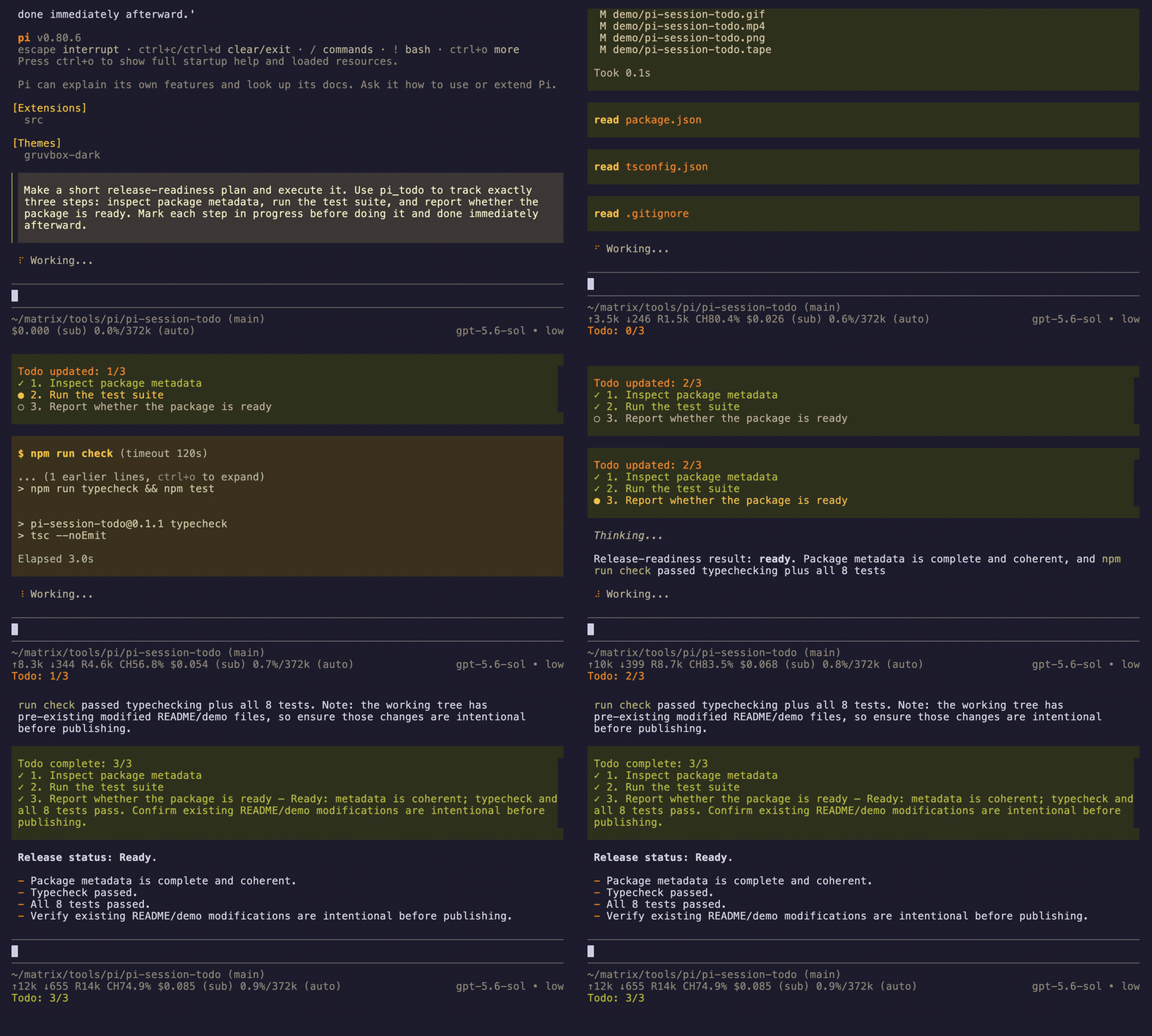
A real Pi agent creates a three-step release plan, works through it, marks the active step, and checks off each result as it completes.
Install
pi install npm:pi-session-todoThen restart Pi or run /reload.
Try it without installing:
pi -e npm:pi-session-todoUsage
The agent manages the checklist automatically for multi-step work. To inspect it yourself:
/todoExample tool call:
{
  "action": "set",
  "items": [
    { "id": "inspect", "text": "Inspect the existing implementation", "status": "done" },
    { "id": "extract", "text": "Extract the standalone extension", "status": "in_progress" },
    { "id": "test", "text": "Run tests and package checks", "status": "pending" }
  ]
}
Update several items atomically:
{
  "action": "update",
  "items": [
    { "id": "extract", "status": "done" },
    { "id": "test", "status": "in_progress" }
  ]
}
You can also update by one-based position:
{ "action": "update", "id": "2", "status": "blocked", "note": "Waiting for credentials" }Todos vs. durable plans
pi-session-todo tracks live execution progress for the current conversation. A project plan tracks intent and approach across sessions. They complement each other:
- Change a todo as work advances.
- Change a durable plan only when scope, approach, risks, or completion criteria change.
The extension does not depend on a specific workspace or plan-mode package. Plan mode can enable pi_todo when installed.
Development
git clone https://github.com/kungfusaini/pi-session-todo.git
cd pi-session-todo
npm install
npm run check
pi -e ./src/index.ts
Build the publish preview:
npm pack --dry-runSecurity and storage
The extension has no runtime dependencies beyond Pi's bundled peer packages and performs no network or filesystem operations. Todo checkpoints are stored as custom entries in Pi's existing session JSONL file and do not enter the model conversation context directly.
License
MIT © Sumeet Saini