
pi-skill-gate
v0.8.1
Published
Interactive skill visibility manager for pi coding agent — browse, toggle, invoke, and track usage of skills from a keyboard-driven TUI overlay.

Maintainers
 cullendotdev
Readme
Skill Gate
Interactive skill visibility manager for pi coding agent
Features • Installation • Usage • Configuration • How It Works
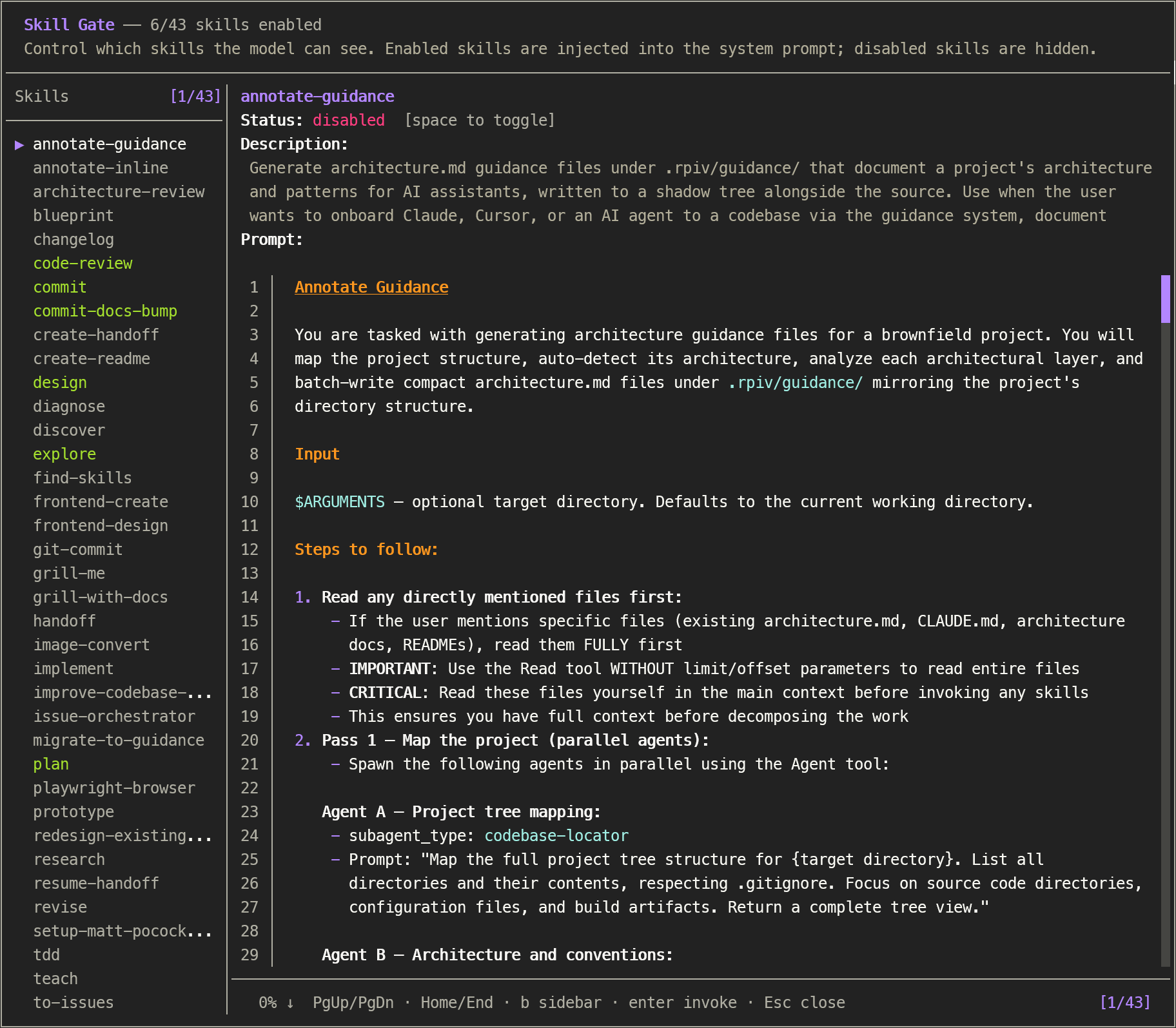
Control which skills are injected into the initial system prompt with /skill-gate. Browse full skill content, toggle visibility on or off, and invoke skills — all from a keyboard-driven overlay. Skills that are not injected can still be executed manually in chat. State is persisted across sessions and injected into the system prompt before every agent run.
Features
- Complete skill coverage — uses pi's
ResourceLoaderAPI with dynamic directory discovery to match/skill:autocomplete (including extension-contributed, project-memory, and migrated package skills) - Skill browser — view the complete
SKILL.mdcontent (description, when-to-use, procedure, prompt body) for every skill with syntax-highlighted markdown rendering - Toggle visibility — enable or disable skills individually; disabled skills are excluded from the system prompt
- Search with highlighting —
/searches by skill name;fperforms full-text search across names, descriptions, and SKILL.md bodies. Matching text is highlighted in the sidebar, description, and rendered prompt body - Bulk actions with confirm modals — enable/disable all visible skills at once (
a/A, warning-bordered modal) or reset the current scope to defaults (r, error-bordered modal). Bulk respects the active search filter - Persistent state — toggle state saved to
~/.pi/agent/config/skill-gate.json - Usage analytics — every
/skill:nameinvocation is counted and persisted; show a "Uses" column in the sidebar (toggle withu) and per-skill usage in the detail view - System prompt injection — enabled skills are automatically inserted as
<available_skills>before each agent start via thebefore_agent_starthook - Respects native-disabled — skills with
disableModelInvocation: trueare marked with a disabled indicator and cannot be toggled - Per-project configs — project-level overrides stored under a
projectskey in the same config file, keyed by absolute path. Toggle scope between global and project withg - Fast hook —
before_agent_startfilters from in-memory caches (skills + config) — zero filesystem access per agent turn
Installation
Via npm (recommended)
Install the package, then let pi discover it:
pi install npm:pi-skill-gateManual (local development)
Clone / copy the extension into your pi extensions directory:
git clone https://github.com/cullendotdev/pi-skill-gate.git
cp -r pi-skill-gate ~/.pi/agent/extensions/pi-skill-gate
Usage
/skill-gateOpens an overlay showing all discovered skills.
| Key | Action |
|---|---|
| ↑ ↓ | Navigate skills |
| Space | Toggle selected skill enabled/disabled |
| / | Enter name-only search mode — type to filter skills by name (Enter commits query, filter persists) |
| f | Enter full-text search mode — type to filter skills by name, description, and body (Enter commits query, filter persists) |
| b | Toggle skill-list sidebar |
| u | Toggle "Uses" column in sidebar (shows per-skill invocation count) |
| k j | Scroll prompt content |
| Home End | Jump to top/bottom |
| Enter | Invoke skill into chat (confirm selection in search mode and confirm modals) |
| g | Toggle editing scope (global ↔ project) — only in a project directory |
| a | Open "Enable all" confirm modal (warning border) — respects active filter |
| A | Open "Disable all" confirm modal (warning border) — respects active filter |
| r | Open "Reset scope" confirm modal (error border) |
| Esc | Close (cancel search when searching; clear active filter on first press; cancel confirm modal when open) |
Confirm modals
a, A, and r open a centered confirmation modal before applying the change:
a/A— Warning border (yellow): show the count of skills that will be affected plus the active scope. UseEnteroryto confirm,Escornto cancel.r— Error border (red): shows the scope that will be cleared and how many toggles will be removed. UseEnteroryto confirm,Escornto cancel.
When the modal is open, all other keys (including r, arrows, j/k) are ignored so you can't accidentally double-confirm.
Configuration
skill-gate.json at ~/.pi/agent/config/skill-gate.json is created automatically. Only "enabled" keys are persisted; "disabled" is the default.
Global skills
{
  "skills": {
    "code-review": "enabled",
    "blueprint": "disabled"
  }
}
Per-project overrides
Add a projects key keyed by the absolute project path. Project entries override global settings for that project only. The overlay defaults to editing the global scope — press g to switch to project-level editing.
{
  "skills": {
    "code-review": "enabled",
    "debugger": "enabled"
  },
  "projects": {
    "/home/user/work/my-react-app": {
      "skills": {
        "debugger": "disabled",
        "test-runner": "enabled"
      }
    }
  }
}
In this example, my-react-app inherits code-review from global, overrides debugger to disabled (shown in red in the sidebar), and adds test-runner (not in global).
Redundant project entries (where the project toggle matches the global effective state) are automatically removed to keep the config clean.
[!WARNING] Corrupted JSON resets all toggles to disabled.
Usage analytics
Invocation counts are stored separately at ~/.pi/agent/config/skill-gate-analytics.json. The input event hook increments the count for every /skill:name (or /skill:foo bar etc.) that fires before skill expansion. Duplicate names in a single input are counted once.
{
  "counts": {
    "code-review": 47,
    "debugger": 12,
    "blueprint": 3
  }
}
In the overlay, the detail view always shows a Usage: Used Nx line (or Usage: — for never-used skills). Press u to add a dedicated Uses column to the sidebar with a vertical │ divider aligned to the ┬ in the separator and the right edge of the Uses header. Numbers are centered in the column and the column width auto-sizes for 1-, 2-, and 3-digit counts.
To reset analytics, delete the file or set counts to {}.
How It Works
session_start
        ↓
  DefaultResourceLoader + dynamic skill path discovery
  (walks agentDir for skills/ dirs not covered by includeDefaults,
   e.g. pi-hermes-memory/skills/, projects-memory/*/skills/)
        ↓                         ↓
  cachedSkills[]              skill-gate.json
  (Skill: name, desc,         (global skills + per-project
   filePath, disableModelInvocation)   overrides keyed by abs path)
        ↓                         ↓
  SkillDetailOverlay ←── loadEffectiveState() / persistToggle(scope)
        ↓
  before_agent_start hook (in-memory filter, project-aware)
        ↓
  buildVisibleBlock() → injected into system prompt

input hook (pi.on("input", ...))
        ↓
  match /skill:name patterns → incrementSkillUsage()
        ↓
  skill-gate-analytics.json (persisted, in-memory cache)
State resolution
Effective state is resolved per-skill: project override → global → disabled (default). The before_agent_start hook passes ctx.cwd as the project path, so per-project toggles take effect automatically when running an agent from that directory.
Editing scope
When opened from a project directory, the overlay defaults to global editing scope. Press g to switch to project-level editing. The sidebar shows ·G indicators for skills inherited from global (project scope) and ·P for skills overridden at the project level (global scope). Skills that are enabled globally but explicitly disabled by a project override render in red.
Skill discovery
The extension creates a DefaultResourceLoader at session_start with includeDefaults: true (covers ~/.pi/agent/skills/, npm package skills, and .agents/skills/) plus dynamically discovered additionalSkillPaths:
- Agent-level directories with
skills/subdirectories (e.g.pi-hermes-memory/skills/) - Project memory skills (
projects-memory/<project>/skills/)
This ensures the skill count always matches /skill: autocomplete, regardless of where skills are stored.