
pi-smart-web-search
v0.2.4
Published
Batch web search for the Pi coding agent — ranked, readable results ready to fetch. Pairs with pi-smart-fetch.

Maintainers
 joematthews
Readme
pi-smart-web-search
A pi extension that adds one tool — web_search — for batch web discovery.
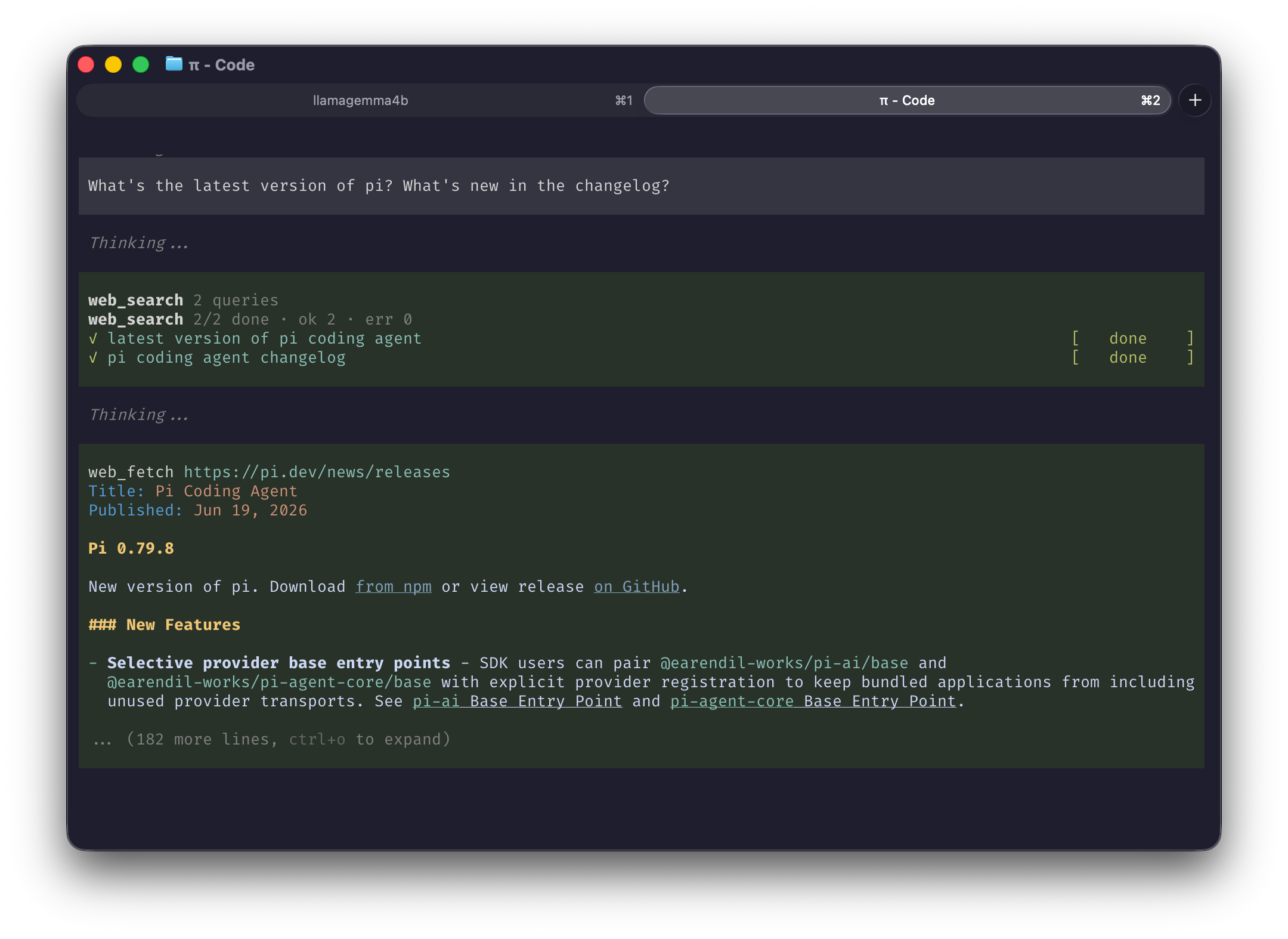
It takes an array of queries, turns each into a search URL,
and runs it through the same fetch→extract pipeline as pi-smart-fetch (wreq-js → linkedom →
Defuddle). It returns the extracted search-results pages (titles, links, snippets as markdown),
prefaced with a # Next step header telling the model to open the best result URLs.
So the model curates which links to open (no SEO-trash auto-pulled into context), and the follow-up nudge sits right next to the links.
Install
pi install npm:pi-smart-web-search
pi install npm:pi-smart-fetch   # companion (see below)
Then restart pi.
Pairs with pi-smart-fetch
web_search finds sources; it hands off to batch_web_fetch (from
pi-smart-fetch) to read the chosen pages. Install
it alongside, or the model has nothing to follow up with.
Usage
Once installed, start up pi and just ask a question — web_search kicks in automatically when an
answer needs current or external info. Try:
What's the latest version of Node.js, and what's new in it?Compare Bun and Deno for a new TypeScript API in 2026.pi searches, opens the best results, and answers from what it read. No flags, no setup — just ask.
Tool
web_search(searches: string[])Pass several queries at once to cover a topic from multiple angles in one call.
Development
Run from a local clone instead of the registry:
git clone https://github.com/joematthews/pi-smart-web-search
cd pi-smart-web-search
npm install
pi install .
Then restart pi.
npm run check runs typecheck, lint, format, spell, and tests.
npx tsx debug.ts "your query" prints what the model would receive for a search.
Credits
Heavily inspired by pi-smart-fetch by
Thinkscape (MIT). It shares the same pipeline (wreq-js → linkedom → Defuddle), and the web_search result card mirrors batch_web_fetch's look. Thanks to that project for the pattern.
License
MIT © Joe Matthews