
pi-system-prompt-viewer
v1.0.0
Published
Inspect and copy the assembled Pi coding agent system prompt and active tool definitions in a scrollable TUI overlay

Maintainers
 eggmasonvalue
Readme
Pi System Prompt Viewer
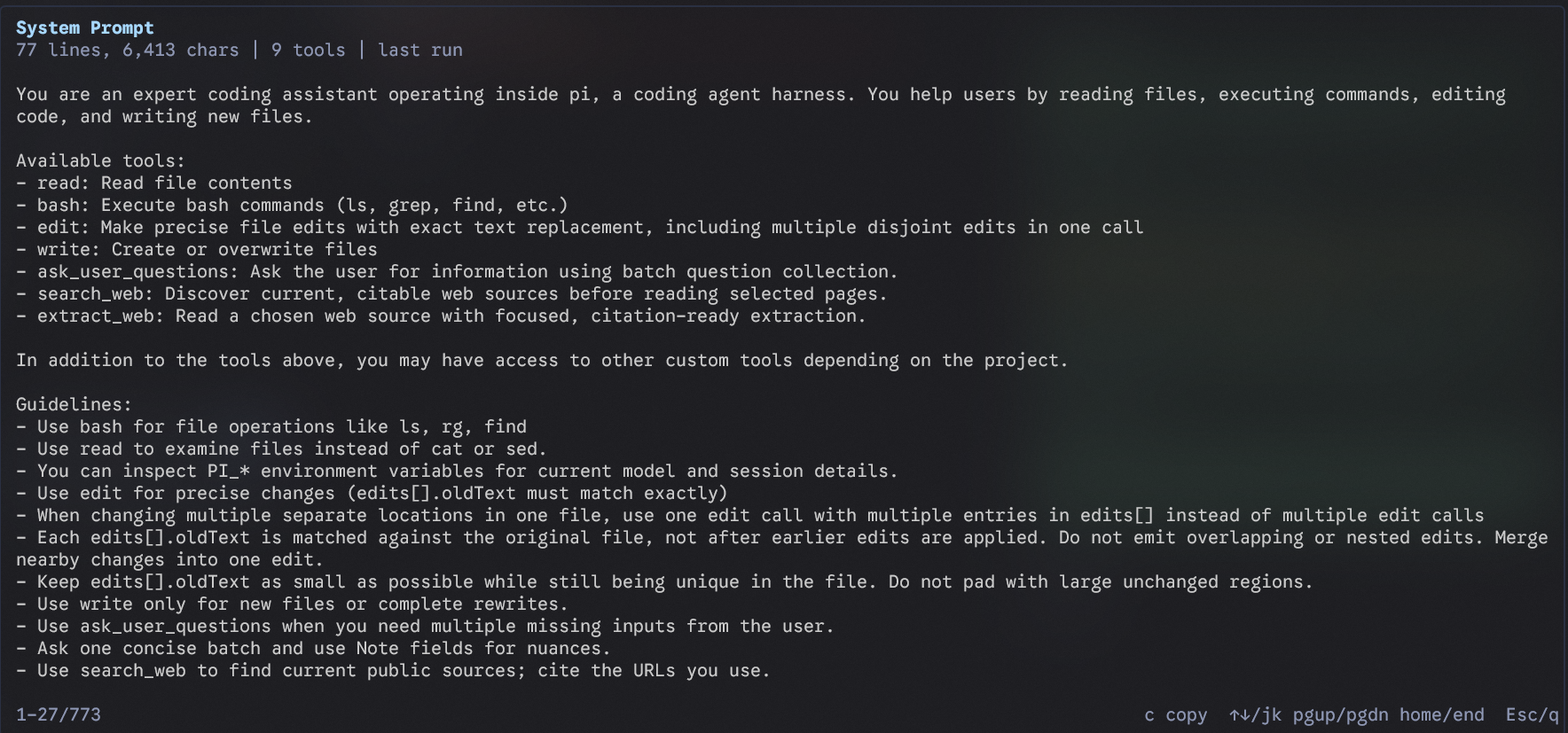
Inspect the exact context that Pi sends to the model. This Pi extension adds a /system-prompt command that opens a scrollable terminal UI overlay containing:
- the assembled Pi coding-agent system prompt;
- the active tool definitions, including their JSON schemas; and
- line/character counts and the number of active tools.
It snapshots the prompt at agent_start, after other extensions have modified it. This makes it useful for prompt debugging, extension development, tool inspection, and understanding why a Pi session behaves differently from another one. Nothing is uploaded: the viewer only displays local runtime data.
Usage
After installing the package, restart Pi or run /reload, then run:
/system-prompt| Key | Action |
|---|---|
| ↑↓ / j k | Scroll one line |
| PgUp / PgDn | Scroll one page |
| Home / End | Jump to the top or bottom |
| c | Copy the prompt and tool JSON to the terminal clipboard |
| Esc / q | Close the overlay |
Open the command before the first agent run to inspect Pi's base prompt. After a run, it shows the prompt assembled for that run, including changes made by other extensions.
Install
Install from npm:
pi install npm:pi-system-prompt-viewerOr install directly from GitHub:
pi install git:github.com/eggmasonvalue/pi-system-prompt-viewerTo try it for one session without adding it to your settings:
pi -e npm:pi-system-prompt-viewerRequirements
- Pi with extension support
- Node.js supported by Pi
- An interactive Pi TUI session (the command is not available in print/RPC mode)
Development
Run the extension from a local checkout:
pi -e .After making changes, run /reload in Pi. The extension is intentionally dependency-light and has no network or telemetry behavior.
Why this exists
Pi's system prompt is assembled at runtime from Pi itself, project instructions, skills, and extensions. The tool list is also assembled dynamically. This viewer exposes that normally hidden context so you can verify the prompt and tools actually sent to the model instead of guessing from configuration files.
License
Apache-2.0