npm package discovery and stats viewer.

Discover Tips

  • General search

    [free text search, go nuts!]

  • Package details

    pkg:[package-name]

  • User packages

    @[username]

Sponsor

Optimize Toolset

I’ve always been into building performant and accessible sites, but lately I’ve been taking it extremely seriously. So much so that I’ve been building a tool to help me optimize and monitor the sites that I build to make sure that I’m making an attempt to offer the best experience to those who visit them. If you’re into performant, accessible and SEO friendly sites, you might like it too! You can check it out at Optimize Toolset.

About

Hi, 👋, I’m Ryan Hefner  and I built this site for me, and you! The goal of this site was to provide an easy way for me to check the stats on my npm packages, both for prioritizing issues and updates, and to give me a little kick in the pants to keep up on stuff.

As I was building it, I realized that I was actually using the tool to build the tool, and figured I might as well put this out there and hopefully others will find it to be a fast and useful way to search and browse npm packages as I have.

If you’re interested in other things I’m working on, follow me on Twitter or check out the open source projects I’ve been publishing on GitHub.

I am also working on a Twitter bot for this site to tweet the most popular, newest, random packages from npm. Please follow that account now and it will start sending out packages soon–ish.

Open Software & Tools

This site wouldn’t be possible without the immense generosity and tireless efforts from the people who make contributions to the world and share their work via open source initiatives. Thank you 🙏

© 2026 – Pkg Stats / Ryan Hefner

pi-title-status

v0.2.1

Published

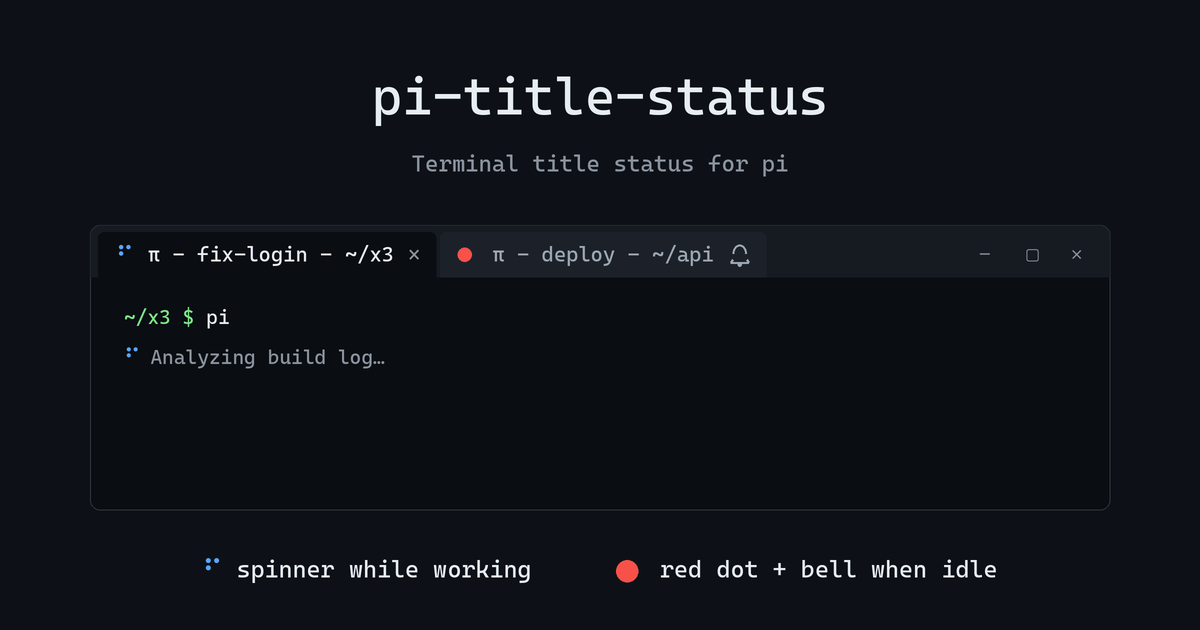
Terminal title status for pi: spinner while working, red dot + bell when idle

Downloads

422

Readme

pi-title-status

preview

pi 的终端标题栏状态扩展:任务运行时显示 braille spinner,空闲时显示 🔴 并响铃(Windows Terminal 未聚焦标签会显示铃铛图标)。

安装

从 npm 安装(推荐):

pi install npm:pi-title-status

也可以从 git 安装指定版本:

pi install git:github.com/waqiju/[email protected]

升级

pi update npm:pi-title-status

或安装指定新版本:

pi install npm:[email protected]

行为

| 状态 | 标题 | |------|------| | 运行中 | ⠋ π - {session} - {目录}(100ms 旋转) | | 空闲等待 | 🔴 π - {session} - {目录} + 响铃 | | 用户开始输入 | 红点即消,回到 π - {session} - {目录} |

  • 基础标题完全镜像 pi 原生格式。
  • 多开时每个实例只控制自己的终端标签页。
  • 红点清除时机:第一下"有效输入"(可打印字符 / 回车 / 退格 / 粘贴)即消;方向键、Ctrl 组合键、鼠标等纯转义序列不算。

配置(可选)

不配也能用。想改默认行为,新建 ~/.pi/agent/pi-title-status.json(若设了 PI_CODING_AGENT_DIR 则放在该目录下):

{
  "doneMark": "🔴",
  "bell": true,
  "spinIntervalMs": 100,
  "template": "{mark}{app} - {session} - {cwd}"
}

| 字段 | 默认 | 说明 | |------|------|------| | doneMark | 🔴 | 空闲标记,可改 ✅ / [done] 等 | | bell | true | 空闲时是否响铃 | | spinIntervalMs | 100 | 旋转帧间隔,下限 20ms | | template | {mark}{app} - {session} - {cwd} | 完整标题模板 |

模板占位符:{mark} 状态标记(spinner/红点,自带尾随空格)、{app} 应用名 π、{session} 会话名、{cwd} 目录名。会话名为空时 - - 空段会自动折叠。

只写想改的字段即可,其余用默认值;新会话生效。JSON 语法错误会整体回退默认值并提示一次。

已知限制

启动(或 /new、session 切换)后的一小段时间,标题是 pi 原生格式——pi 会在扩展的 session_start 之后才写入原生标题,扩展抢不到前面。第一次有效击键(可打印字符 / 回车 / 退格 / 粘贴)或第一个任务开始时即接管为 template 渲染。

本地开发

# 临时加载(不安装)
pi -e ./extensions/title-status.ts