
picgo-plugin-convert-heic
v1.0.2
Published
Convert HEIC Photo to other formats (eg. JPEG)

Maintainers
 ding_junyao
Readme
picgo-plugin-convert-heic
Convert HEIC Photo to other formats (eg. JPEG).
Currently it only convert HEIC to JPEG with .jpg extension name, for uploading original photos shot by iOS devices that enable HEIC. More functions will be added if I have time.
Usage
Searching
convert-heicand install it inPlugin Settingsin PicGo GUI.Executing the folowing command if using PicGo CLI:
picgo add convert-heic
Note
- Some files' extension name is
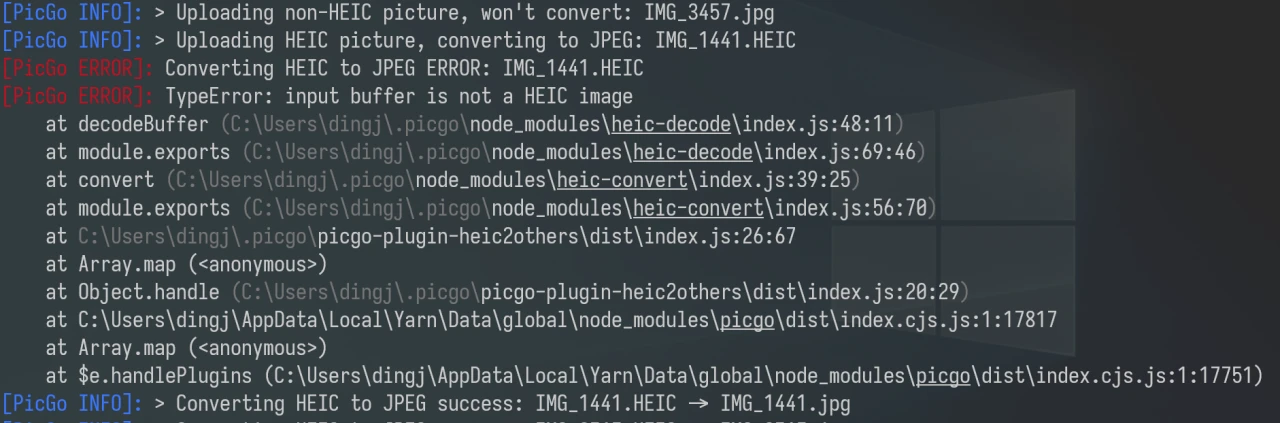
.heicbut they are not HEIC format.- Uploading them will cause TypeError in logs, but the extension name will be changed, and you can still paste the URL.
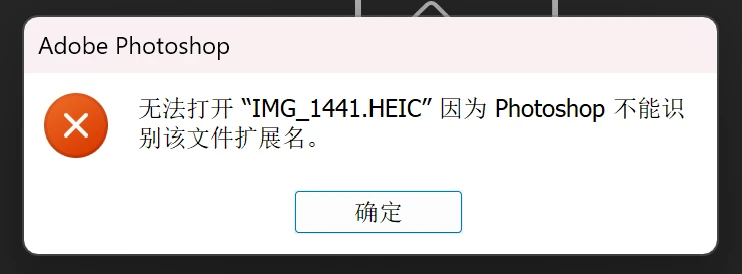
- These files cannot be opened by Photoshop if keep the extension name, which is the best way for most people to tell them from other HEIC files.
- Uploading them will cause TypeError in logs, but the extension name will be changed, and you can still paste the URL.
Thanks
- catdad-experiments/heic-convert: 🤳 convert heic/heif images to jpeg and png, which provides the converting tool.
- hans362/picgo-plugin-remove-exif: Remove EXIF data before uploading, which provides an easy template of the plugins of PicGo.
- Unfortunately, the plugin is not compatibile with it, and I have no idea of how to fix it due to my lack of JavaScript, so I am looking forward to receiving pull requests of it.