
pimatic-mythermostat
v0.0.3
Published
Plugin to control my electric heater.
Downloads
3


Readme
pimatic-mythermostat
Thermostat plugin for the Pimatic
Synopsis
This plugin is a simple thermostat for Pimatic. Here are some examples of the functionality
- scheduling and manual modes
- Bang Bang and PID controllers
- Early On (coming)
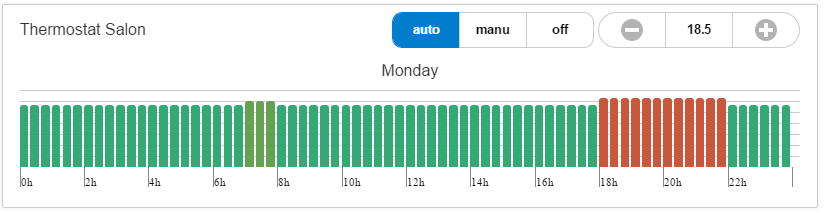
- a simple but explicit UI
Requirement
To make it work, you'll need :
- some heaters that can be witched on or off using a Pimatic rules or action
- a thermometer controlling the temperature of the room
configuration
To include the plugin just add this code in the plugins section
{
  "plugin": "mythermostat"
},
The configuration is split in 3 different zones
- the observable and controllers
- the different programs
- the schedule
- a trick !
Observable and controllers
The thermostat is continuously observing the room temperature given by a variable variableTemp
it will also switch On or Off the heaters by executing an Action
  "variableTemp": "temperature.variableName",
  "actionHeatingOn": "press heat-on-button",
  "actionHeatingOff": "press heat-off-button",
The different programs
The thermostat's objective temperature is based on programs.
  "programs": [
    {
      "id": 0,
      "temperature": 18.5
    },
    {
      "id": 1,
      "temperature": 19.5
    },
    {
      "id": 2,
      "temperature": 20.5
    }
  ],
The schedule
The schedule is expressed for each day of the week "Mon", "Tue", "Wed", "Thu", "Fri", "Sat" , "Sun". For each day, you can set a program (ie a temperature) that starts at the given time and end at the next program
"timetable": [
{
  "day": "Mon",
  "schedule": [
    {
      "start": "0000",
      "programID": 0
    },
    {
      "start": "0700",
      "programID": 1
    },
    {
      "start": "0800",
      "programID": 0
    },
    {
      "start": "1800",
      "programID": 2
    },
    {
      "start": "2200",
      "programID": 0
    }
  ]
}, ...
The trick!
To refresh the UI when program changes, you must emit a variable. Pimatic will try to save it in the database and will throw an exception as it is an array.
Just add this to the deviceAttributeLogging
{
  "deviceId": "*",
  "attributeName": "currentProgram",
  "expire": "0d",
  "type": "*"
}
Full config
in the database section
"database": {
  "deviceAttributeLogging": [
    ...
    {
      "deviceId": "*",
      "attributeName": "currentProgram",
      "expire": "0d",
      "type": "*"
    }
  ],
}
Add as many thermostat devices as needed in the devicesection.
{
  "id": "thermostat",
  "class": "MyHeatingThermostat",
  "name": "Thermostat Salon",
  "comfyTemp": 21,
  "ecoTemp": 16,
  "controller": "PID",
  "variableTemp": "tempsalon.temperature",
  "actionHeatingOn": "press heat-on-button",
  "actionHeatingOff": "press heat-off-button",
  "programs": [
    {
      "id": 0,
      "temperature": 18.5
    },
    {
      "id": 1,
      "temperature": 19.5
    },
    {
      "id": 2,
      "temperature": 20.5
    }
  ],
  "timetable": [
    {
      "day": "Mon",
      "schedule": [
        {
          "start": "0000",
          "programID": 0
        },
        {
          "start": "0700",
          "programID": 1
        },
        {
          "start": "0800",
          "programID": 0
        },
        {
          "start": "1800",
          "programID": 2
        },
        {
          "start": "2200",
          "programID": 0
        }
      ]
    },
    {
      "day": "Tue",
      "schedule": [
        {
          "start": "0000",
          "programID": 0
        },
        {
          "start": "0700",
          "programID": 1
        },
        {
          "start": "0800",
          "programID": 0
        },
        {
          "start": "1800",
          "programID": 2
        },
        {
          "start": "2200",
          "programID": 0
        }
      ]
    },
    {
      "day": "Wed",
      "schedule": [
        {
          "start": "0000",
          "programID": 0
        },
        {
          "start": "0700",
          "programID": 1
        },
        {
          "start": "0800",
          "programID": 0
        },
        {
          "start": "1630",
          "programID": 2
        },
        {
          "start": "2200",
          "programID": 0
        }
      ]
    },
    {
      "day": "Thu",
      "schedule": [
        {
          "start": "0000",
          "programID": 0
        },
        {
          "start": "0700",
          "programID": 1
        },
        {
          "start": "0800",
          "programID": 0
        },
        {
          "start": "1800",
          "programID": 2
        },
        {
          "start": "2200",
          "programID": 0
        }
      ]
    },
    {
      "day": "Fri",
      "schedule": [
        {
          "start": "0000",
          "programID": 0
        },
        {
          "start": "0700",
          "programID": 1
        },
        {
          "start": "0800",
          "programID": 0
        },
        {
          "start": "1630",
          "programID": 2
        },
        {
          "start": "2200",
          "programID": 0
        }
      ]
    },
    {
      "day": "Sat",
      "schedule": [
        {
          "start": "0000",
          "programID": 0
        },
        {
          "start": "0700",
          "programID": 1
        },
        {
          "start": "0900",
          "programID": 2
        },
        {
          "start": "2200",
          "programID": 0
        }
      ]
    },
    {
      "day": "Sun",
      "schedule": [
        {
          "start": "0000",
          "programID": 0
        },
        {
          "start": "0700",
          "programID": 1
        },
        {
          "start": "0900",
          "programID": 2
        },
        {
          "start": "2200",
          "programID": 0
        }
      ]
    }
  ]
},
Next
This plugin is still under development.
- PID is not correctly implemented, as of today, it is a simple proportional controller
- PreHeat : start heating according to the next scheduled temperature
- Make it smart : add a presence sensor and some maths (HMM?)
- Off mode is not working
- UI
License
Code released under the MIT license.