
pimatic-solarview
v0.8.6
Published
Pimatic Plugin for SolarView (SV), a data logger for PV systems

Maintainers
 mwittig
Readme
pimatic-solarview


A pimatic Plugin for SolarView (SV), a data logger for PV systems:
- German homepage: http://www.solarview.info
- English homepage: http://www.solarview.info/Solarlogger_en.aspx
SV is capable of gathering data from up to 9 inverters and additional meter points which may be used to monitor the in-house consumption of solar energy, for example. SV is a vendor-neutral solution which supports a large number of inverter models from various vendors. It is available for Fritz!Box, Raspberry PI, and Windows.
Screenshots
Example of the device display as provided by the SolarViewInverterSimple

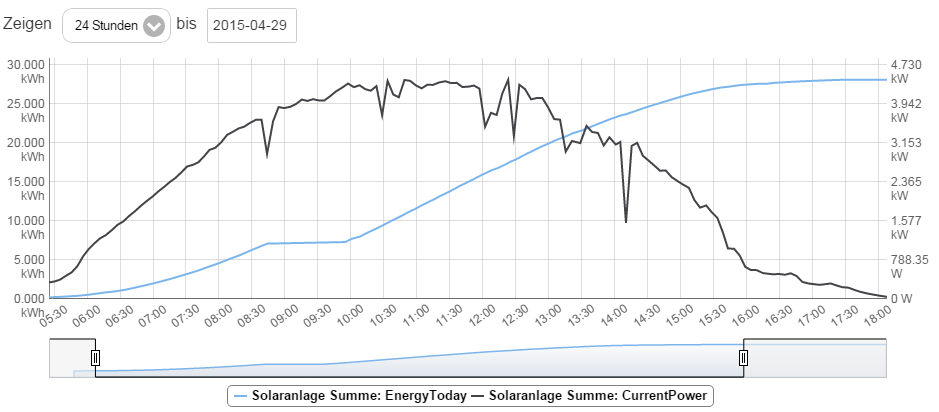
Example of the customizable graph utility provided by the pimatic frontend
Configuration
To be able to read the SV data records with pimatic-solarview, the TCP-Server option must be enabled by adding the
-TCP <port> option to the SV start script. See section TCP-Server of the SV Installation Manual.
You can load the plugin by editing your config.json to include the following in the plugins section. The properties
host and port denote the hostname (or IP address) and port of the SV TCP server. The property interval specifies
the time interval in seconds for updating the data set. For debugging purposes you may set property debug to true.
This will write additional debug messages to the pimatic log.
{
   "plugin": "solarview"
   "host": "fritz.box"
   "port": 15000
   "interval": 10
}
Then you need to add a device in the devices section. The plugin offers three device types:
- SolarViewInverterSimple: This type of device provides status data on the accumulated energy earnings (today, this month, this year, total) and the current power produced.
- SolarViewInverter: This type of device additionally provides you with data on AC voltage, amperage and inverter temperature readings.
- SolarViewInverterWithMPPTracker: This type of device is for PV systems with a MPP tracking system. It additionally provides you with data on voltage and amperage for up to three DC strings.
As part of the device definition you need to provide the inverterId which is a digit [0-9] to identify the number of
the inverter attached to the SV logger (see example below). The digit 0 depicts the sum of all inverters attached to
the SV logger.
{
    "id": "sv1",
    "class": "SolarViewInverterSimple",
    "name": "PV System",
    "inverterId": 0
}Hints: If you wish to hide some attributes this is possible with pimatic v0.8.68 and higher using the
xAttributeOptions property as shown in the following example. Using the xLink property you can also
add a hyperlink to the device display.
{
    "id": "sv1",
    "class": "SolarViewInverterSimple",
    "name": "PV System",
    "inverterId": 0,
    "xLink": "http://fritz.box:88",
    "xAttributeOptions": [
        {
          "name": "currentPower",
          "hidden": true
        }
    ]
}
TODO
There are a few things I am planning to add in the short term:
- Add support for additional meter points, for example, for an additional power meter to monitoring the in-house consumption of solar energy.
- Currently, the update cycles also run at night. This could be limited to daylight hours even though the load caused by the update cycles should be fairly low.
- Possibly add localized names for attributes if this is supported by pimatic.
History
See Release History.
License
Copyright (c) 2015-2016, Marcus Wittig All rights reserved.