
pinetrie
v0.1.0
Published
An agent harness for teams.

Maintainers
 canadaduane
Readme
pine·trie
An agent harness for teams. The conversation is a tree, not a transcript: branch from any message, run branches side by side, and work in the same tree with other people, live. Each thread's agent works in a Linux container of its own, on its own copy of your project, and what it changes comes back as commits you review and accept.
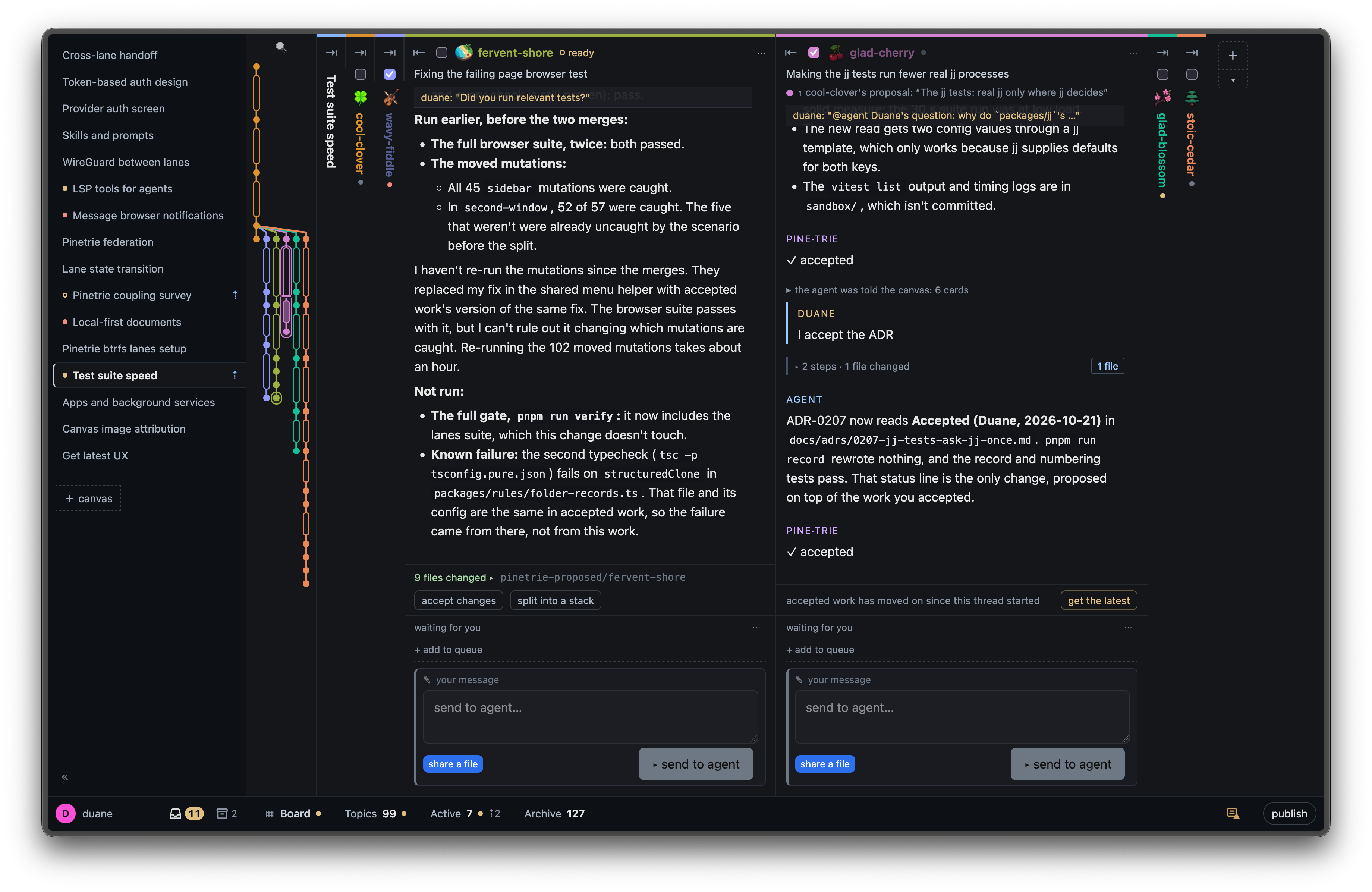
Two threads on a canvas, with the rail beside them drawing the tree. One has changes ready to accept; the other has been accepted, and is told that accepted work has moved on since it started.
Why a tree
- Ask aside without derailing. Every message in the tree is shared and kept, but the model is sent only the path to the message it answers. A side question costs the main thread no context.
- Run branches at once. A branch's agent starts on a disk cloned from its parent's at the turn it branched, so parallel branches don't step on each other's files.
- Work together. The tree is a CRDT document, so everyone connected sees each message, branch and run as it happens.
- Review before anything lands. A thread's work is a jj bookmark,
pinetrie-proposed/<thread>, that you can read in the page or in jj. Accepting it moves a bookmark forward and leaves your working copy alone. When accepted work moves on, a thread can get the latest, and its agent resolves a conflict, or asks you.
A folder under no version control works too: its proposed changes are files you review and accept.
What it needs
- Node 24 or later, and a model provider's credential.
- On macOS: Apple silicon, Xcode's command line tools, and the Docker CLI with buildx. No Docker engine: lanes run in a VM pine·trie starts.
- On Linux, arm64 or x86_64: Docker, with pine·trie's lanes directory
(
$XDG_STATE_HOME/pinetrie/lanes) on btrfs. - For a project under version control, jj
and git. A git repo gets jj beside it (
jj git init --colocate) the first time, and git works as before.
Start
npm install -g pinetrie
pinetrie sign-in anthropic    # `pinetrie sign-in` lists the providers
PINETRIE_MODEL=anthropic/claude-sonnet-5-5 pinetrie serve ~/code/my-project
Then open http://localhost:7391. To keep the model, put
{ "model": "anthropic/claude-sonnet-5-5" } in
~/.config/pinetrie/pinetrie.json. A key in a provider's usual
environment variable works in place of sign-in.
The first start builds the lanes' images, which takes a few minutes; once
the host says listening, every thread's agent can work. Write to the
agent in a new thread, then branch from any message to try something else
beside it.
To work with others, start with PINETRIE_BIND=0.0.0.0: the host prints
an invite link for each network address.
pinetrie alone lists the commands. Settings are pinetrie.json files,
from the machine's to yours for one project;
docs/pinetrie.md
("Your config") says which may set what.
Status
pine·trie is early, and runs one host per project.
- Identity is not verified. The invite key decides who gets in, and a person is the email they give. Anyone with the link can direct agents, and run commands on the host's machine as you: share it only on a trusted network or through a tunnel.
- An agent works in its lane. It sees its own copy of your project,
your working copy read-only, and nothing else of your machine unless a
pinetrie.jsongrants it.
How it is built
pine·trie runs pi's agent core
over Kyneta's CRDT documents: pi's
own storage conformance suite runs against the Kyneta adapter. Every
end-to-end check comes with a deliberate bug it is proven to catch.
Decisions are recorded one per file in
docs/adrs/.
pine·trie is developed in pine·trie: its own threads' agents work on it in
lanes.
Developing pine·trie
From a clone of github.com/halecraft/pinetrie, with pnpm:
pnpm install --frozen-lockfile
pnpm dev [folder]
Start with
docs/pinetrie.md,
and AGENTS.md
for how the work is done.
License
MIT