
pinu-bot
v0.3.0
Published
A small TypeScript library for orchestrating expressive robot screen faces on HTML5 canvas.

Maintainers
 pauljohnberry
Readme
pinu-bot
pinu-bot is a framework-agnostic TypeScript library for expressive robot display faces on HTML5 canvas. It focuses on orchestrating animated emotions, actions, and overlays instead of drawing static avatars.
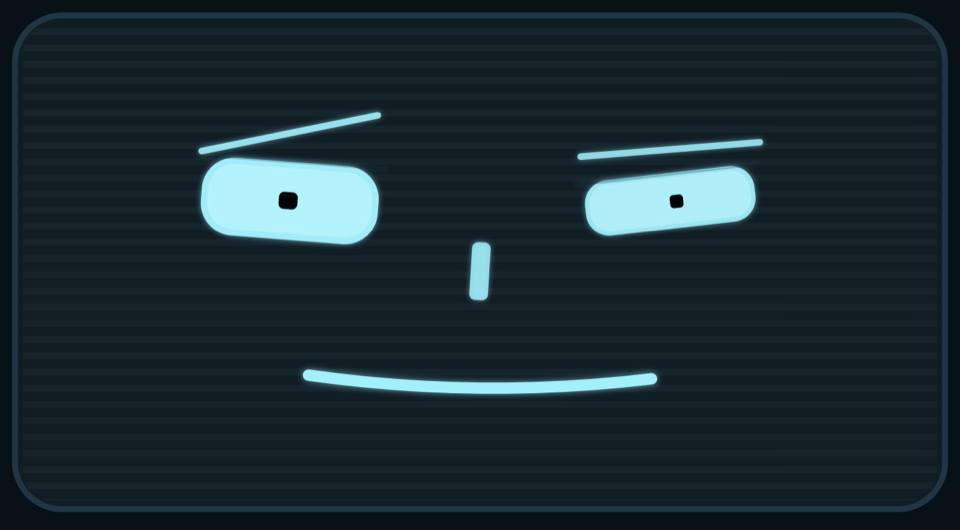
Highlights
- Canvas 2D only
- Parametric geometry only, no sprite sheets
- Layered runtime: base emotion + blink + lookAt + speaking + screen FX
- Character system: swap between different face types
- Low-level construction helpers for composition-first character authoring
- Shared standard renderer helpers for robot-like face families
- Optional mood lighting and symbol mode
- Built-in face-theme presets, visual themes, and style presets
- Direct part control for eyes, mouth, and nose
- Device-pixel-ratio aware render loop
- Works with React, Vue, Angular, Svelte, and vanilla apps because the runtime only needs a canvas element
Install
npm install pinu-bot
pnpm add pinu-bot
bun add pinu-bot
Demo And Docs
Local interactive demo/docs:
bun run devRelease and deploy docs:
Quick Start
import { createRobotFace } from "pinu-bot";

const canvas = document.querySelector("canvas")!;
const face = createRobotFace(canvas, {
  character: "pinu",
  faceTheme: "companion",
  backgroundFx: "emotion",
  transparentBackground: false
});

face.emote("happy");
face.lookAt(0.2, -0.1);
face.speak({ intensity: 0.35 });
Recommended canvas CSS:
canvas {
  width: 320px;
  height: 200px;
  display: block;
}
Destroy the instance when your component or page unmounts:
face.destroy();Usage
import { BUILTIN_FACE_THEMES, BUILTIN_STYLES, createRobotFace } from "pinu-bot";

const canvas = document.querySelector("canvas")!;
const face = createRobotFace(canvas, {
  faceTheme: "companion",
  theme: "cyan",
  style: "soft",
  backgroundFx: "emotion",
  features: {
    nose: false
  },
  parts: {
    eyeShape: "wide",
    eyeWidthScale: 0.82,
    eyeHeightScale: 1.25,
    browShape: "soft",
    mouthShape: "soft"
  }
});

face.emote("happy");
face.emote("sad", { intensity: 0.8 });
face.emote("love");
face.emote("angry");

face.think({ persistent: true });
face.listen({ durationMs: 1800 });
face.sleep({ persistent: true });
face.goOffline({ persistent: true });
face.bootUp();
face.glitch();
face.reset();

face.lookAt(0.2, -0.1);
face.lookLeft(0.7);
face.lookUp(0.4);
face.smile(1, { open: false });
face.frown(0.6, { open: false });
face.pout(0.5, { open: false });
face.blink();
face.wink("right");

face
  .eyes().open(0.9).done()
  .mouth().smile(0.3).done();

face.speak({ intensity: 0.4 });

face.setStyle("visor");
face.setFaceTheme(BUILTIN_FACE_THEMES.sentinel);
face.setParts({
  eyeShape: "block",
  eyeWidthScale: 0.7,
  eyeHeightScale: 1.4,
  noseShape: "bridge",
  mouthShape: "band",
  browShape: "bold",
  scanlineThickness: 2,
  scanlineSpacing: 5
});
face.setBackgroundFx("emotion");
face.showSymbol("question");
face.showFace();
face.configure({
  mode: "symbol",
  symbol: "loading",
  theme: "ice-blue",
  style: BUILTIN_STYLES.industrial,
  features: {
    brows: true,
    mouth: false,
    panel: true
  }
});
Public API
createRobotFace(canvas, options?)Options includecharacter,theme,style,features,parts,mode,symbol,backgroundFx,transparentBackground,autoStart, andpixelRatio.face.setCharacter(nameOrDefinition)
Emotions:
face.emote(name, options?)emote()sets the persistent emotional baseline. A lateremote(...)call replaces the previous one.
Actions:
face.think(options?)face.listen(options?)face.sleep(options?)face.goOffline(options?)These actions support:durationMspersistent: true
face.bootUp(options?)face.glitch(options?)These actions support:durationMsbootUp()andglitch()are timed overlay actions: they layer on top of the current emotion and any active held action. Held actions (think,listen,sleep,goOffline) are superseded by a later emotion or held action call.
Expression and motion helpers:
face.transitionTo(state)face.lookAt(x, y)face.lookLeft(amount?)face.lookRight(amount?)face.lookUp(amount?)face.lookDown(amount?)face.smile(amount?, { open? })face.frown(amount?, { open? })face.pout(amount?, { open? })face.blink()face.wink(side?)face.speak(options)
Controls and configuration:
face.reset()Returns the face to the original creation-time baseline: the initial emotion, mode, and symbol set when you created the face.face.setTheme(nameOrDefinition)face.setFaceTheme(nameOrDefinition)face.setStyle(nameOrDefinition)face.setParts({ eyeShape, eyeWidthScale, eyeHeightScale, noseShape, mouthShape, browShape, scanlineThickness, scanlineSpacing })face.setMode("face" | "symbol")face.showSymbol(name)face.showFace()face.setBackgroundFx("off" | "emotion" | { mode: "custom", color, intensity, pulseHz })face.configure({ character, theme, style, features, parts, mode, symbol, backgroundFx, transparentBackground, pixelRatio })
Lifecycle:
face.start()face.stop()face.render()face.destroy()
Low-level part controls:
face.eyes()face.leftEye()face.rightEye()face.mouth()face.nose()
Characters
Characters define how the face looks: the shapes of eyes, nose, mouth, and brows, plus optional overlays and emotion-specific effects. Every character shares the same API.
Built-in characters: pinu, bubo, kiba
Switch characters at creation or at runtime:
const face = createRobotFace(canvas, { character: "pinu" });
face.setCharacter("pinu");
Custom Characters
import { registerCharacter, createRobotFace } from "pinu-bot";
import type { CharacterDefinition } from "pinu-bot";

const myCharacter: CharacterDefinition = {
  name: "my-character",
  partOptions: {
    eyeShape: ["soft", "sleepy"],
    noseShape: ["button"],
    mouthShape: ["soft"],
    browShape: ["soft"],
  },
  defaultParts: {
    eyeShape: "soft",
    eyeWidthScale: 1,
    eyeHeightScale: 1,
    noseShape: "button",
    mouthShape: "soft",
    browShape: "soft",
    scanlineThickness: 1.5,
    scanlineSpacing: 5,
  },
  defaultStyle: { /* StyleDefinition */ },
  drawEye(dc, params) { /* draw with dc.ctx */ },
  drawBrow(dc, params) { /* draw with dc.ctx */ },
  drawNose(dc, params) { /* draw with dc.ctx */ },
  drawMouth(dc, params) { /* draw with dc.ctx */ },
};

registerCharacter(myCharacter);
const face = createRobotFace(canvas, { character: "my-character" });
Characters can optionally provide drawOverlay, drawBackground, getFaceVisibility, getScrambleStrength, and per-character emotions or actions overrides. See src/character.ts for the full interface and src/characters/pinu.ts for a reference implementation.
Advanced custom-character helpers are also exported for composition-first authoring. See docs/construction-api.md for the deeper design notes.
Built-In Presets
Emotions:
neutral, happy, love, sad, angry, surprised, confused, excited
Actions:
thinking, listening, sleeping, offline, bootUp, glitch
Themes:
amber, cyan, green-crt, white, red-alert, ice-blue, sunset, violet
Styles:
classic, soft, minimal, visor, industrial
Face themes:
default, companion, service, sentinel, soft-smile, status-strip, sharp-cheer, sleepy-muse, droplet-dream
Aliases sharp, sleepy, droplet, caret-cheer, crescent-muse, and teardrop-dream still resolve for compatibility.
Features And Shapes
Consumer-facing feature toggles:
leftEyerightEyebrowspupilsnosemouthpanelscanlines
Part shape options:
eyeShape:soft,wide,block,sharp,sleepy,dropleteyeWidthScale/eyeHeightScalenoseShape:gem,pointed,bridge,buttonmouthShape:soft,band,blockbrowShape:soft,bold,angledscanlineThickness/scanlineSpacing
Symbol Mode
Symbols:
questionexclamationellipsisheartofflineloadingwarning
Symbols still participate in glow, bob, flicker, scanlines, and distortion.
Background FX
off: no extra lightingemotion: derive tint and pulse from the current emotioncustom: provide your owncolor,intensity, andpulseHz
Canvas Background
transparentBackground: true: clear the canvas without painting the theme background first- default: paints the full theme background across the canvas
Example:
const face = createRobotFace(canvas, {
  theme: "white",
  transparentBackground: true,
  features: {
    panel: false,
    scanlines: false
  }
});
Framework Consumption
The library is imperative and only depends on a canvas, so it works with any framework that can hand you an HTMLCanvasElement.
See examples/frameworks.md for:
- React
- Vue
- Angular
- Vanilla TypeScript
Extending The Library
The current architecture is intentionally open to extension:
- add new characters in
src/characters/implementingCharacterDefinition - add new emotions in
src/emotions.ts - add new bundled face themes in
src/faceThemes.ts - add new visual themes in
src/themes.ts - shared drawing helpers available in
src/drawUtils.ts:roundedRect,clamp,wave,ease,drawPixelGlyph
Performance Notes
- The renderer uses a single
requestAnimationFrameloop. - It reuses pose objects instead of allocating new state every frame.
- Geometry is parametric and drawn directly on Canvas 2D.
- It is designed to be fast enough for interactive UI use, but multi-face production benchmarks are still a recommended next step.
Development
bun install
bun run check
bun run dev
Demo
Run the local demo:
bun run devThen open the local URL printed by the Bun dev server.