
pipedrive-app-extensions-mock-host
v0.4.2
Published
Development-only mock host for the Pipedrive App Extensions SDK: lets your app extension's code run on localhost — talking to the real @pipedrive/app-extensions-sdk — by playing the Pipedrive window and rendering real UI elements. Framework-agnostic.

Maintainers
 antlaht86
Readme
pipedrive-app-extensions-mock-host
A development-only mock host for the
Pipedrive App Extensions SDK
(@pipedrive/app-extensions-sdk).
In production your app extension runs inside a Pipedrive iframe, and the SDK
posts messages to the Pipedrive window (window.parent). On localhost there is
no Pipedrive on the other end, so the SDK has nobody to talk to. This package
plays that missing window: it listens for the SDK's messages and answers
them, rendering real UI elements (snackbars, confirmations, modals, surface
header bars, …) into your page. It is framework-agnostic — works with React,
Vue, Next.js, or plain vanilla JS.
It does not replace the SDK. You keep using the real
@pipedrive/app-extensions-sdk; this is the host it connects to.
How it works
The real SDK and the mock host talk over the exact same wire protocol the SDK uses in production:
- Handshake. When your code calls
new AppExtensionsSDK(...).initialize(), the SDK posts aninitializemessage towindow.parent. Because you are not in an iframe in dev,window.parent === window, so the mock host — listening on that same window — receives it and replies, completing the handshake. - Commands. Each
sdk.execute(Command.X, args)opens aMessageChannel: one request, one reply. The host parses the command, renders the matching UI (or runs your headless override), and replies on the same port — which resolves the SDK's promise. Reply shapes match the SDK's own types exactly. - Events. The host can push messages to your App Extension over time
(e.g.
VISIBILITY,USER_SETTINGS_CHANGE) via the controller'semit(). Yoursdk.listen(Event.X, cb)receives them. The host also fires some events on its own from user interaction: closing a custom modal (its X button orCLOSE_MODAL) firesCLOSE_CUSTOM_MODAL, closing a floating window via its X firesVISIBILITYwithcontext.invoker = 'user', and collapsing/expanding the panel firesVISIBILITY(is_visiblefalse/true,invoker: 'user'). - Tracks. Fire-and-forget messages the SDK sends (e.g.
FOCUSED) are received and swallowed — no reply, by design.
All host-rendered UI lives inside a single open Shadow DOM root, so the host's styles never leak into your app and your app's styles never reach the host UI. The published package contains zero third-party code and has no runtime dependencies.
Data flow between the App Extension, the Real SDK, and the Mock Host over a
MessageChannel — your code drives the SDK, the SDK and host exchange messages
on the same window, and the host renders its UI and pushes events back:
flowchart LR
    code["App Extension code"]
    sdk["Real SDK<br/>@pipedrive/app-extensions-sdk"]
    host["Mock Host<br/>listens on the same window"]
    ui["Shadow DOM UI<br/>surfaces · snackbar · modals · Dev Tool"]

    code <-->|"execute() · listen() · track()"| sdk
    sdk -->|"handshake, Commands, Tracks<br/>(postMessage / MessageChannel)"| host
    host -.->|"Command replies & Events"| sdk
    host --> ui
Requirements
- The real
@pipedrive/app-extensions-sdkinstalled (it is apeerDependency,>=0.16.0). - Node
>=20for development of this package. - Your app must not run inside an iframe in dev, so that
window.parent === windowand the mock host can listen on the same window.
Install
npm install --save-dev pipedrive-app-extensions-mock-hostQuick start
import { startPipedriveMockHost } from 'pipedrive-app-extensions-mock-host';
import AppExtensionsSDK, { Command } from '@pipedrive/app-extensions-sdk';

// Detect dev however you like (Vite: import.meta.env.DEV, Node:
// process.env.NODE_ENV, or a hostname check for vanilla JS).
const isDev = location.hostname === 'localhost';

// Start the host only in development.
const host = isDev ? startPipedriveMockHost() : undefined;

// The real SDK, pointed at the mock host (no iframe → identifier must be given).
const sdk = await new AppExtensionsSDK(
  isDev ? { identifier: 'dev-local' } : undefined,
).initialize();

await sdk.execute(Command.SHOW_SNACKBAR, {
  message: 'Hello from the mock host!',
});

// Later, when tearing down dev tooling:
host?.teardown();
In a plain HTML page, load the SDK's UMD build and this package's IIFE build
(window.PipedriveMockHost) side by side — no bundler required. See
testing/index.html for a complete vanilla example.
Configuration
startPipedriveMockHost(config?) accepts a MockHostConfig. Every field is
optional:
| Option | Type | Default | Purpose |
| ---------------- | ------------------------------------------------------------ | -------------------- | ------------------------------------------------------------------------------------------------------------------------------------------------------- |
| enabled | boolean | true | Turn the host off without removing the call (e.g. { enabled: import.meta.env.DEV }). When false, returns an inert handle. |
| theme | 'light' \| 'dark' | 'light' | Visual theme for the host's own mock UI. |
| onConfirmation | (args) => boolean \| Promise<boolean> | — | Headless override for SHOW_CONFIRMATION; return whether the user confirmed. Omit to render an interactive dialog. |
| getSignedToken | () => string \| Promise<string> | 'dev-signed-token' | Provides the token returned by GET_SIGNED_TOKEN. Return a real dev JWT to exercise your backend's verify path. |
| onModal | (attrs) => ModalResult \| Promise<ModalResult> | — | Headless override for OPEN_MODAL; return the modal result instead of rendering a dialog. |
| customModals | Record<string, string> \| ((attrs) => string \| undefined) | — | Maps a custom-modal action_id to the URL the modal iframe should load. |
| appName | string | 'App Extension' | Name shown in the surface header bar the host injects onto each surface. |
| appIcon | string | a generic glyph | Icon shown in the surface header bar — a URL (rendered as an <img>) or a short glyph/emoji. |
| devTool | boolean \| { position?, startCollapsed? } | true | Show the host's interactive Dev Tool overlay (see Dev Tool). Pass false to omit it, or an object to set its corner / start it collapsed. |
Theme and header branding
const host = startPipedriveMockHost({
  theme: 'dark',
  appName: 'Acme CRM Helper',
  appIcon: '/logo.svg', // a URL → rendered as <img>; or a glyph like '🚀'
});
Headless overrides (skip the UI)
Pass onConfirmation and onModal to answer those commands without rendering a
dialog — handy for automated runs and end-to-end tests:
startPipedriveMockHost({
  // Always confirm, instead of showing the confirmation dialog.
  onConfirmation: () => true,
  // Resolve OPEN_MODAL with a fixed result instead of opening a modal.
  onModal: (attrs) => ({ status: 'submitted', id: 123 }),
});
Signed token and custom modals
import { SignJWT } from 'jose';

startPipedriveMockHost({
  // Return a real dev JWT to exercise your backend's verify path.
  getSignedToken: async () =>
    new SignJWT({ sub: 'dev-user' })
      .setProtectedHeader({ alg: 'HS256' })
      .sign(new TextEncoder().encode('dev-secret')),
  // Map a custom-modal action_id → the URL its iframe loads.
  customModals: {
    'settings-modal': '/dev/settings.html',
  },
});
customModals can also be a function, e.g. to build the URL from the modal's
arguments:
startPipedriveMockHost({
  customModals: (attrs) => `/dev/modals/${attrs.action_id}.html`,
});
Controller API
startPipedriveMockHost() returns a MockHost controller:
| Member | Signature | Purpose |
| ------------ | ------------------------------- | ----------------------------------------------------------------------------------------------------------------------------------------------- |
| shadowRoot | ShadowRoot | The open shadow root the host renders its UI into. Query it in tests (within(shadowRoot)). |
| emit | (event: string, data) => void | Push a host-driven event to the App Extension (e.g. USER_SETTINGS_CHANGE, VISIBILITY). |
| getCalls | () => MockHostCall[] | The commands the App Extension has sent so far ({ command, args }) — useful in tests. |
| devTool | { setPosition(p) => void } | Runtime controls for the Dev Tool overlay; setPosition moves it to a corner (no-op when the Dev Tool is disabled). See Dev Tool. |
| teardown | () => void | Stop listening and remove all rendered UI. |
Pushing events to the App Extension
The App Extension listens with sdk.listen(...); the host pushes events with
emit(...). Use it to simulate Pipedrive-driven changes like a theme switch or
visibility change:
import AppExtensionsSDK, { Event } from '@pipedrive/app-extensions-sdk';

const host = startPipedriveMockHost();
const sdk = await new AppExtensionsSDK({
  identifier: 'dev-local',
}).initialize();

// App side: react to host-driven events.
sdk.listen(Event.USER_SETTINGS_CHANGE, ({ data }) => {
  console.log('theme is now', data.theme);
});

// Host side: simulate Pipedrive flipping the theme to dark.
host.emit(Event.USER_SETTINGS_CHANGE, { theme: 'dark' });
Inspecting sent commands in tests
getCalls() returns every command the App Extension has sent, so you can assert
on them, then teardown() to clean up:
const host = startPipedriveMockHost();
const sdk = await new AppExtensionsSDK({
  identifier: 'dev-local',
}).initialize();

await sdk.execute(Command.SHOW_SNACKBAR, { message: 'Saved!' });

expect(host.getCalls()).toContainEqual({
  command: 'show_snackbar',
  args: { message: 'Saved!' },
});

host.teardown(); // stop listening and remove all rendered UI
Supported commands
The host implements the App Extension command set and renders the same UI Pipedrive would. Reply shapes match the SDK's own types.
| Command | What the host does |
| ----------------------------------------------- | ------------------------------------------------------------------------------------------------------------------------------------------------------------------------------- |
| INITIALIZE | Completes the handshake; applies the optional initial size to the active surface. |
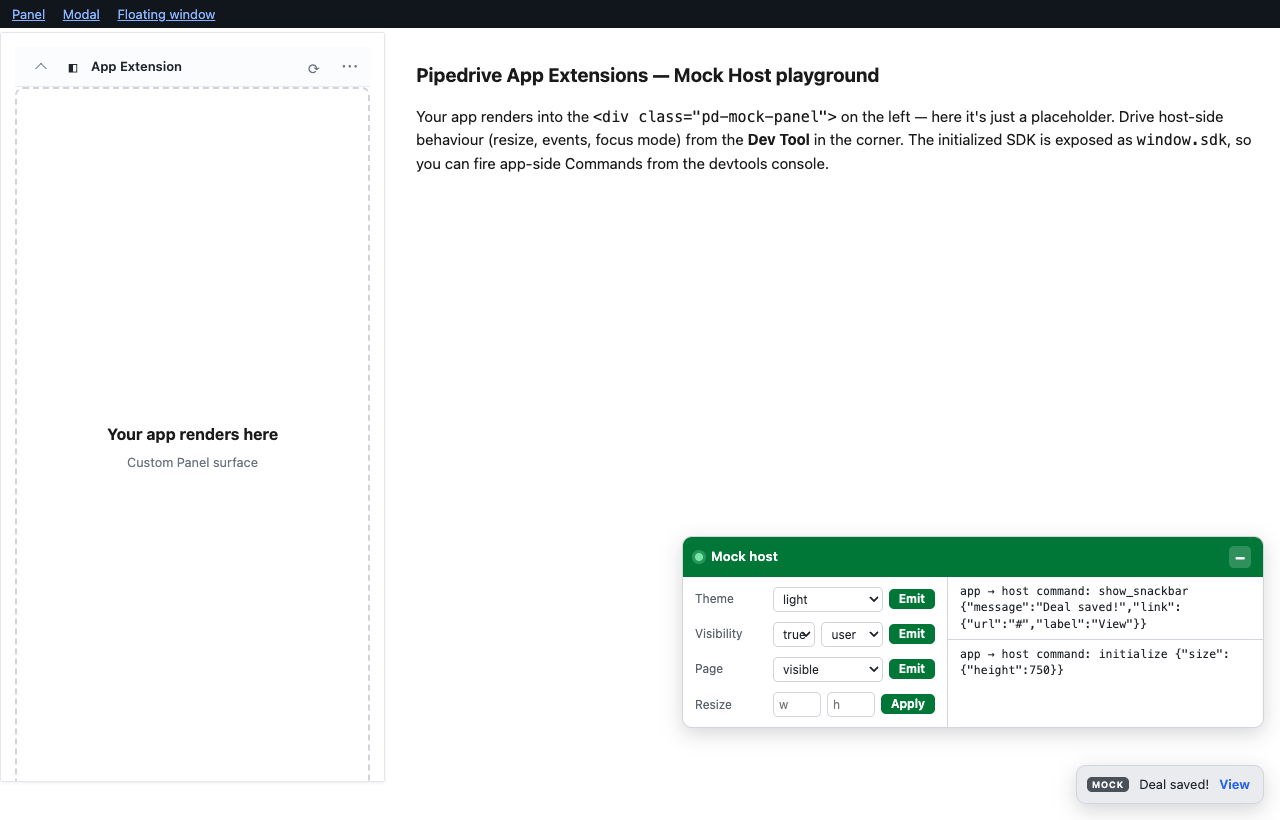
| SHOW_SNACKBAR | Renders a transient snackbar (bottom-right), auto-dismissing after ~5s; supports an optional link button. |
| SHOW_CONFIRMATION | Renders a confirmation dialog and resolves { confirmed }; or uses your onConfirmation override. |
| OPEN_MODAL | Opens a custom modal (loads a URL via customModals) or an entity modal (a Pipedrive-style create-record form with prefilled values); or uses your onModal override. |
| CLOSE_MODAL | Closes an open custom modal and fires CLOSE_CUSTOM_MODAL. (Entity modals are native forms the app cannot close.) |
| REDIRECT_TO | Shows a redirect banner (auto-dismisses after ~4s) naming the target view/id. |
| SET_NOTIFICATION | Shows a notification badge. Floating-window only. |
| SET_FOCUS_MODE | Toggles focus mode, disabling the floating window's close button. Floating-window only. |
| SHOW_FLOATING_WINDOW / HIDE_FLOATING_WINDOW | Shows / hides the floating-window surface. Floating-window only. |
| RESIZE | Resizes the active surface, clamped to that surface type's bounds (out-of-range requests are rejected). |
| GET_METADATA | Returns the hosting window's { windowWidth, windowHeight } (the dev browser viewport) — not the surface's own size — so apps can size a surface relative to it. |
| GET_SIGNED_TOKEN | Returns { token } from getSignedToken (default 'dev-signed-token'). |
Surface-scoped commands run on the wrong surface log a dev-only diagnostic and still reply (so the SDK promise never hangs).
Example calls
// A snackbar with an action link.
await sdk.execute(Command.SHOW_SNACKBAR, {
  message: 'Deal saved!',
  link: { url: '/deals/42', label: 'View' },
});

// A confirmation dialog → resolves with the user's choice.
const { confirmed } = await sdk.execute(Command.SHOW_CONFIRMATION, {
  title: 'Delete this deal?',
  description: 'This cannot be undone.',
  okText: 'Delete',
  okColor: 'negative',
});

// Open an entity modal (Pipedrive create-record form) with prefilled values.
const result = await sdk.execute(Command.OPEN_MODAL, {
  type: 'activity',
  prefill: { subject: 'Follow up', dueDate: '2026-07-01' },
});

// Open a custom modal whose iframe loads the URL mapped in `customModals`.
await sdk.execute(Command.OPEN_MODAL, {
  type: 'custom_modal',
  action_id: 'settings-modal',
});

// Resize the active surface, then read the hosting window's size (e.g. to size
// a modal relative to it). GET_METADATA reports the window, not the surface.
await sdk.execute(Command.RESIZE, { height: 600 });
const { windowWidth, windowHeight } = await sdk.execute(Command.GET_METADATA);

// Get a signed token (whatever `getSignedToken` returns).
const { token } = await sdk.execute(Command.GET_SIGNED_TOKEN);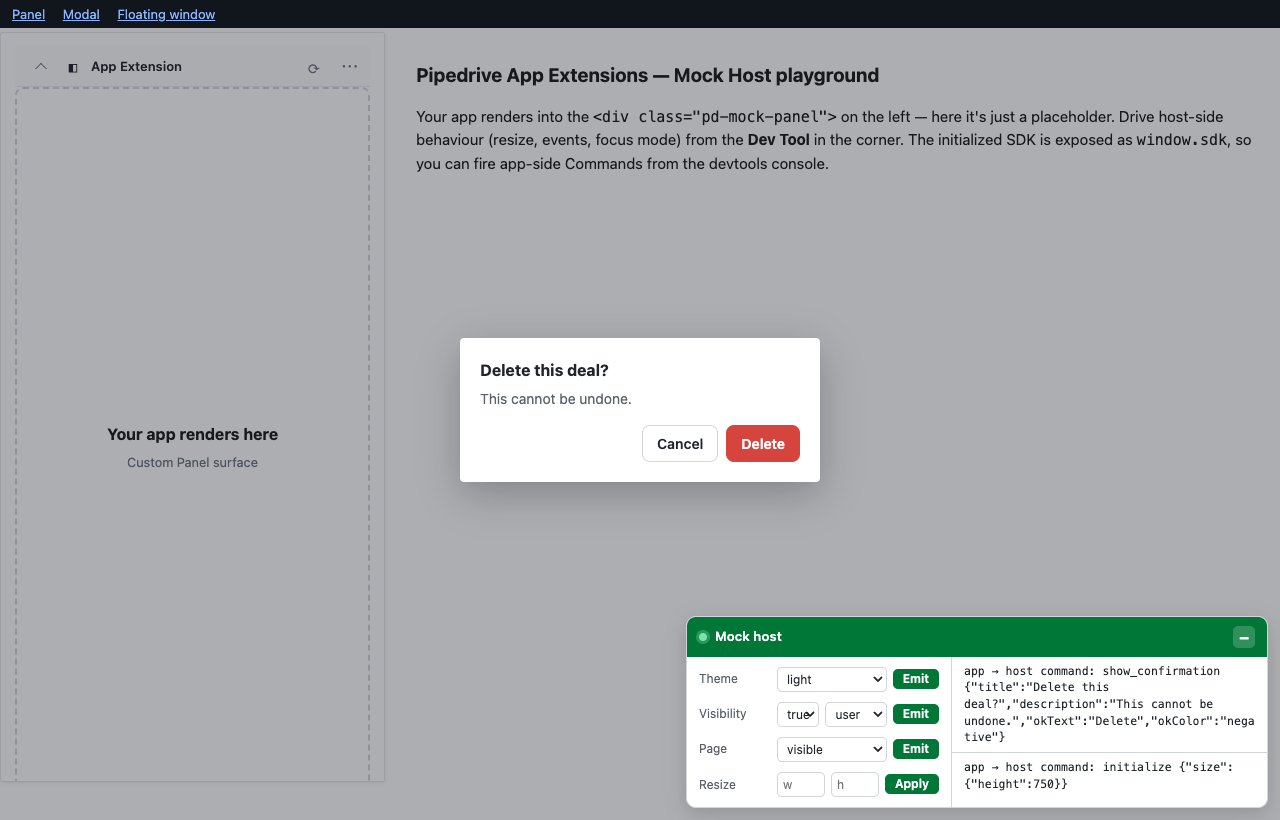
Surfaces
A Surface is the element standing in for the place in Pipedrive where your
App Extension renders. RESIZE sizes it. (GET_METADATA reports the hosting
window, not the surface — see Supported commands.) You
opt in by wrapping your app in an element with the host's class (or id):
| Surface | Wrapper class / id | Width | Height |
| --------------- | ------------------------- | ---------------- | ---------------- |
| Custom Panel | pd-mock-panel | fixed ~385px | 100–750px |
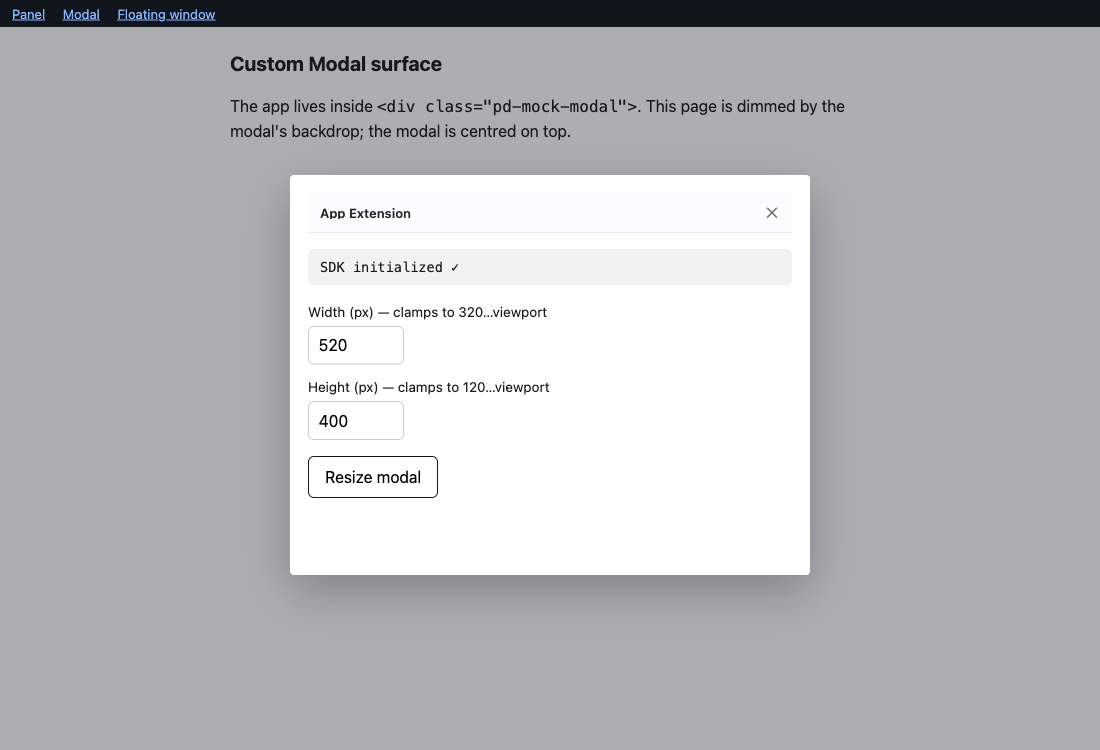
| Custom Modal | pd-mock-modal | 320px – viewport | 120px – viewport |
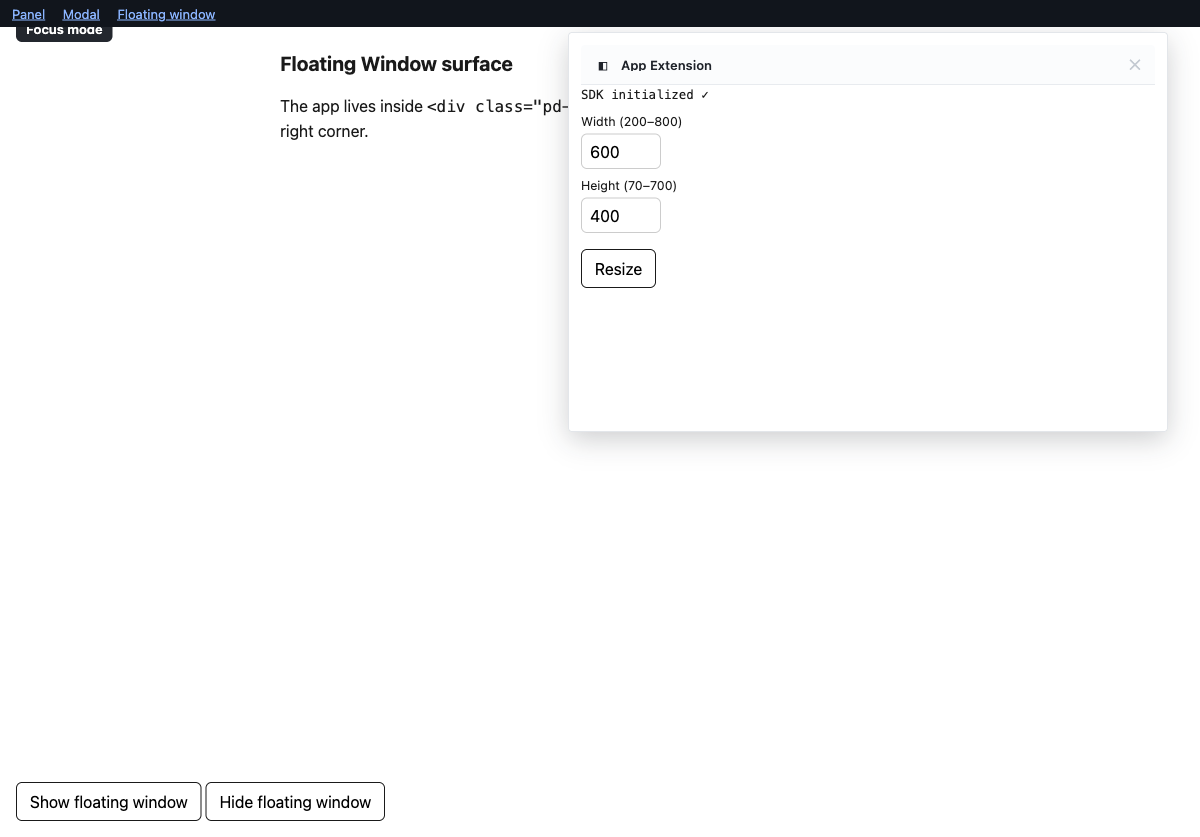
| Floating Window | pd-mock-floating-window | 200–800px | 70–700px |
<div class="pd-mock-panel">
  <div class="pd-mock-scroll-layer">
    <!-- your App Extension renders here -->
  </div>
</div>
The same wrapper in React (or any framework):
export function App() {
  return (
    <div className="pd-mock-panel">
      <div className="pd-mock-scroll-layer">
        {/* your App Extension renders here */}
      </div>
    </div>
  );
}
The inner .pd-mock-scroll-layer makes the surface behave like Pipedrive's
production frame: a position: fixed footer pins to the surface and there is a
single scrollbar (see
Pinned footers and scrolling).
You can omit it — <div class="pd-mock-panel">…</div> on its own works too,
and the surface simply scrolls itself.
You don't write CSS for surfaces — the class is enough; the host injects the styling and positioning.
Using the host name as an
id(<div id="pd-mock-panel">) gives the same behaviour (resize bounds, metadata, floating-window commands) without the host's visual styling, so you can style the element yourself:<!-- behaviour without the host's look — you style it --> <div id="pd-mock-floating-window" style="background: #fff; border: 1px solid #ccc;" > <!-- your App Extension renders here --> </div>The host injects a surface header bar as the first child of each class-identified surface, reproducing the title bar Pipedrive frames each surface with: a collapse chevron, app icon + name, refresh, and a "more (⋯)" button on the panel; a close (X) on modals and floating windows.
Pinned footers and scrolling (the scroll layer)
In production each surface is a real <iframe> inside an overflow: hidden
wrapper, so a position: fixed; bottom: 0 footer pins to the surface bottom
while the app scrolls. The host renders surfaces as plain <div>s (no iframe);
the .pd-mock-scroll-layer from the standard example above stands in for that
iframe. Put your pinned footer inside it:
<div class="pd-mock-panel">
  <div class="pd-mock-scroll-layer">
    <!-- your App Extension renders here -->
    <footer style="position: fixed; bottom: 0">…</footer>
  </div>
</div>
With the scroll layer present, the surface becomes a non-scrolling frame and
the scroll layer is the single scroll container, so a position: fixed footer
pins to the surface instead of the browser window — the same CSS that works in
production. It is opt-in: without .pd-mock-scroll-layer, the surface scrolls
itself as before.
- The scroll layer is your element — add it in your own markup/JSX. The host never moves your content (re-parenting framework-rendered nodes would break the framework); it only injects its header as the wrapper's first child.
- Works on all three surfaces (panel, modal, floating window).
- If your layout does not already reserve the footer's height, add
padding-bottom: <footer height>to.pd-mock-scroll-layerso the last content clears the footer.
See ADR-0010.
Which element becomes the active surface
The host picks the first element (in DOM order) matching any surface class or
id, and treats that as the surface RESIZE sizes:
- No wrapper present? The host falls back to
document.body, soRESIZEstill works (it acts on the body).GET_METADATAis unaffected — it always reports the hosting window. (You won't get a surface header bar, since there is no wrapper to inject it into.) - More than one wrapper? The first in DOM order wins; the rest are ignored. Render only one surface wrapper at a time.

Dev Tool
The host renders its own interactive Dev Tool overlay — no consumer markup
needed, it appears as soon as the host starts. It docks to a corner
(bottom-left by default) and can be collapsed to a compact launcher by clicking
anywhere on its header bar (not just the +/– button). It has two columns:
Controls on the left, the Active Log on the right.
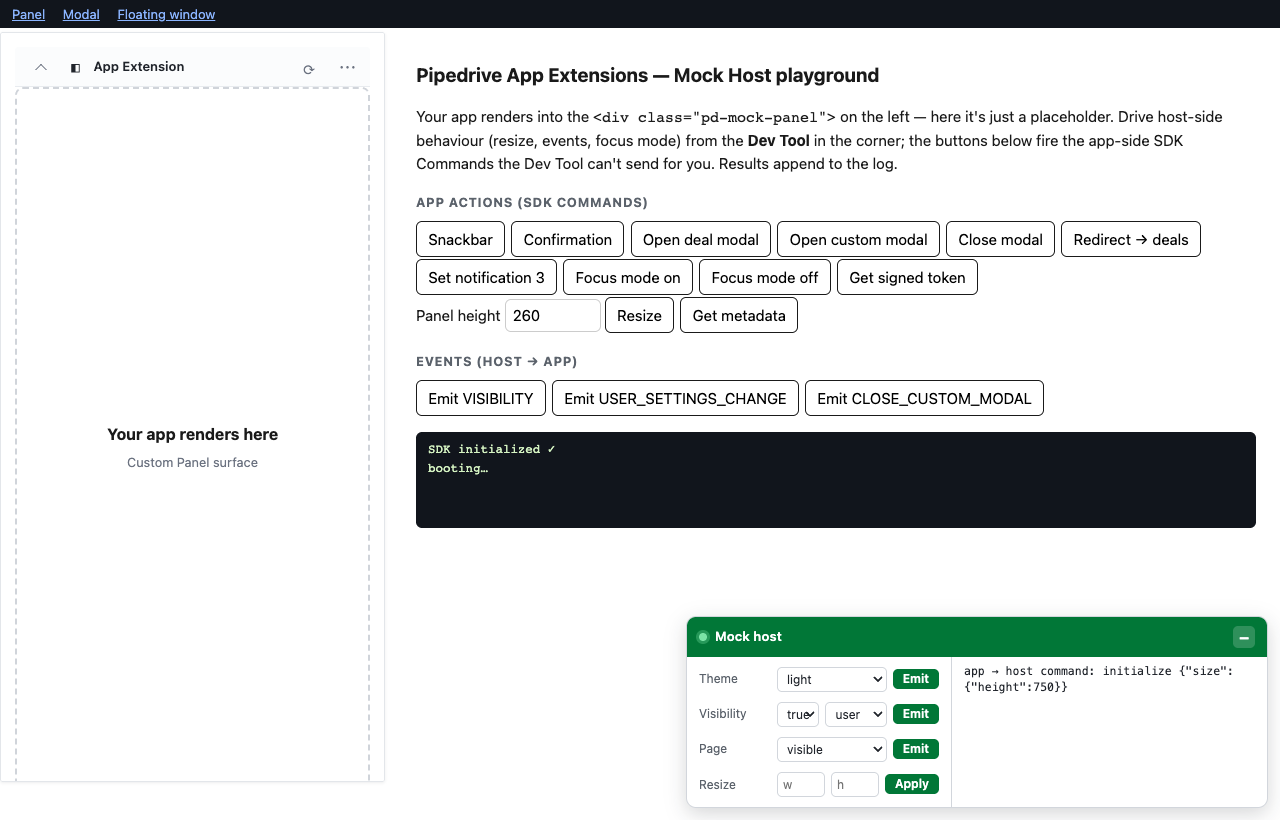
The Controls drive the host the way Pipedrive would — they emit Events to your App Extension and resize the surface (the Dev Tool never sends Commands; only the app can):
- Theme — emit
USER_SETTINGS_CHANGE(light/dark). - Visibility — emit
VISIBILITY(is_visible+invoker). - Page — drive
PAGE_VISIBILITY_STATE(visible/hidden). The SDK reads page visibility from the document, not the host event channel, so this control dispatches a realvisibilitychangeon the page — exactly what a browser tab switch does — and yourlisten(PAGE_VISIBILITY_STATE)callback fires. - Resize — resize the active surface, clamped to that surface's bounds.
- Focus mode — disable the floating window's close button (floating-window only).
- Floating window — show/hide the floating window (floating-window only).
The controls are surface-type aware: the Focus mode and Floating window controls appear only while a Floating Window is the active surface, and the Dev Tool tracks the DOM so it stays in sync as your framework mounts and unmounts the surface wrapper.
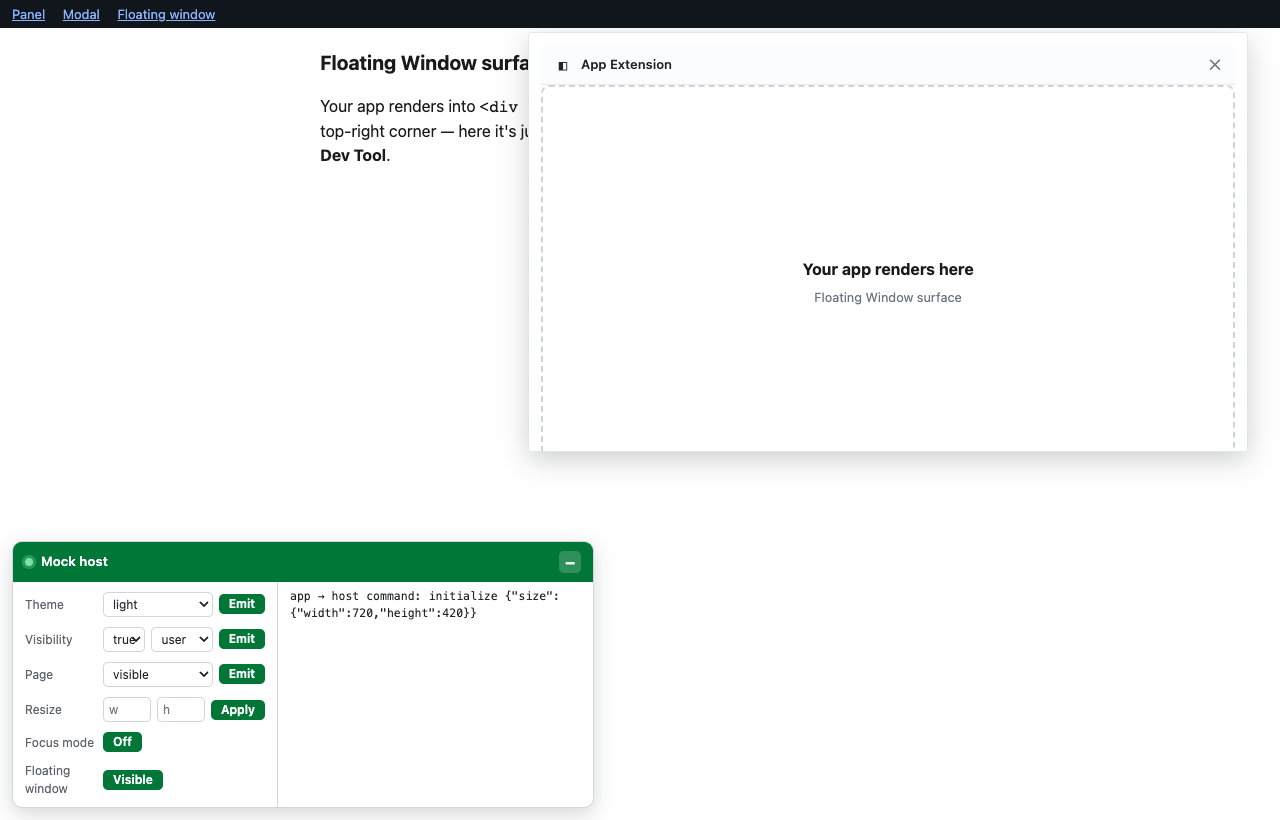
The Active Log records activity, newest-first, each entry tagged with its
direction: the Commands the App Extension sent (e.g.
app → host command: show_snackbar …), the Tracks it fired, the Events the host
pushed back (e.g. host → app event: visibility … — including the user-invoked
VISIBILITY fired when you collapse the panel), and the Dev Tool's own actions
(e.g. dev tool action: resize …). The panel is capped in height and scrolls.
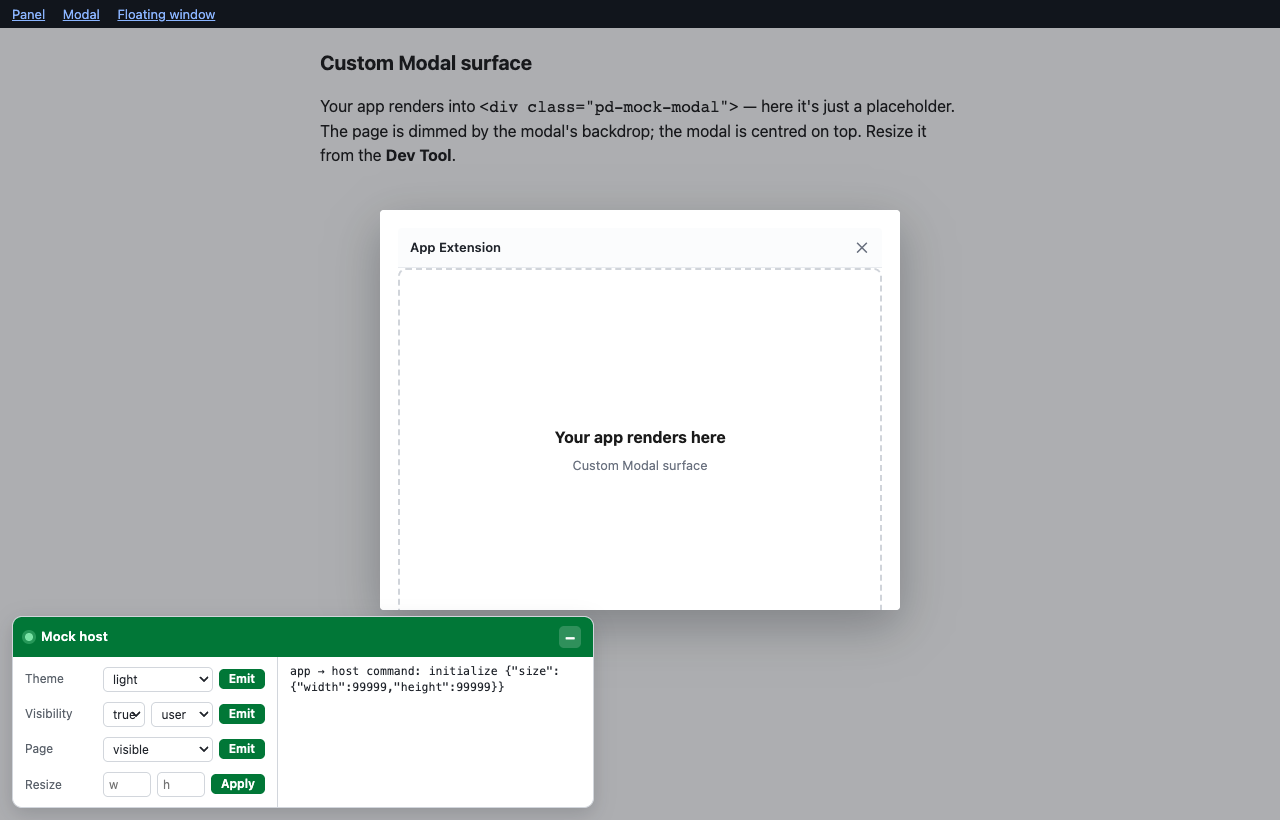
Choose the corner, or turn it off entirely:
startPipedriveMockHost({ devTool: false }); // off
startPipedriveMockHost({ devTool: { position: 'bottom-right' } }); // pick a corner
startPipedriveMockHost({ devTool: { startCollapsed: true } }); // start collapsed
To move it at runtime — e.g. a different corner per view in a single-page app —
call setPosition on the controller:
const host = startPipedriveMockHost();
host.devTool.setPosition('top-right'); // bottom-left | bottom-right | top-left | top-right
Examples
The testing/ folder contains ready-to-run examples covering every
command, event, and surface:
Vanilla HTML playground — load the built bundles with no bundler. Each surface is a "Your app renders here" placeholder, so the Dev Tool is what you drive:
testing/index.html— the Custom Panel surface. It exposes the initialized SDK aswindow.sdk, so you can fire app-side Commands (the ones the Dev Tool can't send) straight from the devtools console, e.g.sdk.execute(AppExtensionsSDK.Command.SHOW_SNACKBAR, …).testing/modal.html— the Custom Modal surface (resize it from the Dev Tool).testing/floating-window.html— the Floating Window surface; resize it and toggle focus mode / visibility from the Dev Tool, or fire the show/hide Commands from the in-page buttons.testing/custom-modal.html— the page loaded inside a custom modal's iframe.
Run them from the repo root:
npm run build
npx http-server . -p 8080   # or: python3 -m http.server 8080
# open http://localhost:8080/testing/  (add ?theme=dark for the dark UI)
Next.js playground —
testing/next-app/is a small Next.js app (pages router) wiring the host into a real framework, with a separate page per surface (/,/modal,/floating-window,/panel) and a sharedMockHostPlaygroundcomponent. Run it withnpm install && npm run devinside that folder.
Lifecycle and edge cases
A few behaviours worth knowing when wiring the host into a dev setup:
One host at a time. Calling
startPipedriveMockHost()again beforeteardown()does not start a second host — it logs a warning and returns the existing instance. (This keeps a single listener onwindow; two would double-process every command.) Under hot-module-reload / fast refresh, callteardown()first if you need a fresh instance:let host = startPipedriveMockHost(); // e.g. on an HMR dispose hook: import.meta.hot?.dispose(() => host.teardown());Server-side rendering is safe. With no
window(e.g. a Next.js server render),startPipedriveMockHost()returns an inert handle and does nothing — so a top-level call won't crash SSR. The host only comes alive in the browser.
Keeping it out of production
This is a development-only tool. The reliable way to keep it out of your
production bundle is a dynamic import() behind a build-time dev gate, so the
bundler code-splits the package into a chunk production never loads:
import type { MockHost } from 'pipedrive-app-extensions-mock-host';

let host: MockHost | undefined;
if (process.env.NODE_ENV !== 'production') {
  const { startPipedriveMockHost } =
    await import('pipedrive-app-extensions-mock-host');
  host = startPipedriveMockHost();
}
This is what the Next.js playground does, and its
production build contains zero bytes of the package (verified by grepping the
built chunks). Keep any types as import type — they erase at compile time and
pull no runtime code in.
Why not a plain static import?
A static import { startPipedriveMockHost } from '…' can be tree-shaken —
but only when the bundler can prove the call is dead code, which is easy to
break. It works when the gate is an inlined flag checked right at the call site
and sideEffects: false then lets the bundler drop the now-unused import:
import { startPipedriveMockHost } from 'pipedrive-app-extensions-mock-host';
// Tree-shaken out in production by Vite/Rollup AND Next.js/Turbopack (measured):
if (process.env.NODE_ENV !== 'production') startPipedriveMockHost();
Two common variations silently ship the package instead:
- Gate behind a helper function —
if (shouldStart()) startPipedriveMockHost();whereshouldStart()lives in another module. The bundler can't prove the call dead across the function boundary, so it keeps the import. (This bit a real consumer: ~65 KB gzip, duplicated across every route chunk.) - Unconditional call —
startPipedriveMockHost({ enabled: … })always ships; only its runtime behaviour is gated, not its presence in the bundle.
The dynamic import() above is robust against both: if the gate is ever not
eliminated, the package lands in a separate on-demand chunk that initial page
loads never fetch — it is never inlined into your route bundles. When in doubt,
use it.
Runtime safety nets
Even if it does end up bundled and called in production, two guards keep it inert (they limit the damage; they do not remove it from the bundle):
- Install it as a
devDependency(npm install --save-dev …). - Started with
NODE_ENV=production, itconsole.warns and stays inert (injects nothing, registers no listener).{ enabled: false }returns the inert handle with no warning, for an explicit off-switch.
Development
npm install          # install dependencies
npm run dev          # run tests in watch mode (vitest)
npm test             # run all tests once (unit + browser)
npm run test:unit    # fast logic/DOM tests only (jsdom)
npm run test:browser # UI tests in real Chromium (Vitest Browser Mode)
npm run build        # bundle ESM + CJS + IIFE with tsup, emit declarations
npm run ci           # build + typecheck + check formatting + test (what CI runs)
Testing strategy
Two Vitest projects (see vitest.config.ts):
unit— fast tests in jsdom for host logic and DOM structure (src/**/*.test.ts). jsdom does not transferMessagePorts throughpostMessage, so these tests simulate the wire protocol directly.browser— UI and real-SDK integration tests in Chromium via Vitest Browser Mode + Playwright (src/**/*.browser.test.ts), where port transfer works. UI is queried via the open Shadow DOM root (within(host.shadowRoot)).
Both use Testing Library and
@testing-library/jest-dom.
Releasing
npx changeset         # describe your change
npm run local-release # version + publish to npm
License
MIT © Antti Lahtinen