
pivotgrid-js
v0.1.15
Published
Vanilla JS pivot table — no dependencies, no frameworks

Maintainers
 aleksandr_korolev
Readme
PivotGrid JS
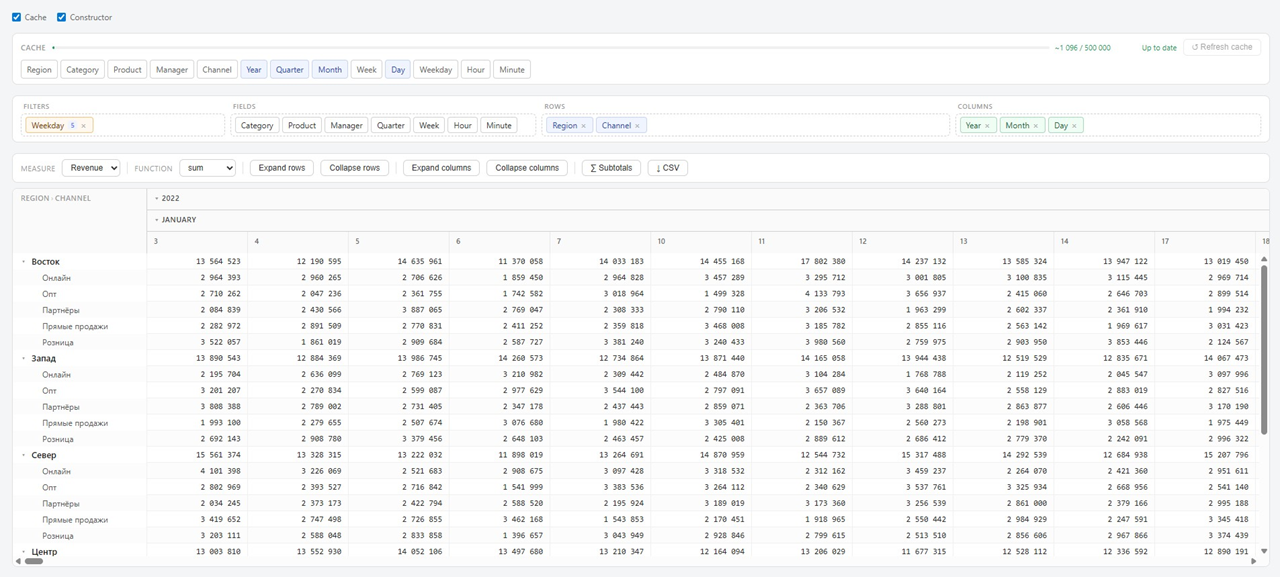
Vanilla JS pivot table — no dependencies, no frameworks.
- Fast — virtual scroll, columnar storage on TypedArrays, in-memory cache
- Flexible — drag-and-drop dimensions, filters, hierarchical rows and columns
- Simple — one
<div>and a few attributes, nothing else needed
Installation
npm install pivotgrid-jsQuick Start
<!DOCTYPE html>
<html>
<head>
  <link rel="stylesheet" href="node_modules/pivotgrid-js/dist/pivotgrid.css">
</head>
<body>

  <div id="my-pivot"
       data-config="sales"
       data-server="http://localhost:8000"
       data-lang="en">
  </div>

  <script src="node_modules/pivotgrid-js/dist/pivotgrid.js"></script>
  <script src="node_modules/pivotgrid-js/widget/pivot-widget.js"></script>

</body>
</html>
Minimal Grid
For a stripped-down embed (no cache UI, no constructor toggle, no built-in
drillthrough panel), combine the three disable-* attributes:
<div id="my-pivot"
     data-config="sales"
     data-server="http://localhost:8000"
     data-disable-cache="true"
     data-disable-constructor-checkbox="true"
     data-disable-drillthrough-panel="true">
</div>Demo Mode (no server)
<!DOCTYPE html>
<html>
<head>
  <link rel="stylesheet" href="node_modules/pivotgrid-js/dist/pivotgrid.css">
</head>
<body>
  <div id="my-pivot" data-demo="true" data-lang="en"></div>

  <script src="node_modules/pivotgrid-js/dist/pivotgrid.js"></script>
  <script src="node_modules/pivotgrid-js/demo_data/demo-data.js"></script>
  <script src="node_modules/pivotgrid-js/demo_data/demo-config.js"></script>
  <script src="node_modules/pivotgrid-js/widget/pivot-widget.js"></script>
</body>
</html>
Container Attributes
| Attribute | Description | Example |
|-----------|-------------|---------|
| data-config | Config name on the server | "sales" |
| data-server | Server URL | "http://localhost:8000" |
| data-demo | Demo mode without a server | "true" |
| data-lang | Interface language | "ru" / "en" |
| data-standalone | Use an existing HTML structure | "true" |
| data-listen | id of another grid's container — this instance stays hidden and makes no requests until that grid fires its first drillthrough, then locks its own query to that context | "my-pivot" |
| data-leaf-columns-only | Only the deepest (leaf) column level is clickable for drillthrough — collapsed/subtotal column cells and the row Total column become non-interactive | "true" |
| data-disable-cache | Hides the Cache checkbox and the whole cache panel. Caching itself (per cachedDimensions in the config) still runs under the hood — this only hides the UI for managing/inspecting it | "true" |
| data-disable-constructor-checkbox | Hides only the Constructor checkbox — the drag-and-drop field zones stay visible and fully functional | "true" |
| data-disable-drillthrough-panel | Forces the built-in raw-row drillthrough panel off, regardless of drillthroughQuery/drillthroughUrl in the config. | "true" |
Config
Configs are stored on the server at server/configs/{name}.json:
{
  "query": "SELECT * FROM sales_data",

  "dimensions": ["region", "category", "channel"],
  "measures":   ["revenue", "units"],
  "funcs":      ["sum", "avg", "count", "min", "max"],

  "fields": {
    "region":   { "label": "region",   "title": "Region" },
    "category": { "label": "category", "title": "Category" },
    "channel":  { "label": "channel",  "title": "Channel" },
    "revenue":  { "label": "revenue",  "title": "Revenue" },
    "units":    { "label": "units",    "title": "Units" }
  },

  "cachedDimensions": ["region", "category"],

  "rows":    ["region"],
  "columns": [],
  "measure": "revenue",
  "func":    "sum",

  "maxCachedRows":       500000,
  "filterCheckboxLimit": 5,

  "drillthroughQuery": "SELECT * FROM sales_data WHERE {filters} LIMIT 200"
}
Config Fields
| Field | Type | Description |
|-------|------|-------------|
| query | string | Base SQL query |
| dimensions | string[] | List of dimension field names |
| measures | string[] | List of measure field names |
| funcs | string[] | Aggregation functions: sum, avg, count, min, max, stddev, variance |
| fields | object | Field definitions — see below |
| cachedDimensions | string[] | Dimensions to pre-aggregate and cache on startup |
| rows | string[] | Initial row dimensions |
| columns | string[] | Initial column dimensions |
| measure | string | Initial active measure |
| func | string | Initial aggregation function |
| maxCachedRows | number | Maximum rows in cache (default: 500000) |
| filterCheckboxLimit | number | Max distinct values to show as checkboxes in filter popup (default: 30) |
| drillthroughQuery | string | SQL for drillthrough panel. Use {filters} as placeholder |
| drillthroughUrl | string | External URL for drillthrough. Filters are appended as query params |
Field Definition
Each entry in fields can have:
| Property | Type | Description |
|----------|------|-------------|
| label | string | Actual column name in the database |
| title | string | Display name shown in the UI |
| sortKey | string | Column to sort by instead of the label (useful for month names etc.) |
Example — month sorted by number:
"sale_month": {
  "label": "sale_month_name",
  "title": "Month",
  "sortKey": "sale_month_num"
}
Server
A lightweight Python proxy to your database is included:
pip install psycopg2-binary
python node_modules/pivotgrid-js/server/server.py
See node_modules/pivotgrid-js/server/README.md for full server documentation.
Config Editor
A visual config editor is included. Open it locally:
node_modules/pivotgrid-js/config/config-editor.html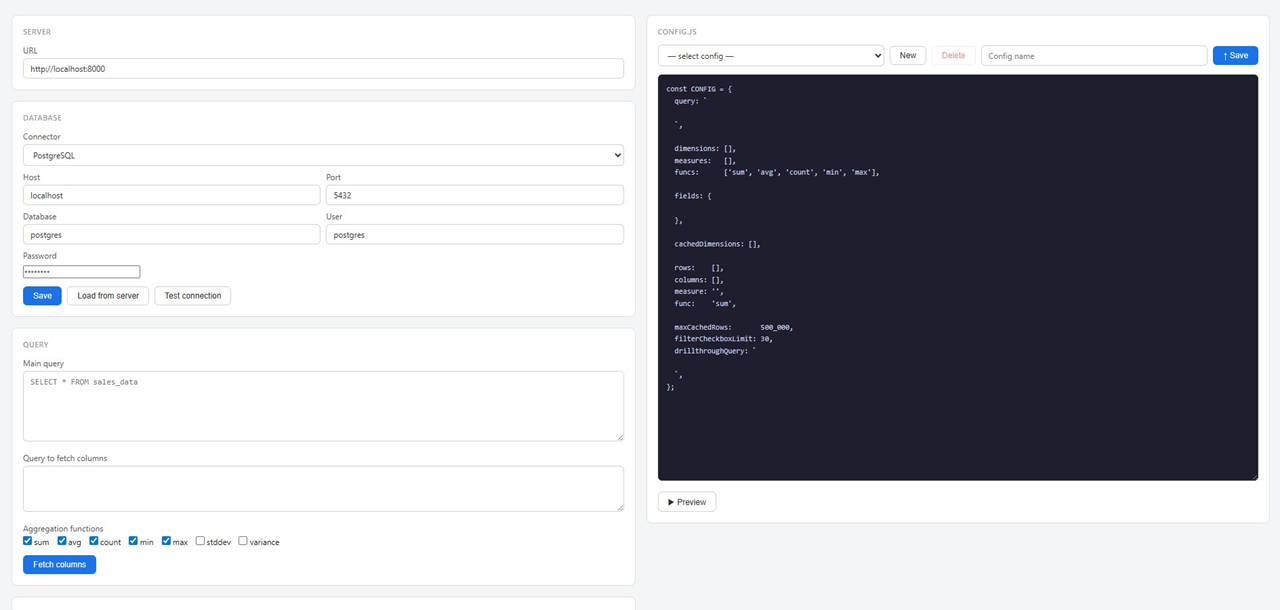
Features:
- Fetch columns from the database with one click
- Configure dimensions, measures, sortKey
- Drag-and-drop initial state (rows / columns / cache)
- Save config to the server
- Preview changes without saving
Grid API
// Expand / collapse rows
grid.expandAll()
grid.collapseAll()
grid.expandToDepth(depth)   // e.g. expandToDepth(1) — first level only

// Expand / collapse columns
grid.expandAllCols()
grid.collapseAllCols()

// Subtotals
grid.toggleSubtotals(visible)

// Update data
grid.setResult(result, { rows, columns, measure, fieldDefs })
Drillthrough
Three ways to handle cell clicks:
1. Built-in panel (SQL query)
Add drillthroughQuery to your config:
"drillthroughQuery": "SELECT * FROM sales_data WHERE {filters} LIMIT 200"A detail panel slides up at the bottom of the page showing the raw rows.
2. External URL
Add drillthroughUrl to your config:
"drillthroughUrl": "https://myapp.com/details"Opens the URL in a new tab with filters appended as query parameters:
https://myapp.com/details?region=North&channel=Online
3. Custom handler
Listen for the drillthrough event on the container:
document.getElementById('my-pivot').addEventListener('drillthrough', (e) => {
  const { context, value } = e.detail;
  // context = { region: 'North', channel: 'Online' }
  // value   = aggregated cell value
  // your custom logic here
});
If neither drillthroughQuery nor drillthroughUrl is set in the config,
only your custom handler fires.
Clicking a cell highlights it (click again to clear) so it's clear which cell triggered the current drillthrough/context. The highlight clears automatically whenever the grid's data refreshes.
Chaining Grids
Beyond handling drillthrough yourself, a grid can be wired to automatically
build a second, fully independent grid scoped to the clicked cell's context —
with its own config, toolbar, and cache, not just a raw-row table.
<!-- Source grid -->
<div id="my-pivot"
     data-config="sales"
     data-server="http://localhost:8000"
     data-leaf-columns-only="true">
</div>

<!-- Detail grid — stays hidden and loads nothing until #my-pivot fires its
     first drillthrough, then locks its own query to that context -->
<div id="my-pivot-detail"
     data-config="sales_detail"
     data-server="http://localhost:8000"
     data-listen="my-pivot">
</div>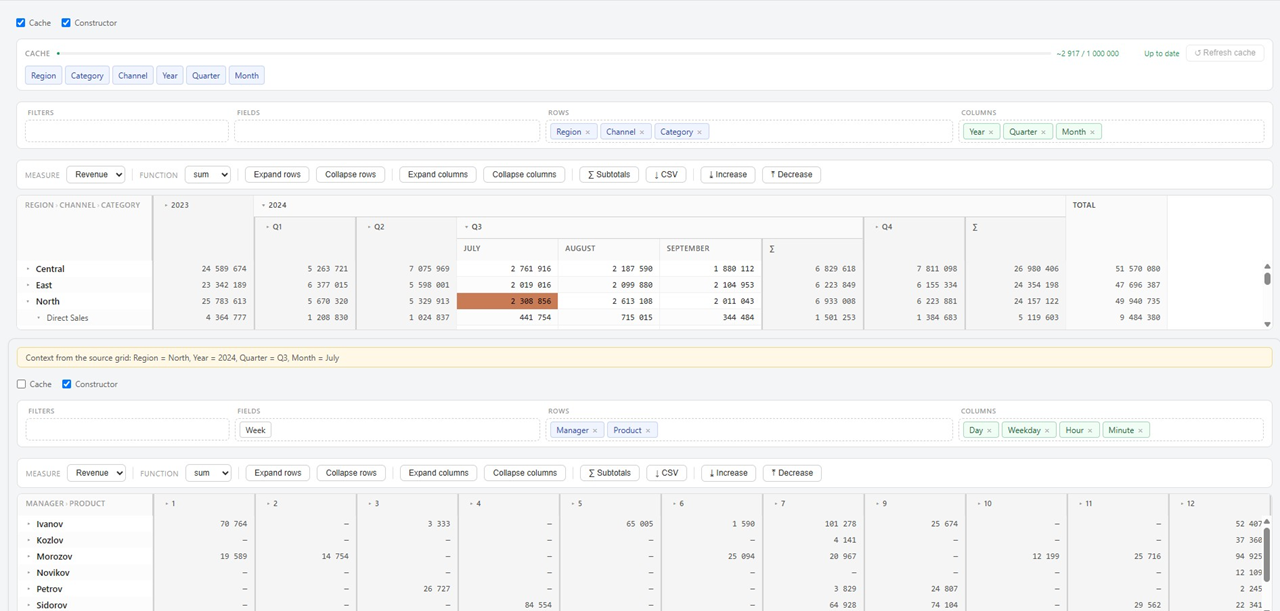
How it works:
- The detail grid loads its own config as usual, but on the first click of
the source grid it rewrites its base
query, adding aWHEREclause built from the clicked cell's context (matching column names via its ownfields). - Every following click rebuilds that
WHEREclause from scratch (not stacked on the previous one) and refreshes the detail grid's cache and view in place — the grid itself is never recreated. data-leaf-columns-only="true"on the source grid (optional, shown above) restricts clicks to the deepest column level only, so a click on a collapsed/subtotal column group can't pass an incomplete context (e.g. only the year, missing quarter/month) down to the detail grid.- Chains can go as deep as you like — a detail grid's own cells dispatch
drillthroughjust like any other grid, so a third grid can listen to the second, and so on. - This works the same way in
data-demomode (no server) — the detail grid filters the in-memory array instead of rewriting SQL. - The detail grid's container shows a small bar with the inherited context (e.g. "Context from the source grid: Region = North, Year = 2024") so it's clear what it's currently scoped to.
While data-listen is set, the source grid's built-in drillthrough panel
(drillthroughQuery) still fires independently if configured — set
drillthroughQuery only on grids where you actually want both behaviors at
once.
Internationalization
ru and en are supported out of the box:
<div data-config="sales" data-lang="en"></div>To add a language, extend the I18N object in widget/i18n.js.
Using with a Bundler
import { PivotGrid, Aggregator, RestProvider, ArrayProvider } from 'pivotgrid-js';Available exports: PivotGrid, Aggregator, ColumnStore, DictionaryEncoder,
RestProvider, ArrayProvider, FieldZones, FilterManager, CacheManager, I18N.
Try It Locally
# Terminal 1 — backend (proxy to your database)
pip install psycopg2-binary
python node_modules/pivotgrid-js/server/server.py

# Terminal 2 — serve the frontend page
python -m http.server 8085
Open the Config Editor (node_modules/pivotgrid-js/config/config-editor.html) and create your config.
License
Free for personal and non-commercial use.
For commercial use, a license is required — contact [email protected].