
plan-review
v1.1.6
Published
Interactive CLI for reviewing AI-generated markdown plans


Readme
plan-review
Interactive CLI for reviewing AI-generated markdown plans. Parses a plan into sections, opens a three-panel browser review UI, collects line-anchored comments, and pipes structured feedback back — to the AI that wrote the plan, your clipboard, or a file.
Install
npm install -g plan-reviewClaude Code skill (optional)
If you use Claude Code, install the companion skill so you can say "review this plan":
plan-review install-skillQuick start
# Review a plan — opens the browser UI (default)
plan-review path/to/plan.md

# Try the included fixture
plan-review examples/renderer-fixture.md

# Pipe feedback directly back to Claude
plan-review path/to/plan.md -o claude
That's it. The browser mode is the default and the recommended way to review plans — line-anchored comments, auto-save, full markdown rendering including mermaid, math, footnotes, and admonitions.
Browser mode (default)
Three panels:
+------------------+----------------------------+------------------+
|                  |                            |                  |
|   Table of       |   Rendered markdown        |   Comment        |
|   Contents       |   with plan metadata       |   Sidebar        |
|                  |                            |                  |
|   - Milestone 1  |   ## Task 1.1              |   [Add comment]  |
|     * Task 1.1 ✓ |                            |                  |
|     * Task 1.2   |   **Depends on:** 1.0      |   > "Line 3-5"   |
|   - Milestone 2  |   **Blocks:** 1.2          |   Fix the error  |
|     * Task 2.1   |                            |   handling here  |
|                  |   Content with line        |                  |
|                  |   gutters for anchoring    |   [Submit Review]|
|                  |   comments to ranges       |                  |
+------------------+----------------------------+------------------+
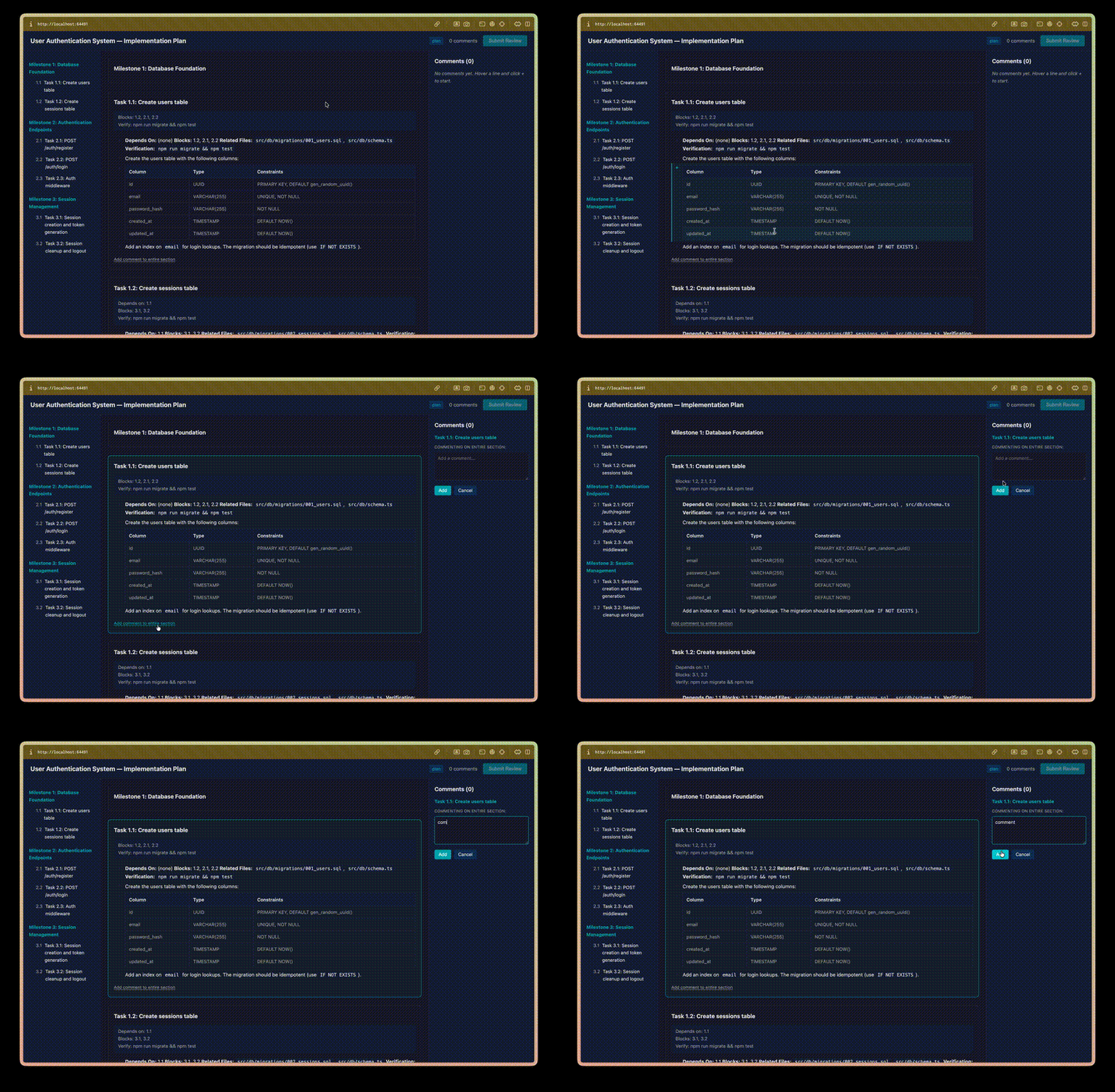
Line-anchored comments. Click a gutter marker to start a selection, shift-click another line to extend the range. Comments anchor to the exact lines and travel back in the output.
Section-level comments. "Add comment to entire section" under any section header when line-level granularity isn't needed.
Auto-save. Your progress writes to ~/.plan-review/sessions/ as you work. Close the tab, come back later, pick up where you left off. Closing the tab mid-review exits the CLI cleanly with the session preserved.
Full markdown rendering. Paragraphs, nested lists, task lists, tables, code fences, blockquotes, GFM admonitions (> [!NOTE]), footnotes, inline HTML (<kbd>, <sub>, <sup>, <details>), emoji shortcodes, horizontal rules, images, reference-style links — plus mermaid diagrams and KaTeX math, both lazy-loaded from CDN only when the plan contains them.
Terminal mode (--cli)
For SSH sessions, CI, or headless environments where launching a browser isn't an option:
plan-review path/to/plan.md --cliInteractive terminal UI with a table of contents, section navigation, and inline commenting.
| Command | Action |
|---------|--------|
| all | Linear review through all sections |
| 1.1 | Jump to a specific section |
| done / q | Finish review |
| toc | Return to table of contents |
| back | Go to previous section |
| (enter) | Skip section |
| (any text) | Add comment on current section |
Terminal mode is a fallback — you get text rendering and section-level comments, but no line anchors, no mermaid, no math, no live markdown preview.
Options
-o, --output <target>   Output target: stdout, clipboard, file, claude
--output-file <path>    Custom output file path (with --output file)
--split-by <strategy>   Force split strategy: heading, separator
--fresh                 Skip session resume, start clean review
--cli                   Use the terminal review UI instead (SSH/CI/headless)
-V, --version           Show version
-h, --help              Show help
The AI feedback loop
The point is closing the loop between AI-generated plans and human review:
AI writes plan → You review with plan-review → Feedback pipes to Claude → AI revises# Review in browser, send structured feedback straight to Claude
plan-review plan.md -o claudeLine-anchored, section-scoped comments become input the AI can act on — not a wall of prose in a chat message.
How it works
- Parses your markdown — auto-detects plan-style documents (milestones, tasks, dependencies) or falls back to generic heading-based splitting.
- Renders in the browser by default, or in the terminal via
--cli. - Collects your comments as you review each section.
- Outputs structured markdown with your comments alongside the original content.
Plan mode
Documents with ## Milestone / ### Task hierarchy and fields like **Depends On:**, **Blocks:**, **Verification:** are detected as plans. Sections show dependency metadata and task IDs in the sidebar.
Generic mode
Any markdown with headings gets split into reviewable sections. Non-plan docs still work — you just don't get the plan-specific chrome.
Output targets
- stdout — print to terminal (default when not prompted otherwise)
- clipboard — copy to clipboard (pbcopy/xclip)
- file — write to
<input>.review.mdor a custom path via--output-file - claude — pipe directly to the Claude Code CLI
Saved sessions
Review progress auto-saves as you work. Re-running plan-review on the same file prompts to resume. Stored in ~/.plan-review/sessions/.
plan-review plan.md --fresh    Skip session resume, start clean
plan-review sessions           List all saved sessions
Manual cleanup: delete files in ~/.plan-review/sessions/.
VS Code extension
Review plans inside VS Code without leaving the editor. See packages/vscode-extension/README.md for install and usage.
License
MIT