
plancia
v0.3.0
Published
Tiling window-manager component (niri-style) for Vue 3 — a scrollable strip of resizable, content-agnostic windows, plus sidebar, layout, dialog and config building blocks.

Maintainers
 daniele-chiappa
Readme
plancia


A niri-style tiling window manager for Vue 3 — a scrollable strip of resizable, content-agnostic "windows".
plancia turns a single-view app into a workspace: open many panels side by
side, resize them in steps, scroll the strip horizontally, and tuck the ones you
don't need into a footer — without losing context or navigating away.
It is content-agnostic (a type → component registry decides what each window
shows) and dependency-light: zero runtime dependencies — it only needs Vue and
Pinia, which your app already has.
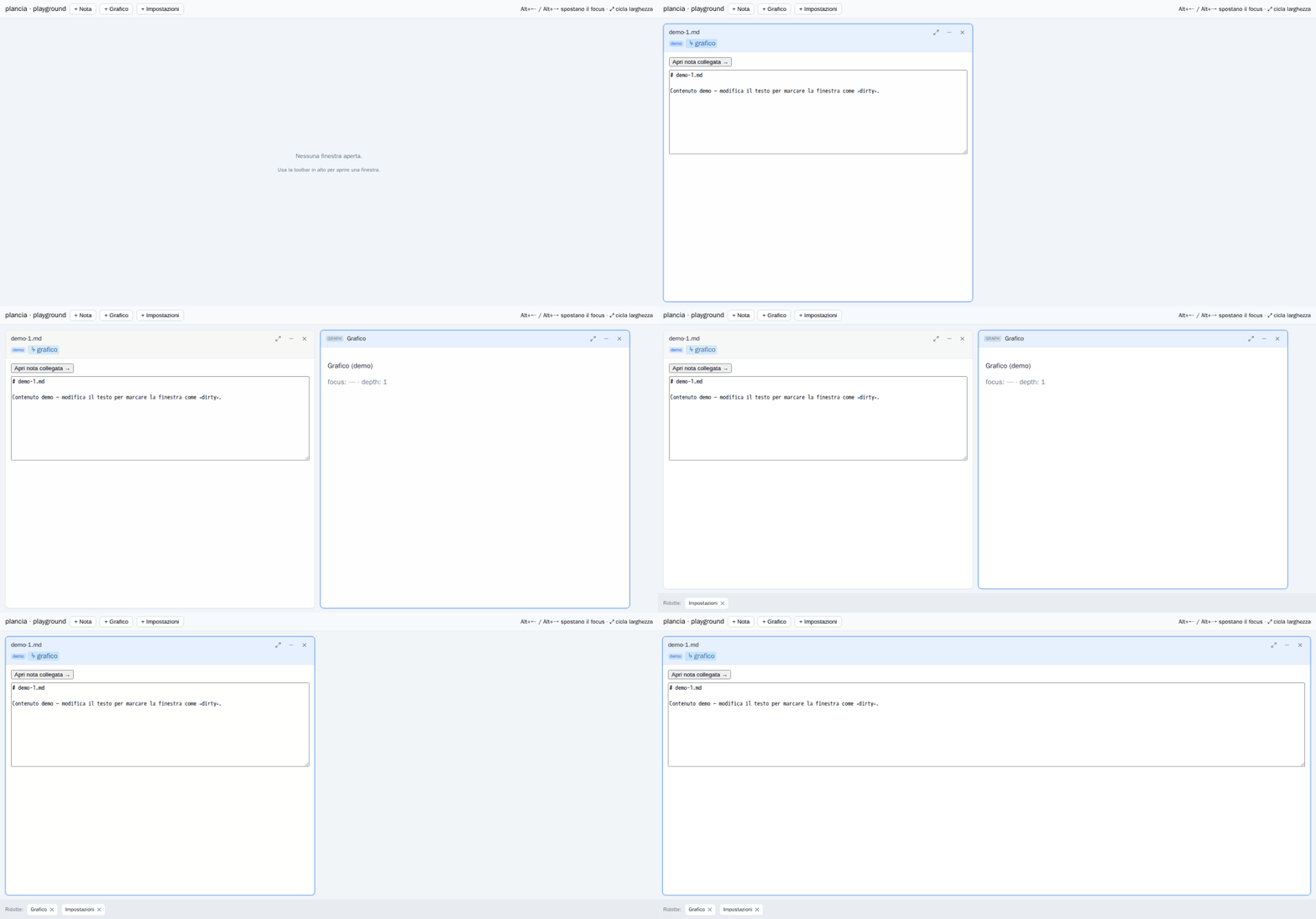
Open windows side by side · resize in steps (⤢) · minimize into the footer · Alt + ←/→ moves focus. Rendered from the live playground.
Why
Route-based UIs show one thing at a time. Real work is comparative — you want the order and the customer and the price list open at once, or the note and its backlinks and the search results. plancia gives you that, with a small, themeable chrome and a pure, testable store.
Highlights
- Content-agnostic — you supply a
registryoftype → component; plancia handles the chrome, focus, sizing and layout. - Zero runtime deps — Vue + Pinia are peers (and
vue-routeris an optional peer, only for URL sync). Nothing else is pulled in. - Themeable with CSS variables — no Tailwind or design-token assumptions; set
--plancia-*to match your app (light/dark, sizes, radii…). - No i18n lock-in — every string is overridable via a
labelsprop. - Pluggable URL / localStorage sync — deep links and back/forward via a token codec you control (covers numeric-id and path-string schemes out of the box).
- Keyboard & a11y aware —
Alt + ←/→to move focus, ARIA labels on controls. - TypeScript-first — ships prebuilt ESM + full type declarations.
Quick start
npm install plancia # peers: vue ^3.5, pinia ^2.2|^3 (vue-router ^4 optional)// main.ts — Pinia must be active
import { createApp } from 'vue'
import { createPinia } from 'pinia'
import App from './App.vue'
createApp(App).use(createPinia()).mount('#app')<script setup lang="ts">
import { defineAsyncComponent, markRaw } from 'vue'
import { Plancia, useWindowsStore, type WindowRegistry } from 'plancia'
import 'plancia/style.css'
const registry: WindowRegistry = {
note: markRaw(defineAsyncComponent(() => import('./windows/NoteWindow.vue'))),
settings: markRaw(defineAsyncComponent(() => import('./windows/SettingsWindow.vue'))),
}
const windows = useWindowsStore()
const openNote = (path: string) =>
windows.open({ type: 'note', key: `note:${path}`, props: { path } })
</script>
<template>
<button @click="openNote('hello.md')">Open note</button>
<div style="height: 70vh">
<Plancia :registry="registry" />
</div>
</template>A window's content is an ordinary component: it gets the window's props and may
emit title / dirty / tags / close back to the frame, and call
useOpenWindow() to spawn siblings. See Getting started.
Use cases
- Back-office / admin consoles. Keep a customer, their orders and a price list open side by side; open a related record from a header tag without losing the one you're on. (This is one of the two apps plancia was extracted from.)
- Knowledge bases & note apps. Notes, graph view, search and settings each become a window — a niri-style workspace instead of page navigation. (The other origin app.)
- Dashboards & monitoring. Pin several live panels in one scrollable strip;
widen the one you're watching to
full, minimize the rest to the footer. - Multi-document editors. Open several documents at once, mark unsaved ones dirty (close asks for confirmation), and re-key a draft once it's saved.
- Data exploration / linked records. Click a tag to open the linked entity in a new window beside the current one; follow links while keeping the trail visible.
- Replacing route-per-view SPAs. Turn
/notes/:id,/graph,/searchinto windows while keeping deep links and back/forward viausePlanciaSync.
How it fits together
<Plancia>renders the strip + footer from the store and aregistry.useWindowsStore(Pinia) is the source of truth — windows, focus, widths. It's pure (no router/DOM), so it's trivial to unit-test.usePlanciaSync(opt-in) mirrors state to the URL /localStoragethrough a codec you provide.
windows.open({ type, key, props })   // open or focus-if-exists (deduped by key)
useOpenWindow()(spec)                // open a sibling from inside window content
Sidebar
The library also ships <PlanciaSidebar> — a standalone, content-agnostic
panel for any of the four edges, with closed / collapsed / expanded states,
inline / overlay / floating modes, an independently-scrolling body, optional
drag-resize, hover-peek and a responsive drawer. Themeable with the same
--plancia-* CSS variables; zero runtime deps.
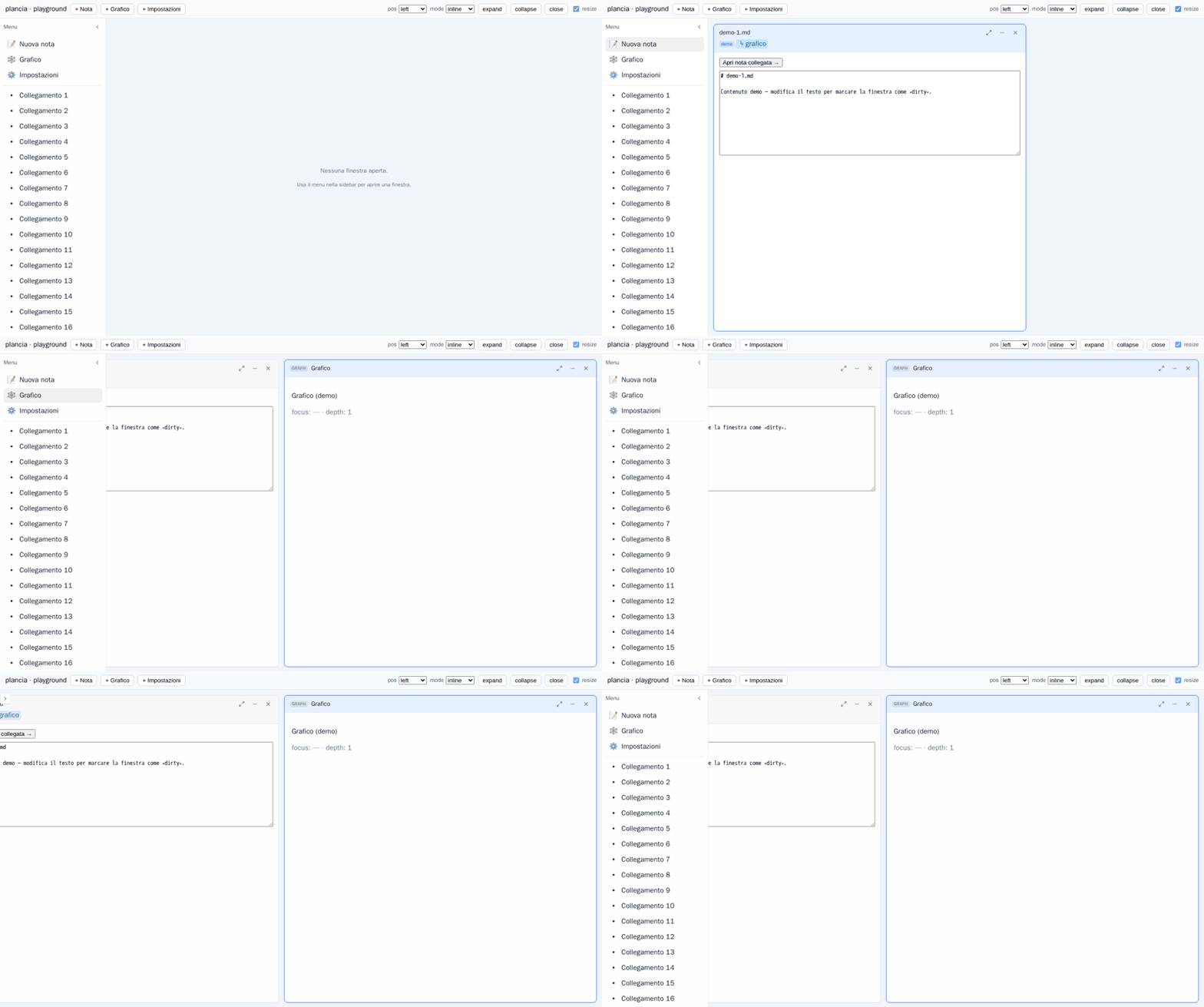
<PlanciaSidebar position="left" :responsive="768" resizable>
  <nav><!-- menu / list / anything --></nav>
</PlanciaSidebar>
See Sidebar for the full reference.
Documentation
Full usage guide (English) under docs/en/:
| Page | |
|---|---|
| Getting started | Install, setup, a minimal plancia |
| Concepts | Windows, registry, store, content↔frame contract |
| Components | <Plancia> / <WindowFrame> props, slots, events |
| Store | useWindowsStore reference |
| URL & state sync | usePlanciaSync + createArgCodec |
| Theming | CSS variables, labels / i18n |
| Recipes | Cross-window links, tags, per-window actions… |
| Sidebar | <PlanciaSidebar> — edges, states, modes, peek, resize, drawer |
| Dialogs | <PlanciaModal> / <PlanciaConfirm> + imperative useDialogs() |
| Config | PlanciaConfig — theme + behavior via <PlanciaConfigProvider> |
| Configurator | dev tool — visual config editor (container) |
Compatibility
| | Requirement |
|---|---|
| Vue | ^3.5.0 |
| Pinia | ^2.2.0 or ^3.0.0 |
| vue-router | ^4.0.0 — optional, only for usePlanciaSync |
| Runtime deps | none |
Ships as ESM + .d.ts, so your bundler/TypeScript version is independent of the
one used to build plancia.
Development
npm install
npm run dev        # playground (src/playground/)
npm run build      # ESM bundle + types → dist/
npm run typecheck
npm test
There's also a Docker setup: docker compose up playground serves the playground,
docker compose run --rm test runs the suite.
Status
Pre-1.0. The library is functional and tested; it was abstracted from two production Vue apps where the same niri-style window manager had been built in parallel.
License
MIT © 2026 plancia contributors.