
playbook-sdk
v1.0.3
Published
A lightweight, production-ready frontend SDK for creating beautiful galleries

Maintainers
 playbook-labs
Readme
Playbook Gallery SDK
A lightweight frontend SDK for creating masonry grid galleries with search, board navigation, and modal views. Works for asset management, photo galleries, and media libraries.


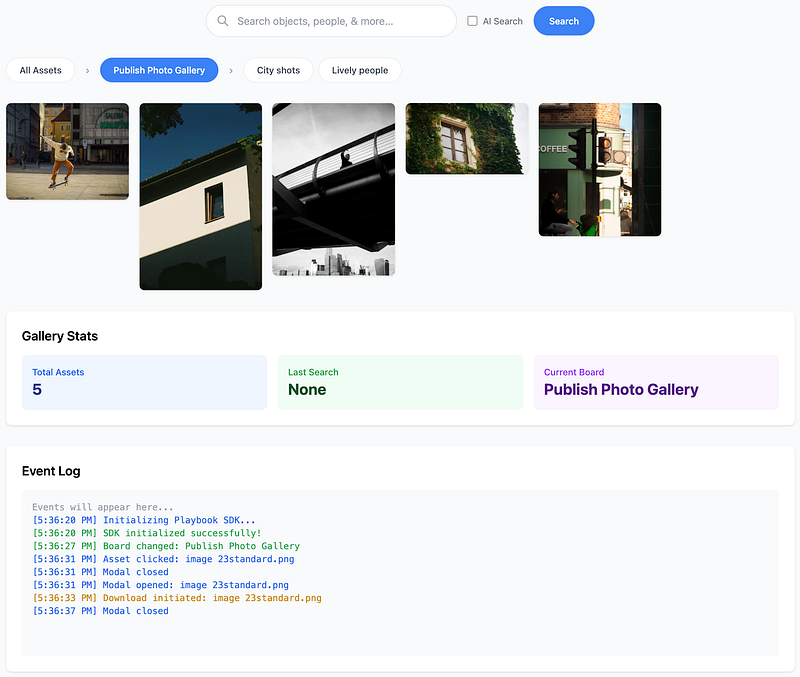
Features
- Fully responsive - adapts from 2 to 8 columns based on screen size
- Search with AI toggle - regular and semantic search
- Board navigation - organize assets into categories
- Modal viewer - full-screen asset view with keyboard navigation
- Download support - one-click downloads
- Customizable - extensive configuration options
- Framework agnostic - works with vanilla JS, React, Vue, Angular
- Zero dependencies
- TypeScript support
- Accessible - ARIA labels and keyboard navigation
- Lightweight - ~15KB minified
Installation
Option 1: CDN (Quickest)
<!DOCTYPE html>
<html lang="en">
  <head>
    <meta charset="UTF-8" />
    <meta name="viewport" content="width=device-width, initial-scale=1.0" />
    <title>My Gallery</title>

    <!-- Optional: Include Tailwind CSS for styling -->
    <script src="https://cdn.tailwindcss.com"></script>
  </head>
  <body>
    <!-- Your gallery container -->
    <div id="my-gallery"></div>

    <!-- Include Playbook SDK -->
    <script src="https://unpkg.com/playbook-sdk@latest/dist/playbook-sdk.min.js"></script>

    <script>
      // Initialize your gallery
      const gallery = PlaybookSDK.init({
        containerId: "my-gallery",
        organizationSlug: "your-org-slug",
        authToken: "your-auth-token",
      });
    </script>
  </body>
</html>
Option 2: npm
npm install playbook-sdkimport PlaybookSDK from "playbook-sdk";
const gallery = PlaybookSDK.init({
containerId: "my-gallery",
organizationSlug: "your-org-slug",
authToken: "your-auth-token",
});Option 3: Download
Download playbook-sdk.min.js and include it in your project:
<script src="path/to/playbook-sdk.min.js"></script>Quick Start
1. Get Your Playbook API Credentials
Request API access at dev.playbook.com or email [email protected]. You'll need:
- Organization Slug (e.g.,
playbook-sdk) - Auth Token (OAuth2 bearer token)
- Board ID (optional - to scope gallery to specific board)
2. Create HTML Container
<div id="gallery-container"></div>3. Initialize SDK
const gallery = PlaybookSDK.init({
  containerId: "gallery-container",
  organizationSlug: "playbook-sdk", // Your organization/workspace slug
  authToken: "your-token-here", // Your API access token
  boardId: "", // Optional: Scope gallery to specific board
  enableSearch: true,
  enableBoards: true,
  enableModal: true,
});
4. Done
The SDK will fetch and display your assets from Playbook.
Configuration Options
PlaybookSDK.init({
  // ===== Required =====
  containerId: "my-gallery", // ID of the container element
  organizationSlug: "your-org-slug", // Your Playbook workspace slug
  authToken: "your-auth-token", // Your API bearer token

  // ===== Optional Scoping =====
  boardId: "", // Scope to specific board (empty = workspace-wide)
  // When boardId is set:
  // - "All Assets" shows only assets from this board + nested boards
  // - Board navigation shows only children of this board
  // - Users cannot navigate outside this board tree

  // ===== Features =====
  enableSearch: true, // Show search bar with AI toggle
  enableBoards: true, // Show board/collection navigation
  enableModal: true, // Enable full-screen asset viewer
  enableDownload: true, // Show download button in modal
  enableInfo: true, // Show info button in modal

  // ===== Responsive Columns =====
  columnBreakpoints: {
    default: 2, // Mobile (< 768px)
    768: 3, // Tablet
    1024: 4, // Desktop
    1280: 5, // Large desktop
    1536: 6, // XL screens
    1800: 7, // 2XL screens
    2000: 8, // Ultra-wide
  },

  // ===== Styling =====
  theme: "light", // 'light' or 'dark' (future)
  customStyles: {}, // Custom CSS overrides

  // ===== Callbacks =====
  onAssetClick: function (asset) {
    console.log("Asset clicked:", asset);
  },

  onSearch: function (query) {
    console.log("Search performed:", query);
  },

  onBoardChange: function (boardId, boardTitle) {
    console.log("Board changed:", boardTitle || boardId);
  },

  onModalOpen: function (asset) {
    console.log("Modal opened:", asset);
  },

  onModalClose: function () {
    console.log("Modal closed");
  },

  onDownload: function (asset) {
    console.log("Asset downloaded:", asset);
  },
});
Examples
Workspace-wide gallery:
PlaybookSDK.init({
  containerId: "gallery",
  organizationSlug: "acme-corp",
  authToken: "abc123...",
  boardId: "", // Empty = show all workspace assets
});
Board-scoped gallery:
PlaybookSDK.init({
  containerId: "gallery",
  organizationSlug: "acme-corp",
  authToken: "abc123...",
  boardId: "SddGjNcAFZThZb3yVTSvbGbe", // Only this board + children
});
Usage Examples
Basic Implementation
<!DOCTYPE html>
<html>
  <head>
    <title>My Asset Gallery</title>
    <script src="https://cdn.tailwindcss.com"></script>
  </head>
  <body class="bg-gray-100 p-8">
    <div class="max-w-7xl mx-auto">
      <h1 class="text-4xl font-bold mb-8">Asset Library</h1>
      <div id="gallery"></div>
    </div>

    <script src="playbook-sdk.min.js"></script>
    <script>
      PlaybookSDK.init({
        containerId: "gallery",
        organizationSlug: "my-company",
        authToken: "your-token-here",
      });
    </script>
  </body>
</html>
With Callbacks
const gallery = PlaybookSDK.init({
  containerId: "gallery",
  organizationSlug: "my-company",
  authToken: "your-token",

  onAssetClick: function (asset) {
    // Track analytics
    gtag("event", "asset_view", {
      asset_id: asset.token,
      asset_name: asset.title,
    });
  },

  onSearch: function (query) {
    // Track search
    console.log("User searched for:", query);
  },

  onBoardChange: function (boardId, boardTitle) {
    // Track board navigation
    console.log("Navigated to:", boardTitle);
  },

  onDownload: function (asset) {
    // Track downloads
    gtag("event", "asset_download", {
      asset_id: asset.token,
    });
  },
});
Custom Column Configuration
PlaybookSDK.init({
  containerId: "gallery",
  organizationSlug: "my-company",
  authToken: "your-token",

  // Custom breakpoints for your design
  columnBreakpoints: {
    default: 1, // 1 column on mobile
    640: 2, // 2 columns on small tablets
    1024: 3, // 3 columns on desktop
    1440: 4, // 4 columns on large screens
  },
});
React Integration
import { useEffect, useRef } from "react";
import PlaybookSDK from "playbook-sdk";

function GalleryComponent() {
  const galleryRef = useRef(null);
  const sdkInstance = useRef(null);

  useEffect(() => {
    if (galleryRef.current && !sdkInstance.current) {
      sdkInstance.current = PlaybookSDK.init({
        containerId: "react-gallery",
        organizationSlug: "your-org-slug",
        authToken: "your-auth-token",

        onAssetClick: (asset) => {
          console.log("Asset clicked:", asset);
        },
      });
    }

    return () => {
      if (sdkInstance.current) {
        PlaybookSDK.destroy("react-gallery");
        sdkInstance.current = null;
      }
    };
  }, []);

  return <div id='react-gallery' ref={galleryRef} />;
}

export default GalleryComponent;
TypeScript Integration
TypeScript definitions included:
import PlaybookSDK, {
  PlaybookConfig,
  GalleryInstance,
  Asset,
  Board,
} from "playbook-sdk";
import { useEffect, useRef } from "react";

function TypeScriptGallery() {
  const sdkInstance = useRef<GalleryInstance | null>(null);

  useEffect(() => {
    const config: PlaybookConfig = {
      containerId: "ts-gallery",
      organizationSlug: "your-org-slug",
      authToken: "your-auth-token",
      enableSearch: true,
      enableBoards: true,

      onAssetClick: (asset: Asset) => {
        console.log("Asset clicked:", asset.title);
      },

      onBoardChange: (boardId: string, boardTitle: string) => {
        console.log("Board changed:", boardTitle);
      },
    };

    sdkInstance.current = PlaybookSDK.init(config);

    return () => {
      if (sdkInstance.current) {
        PlaybookSDK.destroy("ts-gallery");
      }
    };
  }, []);

  return <div id='ts-gallery' />;
}
Public API Methods
Interact with the gallery instance:
const gallery = PlaybookSDK.init({
  /* config */
});

// Refresh the gallery
gallery.refresh();

// Programmatically search
gallery.search("logo");

// Select a specific board
gallery.selectBoardById("brand-assets");

// Get current assets
const assets = gallery.getAssets();

// Destroy the gallery
gallery.destroy();

// Get gallery instance later
const instance = PlaybookSDK.getInstance("my-gallery");
Styling & Customization
CSS classes are prefixed with pb- to avoid conflicts:
/* Override styles in your CSS */
.pb-masonry-item img {
  border-radius: 12px !important;
  box-shadow: 0 4px 8px rgba(0, 0, 0, 0.2) !important;
}

.pb-board-btn.active {
  background-color: #your-brand-color !important;
}

.pb-modal-content {
  border-radius: 20px !important;
}
Keyboard Shortcuts
Modal controls:
←Previous asset→Next assetEscClose modal
Browser Support
- Chrome/Edge (latest)
- Firefox (latest)
- Safari (latest)
- Mobile browsers (iOS Safari, Chrome Mobile)
Support
For issues and questions:
- Documentation: Development Portal
- Email: [email protected]
Roadmap
- [ ] Dark theme support
- [ ] Video preview in grid
- [ ] Drag & drop upload
- [ ] Batch download
- [ ] Grid/List view toggle
- [ ] Advanced filtering
- [ ] Asset metadata display
- [ ] Lazy loading optimization