
player-video-kunstom-pro
v1.0.4
Published
Versione avanzata del player video basato su Video.js.
Downloads
18

Maintainers
 pizzamafia
Readme
player-video-kunstom-pro-NPMversion
----- PLAYER VIDEO KUNSTOM PRO -------
A video player based on Video.js, completely free with advanced features and improved graphics.
Watch the Demo Video
( Modulo in italiano a fine pagina)
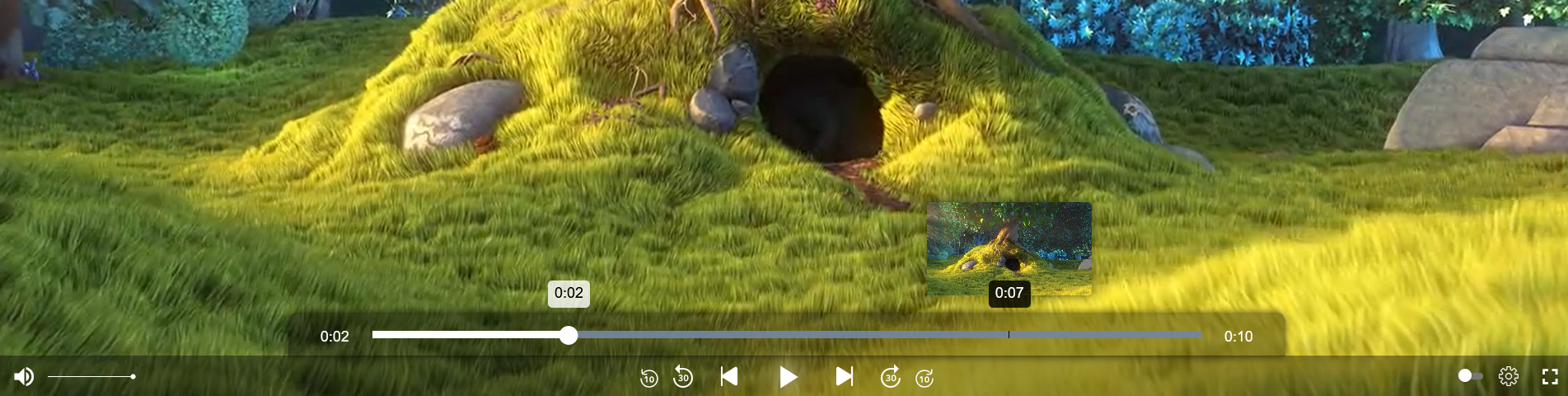
● Miniplayer ● Customizable Props ● Support for multiple video qualities ● autoplay ● Next ● Rewind ● Skip ● Total Time ● Progress Time
Main Features:
- Customizable Props: Easily modify various parameters and customize the player’s behavior.
- Support for multiple video qualities: Video support with different quality options.
- Autoplay: Autoplay mode for the next video.
- Next: Move to the next video.
- Preview: Go back to the previous video.
- Skip: Skip forward and backward by 30 seconds or 10 seconds.
Graphics
- Miniplayer: Activated by hovering over the video progress bar.
- Video Duration: Visual timer showing the total video duration and elapsed time.
- Interface: Enhanced interface with the ability to modify it via props.
- Color: Customizable icon colors via props. Accepts both color names and HEX, RGB, RGBA values.
CUSTOMIZABLE PROPS
Supports native Video.js props (see Video.js Documentation) + additional customizable props for greater control and a unique experience.
--SUPPORTED NATIVE PROPS-- autoplay, loop, muted, volume, aspectRatio, controls, doubleClickFullscreen
--EXTRA PROPS--
- size (Int) – Defines the size of the player in percentage. "25", "50", "75", "100" (default: "100"). EXAMPLE: size={50} //50% size
- width (string) – Defines the player size in pixels, fully customizable. EXAMPLE: width={"700px"}
- color (string) – Changes the color of the player icons to any color, including HEX or RGB. color="red", color="#ffff"
- darkMode (boolean) – DARK mode experience. Changes the button colors on hover. EXAMPLE: darkMode={true}
- title (boolean) – Displays the video title in the control bar. EXAMPLE: title={true}
- quality (boolean) – Hides the settings icon for video quality. EXAMPLE: quality={false}
- tooltips (boolean) – Removes the tooltips that appear when hovering over the icons. EXAMPLE: tooltips={false}
- videoList (array) – You can insert a list of video objects to play. Each object must contain at least the following fields: src: The video link (string, required). type: The video type (string, required, e.g., "video/mp4"). title: The video title (string, optional). qualities: An array of options for video quality (optional). -- (Example of use later on)---
INSTALLATION
To use the player, simply install it in your project. You can do this via npm or yarn:
- NPM npm install player-video-kunstom-pro
- YARN yarn add player-video-kunstom-pro
After installation, import the player into your React project:
import PlayerVideoKunstomPro from "player-video-kunstom-pro";
And add the player in your JSX:
Usage Example
After installing the package, you can use the player in your React project as follows:
import React from "react";
import PlayerVideoKunstomPro from "player-video-kunstom-pro";

const videoList = [
  {
    src: "https://www.w3schools.com/html/mov_bbb.mp4",
    type: "video/mp4",
    title: "Video di Test 1",
  },
  {
    src: "https://media.istockphoto.com/id/1697150103/it/video/guidare-sotto-la-pioggia-di-notte.mp4?s=mp4-640x640-is&k=20&c=virq68l1edFMhw55u_f15bdcx56hZQAQQ83RJBFBqzw=",
    type: "video/mp4",
    title: "Video di Test 2",
  },
  {
    src: "https://test-videos.co.uk/vids/bigbuckbunny/mp4/h264/720/Big_Buck_Bunny_720_10s_1MB.mp4",
    type: "video/mp4",
    title: "Video di Test 3",
    qualities: [
      {
        label: "720p",
        src: "https://test-videos.co.uk/vids/bigbuckbunny/mp4/h264/720/Big_Buck_Bunny_720_10s_1MB.mp4",
        type: "video/mp4",
      },
      {
        label: "360p",
        src: "https://test-videos.co.uk/vids/bigbuckbunny/mp4/h264/360/Big_Buck_Bunny_360_10s_1MB.mp4",
        type: "video/mp4",
      },
    ],
  },
];

const App = () => {
  return (
    <div className="App">
      <PlayerVideoKunstomPro videoList={videoList} width={"1500px"} />
    </div>
  );
};

export default App;
Common Issues
- The video doesn't load: Make sure you have provided a valid URL for the video.
- Video qualities are not visible: Check that the
qualityprop is set correctly. - YouTube Video: Install video-js-youtube with npm install video-js-youtube.
- PROPS width + size: When applying both props, the
widthprop will take precedence.
Methods and Events
- The player allows you to register custom events, such as when playback starts, when the video ends, or quality changes.
- You can also use methods like play(), pause(), seek(), and many others to integrate the player into more complex workflows.
Useful Resources and Links
---🇮🇹 Versione Italiana---
----- PLAYER VIDEO KUNSTOM PRO -------
un player video basato su video js completamente gratuito con funzionalità avanzate e grafica migliorata. Guarda il Video Dimostrativo
● Miniplayer ● Props personalizzabili ● Supporto diverse qualità ● autoplay ● Next ● Rewind ● Skip ● Tempo Totale ● Tempo Progressivo
Funzionalità principali:
- Props personalizzabili: Modifica facilmente vari parametri e personalizza il comportamento del player.
- Supporto per diverse qualità video: Supporto Video con diverse qualità.
- Autoplay: modalità autoplay per il video successivo.
- Next: Passa al video successivo.
- Preview: Torna al video precedente.
- Skip: Avanti e indietro 30 secondi, 10 secondi.
Grafica
- Miniplayer: attivabile al passaggio del mouse sulla barra di avanzamento del video.
- Durata video: Cronometro visivo con durata totale del video e tempo trascorso
- Interfaccia: Interfaccia Migliorato con possibilità di modificarlo tramite props
- Colore: Colore icone personalizzabili tramite props. Accettia sia il nome del colore che valori HEX, RGB, RGBA
PROPS PERSONALIZZABILI
.supporta props native di video-js.(vedi Documentazione di Video.js) + props personalizzabili per un controllo maggiore e un esperienza unica. --PROPS NATIVE SUPPORTATE-- autoplay , loop, muted ,volume, aspectRatio, controls, doubleClickFullscreen
--PROPS EXTRA-- -size (Int) – Definisce la dimensione del player in percentuale. "25", "50", "75", "100" (default: "100"). ESEMPIO: size={50} //dimensione 50% --width (string) -Definisce la dimensione del player in pixel. quindi totalmente personalizzabile. ESEMPIO: width={"700px"} -color(string) -Cambia il colore delle icone del player con qualsiasi colore anche HEX o RGB color"red", color= "#ffff" -darkMode (boolean) -Esperienza DARK. Cambia il colore dei button all':hover ESEMPIO darkMode={true} -title (boolean) -Mostra il titolo del video nella barra di controllo ESEMPIO: title={true} -quality (boolean) -Nasconde l'icona settings per la qualita video ESEMPIO: quality={false} -tooltips (boolean) -Rimuove le tooltips che appaiona all'hover delle icone ESEMPIO tooltips={false} --videoList (array) – Puoi inserire una lista di oggetti video da riprodurre. Ogni oggetto deve contenere almeno i seguenti campi: src: Il link al video (stringa, obbligatorio). type: Il tipo di video (stringa, obbligatorio, es. "video/mp4"). title: Il titolo del video (stringa, facoltativo). qualities: Un array di opzioni per la qualità video (facoltativo). -- (Esempio di utilizzo piu avanti)---
INSTALLAZIONE
Per utilizzare il player, basta installarlo nel tuo progetto. Puoi farlo tramite npm o yarn:
- NPM npm install player-video-kunstom-pro
- YARN yarn add player-video-kunstom-pro
Dopo l'installazione, importa il player nel tuo progetto React:
import PlayerVideoKunstomPro from "player-video-kunstom-pro";
E aggiungi il player nel tuo JSX:
Esempio di utilizzo
Dopo aver installato il pacchetto, puoi utilizzare il player nel tuo progetto React come segue:
import React from "react";
import PlayerVideoKunstomPro from "player-video-kunstom-po";

const videoList = [
  {
    src: "https://www.w3schools.com/html/mov_bbb.mp4",
    type: "video/mp4",
    title: "Video di Test 1",
  },
  {
    src: "https://media.istockphoto.com/id/1697150103/it/video/guidare-sotto-la-pioggia-di-notte.mp4?s=mp4-640x640-is&k=20&c=virq68l1edFMhw55u_f15bdcx56hZQAQQ83RJBFBqzw=",
    type: "video/mp4",
    title: "Video di Test 2",
  },
  {
    src: "https://test-videos.co.uk/vids/bigbuckbunny/mp4/h264/720/Big_Buck_Bunny_720_10s_1MB.mp4",
    type: "video/mp4",
    title: "Video di Test 3",
    qualities: [
      {
        label: "720p",
        src: "https://test-videos.co.uk/vids/bigbuckbunny/mp4/h264/720/Big_Buck_Bunny_720_10s_1MB.mp4",
        type: "video/mp4",
      },
      {
        label: "360p",
        src: "https://test-videos.co.uk/vids/bigbuckbunny/mp4/h264/360/Big_Buck_Bunny_360_10s_1MB.mp4",
        type: "video/mp4",
      },
    ],
  },
];

const App = () => {
  return (
    <div className="App">
      <PlayerVideoKunstomPro videoList={videoList} width={"1500px"} />
    </div>
  );
};

export default App;
Problemi comuni
- Il video non si carica: assicurati di aver fornito un URL valido per il video.
- Le qualità video non sono visibili: controlla che la prop
qualitysia impostata correttamente. - Video Youtube: install video-js-youtube con npm install video-js-youtube
- PROPS width + size: Applicando entrambe le props prevarrà la width
Metodi e Eventi
- Il player offre la possibilità di registrare eventi personalizzati, come l'inizio della riproduzione, la fine del video, o cambiamenti di qualità.
- Puoi anche utilizzare i metodi play(), pause(), seek() e molti altri per integrare il player in flussi di lavoro complessi.