
playwright-azure-monitor-reporter
v1.0.3
Published
A Playwright reporter for Azure Monitor
Downloads
36

Maintainers
 antebios
Readme
Playwright Azure Monitor Reporter
This plugin sends Playwright test results to Azure Monitor Log Analytics, allowing you to centralize, analyze, and visualize your test metrics in Azure.
Overview
The Playwright Azure Monitor Reporter is a custom reporter for Playwright tests that automatically collects test execution data and sends it to Azure Monitor Log Analytics.
Prerequisites
- Azure subscription
- Log Analytics workspace
- Appropriate permissions to write to Log Analytics
- Playwright test suite
Installation
To install the Playwright Azure Monitor Reporter...
npm install playwright-azure-monitor-reporter
or
pnpm install playwright-azure-monitor-reporter
Configure Playwright
Environment Variables
- AZURE_TENANT_ID: Your Azure Tenent ID
- AZURE_CLIENT_ID: Your Azure Client ID
- AZURE_CLIENT_SECRET: Your Azure Client Secret
- LOG_ANALYTICS_DCE_ENDPOINT: The ingestion URI from your Data Collection Endpoint
- LOG_ANALYTICS_DCR_IMMUTABLE_ID: The immutable ID of your Data Collection Rule
- LOG_ANALYTICS_STREAM_NAME: The stream name you defined in your DCR (e.g., Custom-PlaywrightTests_CL)
optional:
AZURE_PROJECT_NAME: String of an arbitrary name to associate your Playwright tests. Default: "DefaultProject"
TEST_ENVIRONMENT: String of the environment the tests are run against. Default: "local"
RunId: Uses the following CI\CD environment variables if they are available:
- Azure DevOps = BUILD_BUILDID
- GitLab = CI_PIPELINE_RUN_ID
- GitHub = GITHUB_RUN_ID
- Default
local-${Date.now()}
Commit SHA: Uses the following CI\CD environment variables if they are avilable:
- Azure DevOps = BUILD_SOURCEVERSION
- GitLab = GIT_COMMIT_SHA
- GitHub = GITHUB_SHA
- Default: blank
Playwright Configuration File
// playwright.config.ts
import { defineConfig } from '@playwright/test';
import { AzureMonitorReporter } from 'playwright-azure-monitor-reporter';

export default defineConfig({
  reporter: [
    ['list'],
    ['playwright-azure-monitor-reporter', {
      // Configuration here
      projectName: 'Some Project Name', // to identify the test project or other information to group tests
      // Additional options which look for environment variables if not defined here
      azureTenantId?: string
      azureClientId?: string
      azureClientSecret?: string
      dceEndpoint?: string
      dcrImmutableId?: string
      streamName?: string
      environment?: string
      RunId?: string
      commitSHA?: string
      debugMode?: boolean // Optional debug mode to enable more verbose logging

    } as AzureMonitorReporter,
    ]
  ],
  // Other Playwright configuration
});
Data Schema
This the schema of data being sent to Azure Monitor so users understand what metrics/fields are available for querying and visualization.
"columns": [
  { "name": "TimeGenerated", "type": "datetime" },
  { "name": "RunID", "type": "string" },
  { "name": "TestSuite", "type": "string" },
  { "name": "TestCaseTitle", "type": "string" },
  { "name": "Status", "type": "string" },
  { "name": "DurationMs", "type": "real" },
  { "name": "Browser", "type": "string" },
  { "name": "Environment", "type": "string" },
  { "name": "CommitSHA", "type": "string" },
  { "name": "ErrorMessage", "type": "string" },
  { "name": "StackTrace", "type": "string" },
  { "name": "Retries", "type": "int" },
  { "name": "WorkerIndex", "type": "int" },
  { "name": "TestFile", "type": "string" },
  { "name": "Tags", "type": "string" },
  { "name": "Project", "type": "string" }
]
This is a sample of the data sent to Azure Monitor:
[
  {
    "TimeGenerated": "2024-01-01T00:00:00Z",
    "RunID": "abc123",
    "TestSuite": "LoginTests",
    "TestCaseTitle": "should login successfully",
    "Status": "Passed",
    "DurationMs": 1234.56,
    "Browser": "Chrome",
    "Environment": "Staging",
    "CommitSHA": "abcdef123456",
    "ErrorMessage": "",
    "StackTrace": "",
    "Retries": 0,
    "WorkerIndex": 1,
    "TestFile": "login.spec.ts",
    "Tags": "smoke", // comma-delmited list of tags
    "Project": "My Project Name"
  }
]
Example KQL Queries
Provide example Kusto queries for common reporting scenarios:
PlaywrightTests_CL
| where TestStatus == 'passed'
| summarize count() by Browser, TestFile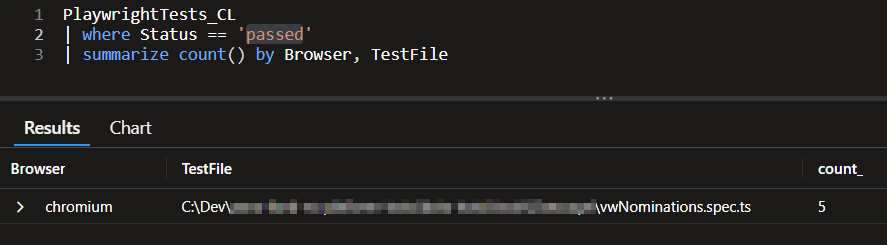
Guide to creating Azure resources
This is detailed documentation in order for you to create the Azure resources and table for this reproter to successfully publish the test results.
The following resources need to be created before using this reporter:
- Azure Log Analytics Workspace
- Data Collection Endpoint
- Data Collection Rule
- Log Table