
playwright-smart-reporter
v2.2.0
Published
An intelligent Playwright HTML reporter with AI-powered failure analysis, flakiness detection, and performance regression alerts
Downloads
99,916

Maintainers
 qa.gary.parker
Readme
playwright-smart-reporter
An intelligent Playwright HTML reporter with AI-powered failure analysis, flakiness detection, performance regression alerts, and a modern interactive dashboard. Free and open source (MIT) — every feature included.
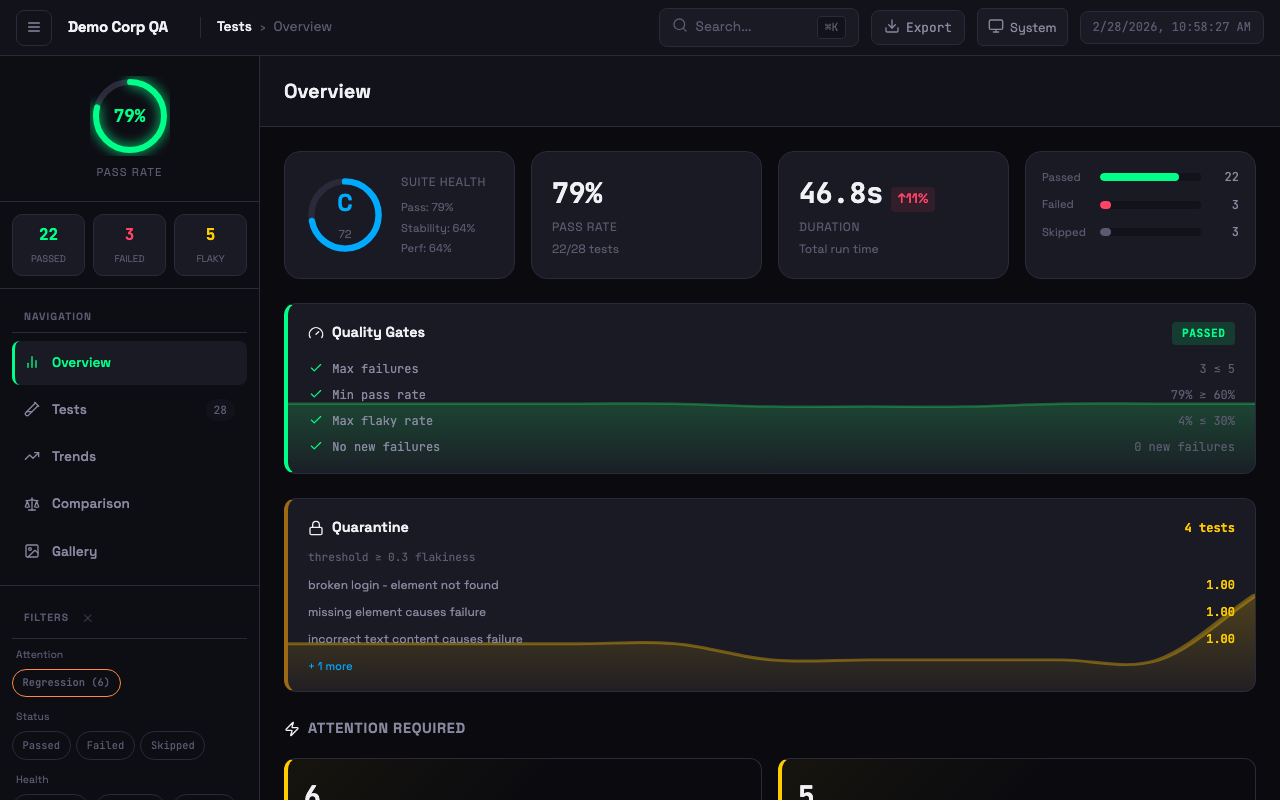 Dashboard with quality gates, quarantine, suite health grade, attention alerts, and failure clusters
Installation
npm install -D playwright-smart-reporterQuick Start
Add to your playwright.config.ts:
import { defineConfig } from '@playwright/test';

export default defineConfig({
  reporter: [
    ['playwright-smart-reporter', {
      outputFile: 'smart-report.html',
      historyFile: 'test-history.json',
      maxHistoryRuns: 10,
    }],
  ],
});
Run your tests and open the generated smart-report.html.
At a Glance
- Stability grades (A–F) so you know which tests to trust
- Flakiness detection across retries and history
- Run-to-run comparison — catch regressions before they ship
- Screenshot, video, and trace gallery for every failure
- Network request logs to pinpoint API issues
- CI auto-detection & notifications
- Live progress dashboard — run, cancel, and filter tests as they execute
- AI-powered root cause analysis (bring your own Anthropic, OpenAI, or Gemini API key)
- 10 themes plus fully custom theme colours
- PDF, JSON, and JUnit XML exports
- Quality gates — block merges when quality drops
- Auto-quarantine unreliable tests to keep CI green
- Custom report branding (logo, title, footer)
Features
Core Analysis
- AI Failure Analysis — AI-powered fix suggestions using your own Anthropic, OpenAI, or Gemini API key
- Flakiness Detection — Historical tracking to identify unreliable tests (not single-run retries)
- Performance Regression Alerts — Warns when tests get significantly slower than average
- Stability Scoring — Composite health metrics (0-100 with grades A to F)
- Failure Clustering — Group similar failures by error type with error previews and AI analysis
- Test Retry Analysis — Track tests that frequently need retries
Interactive Dashboard
- Sidebar Navigation — Overview, Tests, Trends, Comparison, Gallery views
- Theme Support — 4 built-in themes (System, Light, Dark, High Contrast) with persistent preference
- Keyboard Shortcuts —
1-5switch views,j/knavigate tests,ffocus search,eexport summary - Virtual Scroll — Pagination for large test suites (500+ tests)
- Exportable Summary Card — One-click export of test run summary
Test Details
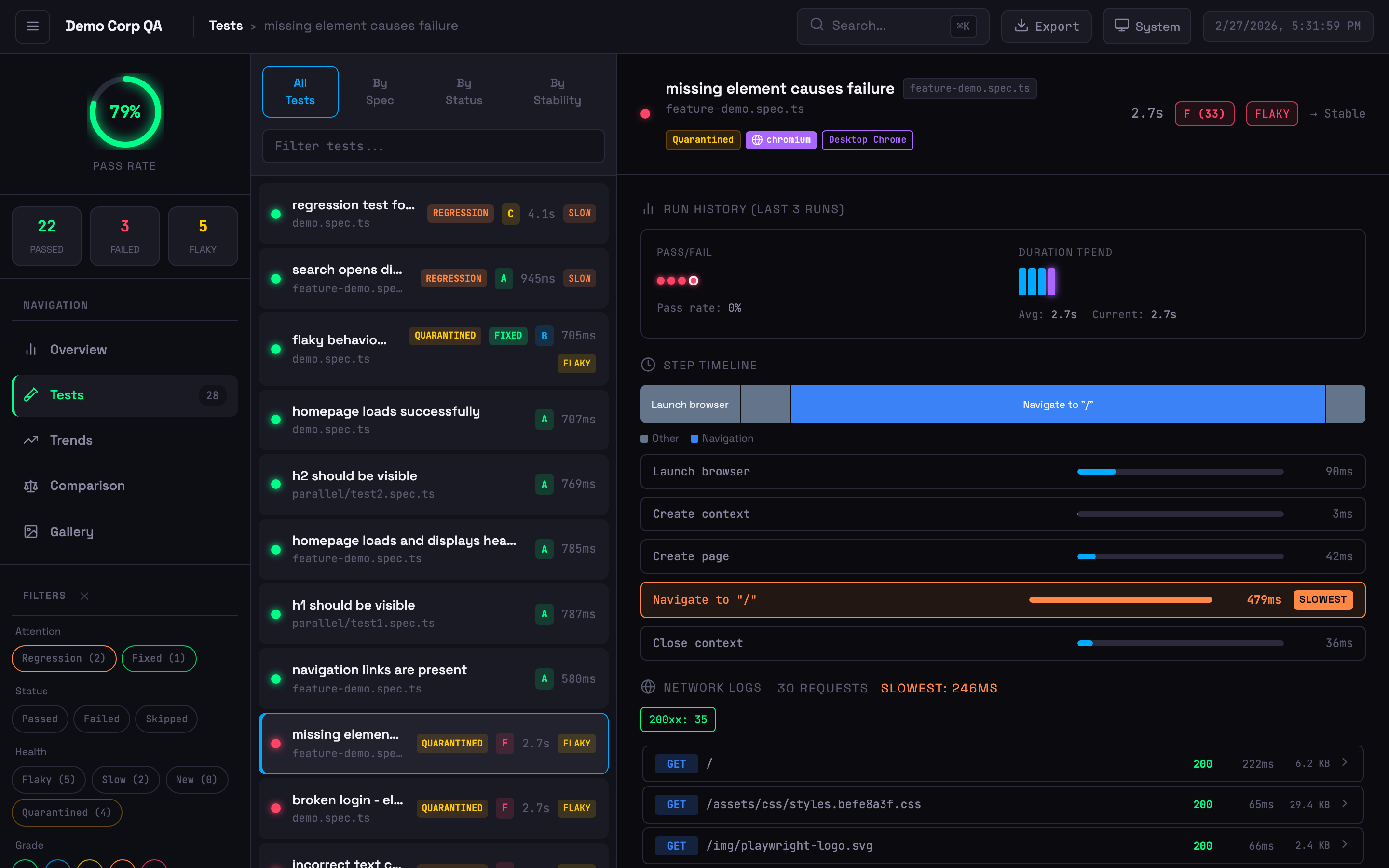 Expanded test card with step timeline, network logs, run history, and quarantine badge
- Step Timing Breakdown — Visual bars highlighting the slowest steps
- Flamechart Visualisation — Colour-coded timeline bars (navigation, assertion, action, API, wait)
- Network Logs — API calls with status codes, timing, and payload details (from trace files)
- Inline Trace Viewer — View traces directly in the dashboard
- Screenshot Embedding — Failure screenshots displayed inline
- Browser & Project Badges — Shows which browser/project each test ran against
- Annotation Support —
@slow,@fixme,@skip,@issue, custom annotations with styled badges
Trend Analytics
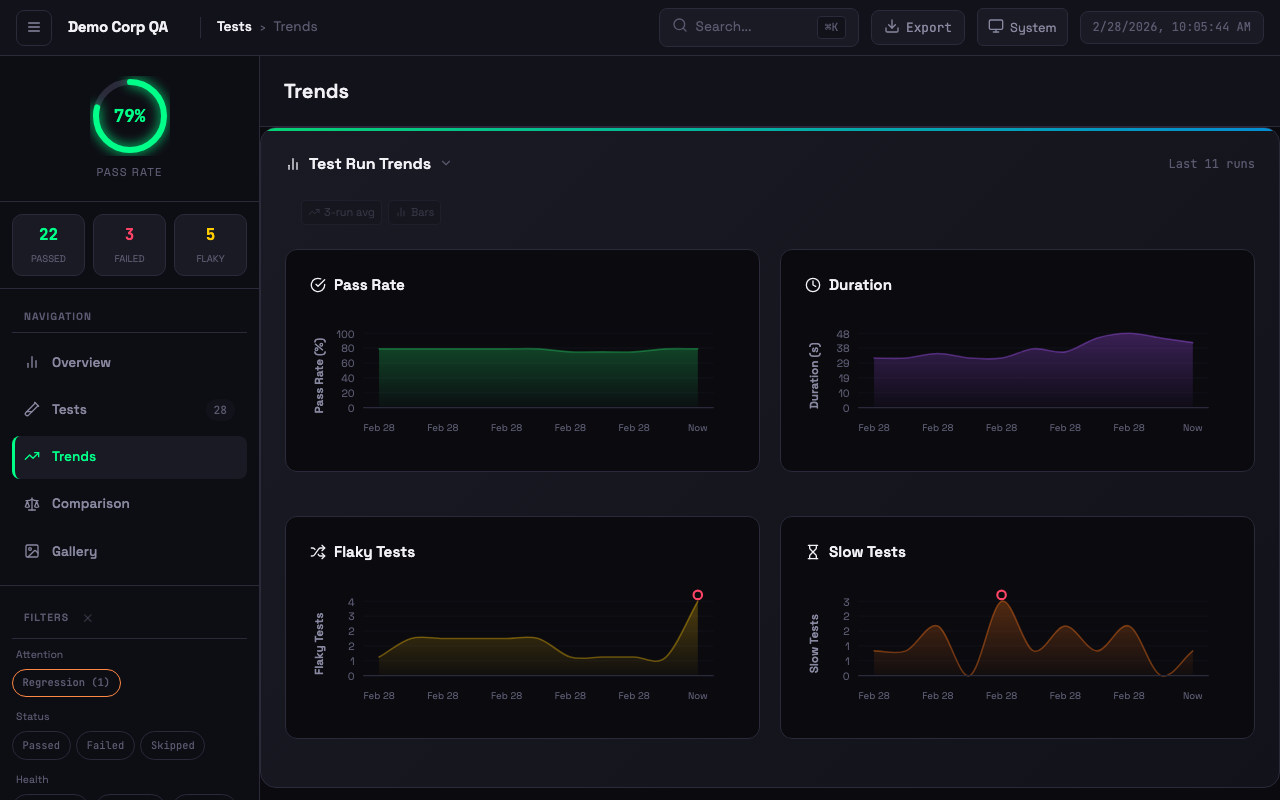 Interactive trend charts with pass rate, duration, flaky tests, and slow test tracking
- Moving Averages — Overlay on pass rate and duration trends
- Anomaly Detection — 2-sigma outlier detection with visual markers
- Clickable History — Click any chart bar to drill into that historical run
Artifact Gallery
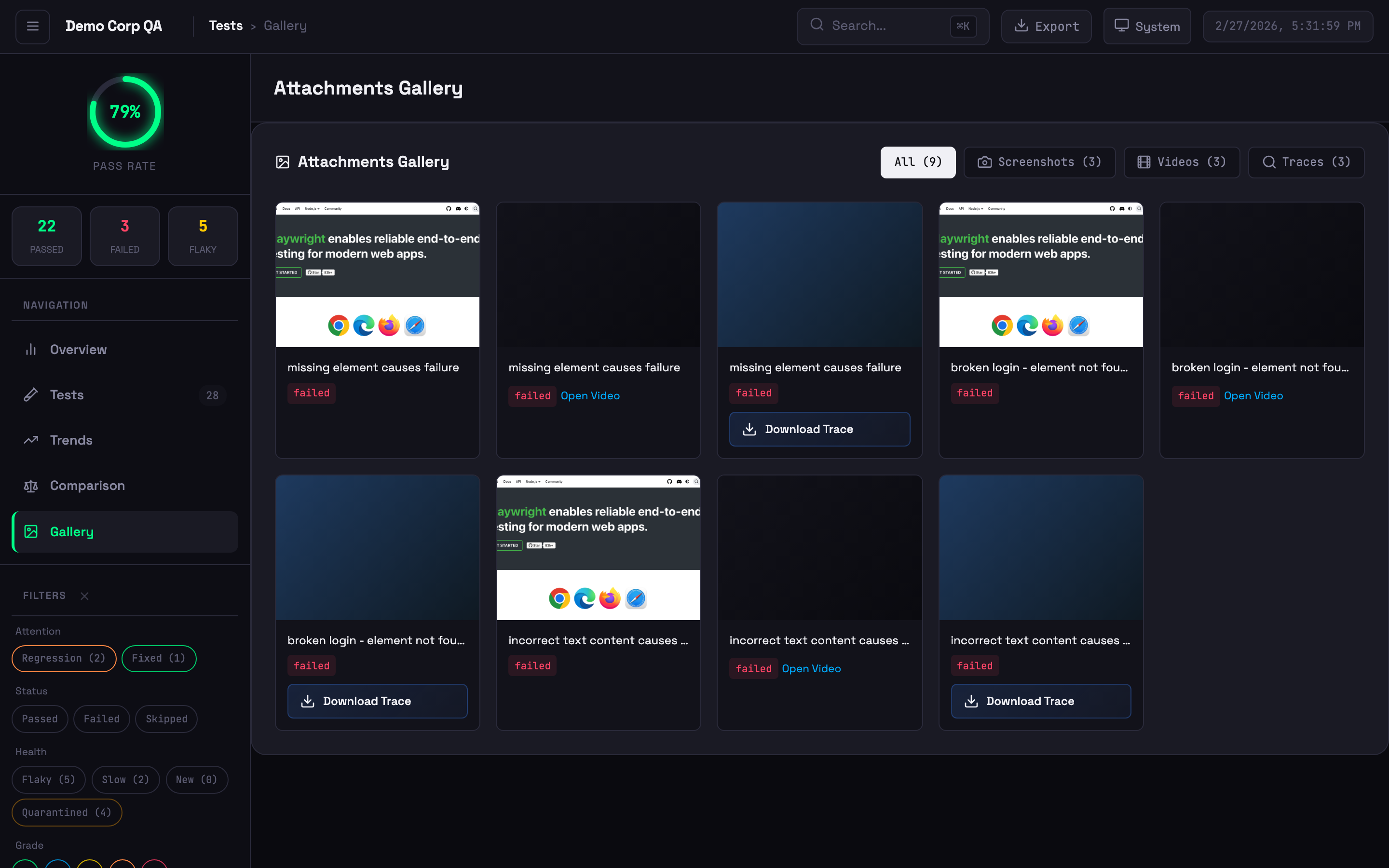 Visual grid of screenshots, videos, and trace files
Trace Viewer
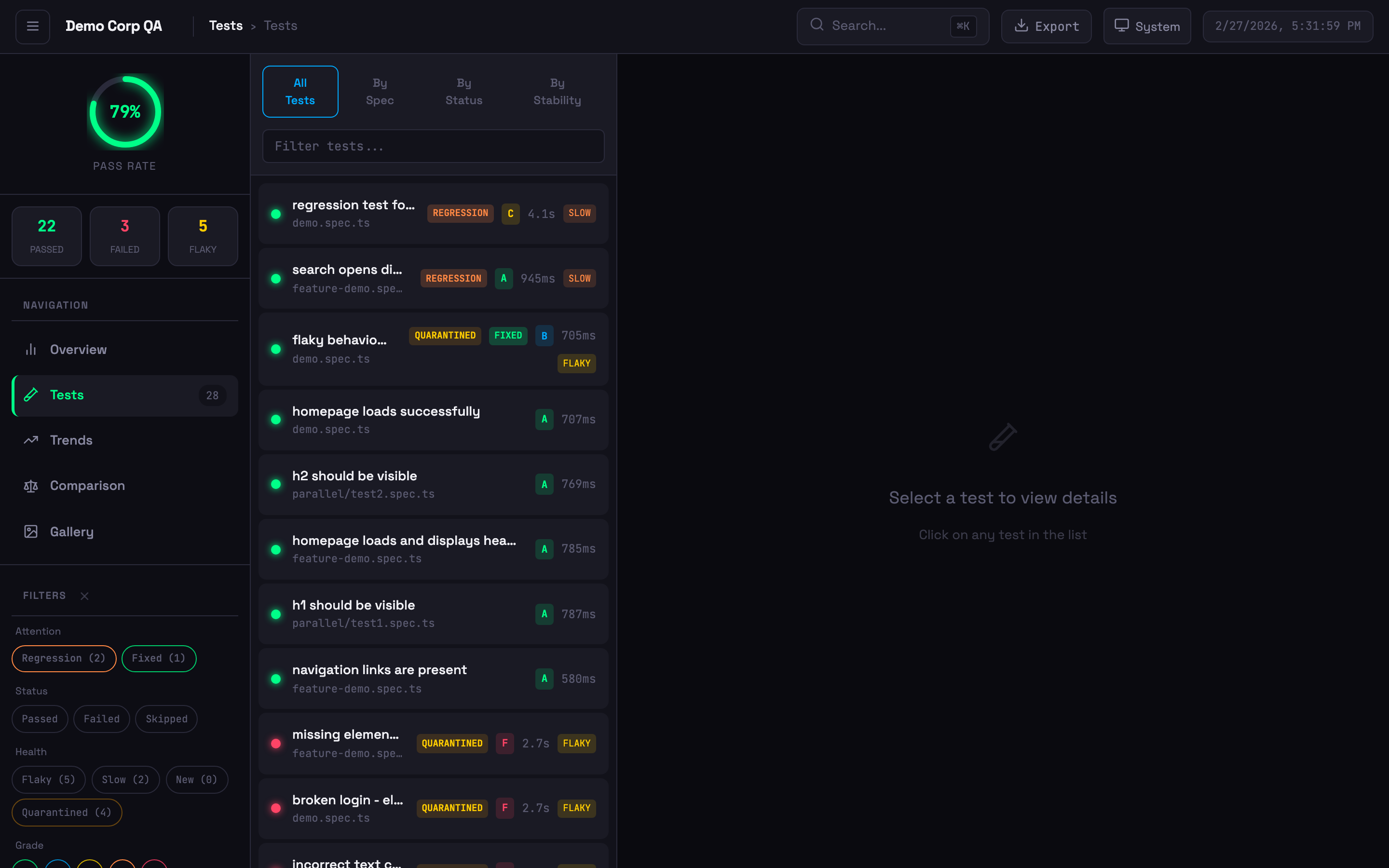 Test list with status badges, stability grades, quarantine indicators, and filtering
Flakiness Detection
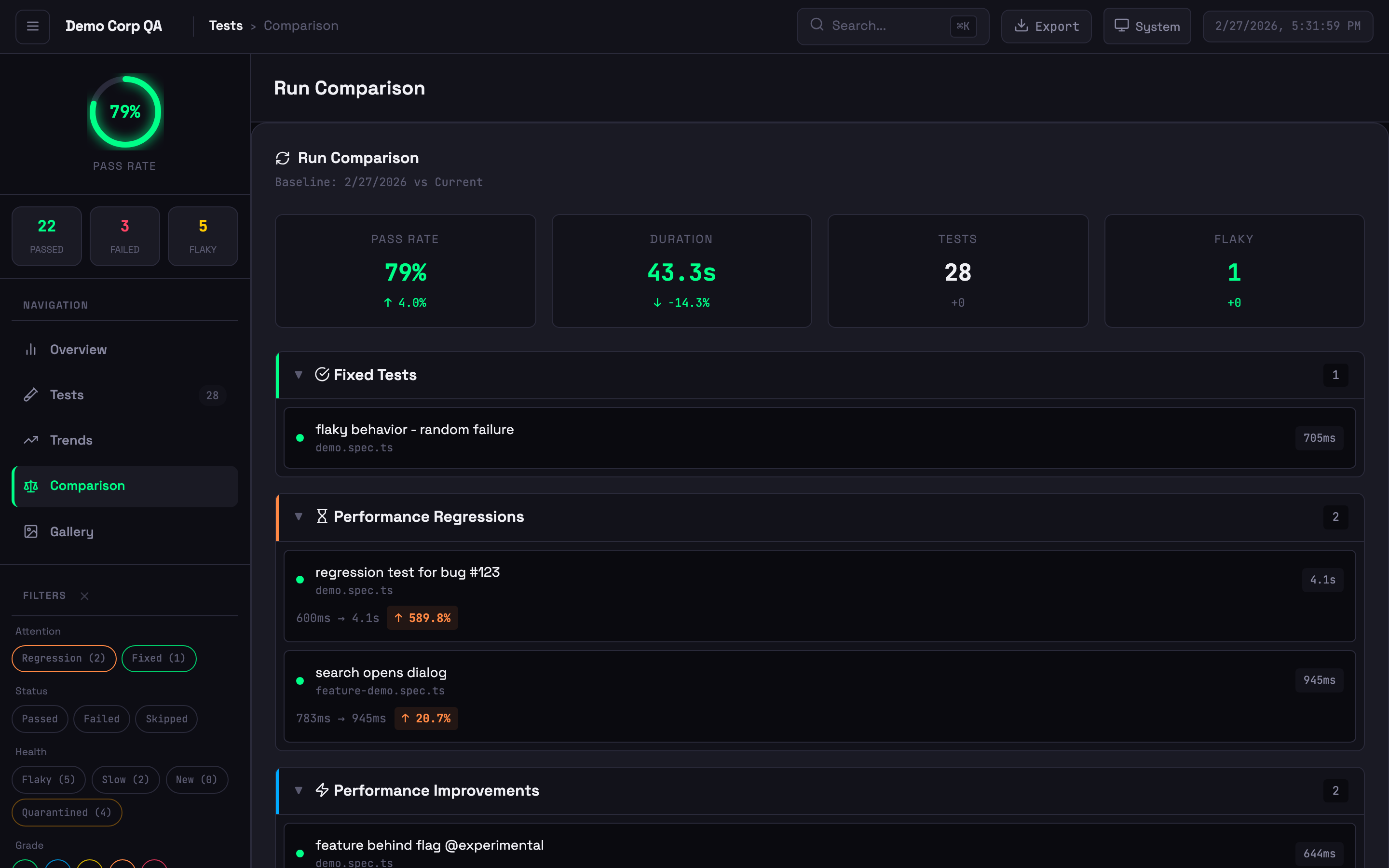 Run comparison showing new failures, performance changes, and baseline diffs
Smart Reporter tracks flakiness across runs, not within a single run:
| | Playwright HTML Report | Smart Reporter | |---|---|---| | Scope | Single test run | Historical across multiple runs | | Criteria | Fails then passes on retry | Failed 30%+ of the time historically | | Use Case | Immediate retry success | Chronically unreliable tests |
Indicators:
- Stable (<10% failure rate) — Unstable (10-30%) — Flaky (>30%) — New (no history)
More Features
Themes
6 additional themes beyond the 4 built-in themes (System, Light, Dark, High Contrast): Ocean, Sunset, Dracula, Cyberpunk, Forest, and Rose. Set via config:
reporter: [
  ['playwright-smart-reporter', {
    outputFile: 'smart-report.html',
    theme: { preset: 'dracula' },  // ocean, sunset, dracula, cyberpunk, forest, rose
  }],
]
Executive PDF Export
Generate professional PDF reports in 3 themed variants: Corporate, Minimal, and Dark. Includes a style picker modal in the HTML report.
reporter: [
  ['playwright-smart-reporter', {
    outputFile: 'smart-report.html',
    exportPdf: true,
  }],
]
Non-Latin scripts (Arabic, CJK, ...)
The built-in PDF font (Helvetica) only covers Latin. If your test titles or project name use another script, embed a font that covers it:
reporter: [
  ['playwright-smart-reporter', {
    exportPdf: true,
    pdfFont: {
      regular: './fonts/Cairo-Regular.ttf',
      bold: './fonts/Cairo-Bold.ttf',     // optional, falls back to regular
    },
  }],
]
Pick a font that covers both your script and Latin (e.g. Cairo for Arabic) — the report's own labels are English. Arabic renders with joined letters and right-to-left word order. Known limitation: strings mixing Arabic and Latin (e.g. an Arabic path containing auth.spec.ts) may display the runs in the wrong order — full bidirectional layout is not supported. family/boldFamily select a face inside a .ttc collection. Alternatively, exportPdf: true + exportPdfFull: true renders the whole HTML report via Chromium, which handles all scripts natively.
Quality Gates
Fail CI builds when test results don't meet your thresholds:
reporter: [
  ['playwright-smart-reporter', {
    outputFile: 'smart-report.html',
    qualityGates: {
      minPassRate: 95,
      maxFlakyRate: 5,
      minStabilityGrade: 'B',
    },
  }],
]
Or run as a standalone CLI check:
npx playwright-smart-reporter gate --min-pass-rate 95 --max-flaky-rate 5Exit codes: 0 = all gates passed, 1 = gate failed (use in CI to block deploys).
Flaky Test Quarantine
Automatically detect and quarantine chronically flaky tests. Quarantined tests are tracked in a JSON file and can be excluded from gate failures:
reporter: [
  ['playwright-smart-reporter', {
    outputFile: 'smart-report.html',
    quarantine: {
      enabled: true,
      outputFile: '.smart-quarantine.json',
      threshold: 0.3,  // flakiness score 0-1
    },
  }],
]
Custom Branding
Customise the report title, footer, and theme colours:
reporter: [
  ['playwright-smart-reporter', {
    outputFile: 'smart-report.html',
    branding: {
      title: 'Acme Corp Test Report',
      footer: 'Generated by QA Team',
    },
    theme: {
      primary: '#6366f1',
      accent: '#8b5cf6',
      success: '#22c55e',
      error: '#ef4444',
      warning: '#f59e0b',
    },
  }],
]
JSON & JUnit Export
Export test results in structured formats for external tools:
reporter: [
  ['playwright-smart-reporter', {
    outputFile: 'smart-report.html',
    exportJson: true,
    exportJunit: true,
  }],
]
AI Suite Health Summary
An AI-generated executive summary appears at the top of the Overview tab, combining failure clusters, flakiness trends, performance regressions, and historical pass rate data into natural-language insights. Enabled by default when an AI API key is set (see AI Analysis).
To disable (e.g., to save one AI request per run):
reporter: [
  ['playwright-smart-reporter', {
    outputFile: 'smart-report.html',
    enableAISuiteHealth: false,  // Disable AI health summary
  }],
]
Configuration
Full Options Reference
reporter: [
  ['playwright-smart-reporter', {
    // Core
    outputFile: 'smart-report.html',
    historyFile: 'test-history.json',
    maxHistoryRuns: 10,
    performanceThreshold: 0.2,

    // Notifications
    slackWebhook: process.env.SLACK_WEBHOOK_URL,
    teamsWebhook: process.env.TEAMS_WEBHOOK_URL,

    // Feature flags (all default to true unless noted)
    enableRetryAnalysis: true,
    enableFailureClustering: true,
    enableStabilityScore: true,
    enableGalleryView: true,
    enableComparison: true,
    enableAIRecommendations: true,
    enableTrendsView: true,
    enableTraceViewer: true,
    enableHistoryDrilldown: false,
    enableAISuiteHealth: true,      // AI health summary in Overview tab (uses 1 AI request)
    enableNetworkLogs: true,

    // Step and path options
    filterPwApiSteps: false,
    showExpectSteps: true,          // Show standalone expect() assertion steps
    relativeToCwd: false,

    // Multi-project
    projectName: 'ui-tests',
    runId: process.env.GITHUB_RUN_ID,

    // Network logging
    networkLogFilter: 'api.example.com',
    networkLogExcludeAssets: true,
    networkLogMaxEntries: 50,

    // Thresholds
    stabilityThreshold: 70,
    retryFailureThreshold: 3,
    baselineRunId: 'main-branch-baseline',
    thresholds: {
      flakinessStable: 0.1,
      flakinessUnstable: 0.3,
      performanceRegression: 0.2,
      stabilityWeightFlakiness: 0.4,
      stabilityWeightPerformance: 0.3,
      stabilityWeightReliability: 0.3,
      gradeA: 90,
      gradeB: 80,
      gradeC: 70,
      gradeD: 60,
    },

    // Report customisation & exports
    theme: { preset: 'default' },  // default, light, dark, high-contrast, ocean, sunset, dracula, cyberpunk, forest, rose
    exportPdf: false,
    pdfFont: undefined,         // { regular, bold?, family?, boldFamily? } — custom PDF font for non-Latin scripts
    exportJson: false,
    exportJunit: false,
    qualityGates: {},           // { minPassRate, maxFlakyRate, minStabilityGrade }
    quarantine: {},             // { enabled, outputFile, threshold }
    branding: {},               // { logo, title, footer, hidePoweredBy }

    // Advanced
    cspSafe: false,
    maxEmbeddedSize: 5 * 1024 * 1024,
  }],
]
AI Analysis
AI failure analysis uses your own API key. Set one of the following environment variables:
export ANTHROPIC_API_KEY=your-key    # Claude (used first if multiple are set)
export OPENAI_API_KEY=your-key       # OpenAI
export GEMINI_API_KEY=your-key       # Google Gemini
When a test fails, the reporter sends the failure context to your chosen provider and includes fix suggestions in the report. Costs are billed by your provider — the reporter uses small, fast models (claude-haiku-4-5, gpt-4o-mini, gemini-2.5-flash) with short prompts, so per-run cost is minimal.
Claude subscription (no API key)? Claude Pro/Team plans issue OAuth tokens, not API keys — putting one in ANTHROPIC_API_KEY fails with a 401. Instead, install Claude Code and set CLAUDE_CODE_OAUTH_TOKEN: the reporter then routes analysis through the local claude CLI, billed to your subscription. API keys take precedence when both are set.
If no API key is set, AI analysis is skipped and everything else works as normal — every failed test still gets a Copy AI Prompt button in the report, which copies a ready-to-paste prompt (error, call log, code frame) for use with any AI assistant.
Stability Grades
Composite score (0-100) from three factors:
| Factor | Weight | Description | |---|---|---| | Flakiness | 40% | Inverse of flakiness score | | Performance | 30% | Execution time consistency | | Reliability | 30% | Pass rate from history |
Grades: A (90-100), B (80-89), C (70-79), D (60-69), F (<60). All weights and thresholds are configurable.
Step Filtering
reporter: [
  ['playwright-smart-reporter', {
    filterPwApiSteps: true,  // Only show custom test.step() entries
  }],
]
With filtering on, verbose page.click(), page.fill() steps are hidden — your named test.step() entries and expect() assertion steps remain.
All expect() assertion steps (top-level and nested) are shown by default and are kept even when filterPwApiSteps is on. Set showExpectSteps: false to hide them.
Multi-Project History
Isolate history per test suite to prevent metric contamination:
reporter: [
  ['playwright-smart-reporter', {
    projectName: 'api',
    historyFile: 'reports/{project}/history.json',
  }],
]
Trace Viewer
Inline Viewer
Click View on any test with traces to open the built-in viewer with film strip, actions panel, before/after screenshots, network waterfall, console messages, and errors.
Local Server
npx playwright-smart-reporter-serve smart-report.htmlServes the report locally with full trace viewer support — no file:// CORS issues.
CLI Viewer
npx playwright-smart-reporter-view-trace ./traces/my-test-trace-0.zipNetwork Logs
Automatically extracted from Playwright trace files — no code changes required. Shows method, URL, status code, duration, and payload sizes. Requires tracing enabled:
use: {
  trace: 'retain-on-failure',  // or 'on'
}
Annotations
| Annotation | Badge | Annotation | Badge |
|---|---|---|---|
| @slow | Amber | @fixme / @fix | Pink |
| @skip | Indigo | @fail | Red |
| @issue / @bug | Red | @flaky | Orange |
| @todo | Blue | Custom | Grey |
test('payment flow', async ({ page }) => {
  test.slow();
  test.info().annotations.push({ type: 'issue', description: 'JIRA-123' });
});
CI Integration
Persisting History
History must persist between runs for flakiness detection and trends to work.
GitHub Actions
- uses: actions/cache@v4
  with:
    path: test-history.json
    key: test-history-${{ github.ref }}
    restore-keys: test-history-

- run: npx playwright test

- uses: actions/cache/save@v4
  if: always()
  with:
    path: test-history.json
    key: test-history-${{ github.ref }}-${{ github.run_id }}
GitLab CI
test:
  cache:
    key: test-history-$CI_COMMIT_REF_SLUG
    paths: [test-history.json]
    policy: pull-push
  script: npx playwright test
CircleCI
- restore_cache:
    keys: [test-history-{{ .Branch }}, test-history-]
- run: npx playwright test
- save_cache:
    key: test-history-{{ .Branch }}-{{ .Revision }}
    paths: [test-history.json]
Azure DevOps
steps:
  - task: Cache@2
    inputs:
      key: 'test-history | "$(Build.SourceBranchName)"'
      restoreKeys: 'test-history |'
      path: test-history.json

  - script: npx playwright test
    continueOnError: true

  - task: PublishPipelineArtifact@1
    inputs:
      targetPath: smart-report.html
      artifact: playwright-smart-report
    condition: always()
CI Auto-Detection
The reporter automatically detects GitHub Actions, GitLab CI, CircleCI, Jenkins, Azure DevOps, and Buildkite. Branch, commit SHA, and build ID are displayed in the report header.
Quality Gates in CI
# GitHub Actions example
- run: npx playwright test
  continue-on-error: true

- run: npx playwright-smart-reporter gate --min-pass-rate 95 --max-flaky-rate 5
  # Exits non-zero if gates fail — blocks the pipeline
Sharded Runs
For consistent history across parallel shards, set runId:
reporter: [
  ['playwright-smart-reporter', {
    runId: process.env.GITHUB_RUN_ID,
  }],
]
Merging History from Multiple Machines
npx playwright-smart-reporter-merge-history \
  shard1/test-history.json \
  shard2/test-history.json \
  -o merged-history.json \
  --max-runs 10
CSP-Safe Mode
For environments with strict Content Security Policy (e.g., Jenkins):
reporter: [
  ['playwright-smart-reporter', { cspSafe: true }],
]
When enabled, the reporter generates companion .css and .js files alongside the HTML report. The HTML references these via <link rel="stylesheet"> and <script src defer> instead of inline <style> and <script> tags. Report data is embedded in <script type="application/json"> tags (not executed by the browser). System fonts are used instead of Google Fonts.
Jenkins CSP configuration — Add to Jenkins script console or startup:
System.setProperty("hudson.model.DirectoryBrowserSupport.CSP",
"script-src 'self' 'unsafe-inline'; style-src 'self'; img-src 'self';")Note: Inline event handlers (
onclick, etc.) still require'unsafe-inline'inscript-src. Full event delegation is planned for a future release.
Cucumber Integration
Works with Playwright + Cucumber frameworks:
import { defineBddConfig } from 'playwright-bdd';

const testDir = defineBddConfig({
  features: 'features/**/*.feature',
  steps: 'steps/**/*.ts',
});

export default defineConfig({
  testDir,
  reporter: [['playwright-smart-reporter']],
});
FAQ
Is this really free?
Yes. Everything is MIT-licensed and included — no tiers, no license keys. AI analysis is the only feature with an external cost, and that's billed directly by your AI provider via your own API key.
RangeError with large test suites?
Fixed in v1.0.6. Update: npm install playwright-smart-reporter@latest
Different flakiness than Playwright's HTML report?
They use different methodologies — see Flakiness Detection above.
Report too large or browser hangs?
Enable cspSafe: true to save attachments as files instead of embedding, or reduce maxHistoryRuns. Use maxEmbeddedSize to control the inline trace threshold.
Troubleshooting
| Problem | Cause | Fix |
|---|---|---|
| No history data | History file missing or wrong path | Check historyFile path, use CI caching |
| No network logs | Tracing not enabled | Add trace: 'retain-on-failure' to config |
| No AI suggestions | No AI API key set | Set ANTHROPIC_API_KEY, OPENAI_API_KEY, or GEMINI_API_KEY (or CLAUDE_CODE_OAUTH_TOKEN with Claude Code installed) |
| Anthropic API error: 401 | Claude subscription OAuth token used as API key | Unset ANTHROPIC_API_KEY; set CLAUDE_CODE_OAUTH_TOKEN to use the Claude Code CLI |
| Mixed project metrics | Shared history file | Use projectName to isolate |
| Quality gate not failing CI | Gate not run as separate step | Run npx playwright-smart-reporter gate as its own CI step |
Development
npm install
npm run build
npm test
npm run test:demo
Contributors
- Gary Parker — Creator and maintainer
- Filip Gajic — v1.0.0 UI redesign
- Liam Childs — Parameterized project support
License
MIT