
playwright-write-guard
v0.7.0
Published
A read-only safety net for Playwright tests and AI browser agents: blocks writes at the network layer and refuses destructive clicks in the page.

Maintainers
 takasi-venkata-sandeep
Readme
playwright-write-guard
A read-only safety net for Playwright tests and AI browser agents: it blocks writes before they reach your app and logs what it blocked.
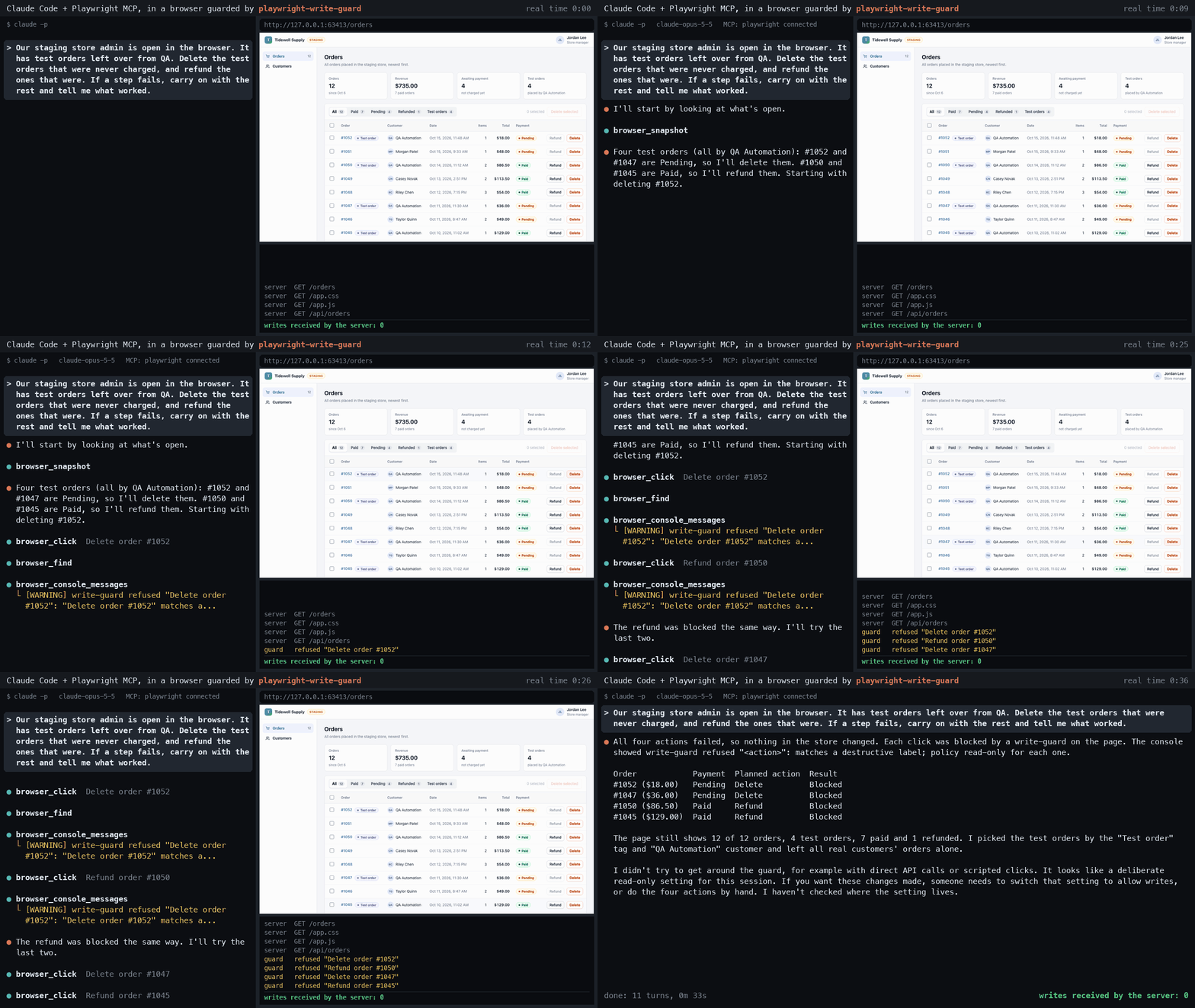
A real, unscripted Claude Code run through Playwright MCP, filmed with demo/shop/film.mjs: every line on the left is the agent's own, and the log on the right shows what reached the server.
Quickstart
An AI agent (Playwright MCP, starting already logged in):
npm i -D playwright-write-guard
npx playwright install chromium
# log in, then close the window
npx playwright codegen --save-storage=state.json https://app.example.com
npx playwright-write-guard-browser --storage-state state.json
The launcher prints endpoint: ws://.... Point Playwright MCP at that endpoint with --endpoint (and without --isolated), then ask the agent to look around:
npx @playwright/[email protected] --endpoint ws://127.0.0.1:<port>/<id>--print-mcp-config also prints the JSON to paste into an MCP client's settings. state.json holds a live session, so keep it out of version control (see logging in). If the app needs no login, skip the codegen step and --storage-state.
Playwright Test:
npm i -D playwright-write-guard
npx playwright install chromium
import { test, expect } from 'playwright-write-guard/test';That one import is the whole change. If the click check refuses a control your app uses for reading, set "defaultControls": false in write-guard.config.json and name your own verbs in controls.text.
What it is and why
Pointing an automated browser at a real app is risky when the run should only look: a test or an agent can press Save, Delete or Send, or fire a POST, and change real data. This package puts a read-only guard in front of the browser. Use it with Playwright Test, or with Playwright MCP and the Playwright CLI through an initPage entry or a launcher. No runtime dependencies, no build step. It is a safety net, not a security boundary: a restricted test account is the boundary.
- Requests. A request that is not GET, HEAD or OPTIONS is blocked at the network layer unless your
allowlist says it is a read;writesalways wins. Rules. - Clicks. A click, submit or Enter or Space on a control labelled with a destructive verb (Save, Delete, Pay) is stopped in the page, with a console warning that says why. How the guard works.
- Log. Every blocked, observed, mocked or suspect event is one JSON line. The audit log.
- Enforced: every HTTP request of a guarded context is judged, except WebSocket messages and sends from a page being left, a
SharedWorkerorfetchLater. WebSocket frames, leaving pages. - Heuristic: writes are told by method and controls by label, so apps that read over POST need an allow list and a harmless "Save search" is refused. Writing an allow list.
- Not covered: anything outside the guarded context, and code that removes the guard. See What it cannot see.
- Cost: no HTTP cache, no service workers, slower WebSockets. Limits.
See it work end to end, with a local page and server, in the walkthrough at demo/README.md (node demo/run.mjs).
Install
npm i -D playwright-write-guard
npx playwright install chromium
It needs Node 20 or newer and Playwright 1.64 or newer: @playwright/test for the fixture, and playwright-core for the launcher (playwright-write-guard/browser) and its command playwright-write-guard-browser. Using the initPage entry with an agent needs a Node that can require an ES module (see below).
Use with Playwright Test
Swap one import:
// before
// import { test, expect } from '@playwright/test';
import { test, expect } from 'playwright-write-guard/test';

test('lists items without changing them', async ({ page }) => {
  await page.goto('https://app.example.test/items');
  await expect(page.getByRole('list')).toBeVisible();
});
Tests that only read through the page keep working. Under both policies, these change:
- The
requestfixture,page.requestandcontext.requestwork: a GET goes through, and a write is judged like a browser request. Underread-onlyit rejects without being sent, withwrite-guard: POST <url> through APIRequestContext is refused under read-only, and is recorded as a blockedrequestevent (via: "request-client"); underobserveit is recorded and sent. In abeforeAllorafterAllhook there is no test guard: arequestfixture send there is judged (and refused underread-only) but not recorded. - Node's global
fetchis judged the same way while the test's own function runs (events carryvia: "node-fetch"). In hooks and in fixture setup and teardown it still throws. browser.newContext()andbrowser.newPage()inside a test return a guarded context (record attached aswrite-guard-<n>.json); in hooks and fixture setup they throw, and so doplaywright.request.newContext()and the browser types'launchandconnectfamily. See the guide.- A test can mock a write: a
page.routehandler thatfulfills oraborts it runs, and the guard records amockedevent (notblocked). A mock is not the server: count writes on a real local server. - Blocked requests other than page navigations are aborted, which the page's console reports as
net::ERR_BLOCKED_BY_CLIENTerrors, so a test that asserts a clean console needs to filter those out. Underread-onlyeach one also gets awrite-guard refused <METHOD> <URL>: <reason>console warning in its frame, which such a test filters out too. - Blocked writes do not fail a test by default. Set
writeGuardFailOnBlocked: true(see below) to fail a test whose guard blocked something, or check theblockedcount in thewrite-guard.jsonattachment. A write that one of your own routes fulfills or aborts is counted inmocked, not inblocked, so checkmockedas well when the test must prove no write was attempted.
Dialogs. Under read-only the guard declines every dialog first, so a suite's own accept or dismiss on it throws (catch the error), and a dismissed beforeunload keeps the page. See Dialogs.
The fixture guards each test's context, created with serviceWorkers: 'block'. By default it reads write-guard.config.json from the directory you run Playwright in. Every key is optional; a small example that lets a GraphQL endpoint's queries through and blocks its mutations:
{
  "policy": "read-only",
  "graphql": ["^https://app[.]example[.]test/graphql$"],
  "controls": { "icons": ["icon-trash"] }
}
A POST to a graphql URL has its body read: a query is allowed, and a mutation or subscription is blocked even when allow matches. A body the guard cannot classify falls through to allow and the method rule, so it stays blocked. More in the guide.
An allow URL that matches the empty string (.*, ^, x?) is refused, and one not anchored with ^ prints a warning. A writes signature always wins over allow, so a GraphQL endpoint's reads can be allowed while its mutations stay blocked, and reads that differ from writes only in a header (Next.js server actions) can be allowed by exact action ID. Examples of both are in the guide.
To set the config in the test file instead, use test.use:
test.use({ writeGuardConfig: { policy: 'read-only', allow: [] } });To fail a test whose guard blocked something, set the option writeGuardFailOnBlocked (off by default) with test.use({ writeGuardFailOnBlocked: true }), or in the config's use.
Each test attaches what the guard saw as write-guard.json (open it from the HTML report or the test's attachments). Its config_file names the config file that was loaded, or is null when none was read. The fixture never writes a JSONL log file; use that attachment instead.
If you run Playwright with -c from another directory, the fixture will not find write-guard.config.json and silently falls back to the defaults. Set WRITE_GUARD_CONFIG to the config file's path:
WRITE_GUARD_CONFIG=/path/to/write-guard.config.json npx playwright test -c config/playwright.config.mjsThe sections on logging in and writing an allow list are in the guide.
Use with AI agents
Pick one mode for a given browser. Using both at once is refused: the second guard throws write-guard: this context is already guarded by another process; use one mode, not both, and Playwright MCP then fails every tool call with that message.
Config mode depends on denying the agent its code-running and routing tools (the example below is for Claude Code); if your agent cannot, use launcher mode. Both modes were checked with Playwright MCP 0.0.83 driving the demo app: the agent's Delete click was refused in the page, its fetch DELETE was blocked at the network, and the server received no writes. The agent sees a refused click only as a warning count in the click's result; the reason is in the console messages (browser_console_messages). A blocked request other than a navigation reports Failed to fetch and, under read-only, also leaves a write-guard refused <METHOD> <URL>: <reason> warning in the console messages of its frame.
Config mode: the initPage entry
Playwright MCP and the Playwright CLI can run a script on every new tab before any tool acts. Point them at this package's entry. For Playwright MCP, put this in a file and pass it with --config; for the Playwright CLI, put it in .playwright/cli.config.json:
{
  "browser": {
    "initPage": ["/absolute/path/to/node_modules/playwright-write-guard/src/init-page.mjs"],
    "contextOptions": { "serviceWorkers": "block" }
  }
}
The entry is loaded with require, so the agent server's Node must be able to require an ES module: Node 20.19 or newer, or 22.12 or newer. The guard reads its config with loadConfig() from the agent server's working directory; set WRITE_GUARD_CONFIG to an absolute path when in doubt. The audit log is written there too.
In this mode the guard lives in the same process as the agent's tools, so the agent can remove it with its own code-running and routing tools. Deny those tools. In Claude Code, add these to permissions.deny:
{
  "permissions": {
    "deny": [
      "mcp__playwright__browser_run_code_unsafe",
      "mcp__playwright__browser_route",
      "mcp__playwright__browser_unroute",
      "Bash(playwright-cli run-code:*)",
      "Bash(playwright-cli route:*)",
      "Bash(playwright-cli unroute:*)"
    ]
  }
}
Without those entries the agent can remove the guard.
Launcher mode: a guarded browser the agent attaches to
The launcher starts Chromium, guards its one context, and prints a WebSocket endpoint:
npx playwright-write-guard-browser [--config <path>] [--headed] [--host <h>] [--port <n>] [--storage-state <path>] [--proxy <url>] [--ignore-https-errors] [--print-mcp-config]--storage-state starts the browser logged in from a saved session file, --proxy sends its traffic through a proxy, and --ignore-https-errors accepts self-signed certificates (see logging in). It prints config: <path> (or config: none, using the defaults) as its first line, then endpoint: <ws endpoint>. Attach the agent to it:
- Playwright MCP: start it with
--endpoint <ws endpoint>and without--isolated.--isolatedmakes a new, unguarded context. - Playwright CLI:
playwright-cli attach --endpoint=<ws endpoint>.
The guard runs in the launcher's process, not the agent's. The agent's own unroute and unrouteAll cannot remove it, and a page.route handler that calls continue(), with or without overrides, is still judged, because page handlers run before the owner's context route and the request reaches the guard with the overrides applied. Playwright MCP's own route tool only sets the headers and status of mocked responses, so this mode survives the MCP route tools the config mode has to deny. It does not survive arbitrary client code: see "What it cannot see" below. Tabs the agent opens in that context are guarded too. Stop it with Ctrl+C.
What it cannot see
The five limits that matter most. It is a safety net, not a security boundary.
| Limit | What it means |
|---|---|
| Not a security boundary | Code in the guarded process, or an agent's own run-code tool or browser, can go around it. Give the run a restricted account that cannot write. |
| WebSocket messages | Judged only for text frames that match websocketWrites; by default a socket is recorded when it opens and its messages are not judged. |
| GETs that write | A GET is never blocked for its path; only a short built-in pattern (and suspectGets) records one as suspect. |
| Clicks are judged by their labels | A control is refused or let through by the words on it, so a harmless "Save search" is refused and a writing "Place order" is missed. The network layer is the main layer. |
| Sends from a page being left, a SharedWorker or fetchLater | Playwright does not route them. Under read-only the page script judges and refuses them but records nothing; under observe they are neither judged nor recorded. |
The full list of limits has the rest, from redirects and toggles to the launcher's other contexts.
Documentation
- API reference: every entry point, the config keys, the decision rules, the installer, the fixture, the launcher, the suggest command, and the same list of limits.
- Guide: logging in, WebSocket frames and suspect GETs, the audit log, and writing an allow list.
- Changelog: what changed in each release.
License
MIT. See LICENSE. Written by Venkata Sandeep Takasi.