
pm2-dashboard
v0.2.1
Published
Self-hosted web dashboard for PM2. No cloud, no subscriptions.

Maintainers
 orchidfiles
Readme
pm2-dashboard





Self-hosted web dashboard for PM2. No cloud, no subscriptions.
Installs as a single npm package, runs on the same server as PM2.
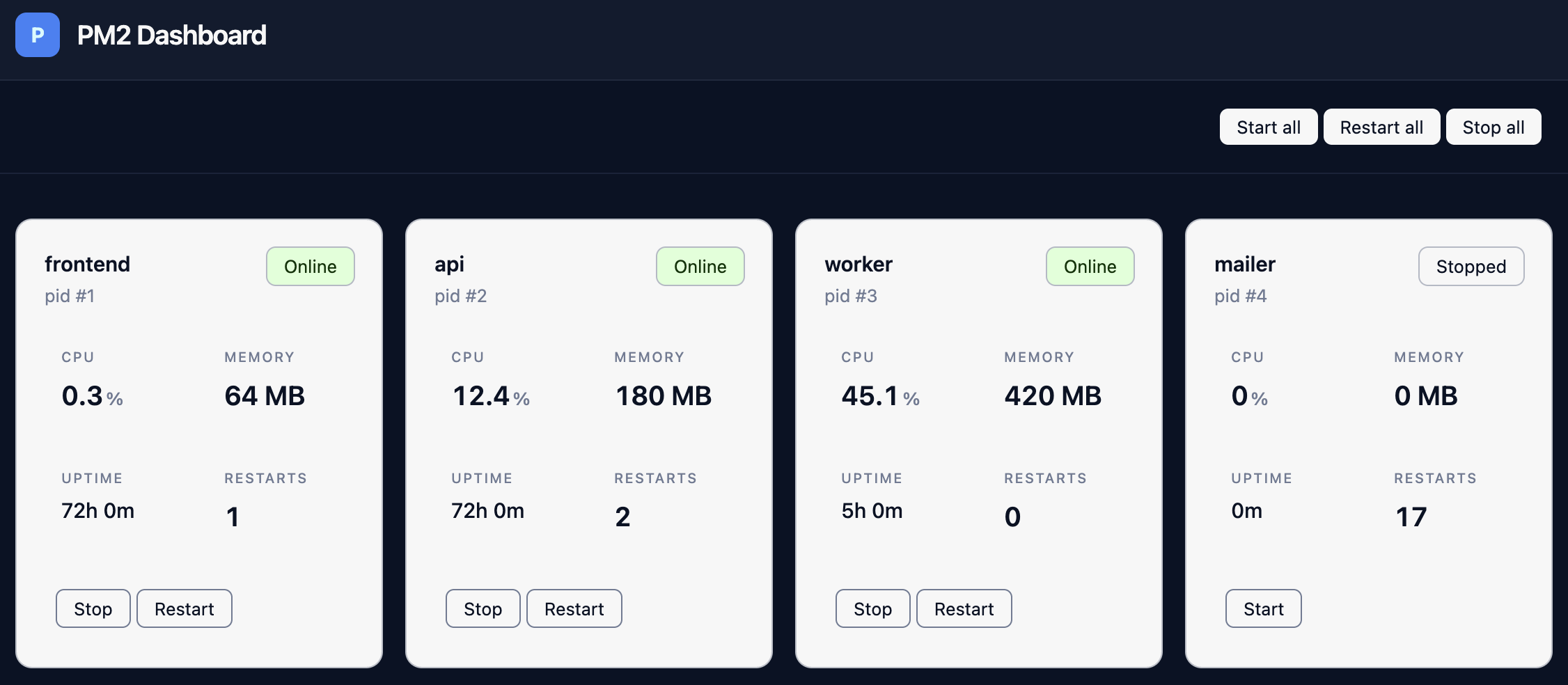
Until version 1.0.0, this project is under active development. Production use is possible, but expect breaking changes and missing features.
What works today
- [x] Process list with CPU, RAM, status
- [x] Start, stop, restart
- [x] Uptime and restart counters
- [x] Authentication
- [x] First-run setup link with initial admin account creation
- [x] Single npm package with API and static web UI
What is next
- [ ] Real-time process updates
- [ ] Log viewer with real-time tail
- [ ] Metrics history with graphs
- [ ] Alerts
- [ ] Environment variables management from the UI
- [ ] Cluster management
First run
- Start the dashboard with
npx pm2-dashboard, or install it globally withnpm install -g pm2-dashboardand then runpm2-dashboard. - Copy the setup URL printed by the CLI.
- Open the link and create the initial admin account.
- Log in to access the dashboard.
Requirements
- Node.js >= 22
- PM2 running on the same server
Installation
# One-time run
npx pm2-dashboard

# Global install
npm install -g pm2-dashboard
pm2-dashboard
Starts on http://localhost:3000 by default.
Run with PM2
pm2 start pm2-dashboardConfiguration
pm2-dashboard --host=127.0.0.1 --port=4000 --db=~/.pm2-dashboard/data.dbHOST=127.0.0.1 PORT=4000 DB_PATH=~/.pm2-dashboard/data.db pm2-dashboardConfig priority: CLI flags, environment variables, defaults.
Defaults:
- Host:
127.0.0.1 - Port:
3000 - Database:
~/.pm2-dashboard/data.db
Use 127.0.0.1 to restrict access to localhost.
Use pm2-dashboard --help to see available CLI options.
Security
The package binds to 127.0.0.1:3000 by default.
On the first launch, the CLI prints a setup URL with a one-time token. After the initial account is created, access requires login.
For public access, place the dashboard behind a trusted reverse proxy or inside a private network.
Architecture
- API: NestJS + TypeScript
- UI: Svelte 5 + TypeScript + Tailwind 4 + Skeleton
- Database: SQLite via Drizzle ORM
- Authentication: setup token for first run, session-based login after setup
- Packaging: single npm package serving API and static web UI
- Runtime model: runs on the same server as PM2
Project structure
apps/api: backend API, auth, PM2 integration, SQLite storageapps/web: browser UI built with Svelte 5packages/shared: code shared between API and frontendpackages/pm2-dashboard: published npm package and CLI entrypoint
Development
git clone https://github.com/orchidfiles/pm2-dashboard.git
cd pm2-dashboard
pnpm install
VSCode tasks are configured in .vscode/tasks.json. Run build-watch all to compile dev-kit, shared, and API in watch mode. Run start all to start API and web dev server.
Build the npm package from source:
pnpm run package:buildReverse proxy (nginx)
Run the dashboard on localhost and proxy it through nginx:
server {
    listen 80;
    server_name dashboard.example.com;

    location / {
        proxy_pass http://127.0.0.1:3000;
        proxy_http_version 1.1;
        proxy_set_header Upgrade $http_upgrade;
        proxy_set_header Connection "upgrade";
        proxy_set_header Host $host;
        proxy_set_header X-Real-IP $remote_addr;
        proxy_cache_bypass $http_upgrade;
    }
}
Run certbot separately for TLS.
Why
PM2 ships with a terminal interface. When you need browser access without SSH, the official option is PM2 Plus (paid SaaS).
Every open source alternative is either abandoned or built without structure: plain JS files, no modules, no clear architecture.
pm2-dashboard is a TypeScript monorepo with a NestJS backend, Svelte 5 frontend, and a shared package layer. It is built to be maintained and extended over time.
Open source alternatives:
| Project | Description | Language | Stars | Last commit | Status | |---------|-------------|----------|-------|-------------|--------| | pm2-webui | Opensource Alternative to PM2 Plus. Minimalistic App Manager and Log Viewer | JS, HTML, CSS | 550 | 2022 | inactive | | pm2-web | A web based monitor for PM2 | JS, CSS, HTML | 540 | 2015 | inactive | | pm2panel | PM2 web control panel to manage processes | JS, HTML, CSS | 528 | 2020 | inactive | | pm2.web | Monitor processes, view logs, access controls | TypeScript, JS, CSS | 168 | 2024 | inactive | | pm2-web-ui | (Not so) modern web interface for PM2 | Next.js, CSS, Sass | 148 | 2023 | inactive | | pm2-ui | PM2 Web UI built with Next.js and TailwindCSS | JS, CSS | 20 | 2023 | inactive | | pm-web-panel | Real-time PM2 manager with user management | Java, TypeScript, Docker | 5 | 2025 | active |
Contributing
Issues and pull requests are welcome. The project is actively maintained.
License
MIT
Made by the author of orchidfiles.com — essays from inside startups.
If you found pm2-dashboard useful, you'll probably enjoy the essays.