
pm2-telegram
v0.2.4
Published
Telegram notifications for PM2 process manager
Downloads
28


Readme


pm2-telegram
Telegram notifications for PM2 process manager
Functions
- collect desired messages to buffer then send collected messages every 10 seconds
- allow messages scope selection (errors, logs, exceptions and kill events)
- truncate long messages (longer than Telegram limitation 4096 characters) to avoid send error
- combine short messages to one message (the resultant big message shorter than 4096 characters) to avoid impact of Telegram messages frequency limitation (see: My bot is hitting limits, how do I avoid this?)
- set message title for pm2-telegram instance to distinguish messages from one Telegram bot installed on many instances (default is server hostname)
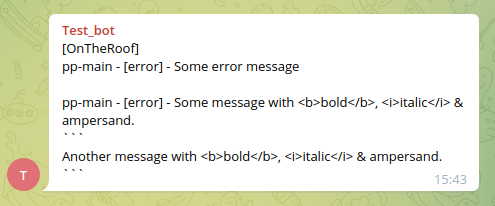
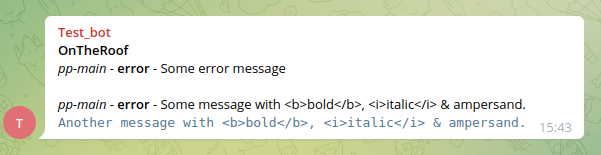
- format messages for better viewing (be aware to face with Markdown characters in raw notification text!)
Examples
Unformatted
Formatted
Roadmap
- (under development) option to split long messages to many continuous messages (you should choose truncate or split big messages)
- (under development) option to display real message's timestamp and set timestamp format (HH:mm:ss.SSS)
- (under development) control messages buffer overflow, reset it and send buffer overflow notification
Setup
Create bot
- create a Telegram bot with Telegram's BotFather (look at Telegram documentation)
- get BOT_TOKEN from BotFather's answer
Get chat id
- add the bot to a group if you want to send notifications to a group
- send message from group to the bot:
/test Hello bot!(use any command-like message started by slash) - open sent message at
https://api.telegram.org/bot<BOT_TOKEN>/getUpdates
{
    "ok": true,
    "result": [{
            "update_id": 123456789,
            "message": {
                "message_id": 1,
                "from": {
                    "id": 223322223322,
                    "is_bot": false,
                    "first_name": "Hildur",
                    "last_name": "Bock",
                    "username": "fröken_bock"
                },
                "chat": {
                    "id": -76543210, // <- this is chat_id!
                    "title": "Buns_Eaters",
                    "type": "group",
                    "all_members_are_administrators": false
                },
                "date": 1649627436,
                "text": "/test Hello bot!",
                "entities": [{
                        "offset": 0,
                        "length": 5,
                        "type": "bot_command"
                    }
                ]
            }
    }]
}
CHAT_ID is on result.message.chat.id property.
Notice:
If you in the first created a group with only you and a bot, but later you'll add a second real user
chat.idcould be changed by Telegram. Checkchat.idafter add the second real user!
Start module
- install the module:
pm2 install pm2-telegram - set the bot token:
pm2 set pm2-telegram:bot_token <BOT_TOKEN> - set chat id:
pm2 set pm2-telegram:chat_id <CHAT_ID>
For a group's chat id prepend it by
g-to isolate minus sign, eg: group chat CHAT_ID =-76543210->g-76543210personal chat CHAT_ID =123456789->123456789
Configure notifications
- to set any option use:
pm2 set pm2-telegram:<OPTION_NAME> <OPTION_VALUE>
Notification options
| option name | default | description | |---------------|---------|------------------------------------| | error | true | console.error() and console.warn() | | log | false | console.log() | | kill | true | kill PM2 process | | exception | true | exception in PM2 process |
Module behavior options
| option name | default | description | |-------------|---------|------------------------------------------------| | collate | true | combine short messages to one Telegram message |
Module description options
| option name | default | description | |-----------------|--------------------|------------------------------------------------------------------------------------------------------------------------| | title | server host name | messages title (could be used for set server name) | | text_format | undefined | 'Markdown' to format messages (be careful if your messages could have Markdown format characters - there'll lost them) |
Full configuration example
pm2 set pm2-telegram:title OnTheRoof
pm2 set pm2-telegram:bot_token 223322223322:ABCDefghIJKLmnop12345rStUvWxYz67890
pm2 set pm2-telegram:chat_id g-76543210
pm2 set pm2-telegram:error true
pm2 set pm2-telegram:text_format Markdown
pm2 install pm2-telegram
Reset option
Use set operator without a value to reset option.
For example to clear text_format option value use: pm2 set pm2-telegram:text_format
Upgrade module to the latest version
pm2 install pm2-telegram@latestNotices
Bugs and feature requests
Welcome to GitHub Issues!
Thanks for some ideas to:
- shubhroshekhar (author of pm2-telegram-notification)
- korolyov88 (author of pm2-telegram-notify)
Releases
| version | changes |
|------------|-----------------------------------------------------------------------------------------------------------------------------------------------------------------------------------------|
| 0.2.4 | • fix: remove extra debug message |
| 0.2.3 | • docs: remove documentation images from project |
| 0.2.2 | • docs: documentation corrections |
| 0.2.1 | • docs: minimize example's image files size |
| 0.2.0 | • feature: add option text_format to format notification messages• fix: mistaken truncate messages on & character |
| 0.1.12 | • docs: documentation update |
| 0.1.11 | • feature: set default title as local server hostname (on upgrade don't forget to call pm2 set pm2-telegram:title with empty value to reset value stored in PM2 'title' variable) |
| 0.1.10 | • docs: documentation update |
| 0.1.9 | • fix: message type missed in notification title ('error', 'exception' etc.) and in messages delimiters (new lines) |
| 0.1.8 | • fix: error on send exception message (message is 'undefined') |