
pmd-annotations
v1.0.3
Published
Analyze @SuppressWarnings PMD annotations in Salesforce Apex class files with a visual dashboard

Maintainers
 mohanchinnappan
Readme
pmd-annotations
Analyze
@SuppressWarningsPMD annotations in Salesforce Apex class files and visualize them in a rich dashboard.


What is @SuppressWarnings?
In Salesforce Apex you can suppress PMD static-analysis warnings on a class or method:
@SuppressWarnings('PMD.MethodNamingConventions, PMD.ApexCRUDViolation')
public class MyClass { ... }
Over time these accumulate and become technical debt. This tool gives you full visibility into which rules are suppressed, in which files, and by whom.
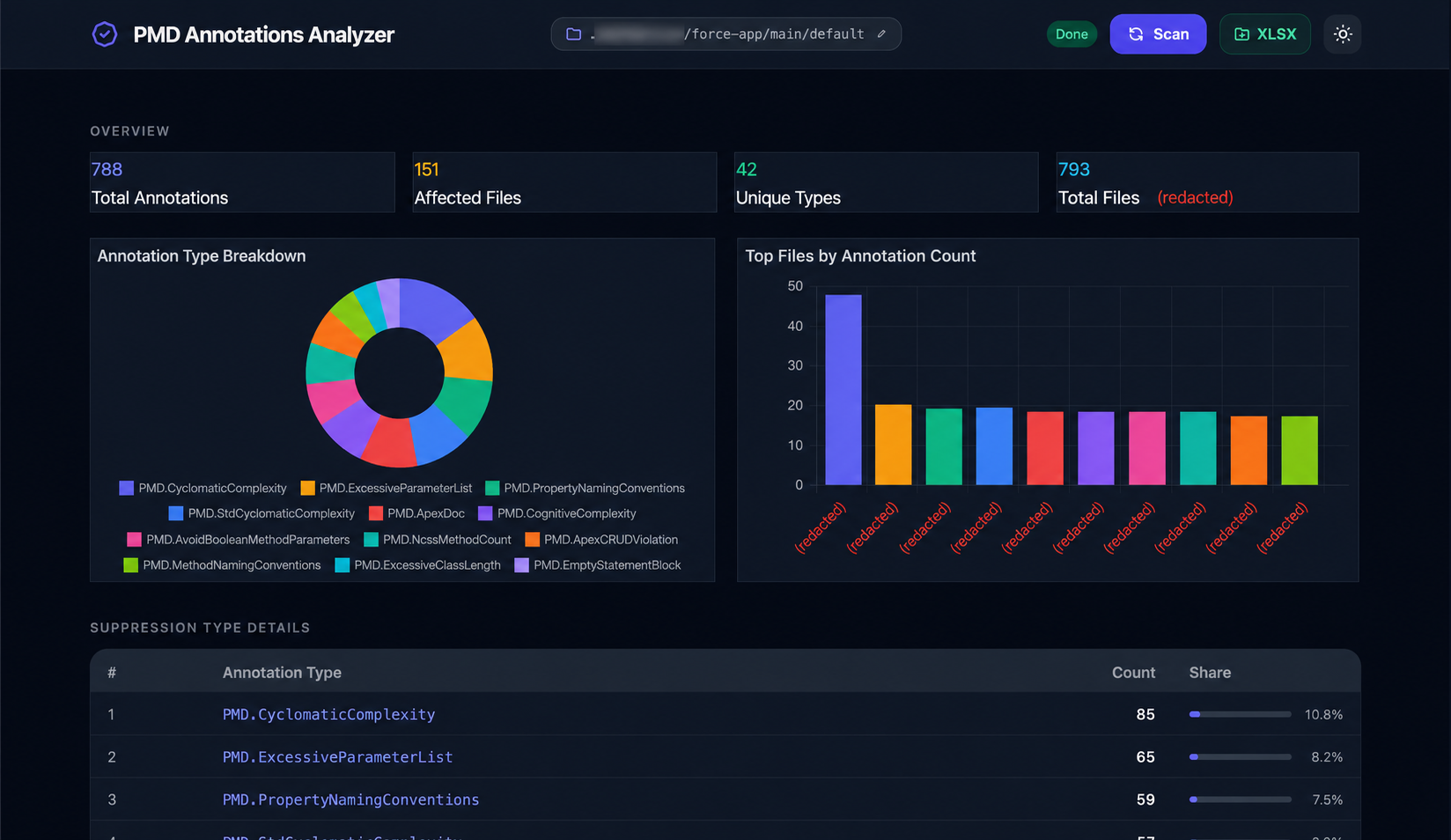
Screenshot
Features
- Scans all
.clsfiles in a given SFDX classes folder - Parses every
@SuppressWarnings('PMD.Xxx')annotation (including comma-separated lists) - Resolves the git author (Committed By) for each affected file via
git log - Opens a live dashboard automatically in your browser with:
- KPI cards — total annotations, affected files, unique types, total class files
- Doughnut chart — annotation type breakdown
- Bar chart — top 10 files by annotation count
- Type table — each suppression type with count and percentage share bar
- File table — file name, committed-by, count badge, deduped annotation pills with repeat counts
- Live search — filter the file table by filename, committer, or annotation type
- Folder picker — change the classes folder at runtime without restarting the server
- XLSX export — download a formatted spreadsheet (Summary, Annotation Types, Files sheets)
- Monaco editor drawer — click any file row to slide in a full syntax-highlighted Apex source viewer with all
@SuppressWarningslines highlighted; click any annotation chip to jump to that occurrence in the editor - Guided tour — interactive step-by-step walkthrough of every UI feature
- Dark / Light theme toggle (persisted in
localStorage) - Splash screen — animated progress overlay while the scan runs
Installation
npm install -g pmd-annotationsUsage
pmd-annotations [-f <path-to-classes-folder>] [-p <port>]| Option | Default | Description |
|---|---|---|
| -f, --folder | (optional) | Path to your SFDX classes folder — can also be set from the UI |
| -p, --port | 3000 | Port for the local web server |
| --enable-tour | false | Show the guided tour button in the UI |
Examples
# Start with a folder pre-selected
pmd-annotations -f ./force-app/main/default/classes

# Start without a folder — pick one from the UI
pmd-annotations -p 8080

# Enable the guided tour button
pmd-annotations -f ./force-app/main/default/classes --enable-tour
The app starts a local Express server and opens http://localhost:<port> automatically.
Folder Picker
Click the folder pill in the header (next to the app title) to open the folder browser modal:
- Browse the filesystem directory by directory
- Type or paste a full path directly and press Go
- Click a directory to highlight it, then Use this folder — the server updates and a fresh scan starts automatically
- The
-fflag is now optional; the folder can be set entirely from the UI
XLSX Export
Once a scan completes, the XLSX button in the header becomes active. Clicking it downloads a pmd-annotations-<timestamp>.xlsx workbook with three sheets:
| Sheet | Contents | |---|---| | Summary | Folder path, scan timestamp, total files, affected files, total annotations, unique types | | Annotation Types | Rank, type name, count, share % — sorted highest first | | Files | File, Committed By (git author), annotation count, deduped annotation list |
Rows are alternately shaded and the header row is indigo with white text.
Monaco Editor Drawer
Click any row in the Files with @SuppressWarnings table to slide in a full-width Apex source viewer:
- Custom Apex syntax highlighting (keywords, annotations, strings, comments)
- Automatically scrolls to the first
@SuppressWarningsoccurrence - Every suppression line is marked in the overview ruler and minimap
- Annotation chips in the drawer header show deduplicated types with repeat counts — click a chip to jump to that rule's next occurrence in the editor (cycles on repeated clicks)
- Close with the ×,
Esc, or by clicking the backdrop
Guided Tour
The Tour button is hidden by default. Pass
--enable-tourwhen starting the server to show it.
Click the Tour button in the header to launch a 9-step interactive walkthrough.
| Key | Action |
|---|---|
| → / Enter | Next step |
| ← | Previous step |
| Esc | Exit tour |
License
MIT © Mohan Chinnappan