pmone-topo
v1.1.4
Published
使用 `graphData` 传入节点与边数据。

Maintainers
 liukx_kellen
Readme
拓扑组件使用文档
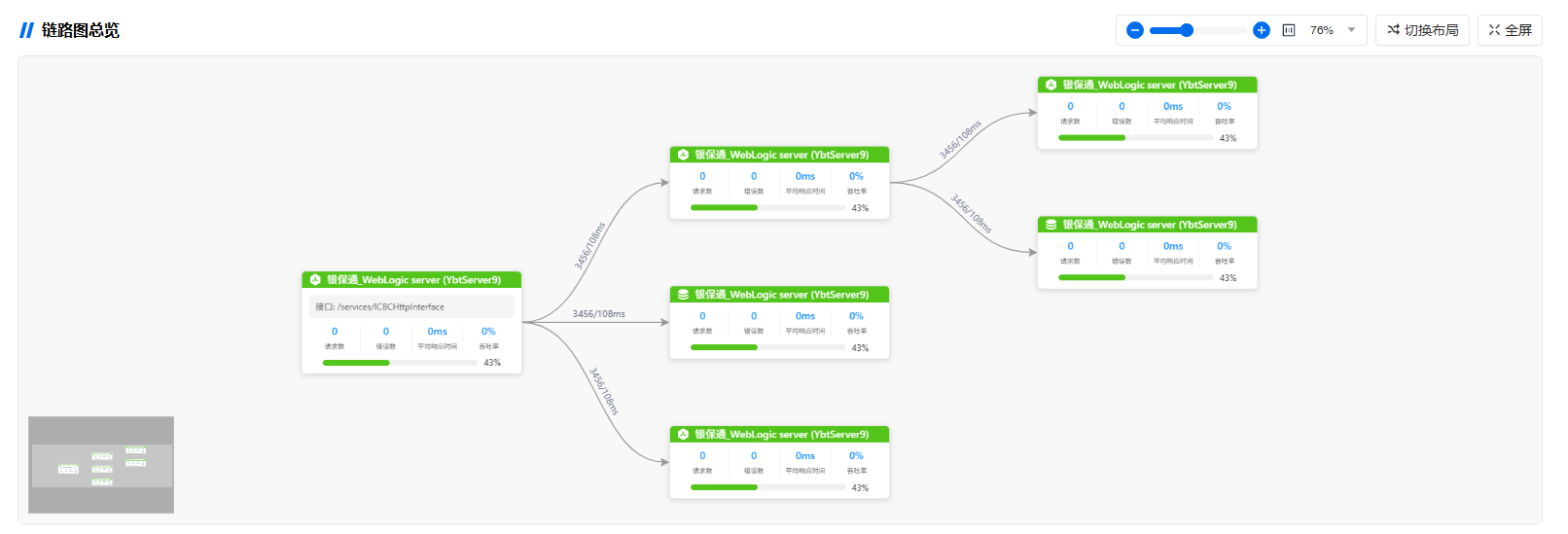
1. 服务实例拓扑 (AppInstanceTopo)
使用 graphData 传入节点与边数据。
使用示例
<AppInstanceTopo :graphData="appGraphData" graphTitle="服务实例链路图" />参数
| 参数 | 类型 | 默认值 | 说明 |
|------|------|--------|------|
| graphData | { nodes, edges?, combos? } | { nodes: [] } | 图数据,必填 |
| graphTitle | string | "链路图总览" | 拓扑标题 |
graphData 参数示例
const appGraphData = {
  nodes: [
    {
      id: "0",
      label: "银保通_WebLogic server (YbtServer9)",
      url: "/services/ICBCHttpInterface",
      duration: "326ms",
      statusCode: "200",
      ip: "10.0.1.28",
      nodeType: "Server",
      ratio: "43%",
      status: "normal",
    },
    {
      id: "app-2",
      label: "银保通_WebLogic server (YbtServer9)",
      url: "",
      duration: "326ms",
      statusCode: "200",
      ip: "10.0.1.28",
      nodeType: "Server",
      ratio: "43%",
      status: "normal",
    },
    {
      id: "app-3",
      label: "银保通_WebLogic server (YbtServer9)",
      url: "",
      duration: "326ms",
      statusCode: "200",
      ip: "10.0.1.28",
      nodeType: "DB",
      ratio: "43%",
      status: "normal",
    },
  ],
  edges: [
    { id: "0-app-2", source: "0", target: "app-2", desc: "3456/108ms" },
    { id: "0-app-3", source: "0", target: "app-3", desc: "3456/108ms" },
    { id: "app-2-app-5", source: "app-2", target: "app-5", desc: "3456/108ms" },
  ],
};
截图
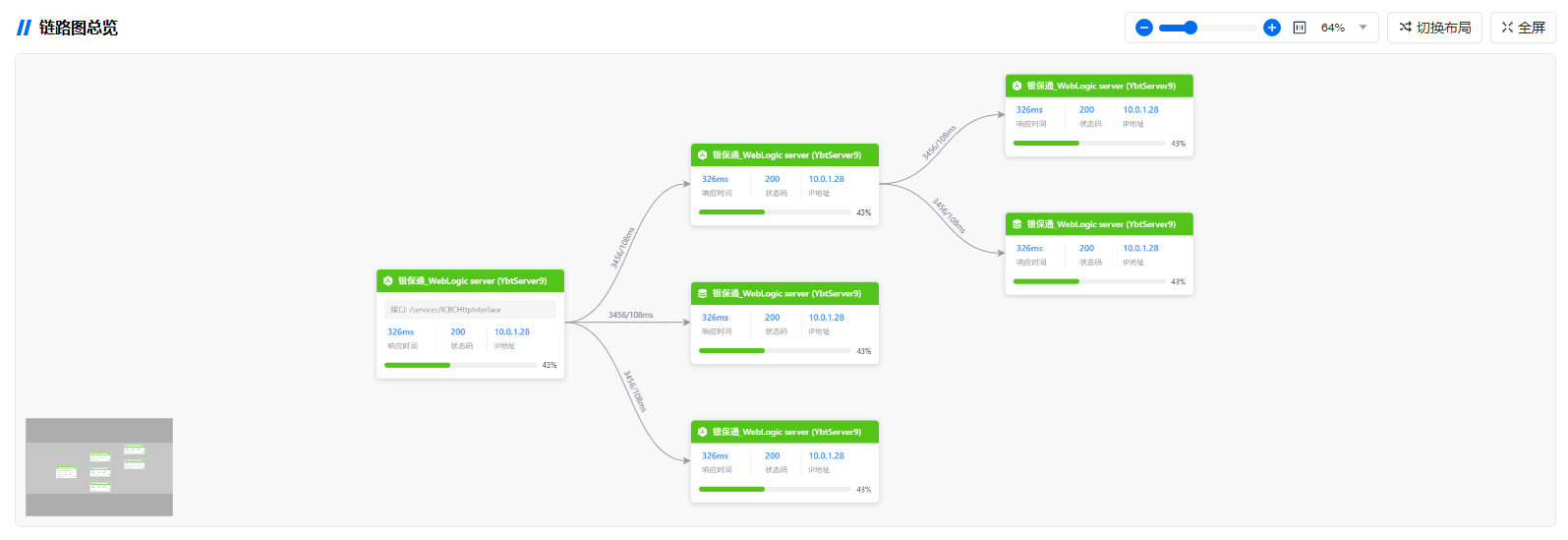
2. 请求追踪拓扑 (RequestTraceTopo)
使用 graphData 传入节点与边数据。
使用示例
<RequestTraceTopo :graphData="requestTraceGraphData" graphTitle="请求追踪链路图" />参数
| 参数 | 类型 | 默认值 | 说明 |
|------|------|--------|------|
| graphData | { nodes, edges?, combos? } | { nodes: [] } | 图数据,必填 |
| graphTitle | string | "链路图总览" | 拓扑标题 |
graphData 参数示例
(结构参考 src/requestTraceTestData.js)
const requestTraceGraphData = {
  nodes: [
    {
      id: "0",
      label: "银保通_WebLogic server (YbtServer9)",
      url: "/services/ICBCHttpInterface",
      duration: "326ms",
      statusCode: "200",
      ip: "10.0.1.28",
      nodeType: "Server",
      ratio: "43%",
      status: "normal",
    },
    {
      id: "app-2",
      label: "银保通_WebLogic server (YbtServer9)",
      url: "",
      duration: "326ms",
      statusCode: "200",
      ip: "10.0.1.28",
      nodeType: "Server",
      ratio: "43%",
      status: "normal",
    },
    {
      id: "app-3",
      label: "银保通_WebLogic server (YbtServer9)",
      url: "",
      duration: "326ms",
      statusCode: "200",
      ip: "10.0.1.28",
      nodeType: "DB",
      ratio: "43%",
      status: "normal",
    },
    {
      id: "app-6",
      label: "银保通_WebLogic server (YbtServer9)",
      url: "",
      duration: "326ms",
      statusCode: "200",
      ip: "10.0.1.28",
      nodeType: "DB",
      ratio: "43%",
      status: "",
    },
  ],
  edges: [
    { id: "0-app-2", source: "0", target: "app-2", desc: "3456/108ms" },
    { id: "0-app-3", source: "0", target: "app-3", desc: "3456/108ms" },
    { id: "0-app-4", source: "0", target: "app-4", desc: "3456/108ms" },
    { id: "app-2-app-5", source: "app-2", target: "app-5", desc: "3456/108ms" },
    { id: "app-2-app-6", source: "app-2", target: "app-6", desc: "3456/108ms" },
  ],
};
截图
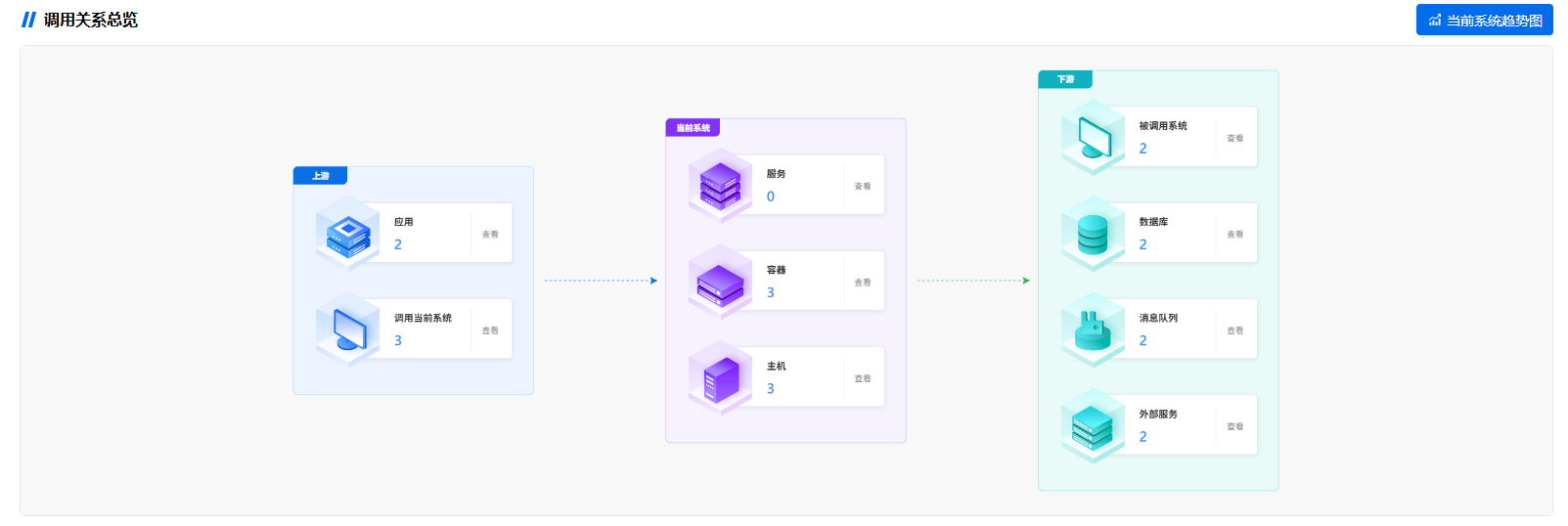
3. 应用系统拓扑 (AppSystemTopo)
使用示例
<AppSystemTopo
  :nodeCounts="appSystemNodeCounts"
  v-model:isTrendActive="isTrendActive"
  graphTitle="应用系统调用关系"
  @nodeClick="handleNodeClick"
/>
参数
| 参数 | 类型 | 默认值 | 说明 |
|------|------|--------|------|
| nodeCounts | Array<{ type: string, count: number \| string }> | [] | 各类型节点数量,type 需与组件 defaultGraphData 中的节点 type 一致 |
| isTrendActive | boolean | true | '当前系统趋势图'按钮是否激活,支持 v-model |
| graphTitle | string | "调用关系总览" | 拓扑标题 |
nodeCounts 参数详细示例
本组件 defaultGraphData 中的节点 type 为:application、caller、service、container、host、calledSystem、database、mq、externalService。传入的 nodeCounts 需按这些 type 配置数量。
const appSystemNodeCounts = [
  { type: "application", count: 2 },
  { type: "caller", count: 3 },
  { type: "service", count: 5 },
  { type: "container", count: 3 },
  { type: "host", count: 3 },
  { type: "calledSystem", count: 2 },
  { type: "database", count: 2 },
  { type: "mq", count: 2 },
  { type: "externalService", count: 2 },
];
截图
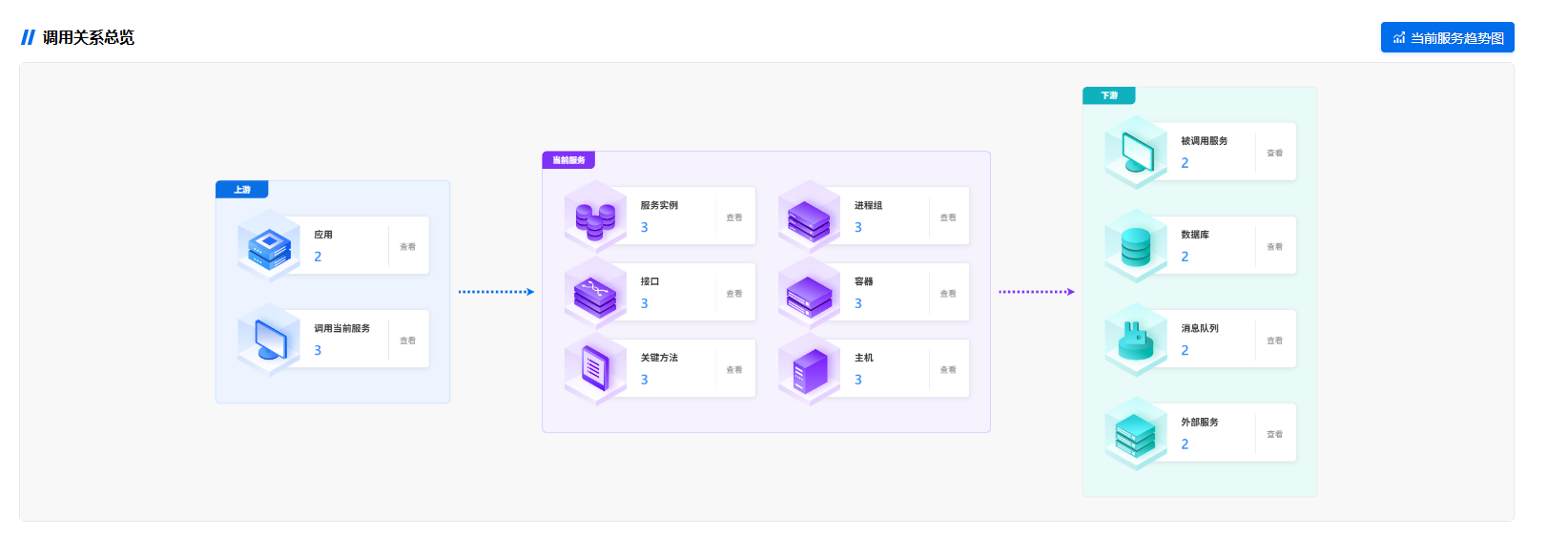
4. 服务清单拓扑 (ServiceCallRelationTopo)
使用示例
<ServiceCallRelationTopo
  :nodeCounts="serviceCallRelationNodeCounts"
  v-model:isTrendActive="isTrendActive"
  @nodeClick="handleNodeClick"
  @trendClick="handleTrendClick"
/>
参数
| 参数 | 类型 | 默认值 | 说明 |
|------|------|--------|------|
| nodeCounts | Array<{ type: string, count: number \| string }> | [] | 各类型节点数量,type 需与组件 defaultGraphData 中的节点 type 一致 |
| isTrendActive | boolean | true | '当前系统趋势图'按钮是否激活,支持 v-model |
| graphTitle | string | — | 本组件无 graphTitle 参数,标题固定为“调用关系总览” |
nodeCounts 参数详细示例
本组件 defaultGraphData 中的节点 type 为:application、caller、instance、processGroup、interface、container、method、host、calledSystem、database、mq、externalService。
const serviceCallRelationNodeCounts = [
  { type: "application", count: 2 },
  { type: "caller", count: 3 },
  { type: "instance", count: 3 },
  { type: "processGroup", count: 3 },
  { type: "interface", count: 3 },
  { type: "container", count: 3 },
  { type: "method", count: 3 },
  { type: "host", count: 3 },
  { type: "calledSystem", count: 2 },
  { type: "database", count: 2 },
  { type: "mq", count: 2 },
  { type: "externalService", count: 2 },
];
截图
5. 接口分析拓扑 (InterfaceAnalysisTopo)
使用示例
<InterfaceAnalysisTopo
  :nodeCounts="interfaceAnalysisNodeCounts"
  v-model:isTrendActive="isTrendActive"
  graphTitle="接口分析调用关系"
  @nodeClick="handleNodeClick"
/>
参数
| 参数 | 类型 | 默认值 | 说明 |
|------|------|--------|------|
| nodeCounts | Array<{ type: string, count: number \| string }> | [] | 各类型节点数量,type 需与组件 defaultGraphData 中的节点 type 一致 |
| isTrendActive | boolean | true | '当前系统趋势图'按钮是否激活,支持 v-model |
| graphTitle | string | "调用关系总览" | 拓扑标题 |
nodeCounts 参数详细示例
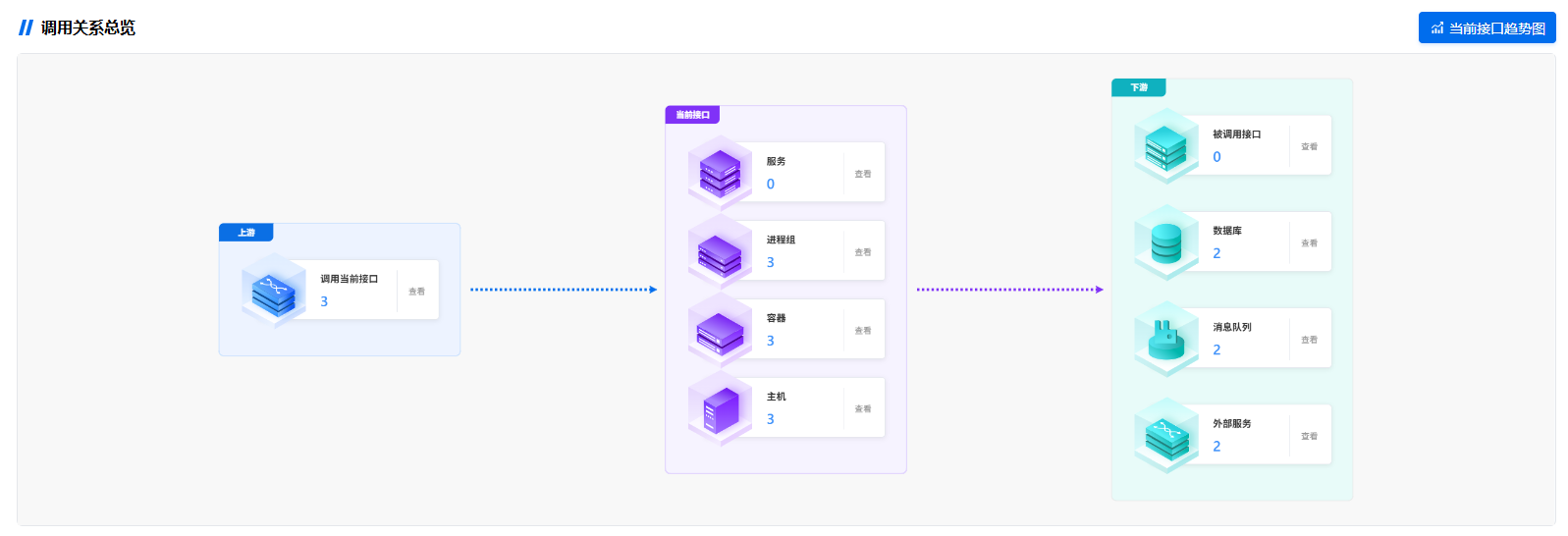
本组件 defaultGraphData 中的节点 type 为:caller、service、processGroup、container、host、calledInterface、database、mq、externalService。
const interfaceAnalysisNodeCounts = [
  { type: "caller", count: 3 },
  { type: "service", count: 4 },
  { type: "processGroup", count: 3 },
  { type: "container", count: 3 },
  { type: "host", count: 3 },
  { type: "calledInterface", count: 5 },
  { type: "database", count: 2 },
  { type: "mq", count: 2 },
  { type: "externalService", count: 2 },
];
截图
6. 数据库拓扑 (DatabaseTopo)
使用示例
<DatabaseTopo
  :nodeCounts="databaseNodeCounts"
  v-model:isTrendActive="isTrendActive"
  graphTitle="数据库依赖关系"
  @nodeClick="handleNodeClick"
/>
参数
| 参数 | 类型 | 默认值 | 说明 |
|------|------|--------|------|
| nodeCounts | Array<{ type: string, count: number \| string }> | [] | 各类型节点数量,type 需与组件 defaultGraphData 中的节点 type 一致 |
| isTrendActive | boolean | true | '当前系统趋势图'按钮是否激活,支持 v-model |
| graphTitle | string | "调用关系总览" | 拓扑标题 |
nodeCounts 参数详细示例
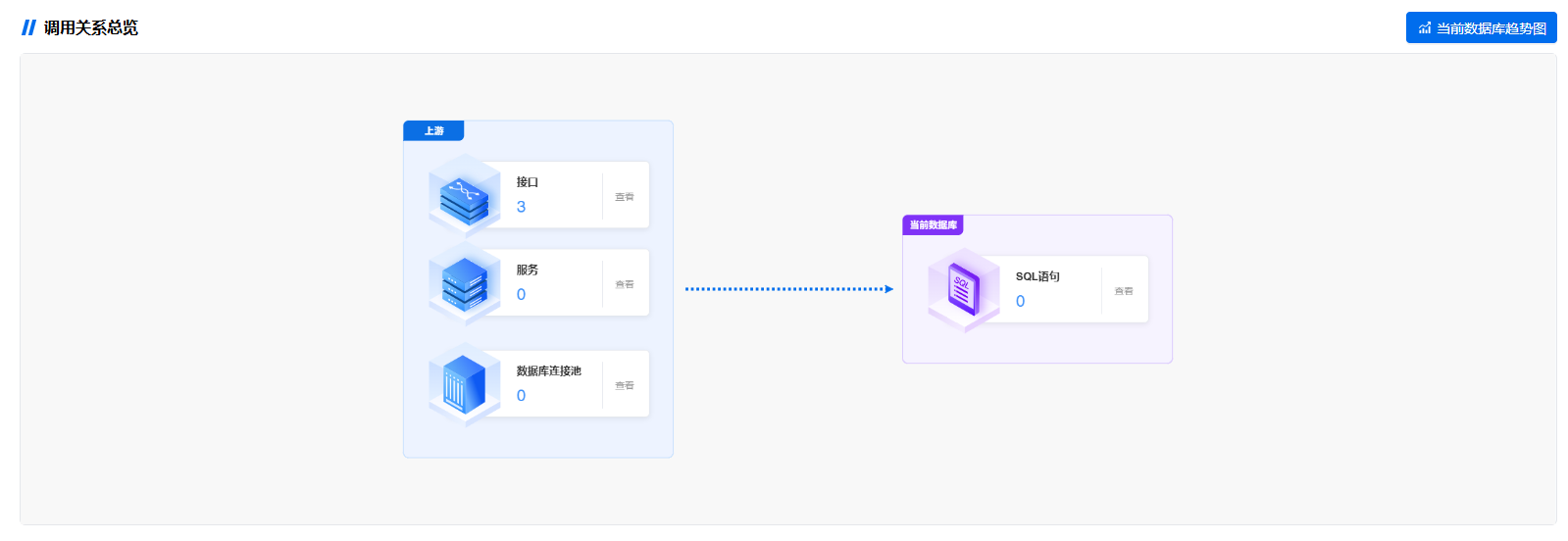
本组件 defaultGraphData 中的节点 type 为:interface、service、dbPool、sql。
const databaseNodeCounts = [
  { type: "interface", count: 3 },
  { type: "service", count: 2 },
  { type: "dbPool", count: 2 },
  { type: "sql", count: 5 },
];
截图
7. 外部服务拓扑 (ExternalServiceTopo)
使用示例
<ExternalServiceTopo
  :nodeCounts="externalServiceNodeCounts"
  v-model:isTrendActive="isTrendActive"
  graphTitle="外部服务依赖"
  @nodeClick="handleNodeClick"
/>
参数
| 参数 | 类型 | 默认值 | 说明 |
|------|------|--------|------|
| nodeCounts | Array<{ type: string, count: number \| string }> | [] | 各类型节点数量,type 需与组件 defaultGraphData 中的节点 type 一致 |
| isTrendActive | boolean | true | '当前系统趋势图'按钮是否激活,支持 v-model |
| graphTitle | string | "调用关系总览" | 拓扑标题 |
nodeCounts 参数详细示例
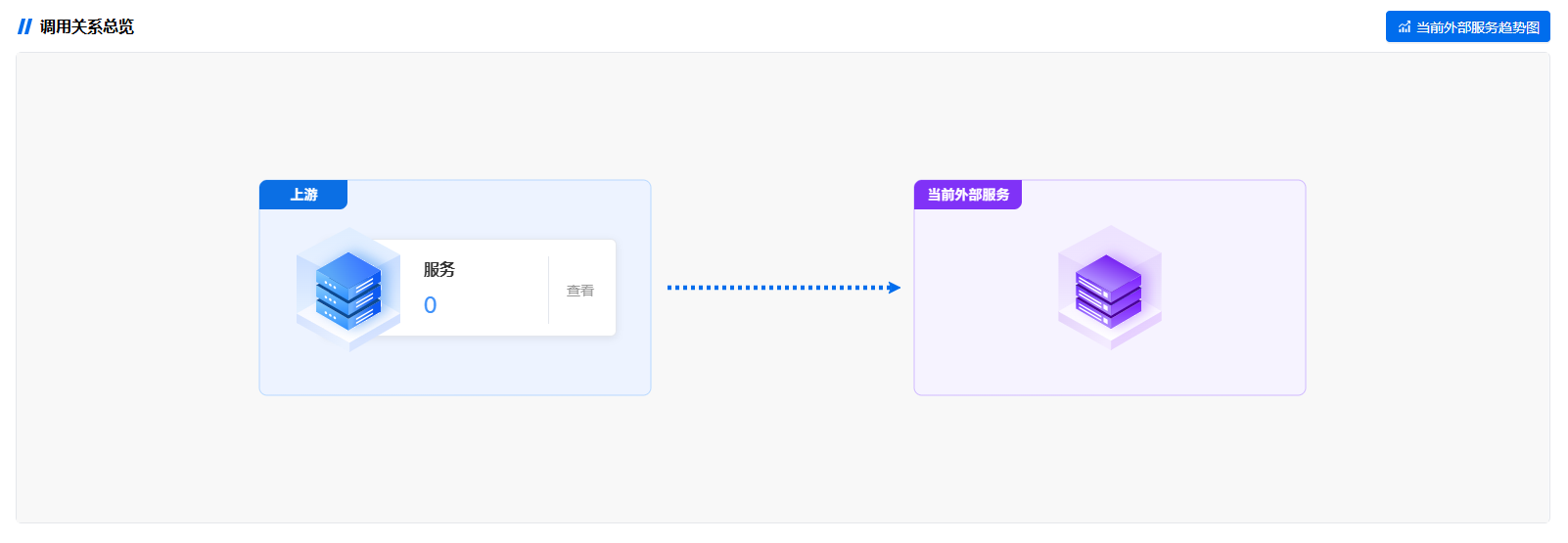
本组件 defaultGraphData 中的节点 type 为:service、externalService。
const externalServiceNodeCounts = [
  { type: "service", count: 4 },
  { type: "externalService", count: 3 },//非必须
];
截图
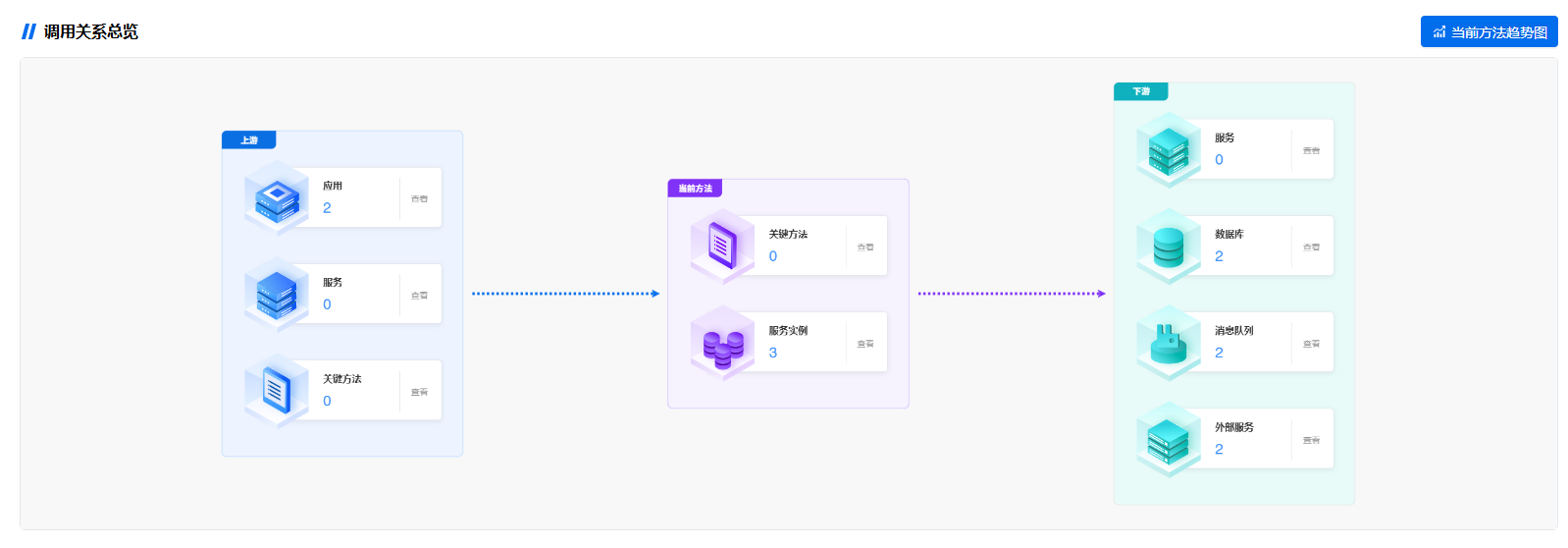
8. 关键方法拓扑 (KeyMethodsTopo)
使用示例
<KeyMethodsTopo
  :nodeCounts="keyMethodsNodeCounts"
  v-model:isTrendActive="isTrendActive"
  graphTitle="关键方法调用关系"
  @nodeClick="handleNodeClick"
/>
参数
| 参数 | 类型 | 默认值 | 说明 |
|------|------|--------|------|
| nodeCounts | Array<{ type: string, count: number \| string }> | [] | 各类型节点数量,type 需与组件 defaultGraphData 中的节点 type 一致 |
| isTrendActive | boolean | true | '当前系统趋势图'按钮是否激活,支持 v-model |
| graphTitle | string | "调用关系总览" | 拓扑标题 |
nodeCounts 参数详细示例
本组件 defaultGraphData 中的节点 type 为:application、upService、upMethod、curMethod、instance、downService、database、mq、externalService。
const keyMethodsNodeCounts = [
  { type: "application", count: 2 },
  { type: "upService", count: 3 },
  { type: "upMethod", count: 3 },
  { type: "curMethod", count: 1 },
  { type: "instance", count: 3 },
  { type: "downService", count: 2 },
  { type: "database", count: 2 },
  { type: "mq", count: 2 },
  { type: "externalService", count: 2 },
];
截图
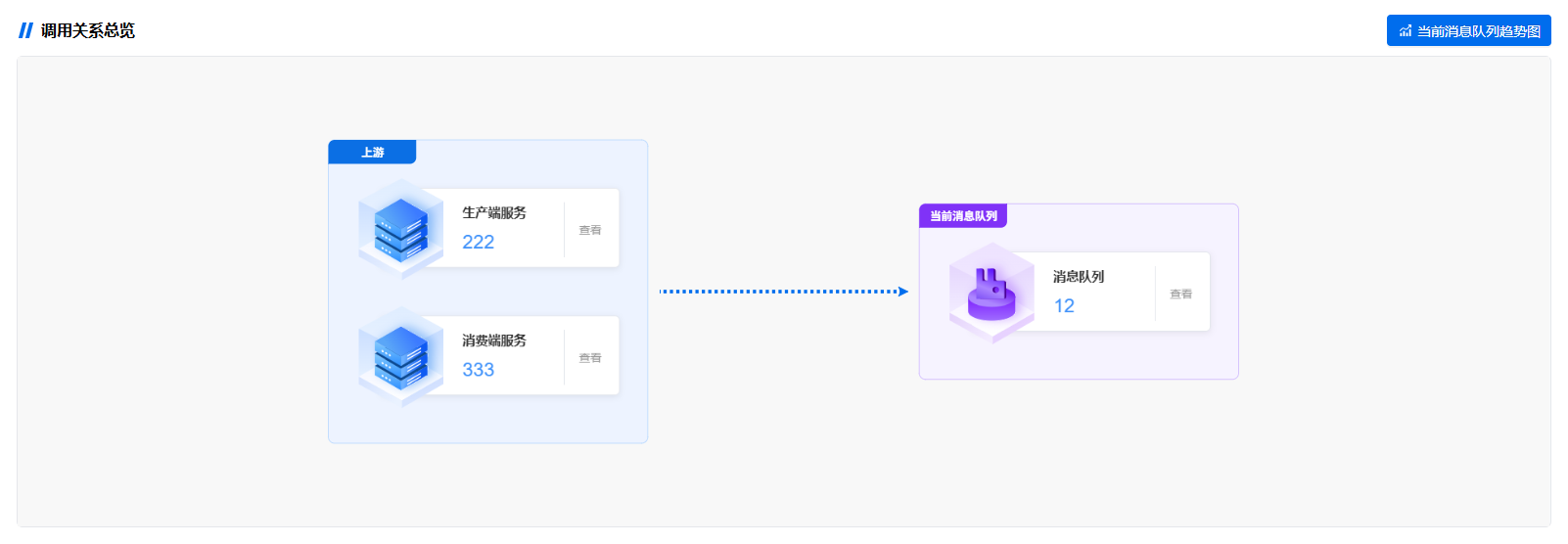
9. 消息队列拓扑 (MqTopo)
使用示例
<MqTopo
  :nodeCounts="mqNodeCounts"
  v-model:isTrendActive="isTrendActive"
  graphTitle="消息队列调用关系"
  @nodeClick="handleNodeClick"
/>
参数
| 参数 | 类型 | 默认值 | 说明 |
|------|------|--------|------|
| nodeCounts | Array<{ type: string, count: number \| string }> | [] | 各类型节点数量,type 需与组件 defaultGraphData 中的节点 type 一致 |
| isTrendActive | boolean | true | '当前消息队列趋势图'按钮是否激活,支持 v-model |
| graphTitle | string | "调用关系总览" | 拓扑标题 |
nodeCounts 参数详细示例
本组件 defaultGraphData 中的节点 type 为:producer (生产端服务)、consumer (消费端服务)、mq (消息队列)。
const mqNodeCounts = [
  { type: "producer", count: 22 },
  { type: "consumer", count: 33 },
  { type: "mq", count: 1 },
];
截图
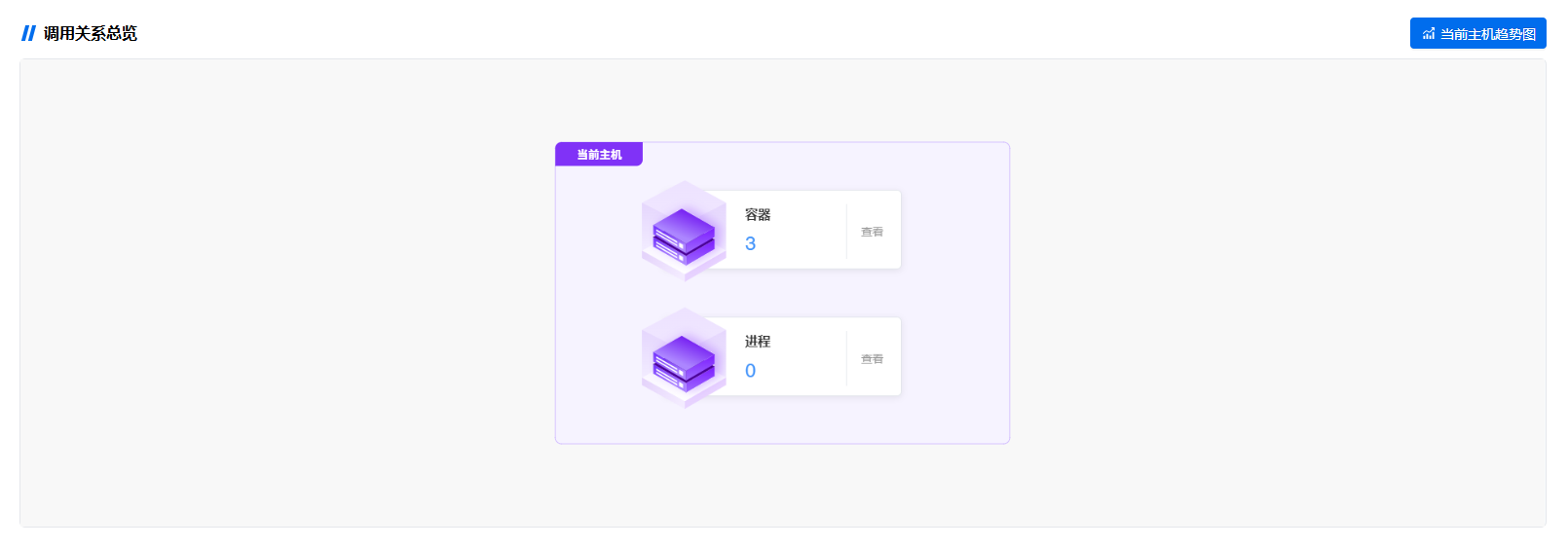
10. 主机拓扑 (HostTopo)
使用示例
<HostTopo
  :nodeCounts="hostNodeCounts"
  v-model:isTrendActive="isTrendActive"
  graphTitle="当前主机"
  @nodeClick="handleNodeClick"
  @trendClick="handleTrendClick"
/>
参数
| 参数 | 类型 | 默认值 | 说明 |
|------|------|--------|------|
| nodeCounts | Array<{ type: string, count: number \| string }> | [] | 各类型节点数量,type 需与组件 defaultGraphData 中的节点 type 一致 |
| isTrendActive | boolean | true | '当前主机趋势图'按钮是否激活,支持 v-model |
| graphTitle | string | "调用关系总览" | 拓扑标题 |
nodeCounts 参数详细示例
本组件 defaultGraphData 中的节点 type 为:container、process。
const hostNodeCounts = [
  { type: "container", count: 3 },
  { type: "process", count: 8 },
];
截图
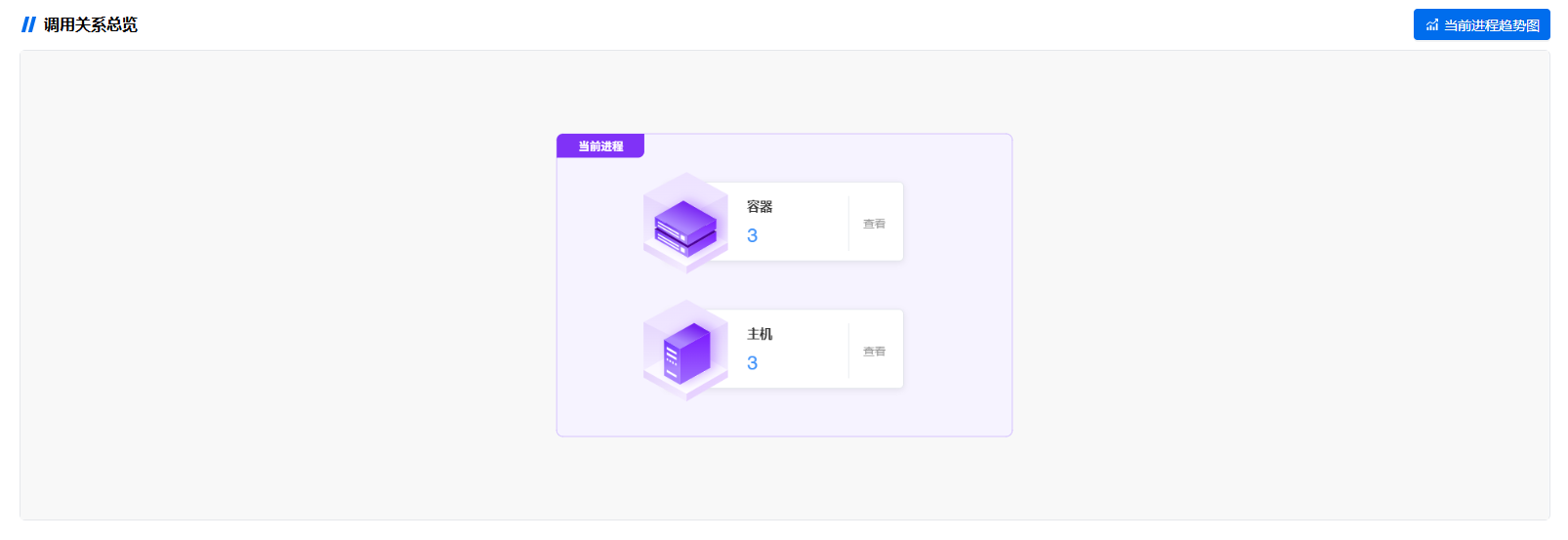
11. 进程拓扑 (ProcessTopo)
使用示例
<ProcessTopo
  :nodeCounts="processNodeCounts"
  v-model:isTrendActive="isTrendActive"
  graphTitle="当前进程"
  @nodeClick="handleNodeClick"
  @trendClick="handleTrendClick"
/>
参数
| 参数 | 类型 | 默认值 | 说明 |
|------|------|--------|------|
| nodeCounts | Array<{ type: string, count: number \| string }> | [] | 各类型节点数量,type 需与组件 defaultGraphData 中的节点 type 一致 |
| isTrendActive | boolean | true | '当前进程趋势图'按钮是否激活,支持 v-model |
| graphTitle | string | "调用关系总览" | 拓扑标题 |
nodeCounts 参数详细示例
本组件 defaultGraphData 中的节点 type 为:container、host。
const processNodeCounts = [
  { type: "container", count: 2 },
  { type: "host", count: 1 },
];
截图
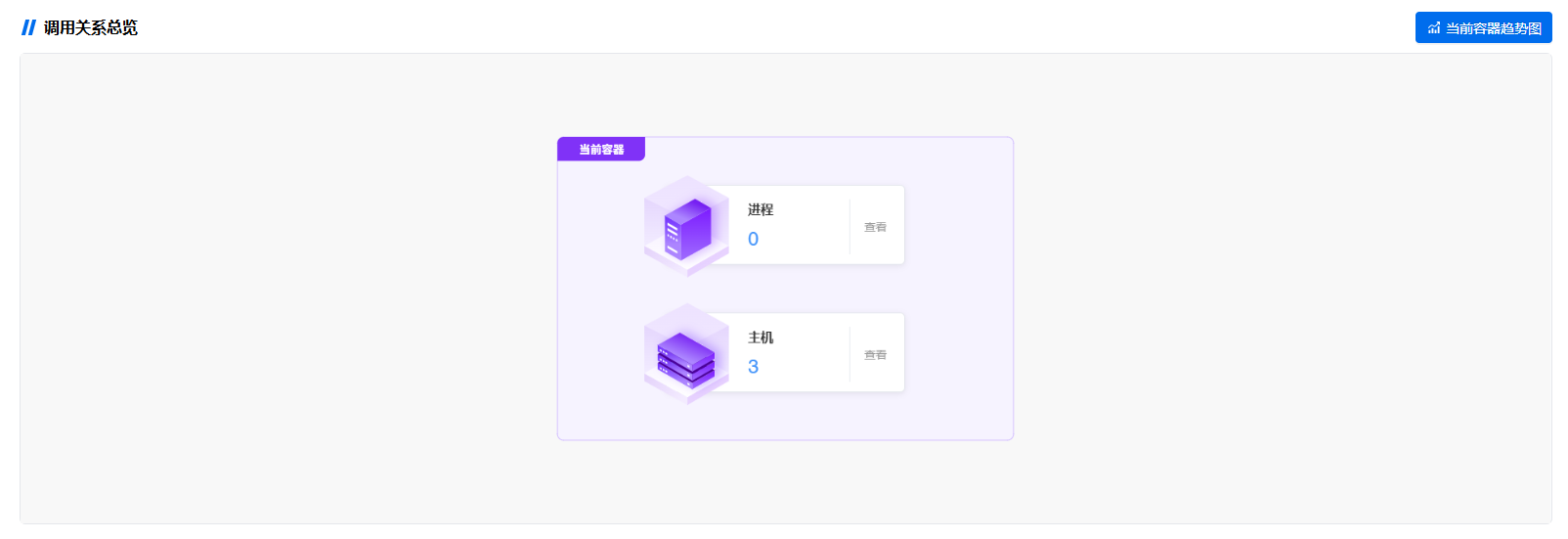
12. 容器拓扑 (ContainerTopo)
使用示例
<ContainerTopo
  :nodeCounts="containerNodeCounts"
  v-model:isTrendActive="isTrendActive"
  graphTitle="当前容器"
  @nodeClick="handleNodeClick"
  @trendClick="handleTrendClick"
/>
参数
| 参数 | 类型 | 默认值 | 说明 |
|------|------|--------|------|
| nodeCounts | Array<{ type: string, count: number \| string }> | [] | 各类型节点数量,type 需与组件 defaultGraphData 中的节点 type 一致 |
| isTrendActive | boolean | true | '当前容器趋势图'按钮是否激活,支持 v-model |
| graphTitle | string | "调用关系总览" | 拓扑标题 |
nodeCounts 参数详细示例
本组件 defaultGraphData 中的节点 type 为:process、host。
const containerNodeCounts = [
  { type: "process", count: 4 },
  { type: "host", count: 1 },
];
截图