
pointflow
v0.1.1
Published
React-first streaming point data core for high-volume visualization workflows.


Readme
PointFlow
| Benchmark | Result | |---|---| | FPS (WebGPU, balanced preset, 50k points) | 163–166 | | Rolling p95 frame time | < 50 ms | | Ingest throughput | 20,000 pts/s | | Test suite | 393 passing, 0 type errors |
Benchmarked on i7-13700HX · RTX 4060 Laptop · Chrome 147 · Windows 11
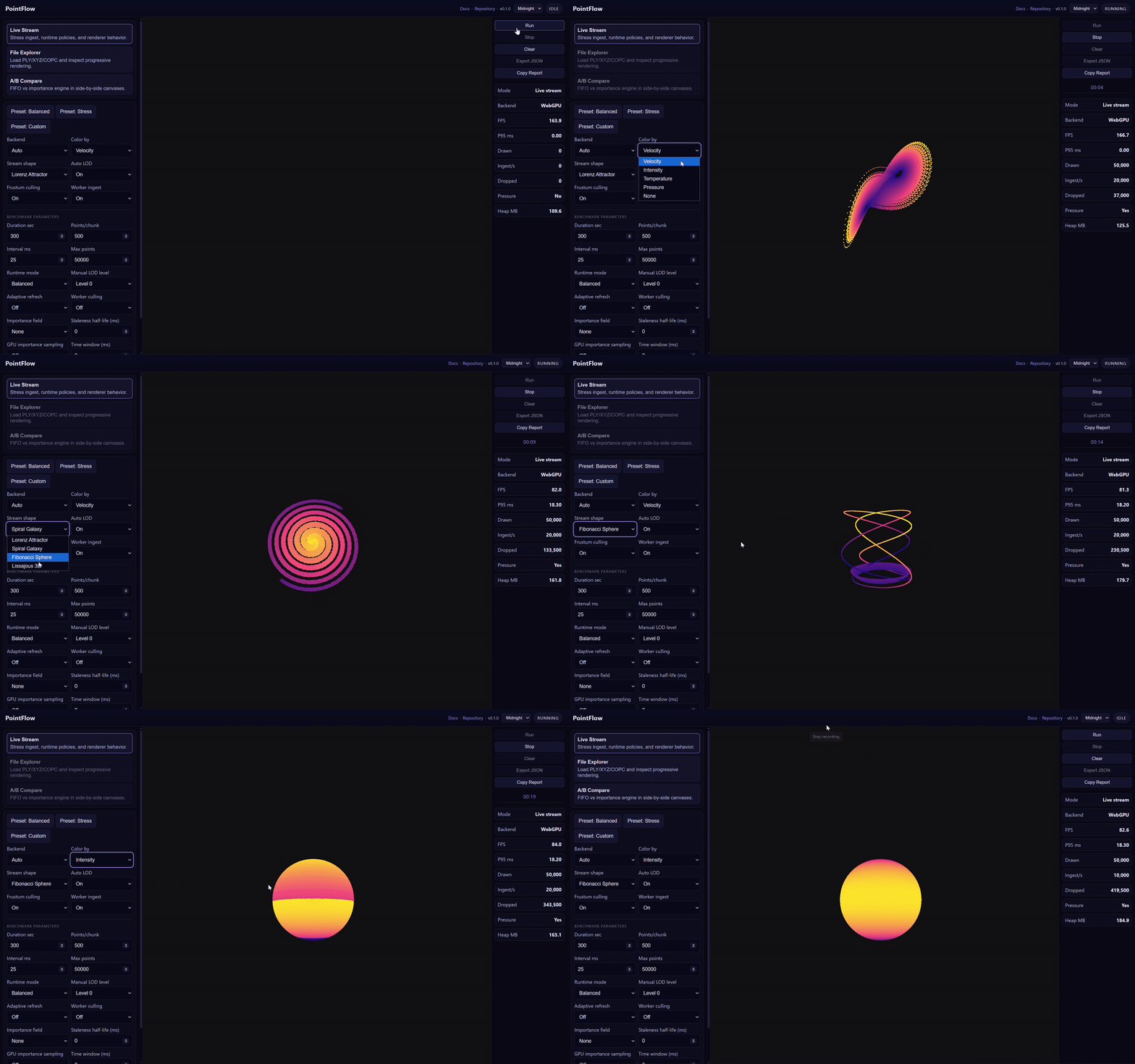
Render live point cloud streams in React without frame drops, memory spikes, or browser stalls — up to 1M+ points, WebGPU-accelerated, with automatic WebGL fallback.
What problem does this solve?
Most point cloud renderers assume static data. When data is live — LiDAR, simulation, sensor fusion, digital twin updates — naive approaches cause three failure modes: frame drops from unbounded memory growth, browser stalls from blocking ingest, and visible lag because the renderer doesn't know which incoming points matter most.
PointFlow is designed for the live-data case. It keeps memory bounded by design, keeps ingest off the main thread, and uses a unified importance function to decide both which points to evict from the buffer and which points to prioritise in the render pass.
Feature summary
| Feature | What it gives you |
|---|---|
| Streaming ingest (WebSocket, push-based) | Continuous live data without frame drops |
| Bounded ring buffer with backpressure | Predictable memory regardless of stream rate |
| Off-main-thread ingest worker | Ingest never blocks the render loop |
| WebGPU default + WebGL fallback | GPU compute culling on supported browsers; safe fallback everywhere else |
| GPU frustum culling (WebGPU) | Only visible points drawn; compute shader compacts to drawIndirect |
| Auto LOD by camera distance | Render budget spent on near points; far points downsampled |
| Unified importance engine (M8.5) | One scalar field drives both buffer eviction and per-frame render sampling |
| Static file loading (<PointCloud src="..." />) | PLY, XYZ, LAS 1.0–1.4, PCD (ASCII/binary/compressed), E57 — off-thread parsing, progressive rendering |
| Unified static source API | src accepts string, URL, Request, File, or Blob |
| LAZ (compressed LAS) loading (M9b) | import { createLazLoader } from "pointflow/laz" — laz-perf WASM inlined, no extra fetch |
| Built-in file dropzone | <PointCloudDropzone> for drag/drop + picker workflows |
| Import-based config module | pointflow/config centralizes defaults with deterministic precedence |
| Attribute-based color mapping | Any numeric field (velocity, uncertainty, pressure) mapped to a color palette |
| GPU point picking (WebGPU) / CPU fallback (WebGL) | onPointPick callback; click any point to receive its world coordinates + attributes; WebGPU resolves within one frame, no O(N) CPU scan |
| 16-bit quantized transport (M9.2) | Binary WebSocket adapter; 6 bytes/point wire cost vs 12 bytes float32 |
| COPC streaming (M10) | <CopcPointCloud> from pointflow/copc; HTTP range requests, LRU tile cache, frustum+LOD selection |
| COPC prefetch strategies | prefetchStrategy: frustum-priority, depth-first, nearest, bandwidth-saver |
| OPFS persistent tile cache (M10.1) | Two-tier memory+disk cache; tiles survive page reload; graceful fallback |
| Reproducible benchmark surface | Fixed profiles, rolling p95, hitch counts, one-click export |
| Side-by-side comparison demo (M11.3) | "Compare" tab: FIFO vs importance engine on same stream; Copy Report button |
| Temporal time window (M12) | timeWindowMs prop + onTemporalStats; GPU compute shader filter; zero CPU overhead on WebGPU |
vs. alternatives
| | PointFlow | Potree | deck.gl PointCloudLayer | Three.js Points | |---|---|---|---|---| | Live streaming | Yes — purpose-built | No (static octree tiles) | Partial (batch updates) | Manual | | Bounded memory | Yes — ring buffer | No (loads all tiles) | No | Manual | | Static file loading | Yes — PLY, XYZ, LAS, LAZ (opt-in), PCD, E57 | Yes — LAZ/LAS/COPC | Limited | Manual | | WebGPU rendering | Yes | No | No | No | | Importance-driven eviction + rendering | Yes — unified score | No | No | No | | React-native API | Yes — hooks + components | No | Partial (layer API) | No | | Off-thread ingest | Yes | N/A | No | No |
Quick start (streaming, under 30 minutes)
1. Install
npm install pointflow2. Stream points into a scene
import { StreamedPointCloud, type StreamedPointCloudRef } from "pointflow";
import { useRef } from "react";

export function LiveScene() {
  const api = useRef<StreamedPointCloudRef>(null);

  // Connect your data source and push chunks
  // api.current.pushChunk({ points: [{ x, y, z, attributes: { velocity: 0.8 } }] })

  return (
    <StreamedPointCloud
      maxPoints={50_000}       // hard memory ceiling — never exceeded
      colorBy="velocity"       // attribute to map to colour
      onReady={(ref) => { api.current = ref; }}
    />
  );
}
3. Push data
// From a WebSocket
ws.onmessage = (e) => {
  const chunk = JSON.parse(e.data); // { points: [{ x, y, z, attributes: {...} }] }
  api.current?.pushChunk(chunk);
};

// Or push pre-packed binary (zero allocation, best for high-rate feeds)
api.current?.pushBinary(xyzFloat32, [{ key: "velocity", values: velocityFloat32 }], count);
4. Load a static file
import { PointCloud } from "pointflow";

<PointCloud
  src="/scan.ply"         // PLY (binary or ASCII) or XYZ/CSV
  colorBy="intensity"
  autoLod                 // auto-enabled above 500k points
/>
Progressive rendering starts immediately — the scene updates as chunks are parsed, not after the full file loads.
4a. Load from local files, blobs, URL, or Request
import { PointCloud, PointCloudDropzone } from "pointflow";

// Local file from input/drop.
<PointCloud src={file} />

// Blob from any fetch pipeline.
const blob = await fetch("/scan.ply").then((r) => r.blob());
<PointCloud src={blob} />

// URL and Request are also accepted.
<PointCloud src={new URL("https://example.com/scan.ply")} />
<PointCloud src={new Request("https://example.com/scan.ply")} />

// Optional reusable dropzone component.
<PointCloudDropzone onSourceChange={(next) => setSource(next)} />
Need imperative cancellation?
<PointCloud
  src={source}
  onLoadControls={({ abort }) => {
    // store abort somewhere in UI state for a Cancel button
  }}
/>
4b. Load a LAZ (compressed LAS) file (M9b)
LAZ support is opt-in — users who don't need it pay zero cost. Import createLazLoader from the pointflow/laz subpath:
import { PointCloud } from "pointflow";
import { createLazLoader } from "pointflow/laz";

<PointCloud
  src="/scan.laz"
  loaderFactory={createLazLoader}   // enables LAZ decoding via inlined laz-perf WASM
  colorBy="intensity"
/>
The laz-perf WASM binary (~210 KB) is base64-inlined in the worker blob — no separate fetch, no CDN dependency, no server config. The same loaderFactory prop works for .las files too (they use the fast uncompressed path).
4c. Stream a COPC file from S3 (M10)
COPC support is opt-in via the pointflow/copc subpath — no bundle cost for users who don't need it:
import { CopcPointCloud } from "pointflow/copc";

<CopcPointCloud
  src="https://s3.amazonaws.com/bucket/scan.copc.laz"
  colorBy="intensity"
  maxDepth={8}             // octree depth limit (default 8)
  prefetchStrategy="nearest"
  persistCache             // store decoded tiles in OPFS across page reloads (M10.1)
/>
Tiles are fetched on-demand with HTTP range requests — only the octree nodes visible in the current frustum are loaded. Coarse tiles (low depth) load first; finer tiles stream in as you zoom. No server infrastructure required — works directly from S3, GCS, or any static host that supports range requests.
OPFS (persistCache) caches decoded tiles to the browser's Origin Private File System. On reload, previously visited tiles render immediately with zero network cost. Graceful no-op in environments where OPFS is unavailable.
4c-i. Atlas tier configuration (atlasTiers)
The COPC renderer allocates GPU memory in tiers — groups of fixed-size slots so that tiles of varying point counts can be stored without fragmentation. Each tier has a slot count and a points-per-slot capacity:
| Tier | Default slots | Points per slot | Suited for | |------|--------------|-----------------|------------| | 0 (small) | 4096 | 512 | Leaf / deep nodes | | 1 (medium) | 1024 | 8,192 | Mid-level nodes | | 2 (large) | 256 | 65,536 | Root / shallow nodes |
A tile is placed in the smallest tier that fits its point count. If that tier is full, the least-recently-used slot in that tier is evicted first.
When to customise: The defaults work well for typical COPC files. Override atlasTiers when:
- Your dataset has uniformly small tiles (e.g. leaf-only scans) — reduce or remove the large tier to save GPU memory.
- Your dataset has very large root tiles (>65k points) — increase
pointsPerSloton the large tier. - You want to cap total GPU memory — reduce
slotCountvalues.
import { CopcPointCloud } from "pointflow/copc";
import type { AtlasTierConfig } from "pointflow/copc";

const MY_TIERS: AtlasTierConfig[] = [
  { slotCount: 8192, pointsPerSlot: 512 },    // more small slots
  { slotCount: 512,  pointsPerSlot: 8192 },
  { slotCount: 64,   pointsPerSlot: 65536 },  // fewer large slots
];

<CopcPointCloud
  src="/scan.copc.laz"
  atlasTiers={MY_TIERS}
/>
Total GPU atlas memory = sum(slotCount × pointsPerSlot) × 16 bytes (vec4 per point for position). The default tiers use ~280 MB; PointFlow requests raised WebGPU buffer limits automatically via copcAtlasRequiredWebGPULimits.
4d. Temporal time window (M12)
Show only points ingested within the last N milliseconds — useful for live feeds where old sensor data should fade out:
<StreamedPointCloud
  maxPoints={100_000}
  timeWindowMs={5_000}          // only render points from the last 5 s
  onTemporalStats={(stats) => {
    console.log(`oldest: ${stats.oldestPointAgeMs}ms`);
    console.log(`in window: ${stats.windowedCount} / ${stats.totalCount}`);
  }}
/>
The ring buffer retains all points up to maxPoints — timeWindowMs is a render-stage filter only. On WebGPU the check runs in the compute shader with zero CPU overhead. On WebGL it filters inside copyToTypedArrays.
4e. Use a config module (pointflow/config)
Use a shared config object when you want one place to manage defaults across StreamedPointCloud, PointCloud, CopcPointCloud, and hook-level behavior.
// pointflow.config.ts
import { definePointFlowConfig } from "pointflow/config";

export const pointFlowConfig = definePointFlowConfig({
  global: {
    rendererBackend: "auto",
    frustumCulling: true,
    adaptiveRefresh: false,
  },
  streamed: {
    lodLevels: 3,
    pickStrategy: "highestImportance",
  },
  pointCloud: {
    chunkSize: 10_000,
  },
  copc: {
    prefetchStrategy: "frustum-priority",
    maxConcurrent: 16,
  },
  hooks: {
    usePointFlow: {
      reactivePush: false,
    },
  },
});
import { PointCloud } from "pointflow";
import { pointFlowConfig } from "./pointflow.config";
<PointCloud src="/scan.ply" config={pointFlowConfig} />;import { usePointFlow } from "pointflow";
import { pointFlowConfig } from "./pointflow.config";
const state = usePointFlow({
maxPoints: 200_000, // explicit override
config: pointFlowConfig,
});Config precedence is stable:
| Priority | Source |
|---|---|
| 1 (highest) | Explicit props/options at call site |
| 2 | Surface config (streamed, pointCloud, copc, hooks) |
| 3 | global config |
| 4 (fallback) | Built-in defaults |
5. Enable importance-driven rendering (optional)
Add importanceField to bias the buffer toward high-importance points:
<StreamedPointCloud
  maxPoints={50_000}
  importanceField="uncertainty"    // attribute key to use as importance signal
  maxStalenessMs={5000}            // recency half-life: old points decay to near-zero score
  importanceSamplingEnabled        // GPU shader samples proportionally to importance
  colorBy="uncertainty"
/>
Points with high uncertainty survive evictions longer and are drawn more often. Points older than a few half-lives are evicted ahead of fresh low-importance points. See the Importance engine section below for the full model.
Demo
npm run dev:demoOpen the URL shown in the terminal. The demo includes:
- Live streaming with configurable ingest rate and buffer size
- Static PLY/XYZ file loading with progressive render
- Importance engine panel (field selector, staleness slider, GPU sampling toggle)
- Renderer panel (WebGPU / WebGL / Auto)
- One-click benchmark with reproducible profiles
- "Copy Report" for a complete soak report you can paste anywhere
Hosting and remote URLs: The file step can fetch remote COPC/LAS URLs from the browser. That is convenient for local development. If you expose the demo on the public internet, treat open-ended URL entry as an operational policy issue (trust boundaries, abuse, and SSRF-sensitive narratives in security reviews). Prefer serving data same-origin, putting known datasets behind an allowlist, using a small server-side proxy, or gating arbitrary URLs behind authentication and clear risk messaging. The default demo configuration only permits pasted http(s) URLs that match bundled public samples unless a “Labs” toggle is enabled in the UI.
Healthy baseline (Normal load, WebGPU): rolling p95 under ~7 ms, zero hitches over a 60s run, dropped ratio < 10% once at capacity, heap stable.
Reproducible benchmarks
npm run bench        # single pass
npm run bench:3x     # three consecutive passes — compare p95 across runs
The demo Benchmark panel runs fixed profiles (Normal, Heavy, Extreme, 1M) with a warmup period excluded from metrics. Use Export JSON for a machine-readable report with environment metadata, per-pass timing, heap, hitch counts, and ingest config. All claims in this README are tied to these outputs.
Dynamic buffer allocation
By default, PointFlow pre-allocates all internal buffers at construction. For large ceilings or exploratory use, enable dynamic allocation:
<StreamedPointCloud
  maxPoints={5_000_000}
  dynamicAlloc={{ initialCapacity: 1024, growthFactor: 2 }}
/>
Buffers start small and double as points arrive, up to maxPoints. Once at the ceiling, the normal drop policy applies. See the Dynamic Buffer Allocation section below for tradeoff details.
Performance options
PointFlow ships with two features on by default (opt-out) and two optional (opt-in, default off).
Spatial acceleration (default on)
A persistent uniform-grid spatial index. Cells are frustum-tested by center — points in clearly-inside cells skip per-point visibility tests; points in boundary cells are still tested per point. Scales to 15M+ when most of the cloud is off-screen.
<StreamedPointCloud spatialCulling={false} ... /> // disable for small clouds or pixel-perfect cullingDeferred buffer growth (default on with dynamicAlloc)
Buffer growth is scheduled via requestAnimationFrame instead of running on the ingest hot path. No user-facing prop — tests pass deferGrowth: false on BackpressurePolicy for synchronous growth (not a public API).
Adaptive visual refresh (opt-in)
<StreamedPointCloud adaptiveRefresh={true} ... />Refresh cadence adapts to recent frame times — backs off when the main thread is busy, increases when frames are fast. Useful for dashboards with multiple heavy widgets. Keep off for benchmarks.
Worker-side culling (opt-in)
<StreamedPointCloud workerMode={true} workerCulling={true} ... />The ingest worker frustum-filters before packing SoA arrays. Points outside the frustum at ingest time are permanently discarded. Good for live, view-centric feeds. Do not use when you need full-history replay.
Dynamic buffer allocation (detail)
By default, PointFlow pre-allocates maxPoints entries at construction — predictable worst-case memory, zero reallocation cost during streaming.
Enabling
<StreamedPointCloud
  maxPoints={5_000_000}
  dynamicAlloc={{ initialCapacity: 1024, growthFactor: 2 }}
/>
| Option | Default | Description |
|---|---|---|
| initialCapacity | min(1024, maxPoints) | Slots allocated at construction. Must be ≥ 1 and ≤ maxPoints. |
| growthFactor | 2 | Multiplier applied each time the buffer fills and is below the cap. |
Behavior
- Growth triggers when the current capacity is full and below
maxPoints. The ring unrolls so data is contiguous, then arrays are replaced. - Capacity never exceeds
maxPoints; once at ceiling the drop policy applies. reset()leaves the buffer at its current grown capacity (no shrink — avoids churn on stream restart).
Tradeoffs
| | Pre-alloc (default) | Dynamic |
|---|---|---|
| Memory at mount | Full maxPoints upfront | ~initialCapacity |
| Reallocation cost | None | O(size) per doubling (infrequent) |
| Ingest hot-path | No extra branches | Same; growths amortized |
| Best for | Known, fixed buffer size | Large ceilings, exploratory use |
WebGPU rendering
PointFlow uses WebGPU by default when the browser supports it, with automatic WebGL fallback.
How the WebGPU path works
- CPU → GPU upload: The CPU ring buffer is copied into a GPU storage buffer (
STORAGE | COPY_DST) each throttle tick. - Compute pass: A WGSL compute shader reads all points, applies a 6-plane frustum test (optionally with importance-weighted stochastic sampling), and atomically compacts visible points into a second storage buffer.
- Draw pass:
drawIndirectdraws from the compacted buffer — no CPU draw preparation, noBufferAttribute.needsUpdate. - Double buffering: Two position + two attribute storage buffers swapped each tick so ingest and draw never access the same buffer.
Support matrix
| Browser / environment | Backend used |
|---|---|
| Chrome / Edge (WebGPU enabled) | WebGPU (compute + indirect draw) |
| Firefox | WebGL (automatic fallback) |
| Safari | WebGL (fallback; WebGPU experimental) |
| Node.js / jsdom (test env) | WebGL (no navigator.gpu) |
Rollback
<StreamedPointCloud rendererBackend="webgl" ... />Known limitations (M7)
- Full-ring upload per tick: O(size) CPU work per throttle tick. The win over WebGL is GPU frustum culling replacing the CPU frustum loop. Worker→GPU incremental uploads (removing the full-ring scan) are planned.
maxStorageBufferBindingSize: GPU buffer capacity is capped by device limits (typically 128–512 MB). PointFlow caps silently ifmaxPointswould exceed this.
Importance engine (M8.5)
PointFlow is the only React streaming point cloud library that uses a unified importance function across both buffer eviction (CPU) and render sampling (GPU).
score(p) = importance(p) × recency(p)Eviction: K=16 lookahead scans the 16 oldest slots and evicts the lowest-scoring one instead of always evicting the head (FIFO). O(16) per eviction — constant cost regardless of buffer size. When importance is uniform and staleness is off, worstOffset = 0 always, so eviction is identical to FIFO.
GPU sampling: the WebGPU compute shader applies a deterministic PCG hash per point per frame. Points with importance = 1.0 always pass; points with importance = 0.1 pass ~10% of frames. The frame seed is quantized to 500 ms to prevent strobing at 60 Hz.
Measurement results:
| Claim | Threshold | Result | |---|---|---| | High-importance retention after sustained pressure | ≥ 70% vs 50% FIFO baseline | Pass | | Density ratio (high vs low importance regions) | ≥ 5× | Pass | | FPS / p95 regression with importance enabled | ≤ 5% | Pass | | Staleness: stale-high evicted before fresh-low | Stale avg < no-staleness avg − 0.20 | Pass | | Uniform importance = identical FIFO order | Exact match | Pass |
Full model specification: see the importance engine guide in the docs.
Point picking
Click any rendered point to receive its world coordinates and attributes via the onPointPick callback.
<StreamedPointCloud
  maxPoints={100_000}
  colorBy="intensity"
  pickRadius={8}           // CSS pixels, default 8
  pickStrategy="recentFirst"
  onPointPick={(pt) => {
    console.log(pt.x, pt.y, pt.z);          // world-space coords
    console.log(pt.attributes.intensity);   // any ingested attribute
    console.log(pt.screenDist);             // distance from click center, in CSS px
    console.log(pt.slotIndex);              // ring-buffer slot (stable until next eviction)
    console.log(pt.confidence);             // 0-1 proximity confidence
  }}
/>
<PointCloud> exposes the same props.
WebGPU path: on click, a second render pass runs in the same GPU command encoder and encodes ring-buffer slot indices into an R32Uint texture. One pixel is read back asynchronously — result arrives within one frame with no O(N) CPU work. DPR scaling applied for HiDPI displays.
WebGL path (fallback): PointBuffer.pickNearest() projects all buffered points into screen space in O(N) on pointerdown.
Stacked-point behaviour: when multiple points project to the same pixel, the one with the highest importance value wins. Screen distance is the tiebreaker only when importance is equal.
16-bit quantized transport (M9.2)
createQuantizedAdapter decodes compact binary WebSocket messages into PointChunk objects. At 6 bytes/point (3 × uint16 XYZ) vs 12 bytes/point (3 × float32), it halves XYZ wire cost at sub-millimetre precision over typical scan ranges.
import { createQuantizedAdapter } from "pointflow";

const ws = new WebSocket("wss://lidar.example.com/stream");
const stop = createQuantizedAdapter(
  ws,
  {
    attributes: [
      { key: "intensity",      min: 0,  max: 1   },
      { key: "classification", min: 0,  max: 31  },
    ],
  },
  (chunk) => api.current?.pushChunk(chunk),
);

// later
stop(); // detach listener (does NOT close the socket)
Wire format (little-endian):
[uint16 N][uint8 M][uint8 flags][float32 xMin][float32 yMin][float32 zMin][float32 scale]
  N × { uint16 qx, uint16 qy, uint16 qz }
  N × M × uint16 (attribute values, row-major)
Reconstruction: x = xMin + (qx / 65535) × scale. Non-binary frames (JSON control messages) on the same socket are silently ignored.
Scripts
npm install          # install dependencies
npm test             # run unit tests
npm run test:watch   # watch mode
npm run build        # emit to dist/
npm run dev:demo     # Vite demo server
npm run bench        # unit-level bench suite
npm run bench:3x     # three consecutive passes
npm run release:check  # pre-publish checks
Loader telemetry and error codes
usePointCloud and <PointCloud> expose optional lifecycle telemetry for diagnostics:
<PointCloud
  src={source}
  onLoadTelemetry={(e) => {
    // e.phase: start | header | chunk | done | error | abort
    console.log(e.phase, e.progress);
  }}
/>
PointFlow errors use stable codes via PointFlowError:
PF_ABORTEDPF_PARSE_FAILEDPF_UNSUPPORTED_FORMATPF_INVALID_SOURCEPF_WORKER_INIT_FAILEDPF_NETWORK_RANGE_UNAVAILABLE
Migrating from pre-M15.8 (<CopcPointCloud>)
M15.8 replaced the old polling-based COPC renderer with a GPU-resident atlas pipeline. Several props were removed or added:
| Prop | Status | Notes |
|------|--------|-------|
| maxPoints | Deprecated — ignored | Memory is controlled by atlas tier configuration. Use atlasTiers to adjust capacity. |
| pollIntervalMs | Deprecated — ignored | Tile loading is now RAF-driven; no polling interval needed. |
| workerMode | Deprecated — ignored | Rendering is always direct WebGPU/WebGL; no worker hand-off. |
| maxConcurrent | New | Max parallel HTTP tile fetches (default: 16). Replaces old implicit concurrency. |
| maxCacheMb | New | In-memory tile LRU budget in MB (default: 512). |
| persistCache | New | OPFS tile persistence across page reloads (default: false). |
| atlasTiers | New | Override GPU atlas tier configuration (see section 4c-i above). |
| lodThreshold | New | Screen-space geometric error cutoff 0–1 (default: 0.01). Lower = finer detail. |
Minimal migration — if you had:
<CopcPointCloud src="/scan.copc.laz" maxPoints={500_000} pollIntervalMs={500} workerMode />Simply remove the deprecated props — maxPoints, pollIntervalMs, and workerMode are silently ignored and the renderer works correctly without them:
<CopcPointCloud src="/scan.copc.laz" />Implementation philosophy
- Deterministic memory bounds over unlimited buffering
- Explainable eviction policy over opaque heuristics
- Testable pure functions over renderer-coupled logic
- Incremental delivery over speculative feature creep
License
MIT