
port-reclaim
v0.4.1
Published
Free up a port already in use: find and kill the process holding it (EADDRINUSE). Cross-platform, zero-config, Docker-safe.
Downloads
996

Maintainers
 princegoel072
Readme
port-reclaim
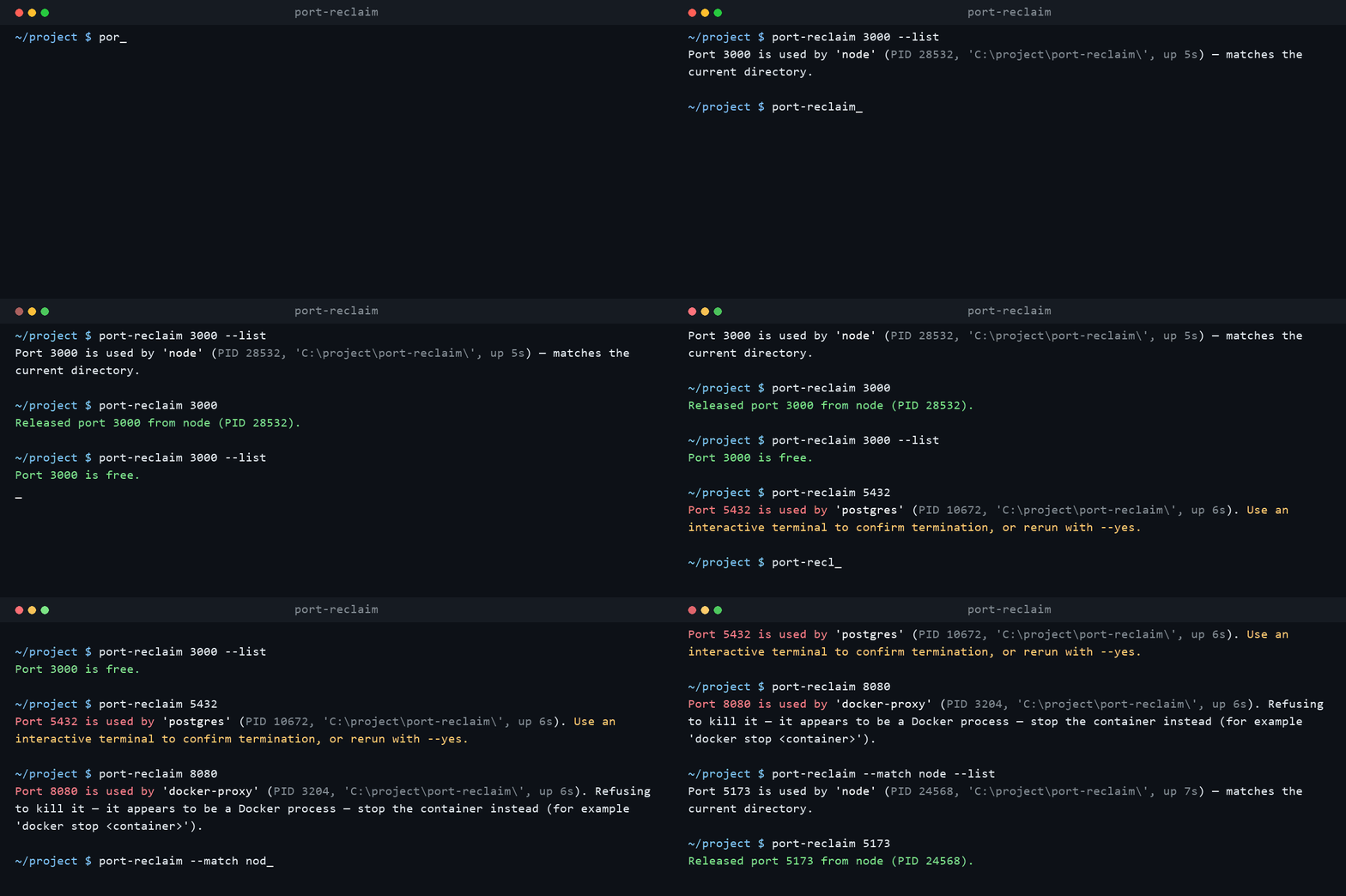
A zero-configuration, cross-platform CLI for safely reclaiming ports held by stale local development processes.
Why port-reclaim?
Tools like kill-port free a port by killing whatever holds it. port-reclaim is built for everyday development, where the process holding port 3000 is usually yours:
- Knows your project — a process started from your current directory is reclaimed automatically; anything else asks first. No more killing the wrong
node. - Shows what it found — process name, PID, working directory, and uptime.
--listlooks without touching. - Never kills Docker — ports held by
docker-proxyor Docker Desktop are reported with a hint to stop the container instead. - Multiple ports, one command —
port-reclaim 3000 5173 8080. - TCP and UDP — catches UDP listeners as well as TCP.
- Configurable — declare ports in
package.jsonor.reclaimignore, then plainport-reclaimin yourdevscript is enough.
Install
Run it once without installing:
npx port-reclaim 3000Or install it globally:
npm install --global port-reclaim
port-reclaim 3000
Requires Node.js 18 or newer. Supports macOS, Linux, Windows, WSL, PowerShell, and CMD.
How It Works
port-reclaim <PORT> [PORT ...]
port-reclaim --match <REGEX>
If the port is free, the command verifies it by briefly binding the port, then exits successfully. If the port is in use but no owning process is visible to the current user, the command reports that instead of claiming success. If the process working directory matches the current project, the process is terminated automatically — except for known data services (postgres, postmaster, mysqld, mariadbd, mongod, redis-server, memcached, etcd), which always ask first even when they share your directory. Processes from another directory, system services, and processes whose working directory cannot be read require explicit confirmation. Confirmation prompts show the process name, working directory, and uptime.
The command uses a graceful termination signal first on Unix-like systems and falls back to a forceful signal if the process remains alive. Windows uses taskkill /F.
If confirmation is required in a non-interactive environment, the command declines safely and exits with status 1 (rerun with --yes to override). --yes skips prompts, including the protected-service prompt, but it cannot override a refusal — list a service's port in .reclaimignore to make it un-killable by accident.
Ports held by Docker processes (for example docker-proxy or Docker Desktop) are never killed. The tool explains that the port looks like Docker and suggests stopping the container instead. The same refusal applies to operating-system PIDs (0–4, such as System/HTTP.sys on Windows or systemd on Linux), which are never signalled.
Both TCP and UDP listeners are discovered. Discovery costs one netstat/lsof call per port, with process names and uptimes fetched in a single batched query. Measured on Windows 11: ~0.1s for a free port, ~0.4s to identify a busy one, ~0.6s for a full reclaim.
Options
| Flag | Meaning |
| --- | --- |
| -l, --list | Report what is using each port without killing anything. |
| -y, --yes | Terminate processes from other directories without prompting. |
| -m, --match REGEX | Reclaim every port held by a process whose name matches REGEX, instead of naming ports. |
| --no-color | Disable coloured output. |
| -h, --help | Show the help message. |
| -v, --version | Show the installed version. |
Reclaiming by process name
When you do not know which ports are involved, select by command name instead. --match scans every listening socket, keeps the processes whose name matches the regular expression (case-insensitive), and reclaims every port each one holds:
port-reclaim --match 'next-server|vite' --list
port-reclaim --match '^node$' --yes
The same safety rules apply: refusals still block Docker and operating-system PIDs, data services still prompt, and a process holding any protected port is skipped entirely. --match cannot be combined with port arguments, and an invalid expression exits with status 2.
Colour
Successes are green, refusals and errors red, prompts yellow, and process details dim. Colour switches itself off when output is redirected, can be forced off with --no-color or the NO_COLOR environment variable, and forced on with FORCE_COLOR=1 for CI logs and recorded demos.
Configuration
Ports can be declared once so scripts can run plain port-reclaim with no arguments. Add a port-reclaim key to package.json:
{
  "port-reclaim": {
    "ports": [3000, 5173],
    "ignore": [5432]
  }
}
Ports in ignore are skipped with a notice. A .reclaimignore file in the project root protects ports the same way — one port per line, # starts a comment:
# databases
5432
6379
Script Integration
Use it in a package script:
{
  "scripts": {
    "dev": "port-reclaim 3000 && next dev"
  }
}
Or rely on configured ports:
{
  "scripts": {
    "dev": "port-reclaim && next dev"
  },
  "port-reclaim": { "ports": [3000] }
}
The same command can be used from Python, Ruby, Go, Make, or shell scripts.
Exit Codes
| Code | Meaning |
| --- | --- |
| 0 | The port was free (verified by binding), listed with --list, or successfully released. |
| 1 | The port is still in use: the user declined, the owner is not visible to the current user, a protected process refused the kill, or an operation failed. |
| 2 | Invalid command-line input. |
Programmatic Use
The process runner is exported for use in other tools:
import { createProcessRunner } from "port-reclaim";

const runner = createProcessRunner();
const found = await runner.discover(3000);
for (const process of found) {
  console.log(process.name, process.cwd, process.ageMs, process.refusal);
}
if (found.length > 0 && !found[0].refusal) {
  await runner.terminate(found[0].pid);
}
if (found.length === 0 && (await runner.probe(3000)) === "occupied") {
  console.log("in use by a process this user cannot see");
}
discover() reports what is on a port, terminate() ends one PID, probe() answers whether the port is bindable at all — "free", "occupied", or "unknown" when the OS refuses to say — and discoverListening(regex) works the other way, returning every listening process whose name matches along with all the ports it holds. A refusal reason on a discovered process means port-reclaim will not kill it, whatever the caller asks; terminate() is still available if you decide otherwise. alwaysConfirm marks a process the CLI will not auto-kill just because it shares your directory.
Security Notes
port-reclaim only acts on processes listening on the port you provide. It does not scan remote hosts, and it refuses to kill Docker processes and operating-system PIDs (0–4) — stop those containers and services yourself. Known data services are never auto-killed even when their working directory matches yours, but --yes does override that prompt, so protect the ports that matter with .reclaimignore. Ports protected by .reclaimignore or the ignore config are always skipped. Review the process name and working directory before confirming a process from another project. UDP matches are heuristic: a UDP socket on a port can belong to a client as well as a server. To confirm a port is free, the tool binds it momentarily and releases it, so a connection arriving in that instant can be reported as in use.
Development
npm install
npm test
npm run build
Pull requests are tested on Ubuntu, macOS, and Windows with Node.js 18, 20, and 22.
License
MIT. See LICENSE.