
postloop
v0.2.0
Published
A local two-way mail dev tool: catches your app's outbound email over SMTP and lets you reply back into it.


Readme
Postloop

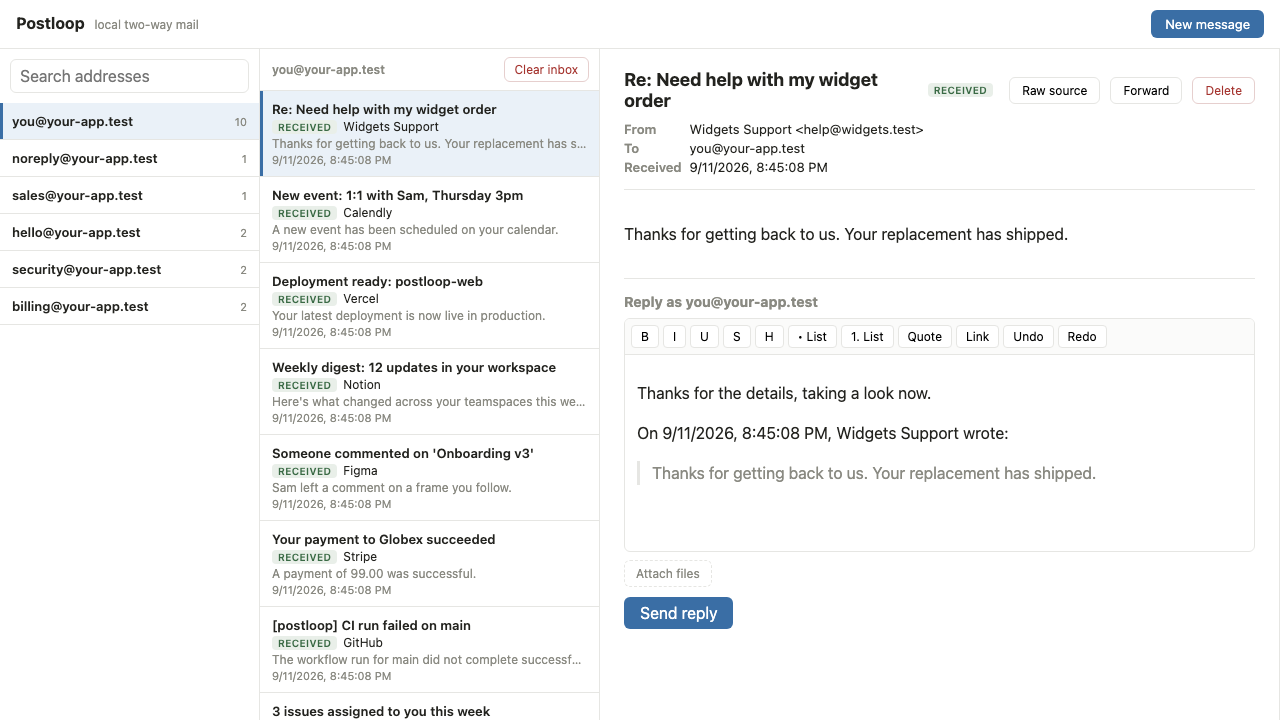
A local two-way mail dev tool. Postloop catches the email your app sends (over SMTP), shows it in a two-list-plus-reading-pane inbox, and lets you reply back into your app by POSTing the reply to an inbound endpoint you configure. It closes the loop: your app emails someone, you read it in Postloop, you reply as that someone, and the reply lands back in your app as inbound mail.
Run
npx postloop
# or: npm i -g postloop && postloop
Open the UI on http://localhost:8025 and point your app's outbound SMTP transport at localhost:1025.
Configuration
All via environment variables:
| Var | Default | What |
| --- | --- | --- |
| PORT | 8025 | HTTP port for the UI and JSON API |
| SMTP_PORT | 1025 | SMTP port the sink listens on |
| OUTBOUND_URL | (unset) | Your app's inbound endpoint; replies POST here. Replies are disabled until this is set. |
| DATA_DIR | ./data | Filesystem store root |
| DEFAULT_FORWARD_PROFILE | plain | Default forward wrapper the composer pre-selects (see Forward styles) |
| POSTLOOP_NO_UPDATE_CHECK | (unset) | Set to 1 to silence the "new version available" startup notice |
How replies work
When you reply, Postloop composes an RFC 5322 message (From the inbox you're viewing, To the original
sender, with In-Reply-To/References chained onto the original) and POSTs it to OUTBOUND_URL as
Content-Type: message/rfc822. The recipient is the To of that message, so your inbound endpoint reads
it from there; Postloop sends nothing out-of-band.
If OUTBOUND_URL is unset, catching and reading still work; the reply button is disabled with a prompt to
set it.
AI agents (MCP)
Postloop exposes a Model Context Protocol server over Streamable HTTP at
/mcp, on the same port as the UI, so an AI agent can drive the loop you drive by hand: read caught mail,
reply back into your app, send new messages, and wait for expected mail to arrive.
Point an MCP client at it. For Claude Code, a project .mcp.json:
{
  "mcpServers": {
    "postloop": { "type": "http", "url": "http://localhost:8025/mcp" }
  }
}
It binds to loopback only and is unauthenticated, like the JSON API. For the full tool reference and running one instance per git worktree, see docs/mcp.md.
Forward styles
The composer can wrap a message in a provider's forwarding shape before it POSTs, so you can exercise how
an ingestion pipeline recovers the true sender and destination inbox. Pick one from the "Forward style"
dropdown, or set DEFAULT_FORWARD_PROFILE to pre-select it. Every profile sets Delivered-To to the
target inbox so a header-based router can resolve it.
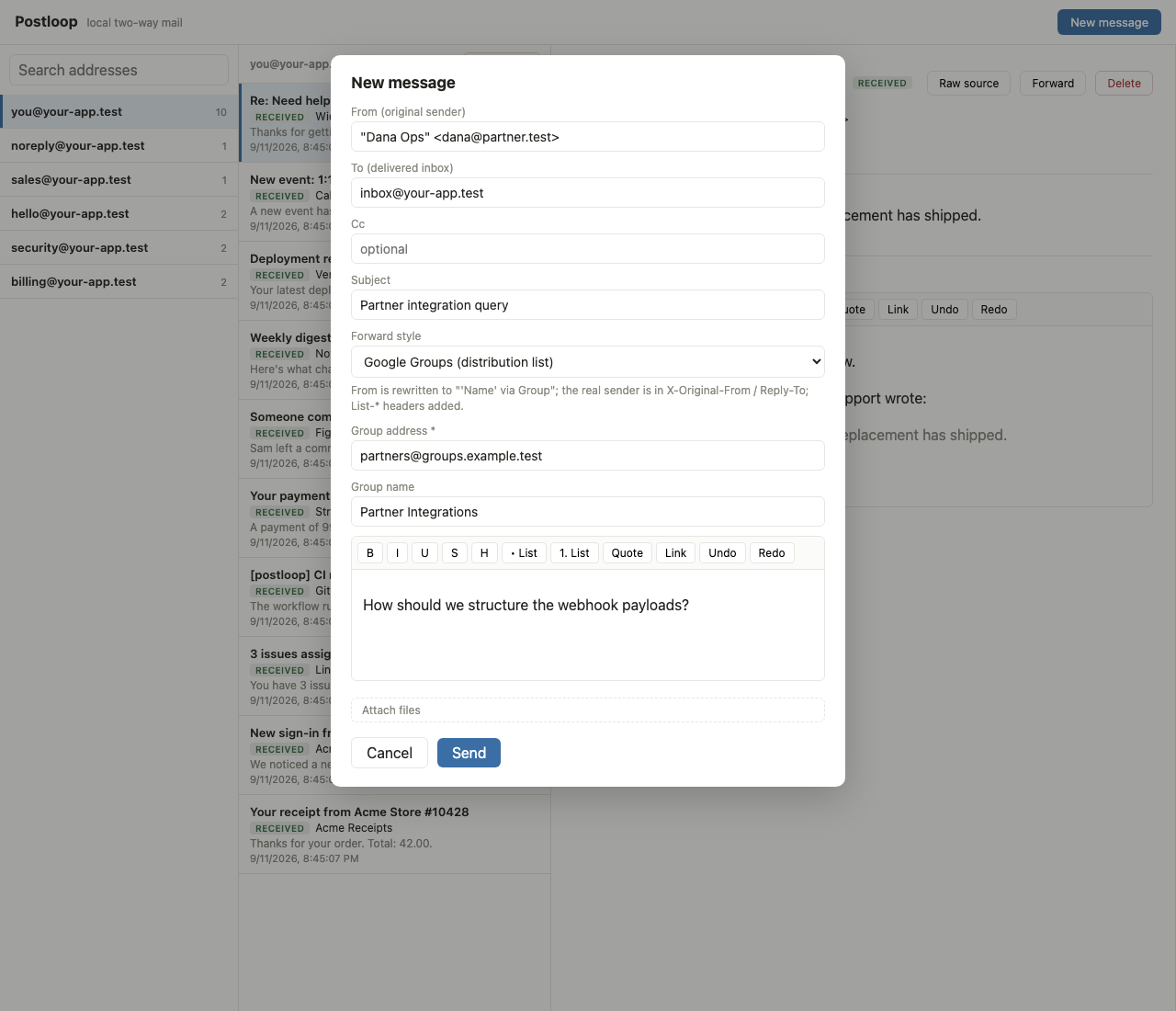
plain— no wrapping;Fromis the original sender.google-groups— list rewrite:Frombecomes"'Name' via Group", the real sender moves toX-Original-From/X-Original-Sender/Reply-To, andList-Id/Precedence: list/X-Google-Group-Id/X-Forwarded-Toare added. Needs the group address.gmail-forward— manual Gmail forward:Fromis the forwarder,Subject: Fwd:, the original quoted in a---------- Forwarded message ---------body block. Needs the forwarder address.outlook-forward— manual Outlook (new/OWA) forward:Fromis the forwarder,Subject: FW:, the original in adivRplyFwdMsgblock with aSent:date. Needs the forwarder address.
Storage
Mail is stored on the filesystem as data/{received-address}/{timestamp}.eml, one folder per address the
mail was received on. The data/ directory is gitignored.
Development
pnpm install
pnpm dev     # vite build --watch + tsx-watched server on one port
pnpm build   # build the UI and compile the server to dist/
pnpm start # run the built serversrc/server— Fastify (HTTP UI + JSON API + the/mcpMCP endpoint), the SMTP sink, the filesystem store, and reply/send composition (operations.ts, shared by the routes and the MCP tools).src/web— React UI (Vite): the two lists and the reading/reply pane.src/shared— DTOs shared by both.tests/e2e— Playwright end-to-end tests that drive the real UI.examples/demo-app— a runnable stand-in for the app under test (sends mail in, receives replies back).
Testing
End-to-end tests run in a real browser (Playwright) against the built UI, with a small demo app standing in for your application. The demo app sends a message into Postloop over SMTP; the test reads it and replies through the UI; it then asserts the reply arrives back at the demo app's inbound endpoint, correctly threaded.
pnpm exec playwright install chromium   # one-off: fetch the browser
pnpm test                               # build, then run the E2E suite
pnpm test:e2e                           # run against an existing build
The stack boots on its own ports (HTTP 8130, SMTP 1130, demo app 4130 by default, all
env-overridable) so it never clashes with a Postloop instance running on the usual 8025/1025. Caught
mail goes to a throwaway, gitignored .e2e-data/ directory, never your normal ./data. CI runs the suite
on every push and pull request (.github/workflows/ci.yml).
The README screenshots are produced by the same suite from a seeded inbox; regenerate them with
POSTLOOP_CAPTURE=1 pnpm test:e2e.
TODO
- Header panel: surface
Message-ID,In-Reply-To,ReferencesandDateon a message, to verify threading. - More forward profiles: Microsoft 365 distribution group / inbox-rule redirect (
Resent-*,X-MS-Exchange-*, SRSReturn-Path), classic Outlook for Windows (-----Original Message-----/ Word HTML), and the DMARC-not-rewritten Google Groups variant. - Custom headers in the composer: set arbitrary ad-hoc headers, beyond the built-in forward profiles.
- Bcc and reply-all, and a plain-text alternative part alongside the HTML (
multipart/alternative). - Search message subjects and bodies, not just addresses.
- Canned scenarios in the UI (new thread, reply, forward, distribution-list) for one-click test sends.
- Unit coverage for the store and compose/forwarding helpers (the Playwright E2E suite covers the full loop end to end; pure-function unit tests are still thin).
- Optional Vite middleware mode for HMR in dev (currently
vite build --watch).