
poudwal
v1.1.5
Published
A Laravel Artisan-inspired CLI for Next.js projects with MongoDB
Downloads
522

Maintainers
 shivam-poudwal
Readme
🎬 Demo
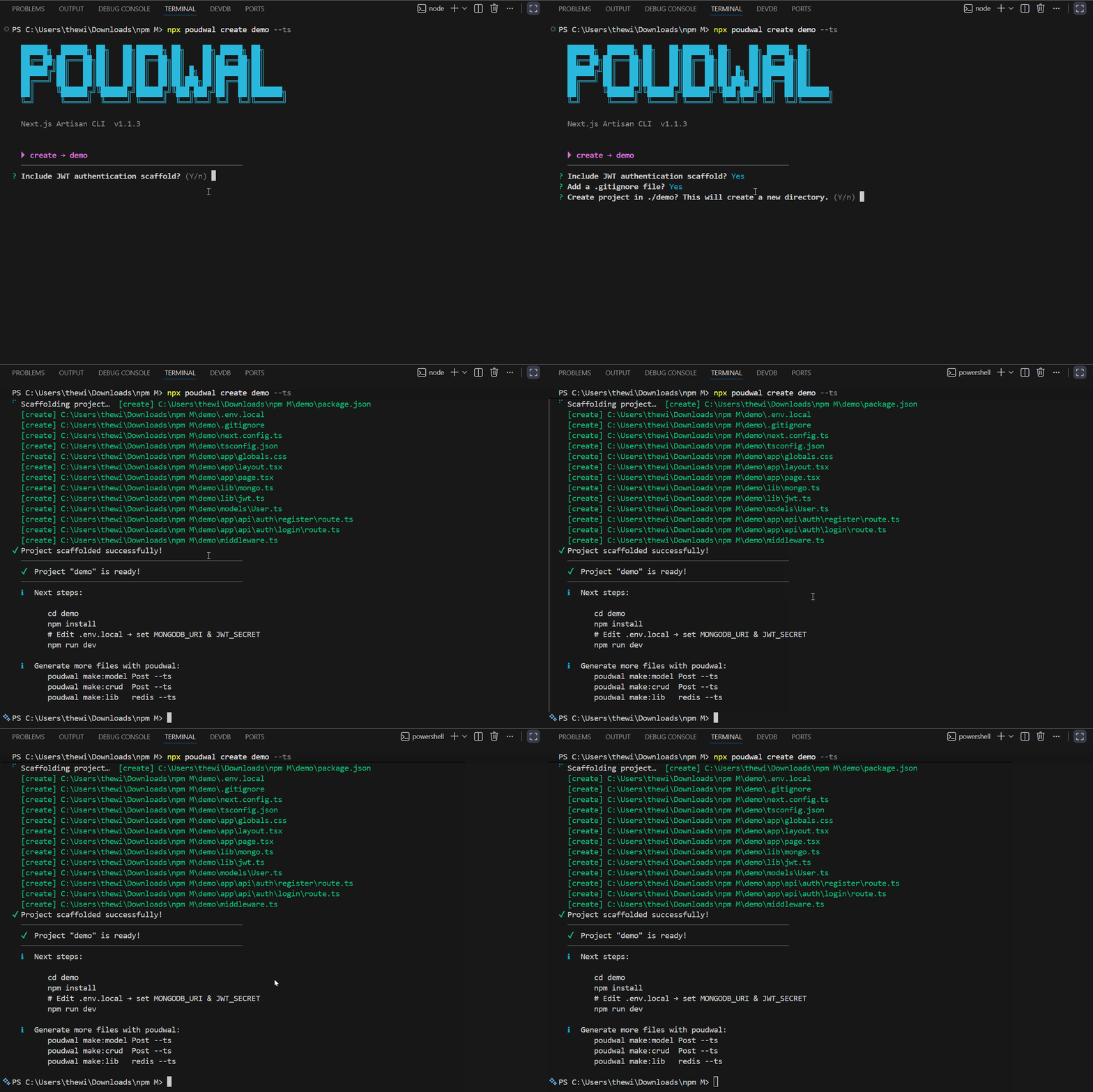
🧰 poudwal
🚀 Artisan for Next.js — A powerful CLI inspired by Laravel Artisan for Next.js 14 App Router with built-in MongoDB + JWT Authentication
✨ Overview
poudwal is a developer productivity CLI that removes repetitive backend setup in Next.js projects.
It helps you quickly scaffold and scale full-stack applications by generating:
- Models (Mongoose)
- API routes (App Router)
- Full CRUD systems
- JWT Authentication (login/register)
- Middleware & utilities
👉 Designed for developers who want Laravel-like development speed in Next.js
🔥 Key Features
- ⚡ One-command project scaffolding
- 🔐 JWT Authentication setup (login/register)
- 🧱 Clean and scalable folder structure
- 📦 MongoDB integration with Mongoose
- 🔄 Full CRUD API generation
- 🧩 Modular template system
- 🟦 TypeScript support
- 🎯 Zero configuration required
🚀 Quick Start
npx poudwal create my-app --ts
cd my-app
npm install
npm run dev🧑💻 Real World Example
npx poudwal create ecommerce-app --ts

cd ecommerce-app

# Create APIs
npx poudwal make:crud product
npx poudwal make:crud order

# Add authentication
npx poudwal install:auth
🎉 You now have:
- Product & Order APIs
- JWT authentication
- MongoDB setup
- Ready-to-use backend
📦 Installation
🔹 Using npx (Recommended)
npx poudwal <command>🔹 Local Development
git clone <your-repo>
cd poudwal
npm install
npm link
⚙️ CLI Commands
🏗 poudwal create <app-name>
Scaffold a complete Next.js project with MongoDB + optional JWT auth.
poudwal create my-app
poudwal create my-app --ts
📁 Generated Structure
my-app/
├── app/
│   ├── layout.(jsx|tsx)
│   ├── page.(jsx|tsx)
│   ├── globals.css
│   └── api/
│       └── auth/
│           ├── register/route.(js|ts)
│           └── login/route.(js|ts)
├── lib/
│   ├── mongo.(js|ts)
│   └── jwt.(js|ts)
├── models/
│   └── User.(js|ts)
├── middlewares/
├── middleware.(js|ts)
├── .env.local
├── .gitignore
├── next.config.(js|ts)
├── tsconfig.json      (TS only)
└── package.json
🧩 poudwal make:model <Name>
Generate a Mongoose model.
poudwal make:model User
poudwal make:model BlogPost --ts
Generates:
models/User.js or models/BlogPost.ts
🌐 poudwal make:api <name>
Generate a Next.js App Router API route (GET list + POST create).
poudwal make:api product
poudwal make:api blog-post --ts
Generates:
app/api/product/route.js
🔥 poudwal make:crud <name>
Generate a model + full CRUD API.
poudwal make:crud Product
poudwal make:crud BlogPost --ts
📁 Output
models/Product.js
app/api/product/route.js
app/api/product/[id]/route.js
🌍 Endpoints
| Method | Path | Action |
| ------ | ------------------- | -------- |
| GET | /api/product | List all |
| POST | /api/product | Create |
| GET | /api/product/[id] | Get one |
| PUT | /api/product/[id] | Update |
| DELETE | /api/product/[id] | Delete |
🛡 poudwal install:auth
Scaffold JWT authentication into an existing Next.js project.
poudwal install:auth
poudwal install:auth --ts
📁 Generates
lib/mongo.(js|ts)– MongoDB connection with cachelib/jwt.(js|ts)– JWT sign, verify, extract tokenmodels/User.(js|ts)– User model with bcryptapp/api/auth/register/route.(js|ts)app/api/auth/login/route.(js|ts)middleware.(js|ts)– JWT guard for/api/*routes
⚙️ Other Commands
make:middleware
poudwal make:middleware auth
poudwal make:middleware rate-limit --ts
make:lib
poudwal make:lib mongo
poudwal make:lib redis --ts
🔐 Authentication Flow
- User registers → password hashed using bcrypt
- User logs in → JWT token generated
- Middleware verifies token for protected routes (
/api/*)
🌱 Environment Variables
Create .env.local in your Next.js project:
MONGODB_URI=mongodb://localhost:27017/myapp
JWT_SECRET=your_super_secret_key
JWT_EXPIRES=7d
NEXT_PUBLIC_APP_URL=http://localhost:3000
📦 Dependencies (Install in your project)
npm install mongoose bcryptjs jsonwebtokenTypeScript Support
npm install -D @types/bcryptjs @types/jsonwebtoken🧠 Template System
Templates use dynamic placeholders:
| Placeholder | Example |
| --------------- | ------- |
| {{name}} | Product |
| {{modelName}} | Product |
| {{routeName}} | product |
| {{appName}} | my-app |
🛠 Adding Custom Templates
- Create
.tplfile insidetemplates/ - Use
{{placeholder}}syntax - Render using:
renderTemplate(tplPath, { key: value })📁 Internal Structure
poudwal/
├── bin/
│   └── poudwal.js
├── commands/
├── templates/
├── utils/
└── package.json
🆚 Why not just Next.js?
| Feature | Next.js | poudwal | | ---------- | -------- | ---------------- | | API setup | Manual | ⚡ Auto-generated | | Auth setup | Manual | 🔐 One command | | CRUD setup | Manual | 🚀 Instant | | Structure | Flexible | 🧱 Scalable |
🚀 Roadmap
- Prisma support
- Zod validation
- Role-based authentication
- Swagger API docs
- Admin dashboard starter
🤝 Contributing
Contributions are welcome! Feel free to open issues or submit pull requests.
📄 License
MIT