
pp-portfolio-classifier
v0.1.4
Published
Automatic classification of Portfolio Performance securities using MorningStar Direct Web Services

Maintainers
 rylorin
Readme
🤖 Portfolio Performance Classifier




This project is an automation tool for Portfolio Performance. It automatically classifies your securities (Funds, ETFs, Stocks) by retrieving data from Morningstar.
It is a TypeScript adaptation and rewrite of the Python project Alfons1Qto12/pp-portfolio-classifier.
🌟 Features
- Multi-Type Support: Handles Funds/ETFs as well as Stocks.
- Automatic Taxonomies: Creates and updates classifications in your XML file:
- Asset Allocation (Equity, Bond, Cash, etc.)
- Regions (Americas, Europe, Asia, etc.)
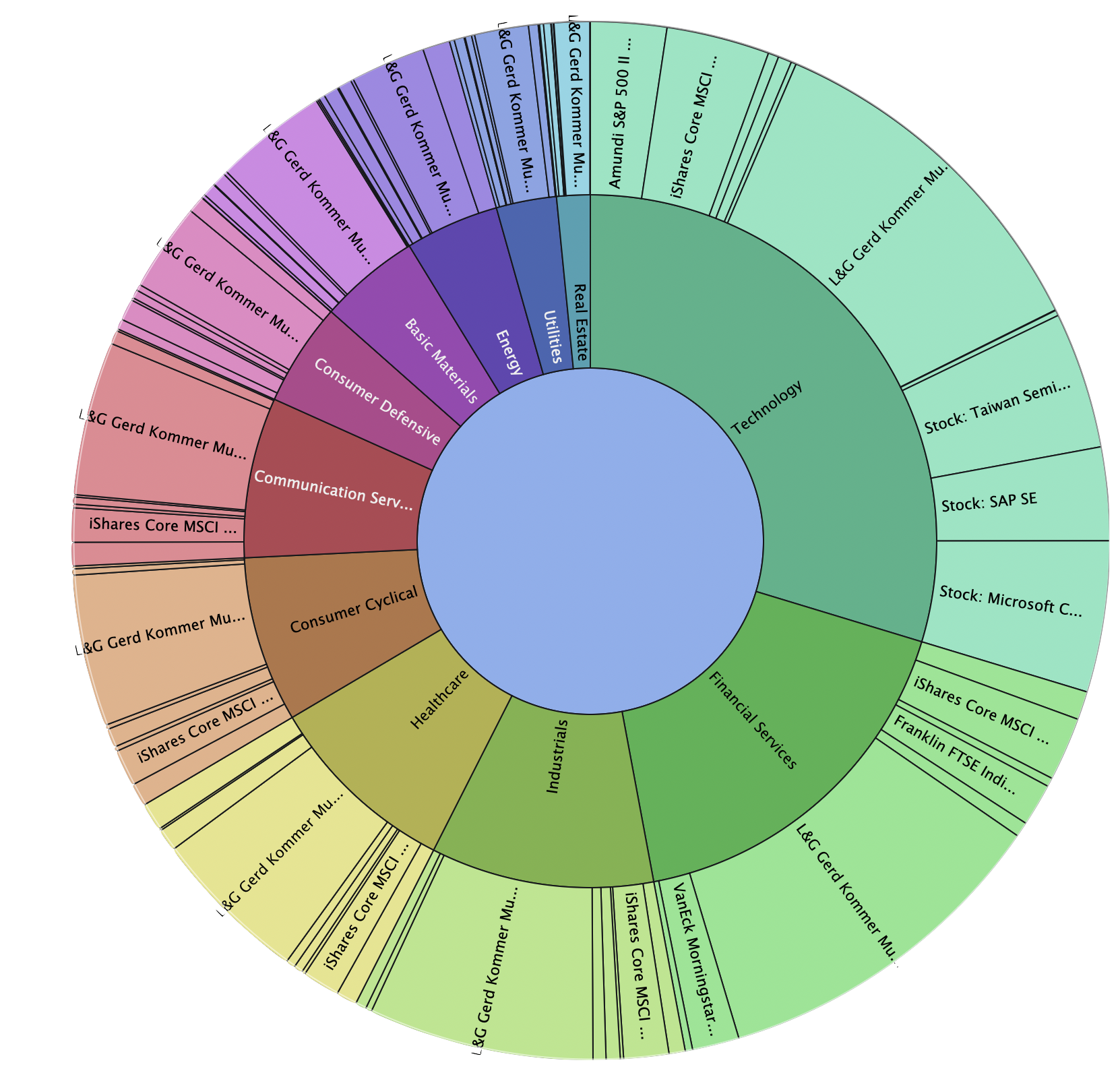
- Sectors (Technology, Healthcare, Finance, etc.)
- Non-destructive: Generates a new XML file by default to avoid overwriting your data without verification.
- Configurable: Customize the script's behavior (language, taxonomies, etc.) via a configuration file.
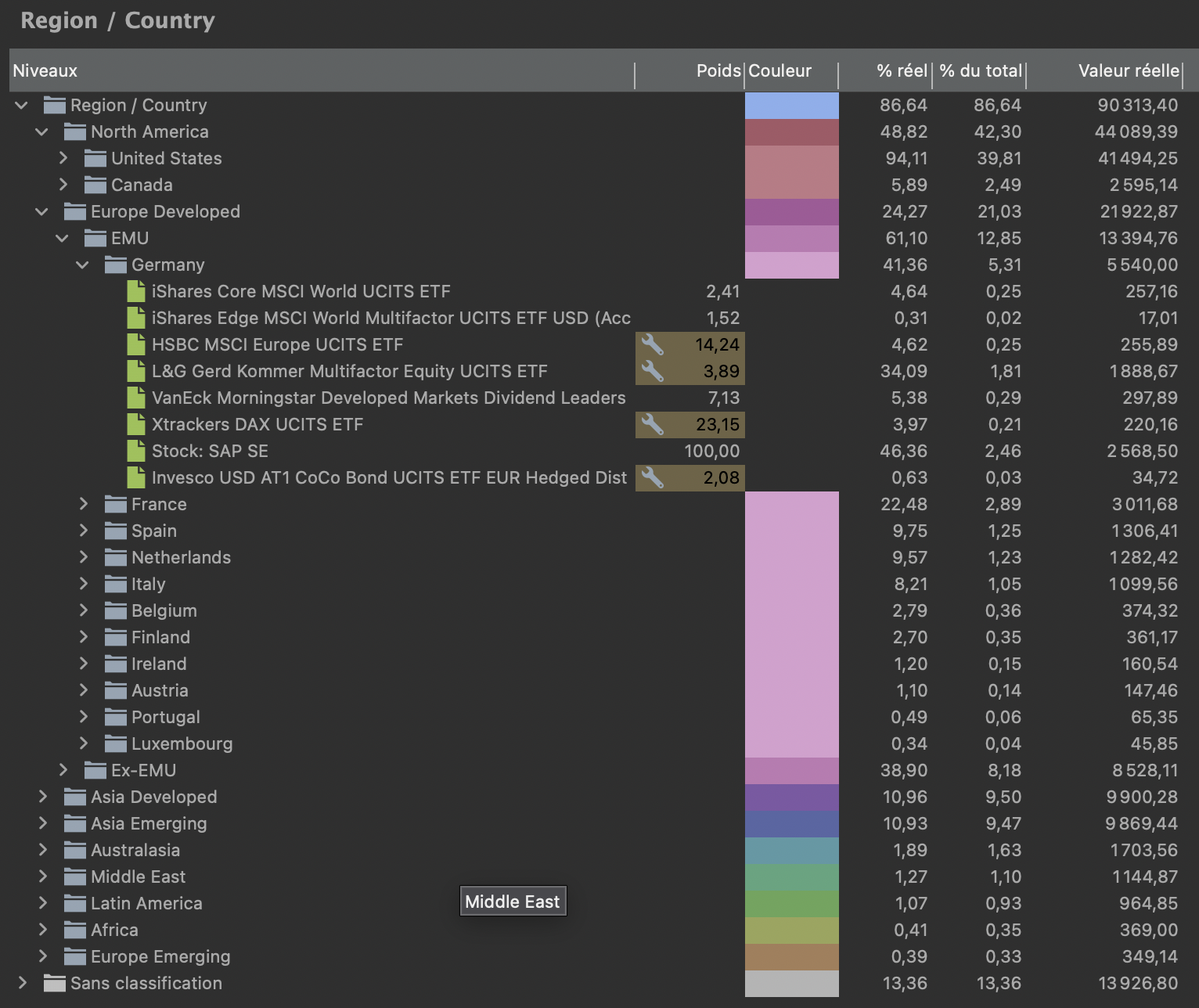
- Multi-levels taxonomies: Supports hierarchical taxonomies (e.g., "Europe > Germany").
- Nested taxonomies: Allows to embed a taxonomy into a specific category of another taxonomy.
🧠 How it works
- Parsing: The script reads your
.xmlfile and extracts all securities with a valid ISIN. - Data Retrieval: It queries Morningstar APIs to fetch:
- Asset Allocation: Breakdown by asset type (Cash, Stocks, Bonds, etc.).
- World Regions: Geographical breakdown (Americas, Europe, Asia, etc.).
- Sectors: Industry breakdown (Technology, Healthcare, Energy, etc.).
- Classification: It maps the retrieved data to the taxonomies defined in your configuration.
- Generation: A new XML file is generated containing your original data plus the new classification categories and assignments.
📌 Prerequisites
- Node.js (v22 or higher recommended)
🚀 Installation & Usage
Installation
No installation is required, npx will download and install on the fly the latest release of the package.
Usage
To run the classification on your portfolio file from the system command line prompt (not from the Node.js REPL), use the following command:
npx pp-portfolio-classifier <path_to_your_portfolio.xml> [output_path.xml]Input - The path to your current Portfolio Performance
.xmlfile.Output (Optional): The path to save the modified file. Default: input file with suffix
.classified.xml.
⚙️ Configuration
The project uses node-config for configuration management.
Credentials
The script is pre-configured with default values for taxonomies and Morningstar API settings.
However, you need to add your Morningstar credentials in a config/local.json file:
{
"morningstar": {
"username": "your-moningstar-username",
"password": "your-moningstar-password"
}
}
If you don't have a Morningstar account, you can create one [here](https://www.morningstar.com/fr/fr/user/register); but a subscription is required to access the Morningstar API.
> If you don't provide the credentials, the script will try to bypass Morningstar authentication which stopped working on 2026-05-30.
### Advanced Customization (Optional)
If you want to customize the script's behavior, you can create a `config/local.json` file.
You can customize the script's behavior (change the taxonomy language, modify the Morningstar domain, etc.) by creating a `config/local.json` file. This file will override the default values defined in `config/default.json`. The custom config file (`config/local.json`) can be located in the same directory as your portfolio file or in the current working directory.
This is ideal for adapting category names to your language or customize taxonomies to your personal preferences.
**Example of `config/local.json`:**
```json
{
"mappings": {
"AssetTypeMap": {
"1": "Actions",
"3": "Obligations",
"5": "Obligations",
"6": "Obligations",
"7": "Liquidités & équivalents",
"8": "Autres",
"99": "Autres"
}
},
"taxonomies": {
"asset_type": {
"active": true,
"name": "Classes d’actifs",
"stockConfig": {
"value": "Actions"
}
},
"region": { "active": false },
"country": { "active": false },
"country_by_region": {
"active": true,
"notClassifiedField": "NotClassified",
"multigroup": true
},
"stock_style": { "active": false },
"stock_sector": { "active": true },
"bond_sector": { "active": false },
"holding": { "active": false, "maxItems": 10 }
},
"embeddedTaxonomies": {
"stock_style_in_asset": {
"active": true,
"parentCategory": "Actions"
},
"bond_sector_in_asset": {
"active": true,
"parentCategory": "Obligations"
}
}
}Available Taxonomies:
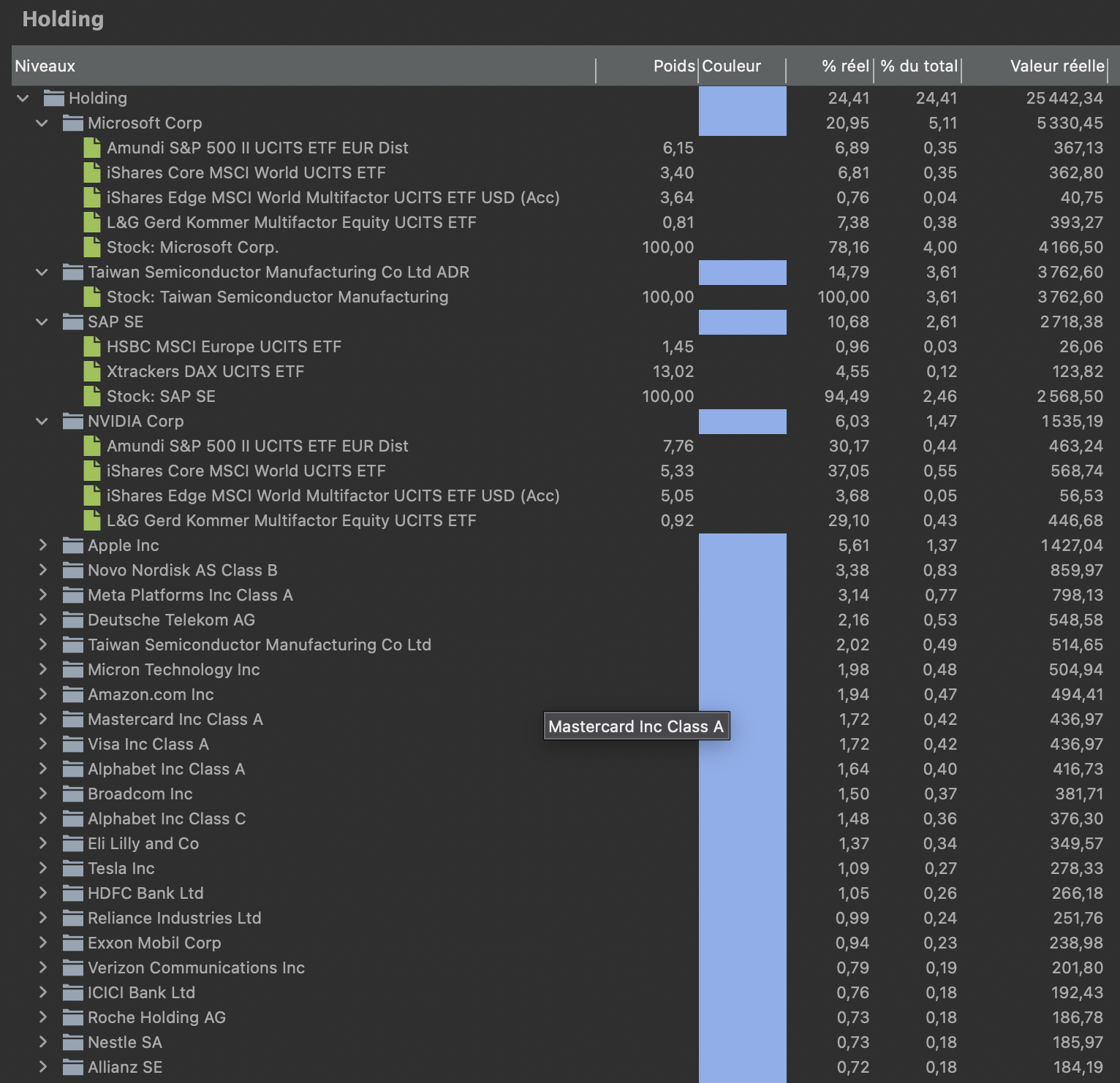
asset_typeenabled by defaultregionenabled (auto) if the taxonomy already exists in your portfolio filecountryenabled (auto) if the taxonomy already exists in your portfolio filecountry_by_regionenabled by defaultstock_styleenabled (auto) if the taxonomy already exists in your portfolio filestock_sectorenabled by defaultbond_sectorenabled (auto) if the taxonomy already exists in your portfolio fileholdingenabled by default but limited to top 100 holdings as the full list may become huge and difficult to manage for PP.
Configuration fields:
active: Enable/disable this taxonomy. Set totrueto enable,falseto disable, or"auto"to enable it only if the taxonomy already exists in your portfolio file (it can be empty with only the root category).name: The name of the taxonomy as it will appear in Portfolio Performance.mapping: The key of the mapping table to use for this taxonomy.stockConfig: Specific configuration for stocks.maxItems: Limit the number of MorningStar breakdown entries used to build the taxonomy. Useful for large taxonomies likeholding.notClassifiedField: The name of the field used to store unclassified breakdown weight total.
How Mappings Work
The classification logic relies on mapping tables defined in the configuration files (config/default.json and config/local.json) to translate Morningstar data into your Portfolio Performance taxonomies.
- Direct Value: For some taxonomies like holding, no mapping table is used. The script directly uses the value provided by Morningstar (e.g., the security name).
- Mapped Value: For most taxonomies, a mapping table is used to convert a code or an ID from Morningstar into a human-readable category name. For instance, AssetTypeMap converts the code 1 to "Stock". If a code is mapped to
null, that specific data point is ignored. This is crucial for avoiding inconsistencies. For example, the region breakdown from Morningstar includes both geographical regions (like "Europe", "Asia") and market types ("Developed Markets", "Emerging Markets"). Without ignoring the market types, the total allocation would exceed 100%. By mapping them tonull, we ensure only the geographical regions are used for the classification.
Advanced Usage: Security Notes Flags
You can control the classification behavior for specific securities by adding special flags to the Note field in Portfolio Performance.
Override ISIN: Use a different ISIN for Morningstar lookup (useful if the security's main ISIN is not found or incorrect in Morningstar).
#PPC:[ISIN2=US0000000000]Ignore Classification: Prevent the script from classifying a specific security.
- Ignore all taxonomies:
#PPC:[ignore] - Ignore specific taxonomies (comma separated):
#PPC:[ignore=asset_type,region]
- Ignore all taxonomies:
⚠️ Known Limitations
- Multi-Asset Fund Breakdowns Currently, the tool may produce inconsistent classifications for funds holding multiple asset classes (e.g., 90% Stocks, 10% Bonds). Morningstar reports a breakdown relative to a specific asset class (e.g., "100% of Bonds are Government Bonds"), therfore this percentage will apply to the entire fund instead of weighting it by the asset class portion (i.e., 100% of the 10%). This means a fund with only 10% bonds could be classified as 100% Government Bonds in that specific taxonomy. This is how Morningstar reports data and is a known limitation of the current logic. 📌 Nested taxonomies are a nice workaround to this issue.
- Portfolio Performance file format The script only supports the unencrypted XML (without IDs) file format of Portfolio Performance.
🔗 Nested Taxonomies
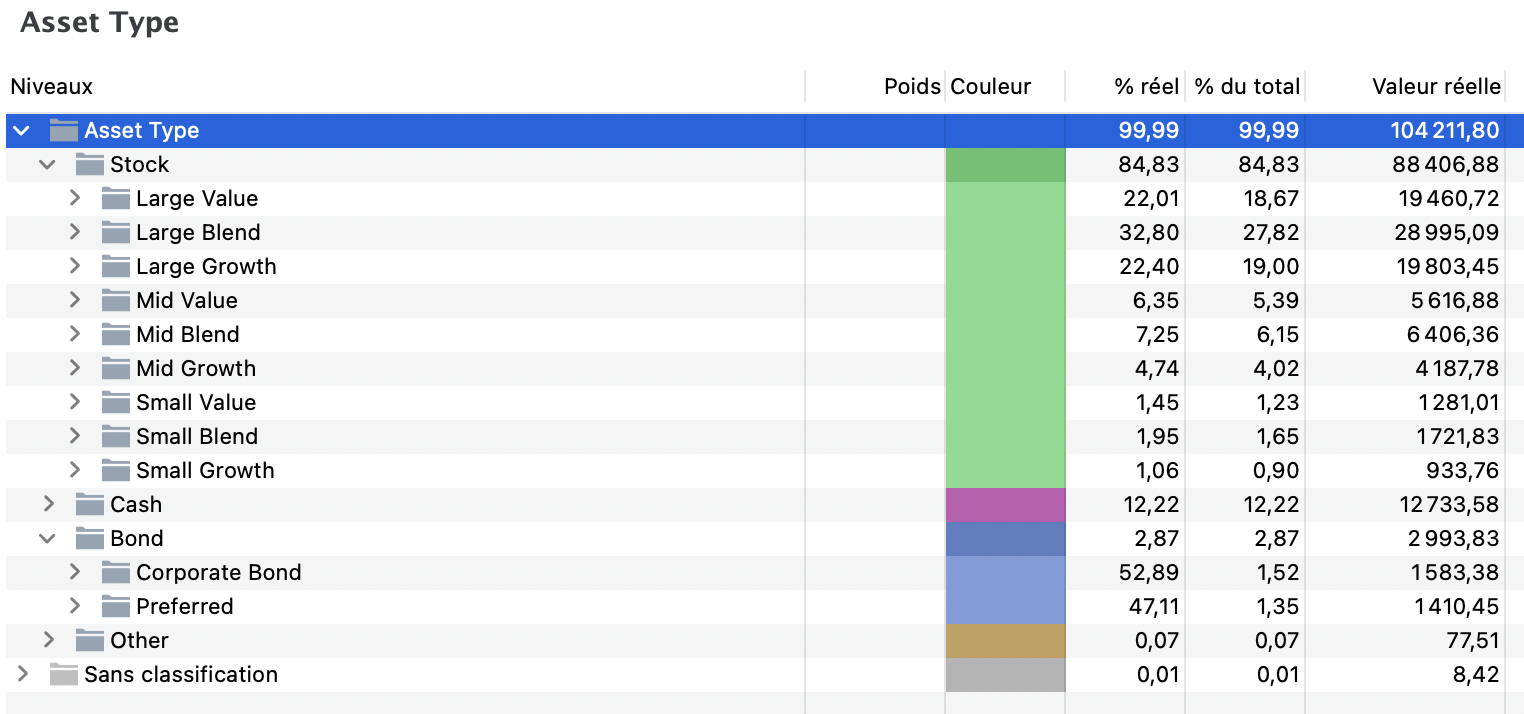
You can now nest taxonomies within specific categories of other taxonomies! This solves the multi-asset fund limitation mentioned above.
How it works
Instead of having separate taxonomies, you can embed one taxonomy into a specific category of another taxonomy. The weights are automatically calculated in cascade.
Example
Without nested taxonomies:
Asset Type:          Stock Style:
├── Stock: 80%       ├── Large Growth: 70%
└── Bond: 20%        └── Small Value: 30%
With nested taxonomies:
Asset Type:
├── Stock (80%)
│   ├── Large Growth: 56%  ← 80% × 70%
│   └── Small Value: 24%  ← 80% × 30%
└── Bond: 20%
Configuration
Add an embeddedTaxonomies section to your config/local.json:
{
  "embeddedTaxonomies": {
    "stock_style_in_asset": {
      "active": true,
      "parentTaxonomy": "asset_type",
      "parentCategory": "Stock",
      "childTaxonomy": "stock_style",
      "targetTaxonomy": "asset_type"
    },
    "bond_sector_in_asset": {
      "active": true,
      "parentTaxonomy": "asset_type",
      "parentCategory": "Bond",
      "childTaxonomy": "bond_sector",
      "targetTaxonomy": "asset_type"
    }
  }
}
The above example is already included in the default configuration but is provided here for reference/documentation.
Configuration fields:
active: Enable/disable this embeddingparentTaxonomy: The taxonomy containing the parent categoryparentCategory: The category where to embed the child taxonomychildTaxonomy: The taxonomy to embedtargetTaxonomy: The taxonomy where to create subcategories (usually same as parentTaxonomy)
Use Cases
- Multi-asset funds: Embed stock styles within stocks, bond sectors within bonds
- Detailed breakdowns: Get more granular classifications for specific asset classes
- Better visualization: See the complete hierarchy in a single taxonomy
Notes
- Nested taxonomies are enabled by default as they provide a more accurate classification.
- The total always equals 100% (automatic adjustment if needed)
- If a parent category doesn't exist (0%), the embedding is skipped
- If a child taxonomy has no data, the parent category remains unchanged
🛠️ Troubleshooting
- Missing Data: If a security is not classified, it might be because Morningstar does not have data for that specific ISIN, or the ISIN is missing in your Portfolio Performance file.
- Rate Limiting: If you have a very large portfolio, Morningstar might temporarily block requests. The script includes delays to mitigate this.
- Invalid XML: Ensure your input file is a valid Portfolio Performance XML file (unencrypted).
🖼️ Gallery
Asset Type (nested taxonomies)
Regions (hierachical taxonomy)
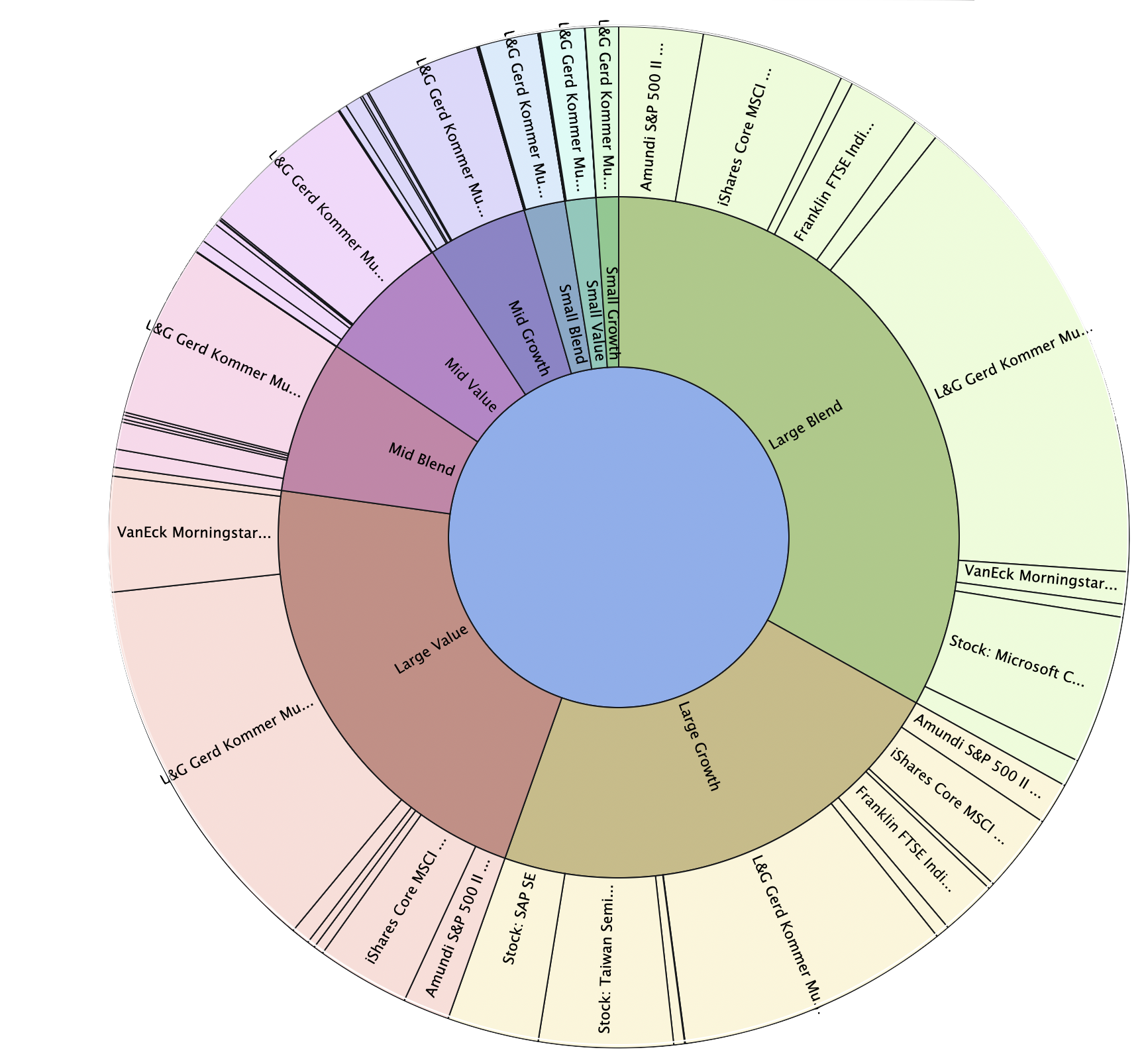
Autoclassified stock-style
Autoclassified Sectors
List of stocks and holdings
✨ Contributions
Contributions are welcome! Please submit a pull request to rylorin/pp-portfolio-classifier GitHub repository with your improvements.
📜 License
This project is licensed under the MIT License. See the LICENSE file for details.
🙏 Credits & Contributors
- Based on the original work by Alfons1Qto12/pp-portfolio-classifier.
- Google Gemini
- Kilo Code
- Benjamin BERTELLE for the
maxItemsconfig option - LuAp for the
notClassifiedField/inclNotClassifiedconfig option
📞 Contact
For questions or support, please open an issue on the GitHub repository.