
pptx-svelte-viewer
v4.0.0
Published
Svelte 5 PowerPoint viewer and editor component: render, edit, present, and export PPTX slides in the browser.

Maintainers
 christophervr
Readme
pptx-svelte-viewer


Show, edit, and present Microsoft PowerPoint (.pptx) files directly in a
Svelte 5 app: no server, no conversion step, no PowerPoint install required.
Drop in a <PowerPointViewer> component (built with runes), hand it the
file's bytes, and it renders slides as real HTML and CSS.
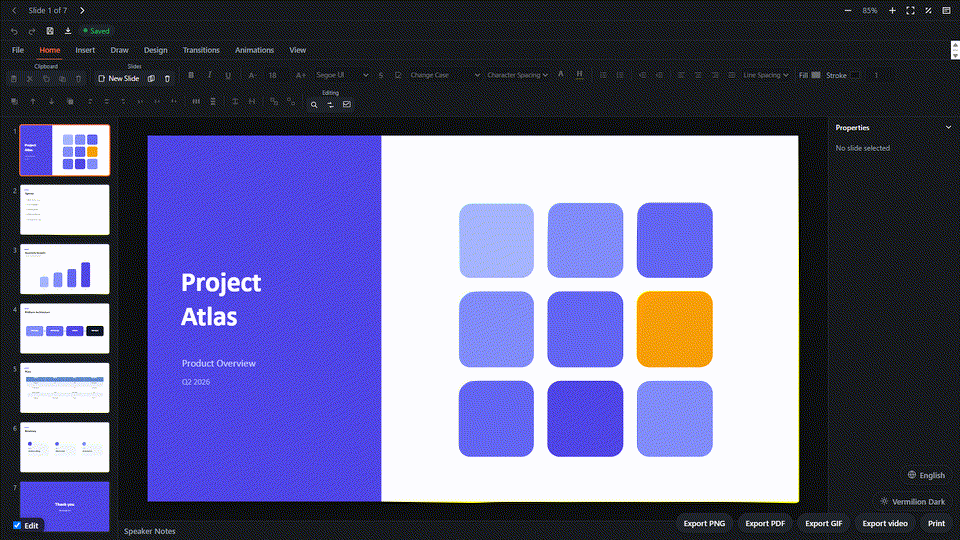
The rendering is done by the framework-agnostic pptx-viewer-core engine, which turns a .pptx file into a structured slide model. This package is the Svelte layer that draws that model on screen, and the engine is bundled in, so you install just one package.
▶️ Try the live demo · 📦 npm · 📖 Full docs · 🧩 Core SDK
Features
- A single component:
<PowerPointViewer>, written with Svelte 5 runes. - Real HTML rendering: slides are drawn as ordinary HTML and SVG, not as a picture, so text stays sharp at any zoom and is selectable and accessible.
- Full element coverage: text, shapes, images, groups, connectors, tables, charts, SmartArt (2D and opt-in 3D), media (video/audio), ink, OLE embedded objects, and 3D models - all powered by the same shared engine as the other bindings.
- Editing: insert and format elements; multi-select, group, arrange, drag,
resize, and rotate; rich inline text and notes editing; inherited template
element editing; undo/redo; save the edited deck back to
.pptx. - Presentation mode: fullscreen presenting via the real Fullscreen API, with media autoplay.
- Export: PNG, PDF, GIF, video, print, notes pages, and handouts.
- Slide navigation: responsive desktop/mobile chrome, thumbnail sidebar, toolbar, keyboard navigation, and a rich speaker-notes panel.
- Review and accessibility: comments and presentation-wide accessibility checks from the Review ribbon.
- Themeable: the shared
ViewerThemesystem (--pptx-*CSS custom properties), including the vermilion presets. - i18n: English built in; register more locales via
pptx-svelte-viewer/i18n.
Install
npm install pptx-svelte-viewerRequires Svelte 5 (runes) as a peer. The pptx-viewer-core engine is
bundled in and its runtime dependencies (jszip, fast-xml-parser)
install automatically, so you don't install anything separately unless you
want to call the SDK directly.
Install three only when you enable a 3D SmartArt or 3D chart prop. The viewer falls back to
SVG when it is absent. Install yjs with y-websocket or y-webrtc only for collaboration.
Component styles ship as a real stylesheet, not runtime-injected CSS (which proved unreliable in real SvelteKit apps: SSR, a strict CSP, or the host's own global CSS could all cause it to silently not apply). Import it once at your app entry:
import 'pptx-svelte-viewer/styles';Usage
<script lang="ts">
	import { PowerPointViewer } from 'pptx-svelte-viewer';

	let source: ArrayBuffer | undefined = $state();

	async function open(file: File) {
		source = await file.arrayBuffer();
	}
</script>

<div style="height: 600px">
	<PowerPointViewer
		{source}
		initialSlide={0}
		showThumbnails
		showToolbar
		onload={(detail) => console.log('slides:', detail.slideCount)}
		onslidechange={(index) => console.log('slide', index)}
		onerror={(message) => console.error(message)}
	/>
</div>
Viewport fit options
<PowerPointViewer {source} fitPadding={0} maxFitScale={null} />fitPadding is a per-side CSS-pixel number or { horizontal, vertical };
maxFitScale is a positive fit-factor ceiling or null for unlimited enlargement.
Omission preserves 24 px padding on each side and unlimited fit enlargement.
Custom state hosts can supply live getFitPadding / getMaxFitScale getters to
createViewerState. These options do not change document geometry, user zoom,
or fullscreen fitting. See the cross-binding defaults.
Props
| Prop | Type | Default | Description |
| -------------------------------------------------------------------------- | ------------------------------------ | ---------------------- | ----------------------------------------------------------------------------------------------------------------------------------------- |
| source | Uint8Array \| ArrayBuffer \| null | - | Raw .pptx bytes. |
| theme | ViewerTheme | - | Color/radius/CSS-var overrides. |
| fonts | ViewerFontSource[] | [] | Licensed font sources supplied by the host application. |
| locale | string | 'en' | UI locale (see pptx-svelte-viewer/i18n). |
| initialSlide | number | 0 | Slide shown after load (0-based). |
| showThumbnails | boolean | true | Thumbnail sidebar. |
| showToolbar | boolean | true | Navigation/zoom/fullscreen toolbar. |
| showNotes | boolean | true | Speaker-notes panel and its toolbar toggle. |
| hiddenActions | ToolbarActionId[] | - | Toolbar buttons/ribbon tabs to hide individually (e.g. ['share', 'broadcast']), instead of hiding the whole toolbar. |
| editable | boolean | false | Ribbon editing, insertion, arrange, and save. |
| smartArt3D | boolean | false | Opt-in Three.js 3D SmartArt renderer (needs the optional three peer; falls back to SVG without it). |
| surfaceChart3D, barChart3D, lineChart3D, areaChart3D, pieChart3D | boolean | false | Independently opt in to interactive Three.js renderers for the matching 3D chart kinds; each falls back to SVG when WebGL is unavailable. |
| ai | PptxAiConfig | n/a | Optional AI assistant configuration. The SDK peers load only when its panel is opened. |
| class | string | - | Class applied to the root element. |
| fileName | string | - | Display name shown in the desktop title bar. |
| autosave | boolean | true | Debounced crash-recovery autosave to IndexedDB (requires filePath; fires onautosave). |
| filePath | string | - | IndexedDB record key for autosave; autosave is inert without it. |
| autosaveIntervalMs | number | File > Options cadence | Autosave debounce window in milliseconds. |
| collaboration | CollaborationConfig | - | Yjs real-time collaboration config (y-websocket or serverless y-webrtc room, role). |
| shareDefaults | { roomId?, userName?, serverUrl? } | - | Prefilled values for the Share/Broadcast dialogs. |
| defaultThemeKey | string | - | Initial File > Options > Appearance selection when no persisted preference exists. |
| availableThemes | ThemeCatalogEntry[] | - | Theme choices offered by File > Options > Appearance (defaults to the built-in catalog). |
| onThemeChange | (key: string) => void | - | Host hook for the appearance picker; when set, the host owns persisting the choice. |
| defaultLocale | string | - | Initial File > Options > Language selection when no persisted preference exists. |
| availableLocales | LocaleCatalogEntry[] | - | Locale choices offered by File > Options > Language (defaults to the registered dictionaries). |
| onLocaleChange | (code: string) => void | - | Host hook for the language picker; when set, the host owns persisting the switch. |
| accountAuth | AccountAuthConfig | - | Optional sign-in hook point for File > Account (disabled unless enabled: true). |
Callbacks
| Callback | Payload | Description |
| ---------------------- | --------------------- | -------------------------------------------------------------------------------- |
| onload | ViewerLoadDetail | Fired after a presentation loads. |
| onerror | string | Fired when loading fails (human-readable message). |
| onslidechange | number | Fired when the active slide changes (0-based). |
| onnotesupdate | string | Fired when the user edits the speaker notes; omit to render the panel read-only. |
| onchange | - | Fired after every committed edit when editable. |
| ondirtychange | boolean | Fired when the unsaved-changes flag toggles. |
| oncontentchange | Uint8Array | Fired with freshly serialised .pptx bytes when the content changes. |
| onmodechange | string | Fired when the viewer mode changes. |
| onzoomchange | number | Fired when the zoom level changes. |
| onselectionchange | string[] | Fired with the selected element IDs when selection changes. |
| onslidecountchange | number | Fired when the total slide count changes. |
| onopenfile | - | Host override for the File > Open action. |
| onautosave | Uint8Array | Fired with serialised bytes after each successful autosave. |
| onautosavetoggle | boolean | Fired when the title bar toggles AutoSave. |
| onstartcollaboration | CollaborationConfig | Fired when a collaboration session starts. |
| onstopcollaboration | - | Fired when a collaboration session stops. |
Imperative API (bind:this)
The component instance implements the full shared PowerPointViewerAPI plus
editing and export methods (the PowerPointViewerApi type):
<script lang="ts">
	import { PowerPointViewer, type PowerPointViewerApi } from 'pptx-svelte-viewer';

	let viewer: PowerPointViewerApi | undefined = $state();
</script>

<PowerPointViewer bind:this={viewer} {source} editable />
<button onclick={() => viewer?.undo()}>Undo</button>- Serialisation:
getContent(),save(format?),downloadPptx(fileName?),downloadAs(format, fileName?). - Navigation / zoom / mode:
goTo(index),goPrev(),goNext(),getZoom(),setZoom(level),zoomIn(),zoomOut(),zoomReset(),getMode(),setMode(mode),getActiveSlideIndex(),setActiveSlideIndex(index),getSlideCount(),isDirty(). - Editing:
undo(),redo(),canUndo(),canRedo(),deleteSelected(),getSelectedElementId(),getSelectedElementIds(),selectElements(ids),clearSelection(). - Slides / elements:
getSlides(),getSlide(index),getActiveSlide(),addSlide(afterIndex?),deleteSlides(indexes),duplicateSlides(indexes),moveSlide(from, to),toggleHideSlides(indexes),getElements(slideIndex?),getElementById(id, slideIndex?),addElement(element),updateElement(id, patch),deleteElements(ids),duplicateElement(id). - Export / print:
exportSlidePng(index?),copySlideAsImage(index?),exportPdf(options?),exportGif(options?),exportVideo(options?),print(options?).
See element insertion
for the addElement contract and a core-factory example.
See the full docs for the complete props/events contract, theming, and localization guides.
Composing a custom viewer shell
<PowerPointViewer> bundles the slide canvas, ribbon, thumbnail rail,
inspector, and every dialog into one component. If you only want a subset,
for example your own chrome around just the ribbon and the slide canvas,
import the pieces independently from the pptx-svelte-viewer/viewer
sub-path instead: Ribbon / ViewerToolbar (the full editing ribbon and the
compact read-only toolbar), SlideCanvas (the slide stage-holder), and
createViewerState, a factory that builds the same reactive controllers
(ViewerState, EditorState, EditorController, CollaborationController,
etc.) PowerPointViewer.svelte itself constructs, so wiring Ribbon /
ViewerToolbar to its return value mirrors the bundled component exactly.
<script lang="ts">
	import { createViewerState, Ribbon, SlideCanvas } from 'pptx-svelte-viewer/viewer';

	let source: ArrayBuffer | undefined = $state();
	let rootEl: HTMLDivElement | undefined;
	let stageHolderEl: HTMLDivElement | undefined;
	let viewportWidth = $state(0);
	let viewportHeight = $state(0);

	// Must be called synchronously here, in your own shell component's
	// script (not inside a callback or after an `await`): it registers
	// `onMount`/`onDestroy` and Svelte context (the translator context
	// `Ribbon`'s tabs and `ViewerToolbar` read via `useTranslator()`,
	// among others) that only work during component initialisation.
	const state = createViewerState({
		getSource: () => source,
		getAutosave: () => false,
		getFilePath: () => undefined,
		getInitialSlide: () => 0,
		t: (key) => key, // or `createTranslator` from `pptx-svelte-viewer/i18n`
		getSmartArt3D: () => false,
		getEditable: () => true,
		getStageHolderEl: () => stageHolderEl,
		getRootEl: () => rootEl,
		getViewportWidth: () => viewportWidth,
		getViewportHeight: () => viewportHeight,
		getMasterScale: () => 1,
	});
</script>

<div bind:this={rootEl} class="my-custom-shell">
	<Ribbon
		editor={state.editor}
		findReplace={state.findReplace}
		canvasSize={state.loader.canvasSize}
		current={state.viewer.current}
		total={state.viewer.slideCount}
		onprev={() => state.viewer.prev()}
		onnext={() => state.viewer.next()}
		onnavigateslide={(index) => state.viewer.goTo(index)}
	/>
	<!-- ...plus whichever other `RibbonProps` fields your shell needs. -->
	<div bind:clientWidth={viewportWidth} bind:clientHeight={viewportHeight}>
		<SlideCanvas
			slide={state.activeSlide}
			canvasSize={state.loader.canvasSize}
			mediaDataUrls={state.loader.mediaDataUrls}
			scale={state.scale}
			editingActive={state.editingActive}
			onstageholder={(el) => (stageHolderEl = el ?? undefined)}
			onstagepointerdown={state.controller.onStagePointerDown}
			onstagepointermove={state.controller.onStagePointerMove}
		/>
	</div>
</div>Ribbon's full prop contract is the RibbonProps type; ViewerToolbar's is
ViewerToolbarProps; SlideCanvas's is SlideCanvasProps (flat/typed
props, no live state-class instances - the editing/annotation/collaboration
overlays that stack on top of the stage are passed in as SlideCanvas
children instead, since only the host knows which of them it needs).
createViewerState's options and return value are CreateViewerStateOptions
and ViewerStateBag.
Two caveats if you go this route:
- There is no standalone "canvas-only" component that also owns the
thumbnail rail, notes panel, and inspector pane the way the bundled
viewer's
ViewerBodydoes - those stay your shell's responsibility to assemble (or reuseViewerBodyitself, which is not exported, since it takes live state-class instances rather than flat props). createViewerStateis a newer, lower-level extraction than the rest of this package's public API; its exact option/return shape may still be refined as more of the bundled component's construction gets folded into it.PowerPointViewer.sveltecurrently keeps its own parallel inline copy of the same wiring rather than callingcreateViewerStateitself, so treat the factory as accurate-today rather than the single source of truth yet.
Internal building blocks & slide-transition helpers
Most of this package's cross-framework logic (colour/geometry/connector/animation/chart math,
slide transitions, and more) lives in pptx-viewer-shared, an internal package that is never
published to npm. The framework-neutral slide-transition resolver/keyframes
(resolveSlideTransition, resolveTransitionDurationMs, SLIDE_TRANSITION_KEYFRAMES) and the
PresentationTransitionOverlay component behind presentation mode are re-exported from the
pptx-svelte-viewer/internals subpath, not covered by semver, so you never need
pptx-viewer-shared yourself:
import {
	resolveSlideTransition,
	PresentationTransitionOverlay,
} from 'pptx-svelte-viewer/internals';
Reference translations
Optional French, Spanish, German, and Simplified Chinese dictionaries ship with this package. Import only the language you need:
import { translationsZhCN } from 'pptx-svelte-viewer/i18n/zh-CN';The other subpaths are i18n/fr (translationsFr), i18n/es
(translationsEs), and i18n/de (translationsDe). See the
localization guide
for registration and runtime switching. Existing English imports are unchanged.
License
Apache-2.0. See LICENSE and NOTICE.