pptx-viewer-core
v1.0.7
Published
Core PPTX engine — parse, edit, serialize, and convert PowerPoint files.
Maintainers
Readme
pptx-viewer-core
A framework-agnostic TypeScript engine for parsing, editing, serialising, and converting PowerPoint (.pptx) files. Operates entirely in-memory on the OpenXML ZIP archive with no native dependencies.
Table of Contents
- pptx-viewer-core
Overview
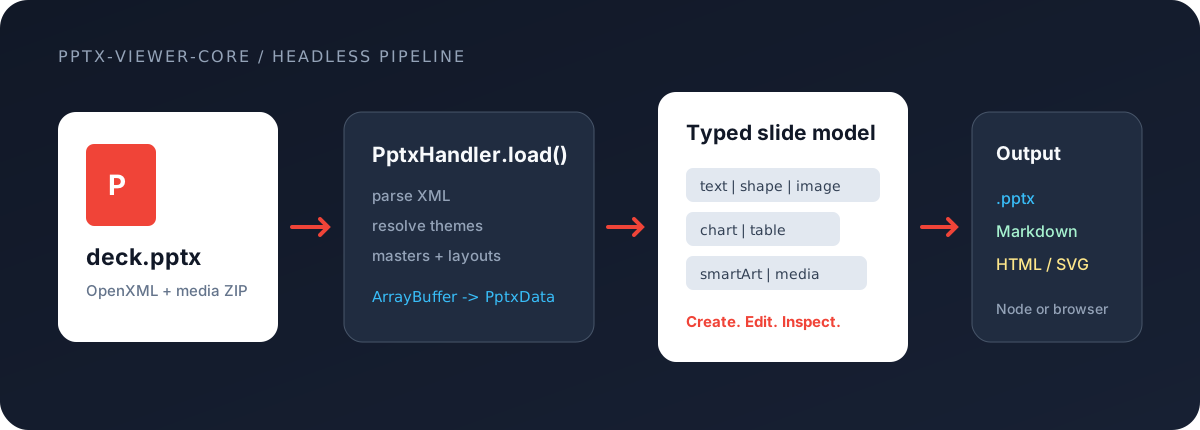
PowerPoint files (.pptx) are ZIP archives containing XML documents conforming to the Office Open XML (OOXML) specification. This package provides a complete TypeScript SDK for working with those files:
| Capability | Description | | ------------------- | ------------------------------------------------------------------------------------------------------------------------------------------------------------- | | Parse | Unzip, parse XML, and extract slides, elements, themes, masters, layouts, media, charts, SmartArt, comments, animations, transitions, and document properties | | Edit | Mutate the in-memory data model (add/remove/reorder slides, insert elements, modify text, change styles, update themes) | | Save | Serialise the modified data model back into a valid .pptx ZIP archive with full round-trip fidelity | | Convert | Transform parsed PPTX data into Markdown with optional media extraction | | Export | Export individual slides as standalone .pptx files | | Encrypt/Decrypt | Handle password-protected PPTX files using AES-128/256 Agile encryption |
The library has only two peer dependencies: jszip (ZIP handling) and fast-xml-parser (XML parse/build).
Quick Start
import { PptxHandler } from 'pptx-viewer-core';
// 1. Parse a PPTX file
const handler = new PptxHandler();
const buffer = await fetch('presentation.pptx').then((r) => r.arrayBuffer());
const data = await handler.load(buffer);
console.log(`${data.slides.length} slides loaded`);
console.log(`Canvas: ${data.canvasSize.width} x ${data.canvasSize.height}`);
// 2. Modify slides
data.slides[0].elements[0].text = 'Updated title';
// 3. Save back to .pptx
const outputBytes = await handler.save(data.slides);
// => Uint8Array of a valid .pptx file
// 4. Export individual slides
const exports = await handler.exportSlides(data.slides, {
slideIndexes: [0, 2],
});
// => Map<number, Uint8Array>Create from scratch (Fluent API)
import { Presentation, ThemePresets, TextBuilder, ChartBuilder } from 'pptx-viewer-core';
const pptx = await Presentation.create({
title: 'Sales Report',
theme: ThemePresets.MODERN_BLUE,
});
// Slides are auto-tracked — no manual .build() or .push() needed
pptx
.addSlide('Title Slide')
.addText('Q4 Sales Report', { fontSize: 44, bold: true, x: 100, y: 200, width: 800, height: 80 });
pptx
.addSlide('Blank')
.addText('Revenue by Region', { fontSize: 28, x: 50, y: 30, width: 600, height: 50 })
.addBuilderElement(
ChartBuilder.create('bar')
.categories(['North', 'South', 'East', 'West'])
.addSeries('2026', [210, 150, 180, 120], '#2563EB')
.title('Revenue ($M)')
.bounds(50, 100, 860, 420),
);
// Find and replace, merge, template — all fluent
pptx.replaceText('2026', 'FY2026');
const bytes = await pptx.save();PPTX to Markdown conversion
import { PptxMarkdownConverter } from 'pptx-viewer-core';
const converter = new PptxMarkdownConverter({
includeMetadata: true,
includeSlideNumbers: true,
imageHandling: 'extract',
});
const markdown = await converter.convert(
buffer,
{
outputPath: 'output.md',
mediaFolderName: 'media',
includeMetadata: true,
},
fileSystemAdapter,
);
// => ConversionResult with markdown string + extracted media statsAPI Reference
PptxHandler
The primary facade for loading, editing, and saving PPTX files.
| Method | Signature | Description |
| -------------------------------- | --------------------------------------------------------------- | ------------------------------------------ |
| load | (data: ArrayBuffer, options?) => Promise<PptxData> | Parse a .pptx buffer into structured data |
| save | (slides: PptxSlide[], options?) => Promise<Uint8Array> | Serialise slides back to .pptx bytes |
| exportSlides | (slides, options) => Promise<Map<number, Uint8Array>> | Export selected slides as standalone files |
| getImageData | (path: string) => Promise<string \| undefined> | Get base64 data URL for an embedded image |
| getMediaArrayBuffer | (path: string) => Promise<ArrayBuffer \| undefined> | Get raw bytes for an embedded media file |
| getChartDataForGraphicFrame | (slidePath, xmlObj) => Promise<PptxChartData \| undefined> | Extract chart data from a graphic frame |
| getSmartArtDataForGraphicFrame | (slidePath, xmlObj) => Promise<PptxSmartArtData \| undefined> | Extract SmartArt data from a graphic frame |
| getLayoutOptions | () => PptxLayoutOption[] | Get available slide layout options |
| getCompatibilityWarnings | () => PptxCompatibilityWarning[] | Get warnings about unsupported features |
| createXmlBuilder / Builder | (data: PptxData) => PptxXmlBuilder | Create a fluent XML builder |
| applyTheme | (colors, fonts, name?) => Promise<void> | Apply a complete theme |
| updateThemeColorScheme | (scheme) => Promise<void> | Modify theme colours |
| updateThemeFontScheme | (scheme) => Promise<void> | Modify theme fonts |
| setPresentationTheme | (path, applyToAll?) => Promise<void> | Load a .thmx theme file |
PptxMarkdownConverter
Converts PPTX files to Markdown documents. Extends the abstract DocumentConverter base class.
| Method | Signature | Description |
| --------- | ----------------------------------------------------- | ------------------------------- |
| convert | (buffer, options, fs?) => Promise<ConversionResult> | Convert PPTX buffer to Markdown |
Requires a FileSystemAdapter for disk output:
interface FileSystemAdapter {
writeFile(path: string, content: string): Promise<void>;
writeBinaryFile(path: string, data: Uint8Array): Promise<void>;
createFolder(path: string): Promise<void>;
}PptxXmlBuilder (Fluent API)
A chainable builder for constructing OpenXML nodes directly in the runtime's in-memory ZIP.
const builder = handler.Builder(data);
// Use fluent methods to construct and insert XML elementsArchitecture
High-Level Architecture
The package follows a layered architecture with clear separation of concerns:
See the architecture diagrams on GitHub for visual representations.
Module Map
See the architecture diagrams on GitHub for visual representations.
Load Pipeline
When handler.load(buffer) is called, the following sequence occurs:
See the architecture diagrams on GitHub for visual representations.
Save Pipeline
When handler.save(slides) is called:
See the architecture diagrams on GitHub for visual representations.
Runtime Mixin Composition
The runtime is assembled from 50+ mixin modules using a linear inheritance chain. Each module adds a focused set of capabilities:
See the architecture diagrams on GitHub for visual representations.
Each file exports a class named PptxHandlerRuntime that extends the previous module's export, adding its own methods. The final PptxHandlerRuntimeImplementation aggregates all functionality into the complete runtime.
Deep Dive: How It Works
1. OpenXML ZIP Structure
A .pptx file is a ZIP archive with this internal structure:
presentation.pptx (ZIP)
+-- [Content_Types].xml <- MIME type registry
+-- _rels/.rels <- Root relationships
+-- docProps/
| +-- app.xml <- Application properties
| +-- core.xml <- Dublin Core metadata
| +-- custom.xml <- Custom properties
+-- ppt/
+-- presentation.xml <- Slide list, canvas size, slide master refs
+-- presProps.xml <- Presentation properties (show type, loop, etc.)
+-- viewProps.xml <- View state (zoom, grid, guides)
+-- tableStyles.xml <- Table style definitions
+-- _rels/presentation.xml.rels
+-- theme/
| +-- theme1.xml <- Colour scheme, fonts, format scheme
+-- slideMasters/
| +-- slideMaster1.xml <- Master slide (background, placeholders)
+-- slideLayouts/
| +-- slideLayout1.xml <- Layout templates
+-- slides/
| +-- slide1.xml <- Slide content (shape tree)
| +-- _rels/slide1.xml.rels <- Per-slide relationships
+-- media/
| +-- image1.png <- Embedded images
| +-- video1.mp4 <- Embedded media
| +-- model1.glb <- 3D models
+-- charts/
| +-- chart1.xml <- Chart definitions
+-- notesSlides/
| +-- notesSlide1.xml <- Speaker notes
+-- diagrams/ <- SmartArt data
+-- embeddings/ <- OLE embedded files
+-- customXml/ <- Custom XML parts
+-- vbaProject.bin <- VBA macros (if present)The runtime uses jszip to read/write this archive and fast-xml-parser to parse/build the XML documents.
2. Type System
The type system is organised into 22 domain-specific modules with a discriminated union pattern for elements:
See the architecture diagrams on GitHub for visual representations.
Key type modules:
| Module | Types |
| ----------------- | -------------------------------------------------------------------- |
| common.ts | XmlObject, PptxData, PptxSlide, PptxCanvasSize |
| elements.ts | PptxElement discriminated union (16 variants) |
| element-base.ts | PptxElementBase shared properties |
| text.ts | TextStyle, ParagraphStyle, TextSegment, TextBody |
| shape-style.ts | ShapeStyle, FillStyle, StrokeStyle, ShadowEffect |
| table.ts | TableData, TableCell, TableRow, TableBorderStyle |
| chart.ts | PptxChartData, ChartSeries, ChartAxis (23 chart types) |
| theme.ts | PptxTheme, PptxThemeColorScheme, PptxThemeFontScheme |
| animation.ts | PptxElementAnimation, PptxAnimationPreset |
| transition.ts | PptxSlideTransition (42 transition types) |
| masters.ts | PptxSlideMaster, PptxSlideLayout |
| image.ts | ImageEffects, ImageCrop |
| geometry.ts | PptxCustomGeometry, GeometryPath |
| smart-art.ts | PptxSmartArtData, SmartArtNode |
| media.ts | PptxMediaData, MediaTiming, MediaBookmark, MediaCaptionTrack |
| metadata.ts | CoreProperties, AppProperties |
| three-d.ts | ThreeDProperties, BevelType |
| type-guards.ts | Runtime type guard functions for PptxElement variants |
3. Theme Resolution Chain
PowerPoint elements inherit visual styles through a multi-level chain. The runtime resolves styles in this order:
See the architecture diagrams on GitHub for visual representations.
Theme colour references (e.g. accent1, dk1, lt2) are resolved through the theme's a:clrScheme, optionally overridden by the slide master's p:clrMap and the layout's p:clrMapOvr.
The engine ships with 8 built-in theme presets and supports runtime theme switching with layout switching and placeholder remapping.
4. Geometry Engine
The geometry module (17 files) handles shape path generation and coordinate transforms:
| Module | Purpose |
| ----------------------------- | --------------------------------------------------------- |
| shape-geometry.ts | Main entry -- resolves shape type, clip path, image masks |
| connector-geometry.ts | Connector routing and path generation |
| guide-formula.ts | OOXML DrawingML guide formula evaluator |
| guide-formula-eval.ts | Mathematical expression evaluation engine |
| guide-formula-paths.ts | SVG path generation from guide-computed coordinates |
| preset-shape-definitions.ts | 187+ preset shape definitions (rect, arrow, star, etc.) |
| preset-shape-paths.ts | Pre-computed SVG clip paths for all preset shapes |
| transform-utils.ts | Element position/rotation/flip transforms |
| custom-geometry.ts | Arbitrary OOXML <a:custGeom> path parsing |
Guide formula evaluation implements the OOXML DrawingML formula language:
+-----------------------------------------------------+
| Guide Formula Language |
| |
| Operators: +/-, */div, val, abs, sqrt, sin, cos, |
| tan, at2, min, max, mod, pin, if, ?: |
| |
| Built-in variables: |
| w (shape width), h (shape height) |
| l, t, r, b (left, top, right, bottom) |
| wd2, hd2 (half width/height) |
| cd2, cd4, cd8 (circle division constants) |
| |
| Adjustment handles: adj, adj1, adj2, ... |
| (user-draggable shape parameters) |
+-----------------------------------------------------+5. Colour Processing
The colour module (4 files) handles OOXML colour parsing and transforms:
See the architecture diagrams on GitHub for visual representations.
Supported colour transform operations:
| Transform | Effect |
|-----------|--------|
| lumMod / lumOff | Luminance modulate / offset |
| tint / shade | Lighten / darken toward white/black |
| satMod / satOff | Saturation modulate / offset |
| hueMod / hueOff | Hue rotation |
| alpha | Opacity (0--100000 = 0--100%) |
| comp | Complementary colour |
| inv | Invert colour |
| gray | Grayscale conversion |
6. Converter System
The PPTX-to-Markdown converter uses a registry pattern for element processing:
See the architecture diagrams on GitHub for visual representations.
The converter supports two output modes:
- Positioned mode (default): HTML
<div>elements with absolute CSS positioning. - Semantic mode (
semanticMode: true): Clean Markdown with headings, paragraphs, and lists.
The MediaContext class manages image extraction during conversion, mapping data URLs to output file paths and deduplicating identical images.
7. Services Layer
Nine specialised services handle cross-cutting concerns:
| Service | Responsibility |
| ------------------------------- | ------------------------------------------------------------- |
| PptxSlideLoaderService | Coordinate slide XML parsing -- elements, notes, media timing |
| PptxNativeAnimationService | Parse native OOXML animation timing trees (p:timing) |
| PptxEditorAnimationService | Map between editor animation presets and OOXML sequences |
| PptxAnimationWriteService | Serialise editor animations back to OOXML timing XML |
| PptxSlideTransitionService | Parse and write slide transition effects (p:transition) |
| PptxCompatibilityService | Detect unsupported features and generate warnings |
| PptxXmlLookupService | Cached XML lookups across relationships and parts |
| PptxDocumentPropertiesUpdater | Update docProps/core.xml and docProps/app.xml |
| PptxTemplateBackgroundService | Manage template/layout background images |
8. Builder APIs (Fluent SDK)
The SDK provides a comprehensive fluent API for creating and manipulating presentations programmatically. Three tiers are available, from highest to lowest level:
Tier 1 — Presentation (highest level)
The recommended entry point. Manages slides, text operations, sections, templates, merging, and saving — all with zero boilerplate.
import {
Presentation,
ThemePresets,
inches,
SlideSizes,
TextBuilder,
ShapeBuilder,
ChartBuilder,
TableBuilder,
ImageBuilder,
ConnectorBuilder,
MediaBuilder,
GroupBuilder,
} from 'pptx-viewer-core';
// Create a new presentation
const pptx = await Presentation.create({
title: 'Quarterly Report',
creator: 'Sales Team',
width: SlideSizes.WIDESCREEN_16_9.width,
height: SlideSizes.WIDESCREEN_16_9.height,
theme: ThemePresets.MODERN_BLUE,
});
// Add slides — they are auto-tracked, no manual push or .build() needed
pptx
.addSlide('Title Slide')
.addText('Q4 2026 Results', { fontSize: 44, bold: true, x: 100, y: 200, width: 800, height: 80 })
.addText('Confidential', {
fontSize: 14,
color: '#999999',
x: 100,
y: 300,
width: 800,
height: 30,
})
.setBackground({ type: 'solid', color: '#1B2A4A' })
.setNotes('Open with the revenue highlight')
.setTransition({ type: 'fade', duration: 500 });
pptx
.addSlide('Blank')
.addText('Revenue grew 15% YoY', { fontSize: 24, x: 50, y: 50, width: 600, height: 40 })
.addChart(
'bar',
{
series: [
{ name: '2025', values: [120, 145, 160, 180], color: '#93C5FD' },
{ name: '2026', values: [140, 170, 195, 210], color: '#2563EB' },
],
categories: ['Q1', 'Q2', 'Q3', 'Q4'],
title: 'Revenue ($M)',
},
{ x: 50, y: 100, width: 600, height: 400 },
)
.addShape('roundRect', {
fill: { type: 'solid', color: '#2563EB' },
text: 'See appendix',
x: 700,
y: 450,
width: 200,
height: 40,
});
// Save to bytes
const bytes = await pptx.save();Full Presentation API reference:
| Category | Method | Description |
| --------------- | ------------------------------------------------ | --------------------------------------------- |
| Create/Load | Presentation.create(options?) | Create a new blank presentation |
| | Presentation.load(buffer) | Load an existing .pptx file |
| Slides | addSlide(layoutName?) | Add a slide (returns SlideBuilder) |
| | insertSlide(index, layoutName?) | Insert a slide at position |
| | duplicateSlide(slideIndex) | Deep-clone a slide with new IDs |
| | removeSlide(index) | Remove a slide (chainable) |
| | moveSlide(from, to) | Move a slide (chainable) |
| | swapSlides(indexA, indexB) | Swap two slides (chainable) |
| | reorderSlides(newOrder) | Reorder all slides by index array (chainable) |
| | clearSlides() | Remove all slides (chainable) |
| | getSlide(index) | Get a slide by index |
| | forEachSlide(callback) | Iterate slides (chainable) |
| | findSlides(predicate) | Find slide indices matching a predicate |
| | slideCount | Number of slides |
| Text | findText(search) | Search all slides for text (string or RegExp) |
| | replaceText(search, replacement) | Replace text across all slides |
| | replaceTextOnSlide(index, search, replacement) | Replace text on a single slide |
| Sections | addSection(name, slideIndices) | Group slides into a section |
| | removeSection(sectionId) | Remove a section |
| | reorderSections(sectionIds) | Reorder sections (chainable) |
| | getSectionForSlide(slideIndex) | Get the section a slide belongs to |
| | moveSlidesToSection(indices, targetId) | Move slides between sections |
| | sections | Get all sections |
| Template | applyTemplate(data) | Replace {{placeholders}} (chainable) |
| | mailMerge(records) | Generate multiple files from template data |
| Merge | merge(source, options?) | Merge another presentation's slides |
| Diff | diff(other) | Structured comparison of two presentations |
| Save | save() | Serialize to .pptx bytes |
| | saveEncrypted(password) | Save with password encryption |
| Metadata | title | Presentation title |
| | creator | Author name |
| | width / height | Slide dimensions in EMU |
| Advanced | handler | Underlying PptxHandler |
| | data | Underlying PptxData (live reference) |
| | slides | Live slides array |
| | xmlBuilder() | Low-level PptxXmlBuilder for mutation |
| | dispose() | Free resources |
Tier 2 — Element Builders (fluent element construction)
Eight builder classes for step-by-step element construction with method chaining. Each builder's .build() produces a standard PptxElement.
TextBuilder:
const title = TextBuilder.create('Hello World')
.fontSize(36)
.bold()
.italic()
.underline()
.strikethrough()
.color('#2563EB')
.fontFamily('Inter')
.alignment('center')
.verticalAlignment('middle')
.lineSpacing(1.5)
.fill({ type: 'solid', color: '#F0F4F8' })
.stroke({ color: '#2563EB', width: 1 })
.shadow({ blur: 4, offsetX: 2, offsetY: 2, opacity: 0.3 })
.position(100, 100)
.size(600, 80)
.rotation(0)
.opacity(1)
.build();
// Rich text with multiple segments
const richText = TextBuilder.create([
{ text: 'Bold intro. ', style: { bold: true, fontSize: 18 } },
{ text: 'Normal body text.', style: { fontSize: 14 } },
])
.position(50, 200)
.size(800, 40)
.build();ShapeBuilder:
const shape = ShapeBuilder.create('roundRect')
.solidFill('#4472C4') // Convenience: solid fill
.noFill() // Convenience: transparent
.gradientFill(
[
// Convenience: gradient fill
{ color: '#2563EB', position: 0 },
{ color: '#60A5FA', position: 1 },
],
45,
)
.fill({ type: 'pattern', preset: 'dkDnDiag' }) // Full fill input
.stroke({ color: '#000', width: 2, dash: 'dash' })
.shadow({ blur: 8, offsetX: 3, offsetY: 3 })
.text('Click me')
.textStyle({ fontSize: 14, bold: true, color: '#FFF' })
.adjustments({ adj1: 16667 }) // Geometry adjustment handles
.position(200, 200)
.size(300, 200)
.rotation(15)
.opacity(0.9)
.build();ImageBuilder:
const logo = ImageBuilder.create('data:image/png;base64,iVBOR...')
.altText('Company logo')
.crop(0.1, 0.05, 0.1, 0.05) // Fractional crop from each edge
.position(50, 50)
.size(200, 100)
.rotation(0)
.opacity(1)
.build();TableBuilder:
const table = TableBuilder.create()
.headerRow(['Name', 'Q1', 'Q2', 'Q3', 'Q4'])
.addRow(['North', '120', '145', '160', '180'])
.addRow(['South', '90', '105', '130', '150'])
.addRow([
{ text: 'Total', style: { bold: true } },
{ text: '210', style: { bold: true, color: '#2563EB' } },
{ text: '250' },
{ text: '290' },
{ text: '330' },
])
.columnWidths([2, 1, 1, 1, 1]) // Proportional widths
.bandRows()
.bandColumns(false)
.firstCol()
.lastRow()
.lastCol(false)
.style('{5C22544A-7EE6-4342-B048-85BDC9FD1C3A}')
.position(50, 150)
.size(860, 250)
.build();ChartBuilder:
const chart = ChartBuilder.create('line') // bar, line, pie, doughnut, area, scatter, ...
.categories(['Jan', 'Feb', 'Mar', 'Apr'])
.addSeries('Actual', [42, 58, 67, 73], '#2563EB')
.addSeries('Target', [50, 55, 60, 65], '#E94560')
.title('Monthly Performance')
.legend(true, 'b') // Show legend at bottom
.grouping('clustered') // clustered | stacked | percentStacked
.position(100, 150)
.size(600, 400)
.build();ConnectorBuilder:
const line = ConnectorBuilder.create()
.type('curved') // straight | bent | curved
.stroke({ color: '#333', width: 2, dash: 'dashDot' })
.startArrow('triangle')
.endArrow('stealth')
.from(shape1.id, 2) // Connect from shape1, site index 2
.to(shape2.id, 0) // Connect to shape2, site index 0
.position(100, 100)
.size(300, 0)
.rotation(0)
.build();MediaBuilder:
const video = MediaBuilder.video('data:video/mp4;base64,...')
.autoPlay()
.loop()
.volume(0.8)
.trim(1000, 5000) // Trim: start at 1s, end at 5s
.posterFrame('data:image/png;base64,...')
.position(100, 100)
.size(480, 270)
.build();
const audio = MediaBuilder.audio('path/to/audio.mp3')
.autoPlay(false)
.loop(false)
.volume(1.0)
.build();GroupBuilder:
const group = GroupBuilder.create()
.addChild(TextBuilder.create('Label').position(0, 0).size(100, 30).build())
.addChildBuilder(ShapeBuilder.create('rect').solidFill('#EEE').size(100, 100))
.addChildren([element1, element2])
.position(200, 200)
.size(300, 300)
.rotation(10)
.build();SlideBuilder (returned by Presentation.addSlide())
Chainable API for adding elements and setting slide properties:
pptx
.addSlide('Blank')
// Add elements (all chainable)
.addText('Title', { fontSize: 36, x: 50, y: 50, width: 860, height: 60 })
.addShape('ellipse', {
fill: { type: 'solid', color: '#FF0000' },
x: 50,
y: 150,
width: 100,
height: 100,
})
.addImage('data:image/png;base64,...', { x: 200, y: 150, width: 300, height: 200 })
.addTable({ rows: [{ cells: [{ text: 'A' }, { text: 'B' }] }] })
.addChart('pie', { series: [{ name: 'S1', values: [60, 40] }], categories: ['Yes', 'No'] })
.addConnector({ type: 'straight', stroke: { color: '#000', width: 1 } })
.addMedia('video', 'data:video/mp4;base64,...', { autoPlay: true })
.addGroup([element1, element2], { x: 0, y: 0, width: 960, height: 540 })
.addFreeform('M 0 0 L 100 50 L 50 100 Z', { stroke: { color: '#F00', width: 2 } })
.addElement(anyPptxElement) // Add any pre-built element
.addBuilderElement(TextBuilder.create('X').bold()) // Accept any builder
// Slide properties
.setBackground({
type: 'gradient',
angle: 135,
stops: [
{ color: '#000', position: 0 },
{ color: '#333', position: 1 },
],
})
.setTransition({ type: 'morph', duration: 800 })
.addAnimation(elementId, { preset: 'fadeIn', trigger: 'afterPrevious', duration: 500 })
.setNotes('Speaker notes here')
.setHidden(false)
.setSection('Introduction')
.setName('Intro Slide')
// Query methods
.getElements() // Readonly array of current elements
.getLastElement() // Last element (for animation IDs)
.elementCount // Number of elements
.removeElement(elementId) // Remove by ID (chainable)
.build(); // Get the PptxSlide objectUnit Helpers and Theme Presets
import { inches, cm, mm, pt, inchesToEmu, SlideSizes, ThemePresets } from 'pptx-viewer-core';
// Unit conversions (all return pixels at 96 DPI)
inches(1); // => 96
cm(2.54); // => 96
mm(25.4); // => 96
pt(72); // => 96
// EMU conversions (for PresentationOptions width/height)
inchesToEmu(10); // => 9144000
// Standard slide sizes (EMU values)
SlideSizes.WIDESCREEN_16_9; // { width: 12192000, height: 6858000 }
SlideSizes.STANDARD_4_3; // { width: 9144000, height: 6858000 }
SlideSizes.A4_LANDSCAPE; // { width: 10692000, height: 7560937 }
// Theme presets (8 built-in themes)
ThemePresets.OFFICE; // Default Office theme
ThemePresets.MODERN_BLUE; // Clean blue professional
ThemePresets.CORPORATE; // Professional corporate
ThemePresets.DARK; // Dark mode
ThemePresets.VIBRANT; // Energetic colours
ThemePresets.EARTH; // Warm earth tones
ThemePresets.MONOCHROME; // High contrast B&W
ThemePresets.MINIMAL; // Soft pastelsTier 3 — Low-Level APIs
PptxXmlBuilder — Fluent in-place mutation of an existing PptxData:
PptxXmlBuilder.from(data)
.slide(0)
.elements()
.add(createTextElement('New text'))
.removeById('old_id')
.updateById('el_id', (el) => ({ ...el, x: 200 }))
.done()
.notes()
.set('Updated notes')
.done()
.done()
.project(); // => mutated PptxDataSDK Operations — Pure functions for batch operations:
| Category | Functions |
| ------------ | -------------------------------------------------------------------------------------------------------------------------------------------------------------------------------------------------------------- |
| Text | findText, replaceText, replaceTextInSlide |
| Charts | setChartType, addChartSeries, removeChartSeries, setChartCategories, updateChartSeriesValues, setChartTitle, setChartGrouping, updateChartDataPoint, addChartCategory, removeChartCategory |
| Shapes | replaceShapeGeometry, replaceWithCustomGeometry, interpolateShapeGeometry, parseSvgPath, serializeSvgPath |
| Slides | duplicateSlide, duplicateElement |
| Sections | addSection, removeSection, reorderSections, getSectionForSlide, moveSlidesToSection |
| Merge | mergePresentation |
| Diff | diffPresentations, diffSlides |
| Template | applyTemplate, findPlaceholders, mailMerge |
| Layout | createLayout, createLayouts, findLayoutByName, findLayoutByType, generateLayoutXml |
PptxElementXmlBuilder — Low-level element XML construction:
- Builds
<p:sp>,<p:pic>,<p:cxnSp>,<p:graphicFrame>nodes - Factory per element type:
TextShapeXmlFactory,PictureXmlFactory,ConnectorXmlFactory,MediaGraphicFrameXmlFactory
9. Encryption and Security
The engine handles several security-related PPTX features:
| Feature | Description |
| ------------------------------ | ------------------------------------------------------------------------------------------- |
| PPTX Encryption/Decryption | AES-128/256 Agile encryption per [MS-OFFCRYPTO]. Reads and writes password-protected files. |
| Modify Password | SHA-based hash verifier for write-protection (does not prevent opening). |
| Digital Signatures | Detects and can strip XML digital signatures (_xmlsignatures parts). |
| Encrypted File Detection | Identifies OLE compound file format (CFB) wrapping encrypted PPTX content. |
Type System Reference
The core type system uses EMU (English Metric Units) as the native coordinate system, matching PowerPoint's internal representation:
1 inch = 914,400 EMU
1 cm = 360,000 EMU
1 point = 12,700 EMU
1 pixel = 9,525 EMU (at 96 DPI)PptxData -- the top-level parsed result:
interface PptxData {
slides: PptxSlide[];
canvasSize: PptxCanvasSize;
theme?: PptxTheme;
slideMasters: PptxSlideMaster[];
slideLayouts: PptxSlideLayout[];
sections: PptxSection[];
customShows: PptxCustomShow[];
presentationProperties: PresentationProperties;
coreProperties: CoreProperties;
appProperties: AppProperties;
customProperties: CustomProperty[];
embeddedFonts: EmbeddedFont[];
// ...
}PptxSlide -- a single slide:
interface PptxSlide {
id: string;
elements: PptxElement[];
background?: SlideBackground;
transition?: PptxSlideTransition;
notes?: string;
hidden?: boolean;
layoutPath?: string;
// ...
}Feature Summary
| Category | Details | | ------------------ | -------------------------------------------------------------------------------------------------------------------------------------------------------------------- | | Element Types | 16: text, shape, connector, image, picture, table, chart, smartArt, ole, media, group, ink, contentPart, zoom, model3d, unknown | | Preset Shapes | 187+ with guide formula evaluation and adjustment handles | | Chart Types | 23: bar, column, line, area, pie, doughnut, scatter, bubble, radar, stock, surface/3D, histogram, waterfall, funnel, treemap, sunburst, boxWhisker, regionMap, combo | | Chart Features | Display units, logarithmic axes, chart color styles, embedded Excel data, pivot sources, trendlines, error bars, data tables | | Transitions | 42 types including morph, vortex, ripple, shred, and p14 extensions | | Animations | 40+ presets with color animations, motion path auto-rotation, text build (by word/letter/paragraph) | | SmartArt | 13 layout types (list, process, cycle, hierarchy, matrix, gear, etc.) | | Fills | Solid, gradient (linear/radial/path), image, 48 pattern presets | | Text Features | Warp (24+ presets), inline math (OMML to MathML), multi-column, text field substitution | | Themes | 8 built-in presets, runtime switching, layout/placeholder remapping | | 3D | ThreeDProperties for shapes and text, extrusion, bevel, material, lighting | | Security | AES-128/256 encryption/decryption, modify password (SHA), digital signature detection | | Preservation | VBA macros, custom XML parts, comment authors, OOXML Strict namespaces | | Other | Kiosk mode, custom shows, sections, tags, print settings, photo album, guide lines, embedded font deobfuscation |
File Structure Reference
src/
+-- index.ts # Package entry -- re-exports core + converter
|
+-- core/ # Core PPTX engine (247 files)
| +-- index.ts # Core barrel export
| +-- PptxHandler.ts # Public facade class
| +-- PptxHandlerCore.ts # Facade over IPptxHandlerRuntime
| +-- constants.ts # EMU conversion, XML namespaces
| +-- constants-colors.ts # Named colour constants
| |
| +-- types/ # Type system (22 files)
| | +-- index.ts # Barrel re-export
| | +-- common.ts # PptxData, PptxSlide, XmlObject
| | +-- elements.ts # PptxElement discriminated union (16 variants)
| | +-- element-base.ts # PptxElementBase shared props
| | +-- text.ts # TextStyle, Paragraph, TextSegment
| | +-- shape-style.ts # ShapeStyle, FillStyle, StrokeStyle
| | +-- table.ts # TableData, TableCell, TableRow
| | +-- chart.ts # PptxChartData, ChartSeries (23 types)
| | +-- theme.ts # PptxTheme, colour/font schemes
| | +-- animation.ts # PptxElementAnimation
| | +-- transition.ts # PptxSlideTransition (42 types)
| | +-- masters.ts # PptxSlideMaster, PptxSlideLayout
| | +-- image.ts # ImageEffects, ImageCrop
| | +-- geometry.ts # PptxCustomGeometry
| | +-- smart-art.ts # PptxSmartArtData
| | +-- media.ts # PptxMediaData, MediaTiming
| | +-- metadata.ts # CoreProperties, AppProperties
| | +-- presentation.ts # PresentationProperties
| | +-- view-properties.ts # ViewProperties
| | +-- three-d.ts # ThreeDProperties
| | +-- actions.ts # ElementAction, hyperlinks
| | +-- type-guards.ts # isShape(), isImage(), etc.
| |
| +-- core/ # Runtime engine (128 files)
| | +-- index.ts # Runtime barrel export
| | +-- PptxHandlerRuntime.ts # Sealed final class
| | +-- PptxHandlerRuntimeFactory.ts # DI factory + interface
| | +-- types.ts # IPptxHandlerRuntime interface
| | |
| | +-- runtime/ # Mixin modules (84 files)
| | | +-- PptxHandlerRuntimeState.ts # Base state (fields, ZIP, parser)
| | | +-- PptxHandlerRuntimeThemeLoading.ts
| | | +-- PptxHandlerRuntimeThemeProcessing.ts
| | | +-- PptxHandlerRuntimeSlideParsing.ts
| | | +-- PptxHandlerRuntimeElementParsing.ts
| | | +-- PptxHandlerRuntimeShapeParsing.ts
| | | +-- PptxHandlerRuntimeShapeTextParsing.ts
| | | +-- PptxHandlerRuntimeChartParsing.ts
| | | +-- PptxHandlerRuntimeSmartArtParsing.ts
| | | +-- PptxHandlerRuntimeLoadPipeline.ts # load() entry point
| | | +-- PptxHandlerRuntimeSavePipeline.ts # save() entry point
| | | +-- PptxHandlerRuntimeSaveElementWriter.ts
| | | +-- PptxHandlerRuntimeSaveTextWriter.ts
| | | +-- PptxHandlerRuntimeImplementation.ts # Top of chain
| | | +-- ...40+ more mixin modules
| | |
| | +-- builders/ # Runtime builders (40 files)
| | | +-- PptxColorStyleCodec.ts
| | | +-- PptxConnectorParser.ts
| | | +-- PptxContentTypesBuilder.ts
| | | +-- PptxGraphicFrameParser.ts
| | | +-- PptxTableDataParser.ts
| | | +-- PptxShapeStyleExtractor.ts
| | | +-- PptxShapeEffectXmlBuilder.ts
| | | +-- ...33 more builders
| | |
| | +-- factories/ # DI factories (4 files)
| | +-- PptxRuntimeDependencyFactory.ts
| | +-- PptxSaveConstantsFactory.ts
| | +-- types.ts
| |
| +-- geometry/ # Shape geometry (17 files)
| | +-- shape-geometry.ts # Shape type -> clip path resolution
| | +-- connector-geometry.ts # Connector path generation
| | +-- guide-formula.ts # OOXML guide formula API
| | +-- guide-formula-eval.ts # Expression evaluation
| | +-- preset-shape-definitions.ts # 187+ preset shapes
| | +-- preset-shape-paths.ts # Pre-computed clip paths
| | +-- custom-geometry.ts # Custom geometry parsing
| | +-- transform-utils.ts # Position/rotation transforms
| |
| +-- color/ # Colour processing (4 files)
| | +-- color-utils.ts # Main API (parseDrawingColor, etc.)
| | +-- color-primitives.ts # Hex <-> RGB <-> HSL conversions
| | +-- color-transforms.ts # OOXML colour transform application
| |
| +-- builders/ # XML builder APIs (11 files)
| | +-- PptxElementXmlBuilder.ts # Low-level element XML builder
| | +-- fluent/
| | | +-- PptxXmlBuilder.ts # Fluent chainable builder
| | +-- factories/
| | +-- TextShapeXmlFactory.ts
| | +-- PictureXmlFactory.ts
| | +-- ConnectorXmlFactory.ts
| | +-- MediaGraphicFrameXmlFactory.ts
| |
| +-- services/ # Service classes (21 files)
| | +-- PptxSlideLoaderService.ts
| | +-- PptxNativeAnimationService.ts
| | +-- PptxEditorAnimationService.ts
| | +-- PptxAnimationWriteService.ts
| | +-- PptxSlideTransitionService.ts
| | +-- PptxCompatibilityService.ts
| | +-- PptxXmlLookupService.ts
| | +-- PptxDocumentPropertiesUpdater.ts
| | +-- PptxTemplateBackgroundService.ts
| |
| +-- utils/ # Utility functions (32 files)
| +-- clone-utils.ts # Deep clone for slides, elements, styles
| +-- element-utils.ts # Element labels, text content, actions
| +-- stroke-utils.ts # Dash styles, border rendering
| +-- data-url-utils.ts # Data URL <-> byte conversions
| +-- encryption-detection.ts # CFB/OLE format detection
| +-- ooxml-crypto.ts # AES-128/256 encryption/decryption
| +-- signature-detection.ts # Digital signature detection
| +-- font-deobfuscation.ts # OOXML font deobfuscation
| +-- smartart-decompose.ts # SmartArt -> individual shapes
| +-- smartart-editing.ts # SmartArt node CRUD operations
| +-- chart-advanced-parser.ts # Trendlines, error bars, data tables
| +-- chart-axis-parser.ts # Axis parsing (value, category, date)
| +-- chart-cx-parser.ts # ChartEx (cx:chart) parsing
| +-- ole-utils.ts # OLE object type detection
| +-- guide-utils.ts # Drawing guide EMU <-> px conversions
| +-- theme-override-utils.ts # Theme colour map override handling
| +-- vml-parser.ts # VML (Vector Markup Language) parsing
| +-- strict-namespace-map.ts # Strict OOXML namespace normalisation
|
+-- converter/ # PPTX -> Markdown (20 files)
+-- index.ts # Converter barrel export
+-- PptxMarkdownConverter.ts # Main converter orchestrator
+-- SlideProcessor.ts # Per-slide markdown generation
+-- base.ts # Abstract DocumentConverter base
+-- types.ts # FileSystemAdapter, ConversionOptions
+-- media-context.ts # Media extraction & deduplication
+-- elements/ # Element processors (11 files)
+-- ElementProcessor.ts # Abstract base processor
+-- TextElementProcessor.ts # Shapes -> markdown text
+-- ImageElementProcessor.ts # Images -> 
+-- TableElementProcessor.ts # Tables -> markdown tables
+-- ChartElementProcessor.ts # Charts -> data summaries
+-- SmartArtElementProcessor.ts # SmartArt -> structured text
+-- GroupElementProcessor.ts # Groups -> recursive processing
+-- MediaElementProcessor.ts # Audio/video -> link references
+-- OleElementProcessor.ts # OLE objects -> descriptions
+-- InkElementProcessor.ts # Ink annotations -> descriptions
+-- FallbackElementProcessor.ts # Unknown elements -> placeholderLimitations
- Embedded OLE objects are read-only -- OLE objects (embedded Excel, Word, etc.) are recognised and their preview images are displayed, but their internal content cannot be edited. OLE2 is an opaque binary container format -- deserialising and re-serialising the internal object structure (e.g. an embedded Excel workbook) would require embedding the full application runtime.
- SmartArt uses static shape decomposition -- SmartArt diagrams are decomposed into individual positioned shapes using PowerPoint's own pre-computed drawing data (13 layout types). The shapes are fully editable, but there is no live SmartArt reflow engine -- moving or reordering shapes won't automatically recalculate the layout the way PowerPoint's built-in SmartArt engine does.
- 3D effects -- 3D properties are fully parsed into
ThreeDProperties(extrusion, bevel, material, lighting). Rendering uses CSS 3D transforms in the React viewer. 3D model elements (GLB/GLTF) require Three.js as an optional peer dependency. - Chart editing is data-level only -- You can add/remove series, edit data points, add/remove categories, and change chart type. However, structural chart properties (axis formatting, legend placement, data labels, trendlines, error bars) are parsed for display but not exposed for programmatic editing.
- Strict OOXML conformance is normalised -- Office 365 can save files in ISO/IEC 29500 Strict mode, which uses different namespace URIs than the more common Transitional (ECMA-376) format. The engine maps 46+ namespace URI pairs on load (Strict -> Transitional) and converts back on save. Features that rely on strict-only extensions outside these mapped namespaces may not round-trip.