
pptx-viewer-mcp
v2.7.0
Published
pptx-viewer MCP server and tools: manipulate, convert, and collaborate on PowerPoint .pptx files from AI agents.

Maintainers
 christophervr
Readme
pptx-viewer-mcp
Document operations, load/save execution and the Y.Doc codec are owned by
ooxml-core/pptx/automation. This repository owns MCP schemas, registration and
the stdio CLI. Compatibility exports retain the existing library API.
The /mcp import exports createServer({ rootDir }) and registerTools(server,
{ rootDir }) without starting a transport; the CLI starts stdio separately.
Release the core automation entry (0.11.0+) before publishing this change.


Edit PowerPoint files from an AI agent. It ships a ready-to-run MCP server with 73 PowerPoint editing tools, including adding slides, replacing text, editing charts, and updating embedded objects. The same operations are available as plain functions you can call yourself, alongside their Zod input schemas and a codec for real-time collaboration (Y.Doc). The pptx-viewer-core engine is a dependency, so one install provides the complete editing stack.
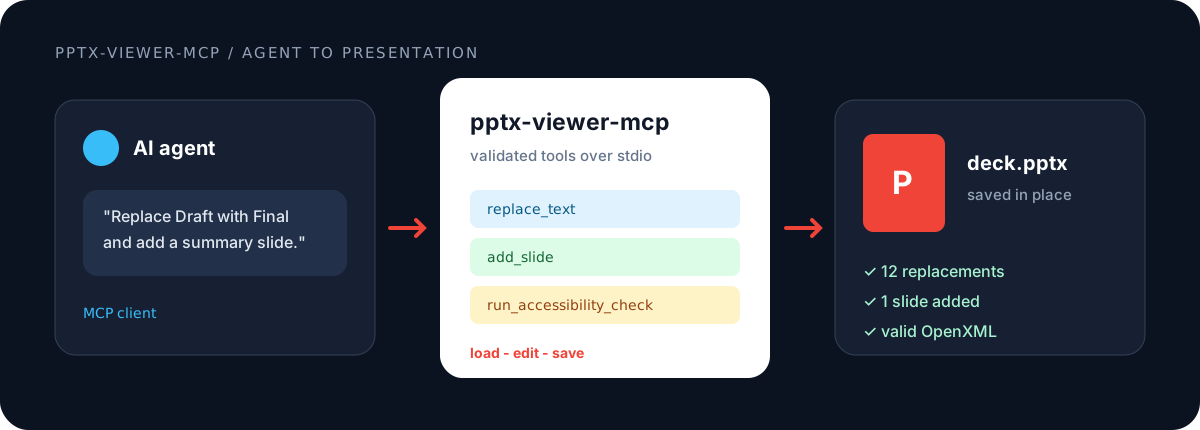
- Live demo: https://christophervr.github.io/pptx-viewer/demo/
- Docs: https://christophervr.github.io/pptx-viewer/
Quick start
This package is, first and foremost, an MCP server. The recommended way to use it is to point an MCP client at the published binary. Calling the tools as a library is a secondary, lower-level option (see Use as a library).
1. Run as an MCP server (recommended)
No clone, no build, no separate core install. Point your MCP client at the published binary via npx:
{
	"mcpServers": {
		"pptx": {
			"command": "npx",
			"args": ["pptx-viewer-mcp"]
		}
	}
}
That is the entire setup. npx downloads pptx-viewer-mcp and its bundled pptx-viewer-core engine on first run, so there is nothing else to install. Add the config above, restart your client, and the tools are available.
This works in Claude Desktop, Claude Code, Cursor, and any MCP-compatible client. All 73 tools are exposed over stdio in snake_case (for example add_slide, batch_update_elements). Every tool takes a filePath argument and the server handles loading and saving internally. File access is scoped to a root directory (PPTX_TOOLS_ROOT, defaulting to the process working directory) and restricted to .pptx and .ppt files.
If you prefer a global install (
npm i -g pptx-viewer-mcp), the same server is available as thepptx-toolsbinary. Pointcommandatpptx-toolswith no args.
2. Use as a library (advanced)
If you are embedding PPTX editing in your own app instead of running the MCP server, install the package once:
npm install pptx-viewer-mcp
# optional, only for the Y.Doc collaboration codec:
npm install yjs
The pptx-viewer-core engine is a regular dependency, so it installs automatically. You import everything you need (tools and the engine) from pptx-viewer-mcp, with no separate pptx-viewer-core install or import:
import { readFile, writeFile } from 'node:fs/promises';
import { PptxHandler, addSlide, getSlide } from 'pptx-viewer-mcp';

const handler = new PptxHandler();
const bytes = await readFile('deck.pptx');
const pptxData = await handler.load(bytes.buffer);

const ctx = { pptxData };
const { pptxData: updated, dirty } = addSlide(ctx, { insertAfterIndex: 0 });

if (dirty) {
	const out = await handler.save(updated.slides);
	await writeFile('deck.pptx', out);
}

const { result } = getSlide(ctx, { slideIndex: 0 });
console.log(result.elements);
See Use as a library below for the higher-level executeToolWithContext helper that handles the load and save cycle for you.
Exports
| Entry point | Contents |
| ------------------------- | ----------------------------------------------------------------------------------------------------- |
| pptx-viewer-mcp | Tool functions, the PptxHandler engine, provider types, and the execution pipeline |
| pptx-viewer-mcp/schemas | Zod schemas for every tool input |
| pptx-viewer-mcp/codec | PptxCodec, the Y.Doc to PPTX bytes codec |
| pptx-viewer-mcp/mcp | The runnable stdio server entry (what npx pptx-viewer-mcp executes); importing it starts the server |
Tools
| Group | Tools |
| -------------------- | -------------------------------------------------------------------------------------------------------------------------------------------------------------------------------------------------------------------------------------------------------------------------------------------------- |
| Slide (8) | getSlide addSlide deleteSlides reorderSlides duplicateSlide updateSlideProperties setSlideTransition setCanvasSize |
| Element (10) | addElement updateElement renameElement deleteElements arrangeElements cloneElement setElementAnimation groupElements ungroupElements batchUpdateElements |
| Table (2) | updateTableCells manageTableStructure |
| Table style (4) | setTableStyleSection createTableStyle deleteTableStyle assignTableStyle |
| Style (2) | updateElementStyle runAccessibilityCheck |
| Content (3) | findText replaceText manageComments |
| Chart (14) | createChart updateChart addChartSeries removeChartSeries updateChartSeriesData listChartUserShapes addChartUserShape updateChartUserShape removeChartUserShape formatChartDataPoint formatChartDataLabel formatChartSeries setChartHelperLine setChartColorMapOverride |
| Theme (4) | getThemeInfo applyThemePreset updateThemeColors updateThemeFonts |
| SmartArt (1) | manageSmartArt |
| Conversion (1) | convertToMarkdown |
| Template (2) | findPlaceholders applyTemplate |
| Metadata (2) | getMetadata updateMetadata |
| Sections (1) | manageSections |
| Export (2) | exportToSvg exportSlideSvg |
| JSON (2) | exportToJson importFromJson |
| Hyperlinks (1) | manageHyperlinks |
| Geometry (1) | replaceGeometry |
| Locking (1) | setElementLock |
| Validation (2) | validatePresentation repairPresentation |
| Presentation (2) | getPresentationProperties updatePresentationProperties |
| Layout (2) | getLayouts applyLayout |
| Embedded objects (6) | getOleContent setOleSheetCell setOleDocumentParagraph setOleDeckSlideTitle replaceOleFile setOleObjectName |
Use as a library
These APIs back the MCP server. Reach for them when you embed PPTX editing directly rather than running the server.
Call tools directly
Each tool is a plain function: it takes the presentation data in and returns the changed data out, without reading or writing files itself and without depending on any framework. The basic load, edit, save loop is shown in Use as a library (advanced) above.
Wrap load, tool, and save with executeToolWithContext
executeToolWithContext handles the load and save cycle and, when a collaboration room is supplied, routes changes through a live Y.Doc instead of the disk.
import {
	executeToolWithContext,
	type ExecutionContext,
	type FileSystemProvider,
	replaceText,
} from 'pptx-viewer-mcp';
import { readFile, writeFile } from 'node:fs/promises';

const filesystem: FileSystemProvider = {
	readFile: (p) => readFile(p),
	writeFile: (p, data) => writeFile(p, data),
};

const result = await executeToolWithContext('deck.pptx', { filesystem }, (ctx) =>
	replaceText(ctx, { find: 'Draft', replace: 'Final', caseSensitive: false }),
);

console.log(result.replacements, result.savedToDisk);
When you supply collaboration on the ExecutionContext, the tool reads the current shared (Y.Doc) state before running and writes the result back into it after saving, so other people in the session see the change without reloading the file.
Architecture
ToolContext { pptxData }
        |
        v
tool function  ->  ToolResult { pptxData, result, dirty }
                        |
                        v  (when dirty)
              savePresentation()
                |- collaboration room -> hydrate Y.Doc -> broadcast
'- no room -> writeFile to diskCollaborationProvider, FileSystemProvider, and ViewerProvider are plain interfaces. Implement them for any runtime (Node, Electron, browser, or edge worker).
Development
bun run build      # tsup -> dist/
bun run typecheck  # tsc --noEmit
bun run test       # vitest run
License
Apache-2.0