
pr-status-cli
v1.0.8
Published
Check GitHub PR status across multiple repositories with beautiful HTML dashboard

Maintainers
 texmeijin
Readme
PR Status CLI
🚀 複数のGitHubリポジトリのPR状況を美しいHTMLダッシュボードで確認
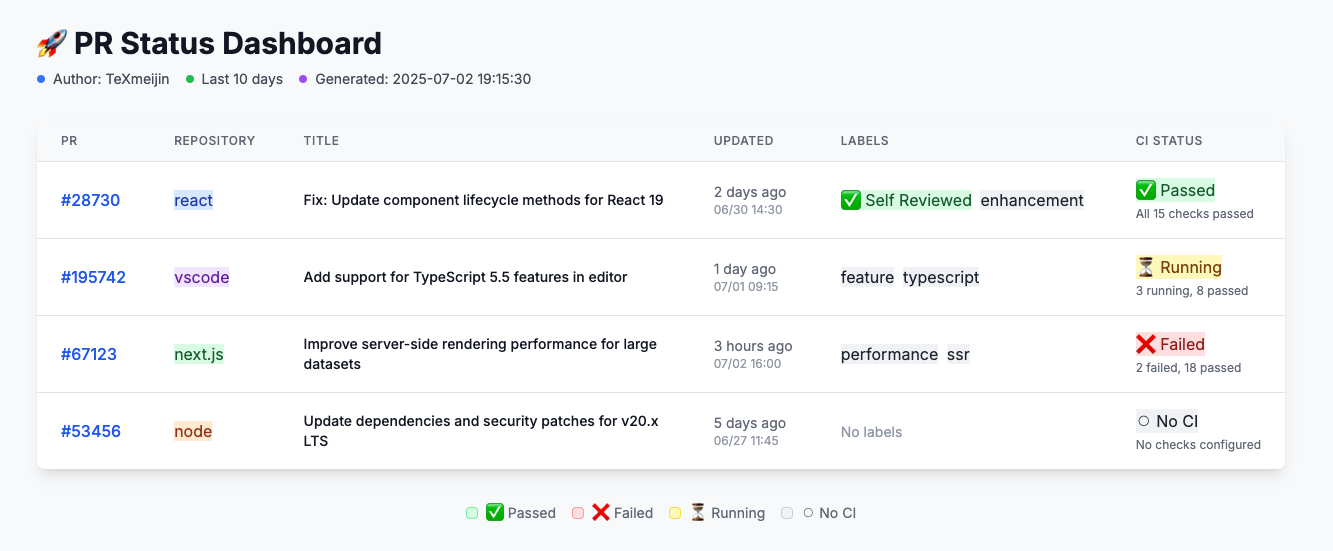
機能
- 複数リポジトリ対応 - 複数のGitHubリポジトリのPRを同時にチェック
- 美しいHTMLダッシュボード - Tailwind CSSによるリッチでインタラクティブなダッシュボード
- CI状況統合 - リアルタイムのCI/CD状況とGitHubチェックページへのクリック可能なリンク
- 自動検出 -
ghCLIを通じてGitHubユーザー名を自動検出 - 柔軟な出力 - HTMLダッシュボードまたはMarkdownテーブル出力を選択可能
- スマートフィルタリング - 作成者、時間範囲、リポジトリでフィルタリング
- ローカルタイムゾーン - 時間をローカルタイムゾーンで表示
- 色分けリポジトリ - 異なるリポジトリを視覚的に区別しやすく
インストール
# npxで直接実行(推奨)
npx pr-status-cli "owner/repo1,owner/repo2"

# またはグローバルインストール
npm install -g pr-status-cli
pr-status "owner/repo1,owner/repo2"
前提条件
- GitHub CLI (gh) がインストール・認証済み
- Node.js 14.0.0以上
使用方法
基本的な使用方法
# 複数リポジトリのPRをチェック(GitHubユーザー名を自動検出)
npx pr-status-cli "facebook/react,microsoft/vscode"

# 単一リポジトリ
npx pr-status-cli "vercel/next.js"
高度なオプション
# 時間範囲と作成者を指定
npx pr-status-cli "owner/repo1,owner/repo2" --days 7 --author username

# HTMLの代わりにMarkdown出力
npx pr-status-cli "owner/repo" --format markdown

# ブラウザを自動で開かない
npx pr-status-cli "owner/repo" --no-open

# ヘルプを表示
npx pr-status-cli --help
コマンドオプション
<repos>- カンマ区切りのリポジトリリスト(必須)-d, --days <number>- 何日前まで遡るか(デフォルト: 10)-a, --author <username>- PRをフィルタするGitHubユーザー名(デフォルト: 自動検出)-f, --format <format>- 出力形式: html または markdown(デフォルト: html)--no-open- HTMLファイルをブラウザで開かない
使用例
オープンソースプロジェクト
npx pr-status-cli "facebook/react,microsoft/vscode,vercel/next.js"組織のリポジトリ
npx pr-status-cli "yourorg/backend,yourorg/frontend,yourorg/mobile"30日間・Markdown出力
npx pr-status-cli "owner/repo" --days 30 --format markdown特定の作成者
npx pr-status-cli "owner/repo1,owner/repo2" --author octocat出力
HTMLダッシュボード
- 美しくレスポンシブなWebインターフェース
- クリック可能なPR番号とCI状況リンク
- 色分けされたリポジトリと状況バッジ
- ホバーエフェクトとスムーズなトランジション
- ローカルタイムゾーン表示
Markdownテーブル
- GitHubのIssueやドキュメントへのコピーに最適
- 必要なPR情報をすべて含む
- PRとCIチェックへのクリック可能なリンク
認証
このツールは認証にGitHub CLI(gh)を使用します。ログインしていることを確認してください:
gh auth loginツールは自動的にGitHubユーザー名を検出し、既存の認証を使用します。
ファイル保存場所
HTMLレポートは使用されたパラメータに基づいた一貫したファイル名でシステムの一時ディレクトリに保存されます。これにより、簡単にブックマークでき、重複ファイルを防ぎます。
例: /tmp/pr-status-yourusername-a1b2c3d4.html
ライセンス
MIT
PR Status CLI (English)
🚀 Check GitHub PR status across multiple repositories with a beautiful HTML dashboard
Features
- Multi-repository support - Check PRs across multiple GitHub repositories simultaneously
- Beautiful HTML dashboard - Rich, interactive dashboard with Tailwind CSS styling
- CI status integration - Real-time CI/CD status with clickable links to GitHub checks
- Auto-detection - Automatically detects your GitHub username via
ghCLI - Flexible output - Choose between HTML dashboard or Markdown table output
- Smart filtering - Filter by author, time range, and repository
- Local timezone - Times displayed in your local timezone
- Color-coded repositories - Easy visual distinction between different repositories
Installation
# Run directly with npx (recommended)
npx pr-status-cli "owner/repo1,owner/repo2"

# Or install globally
npm install -g pr-status-cli
pr-status "owner/repo1,owner/repo2"
Prerequisites
- GitHub CLI (gh) installed and authenticated
- Node.js 14.0.0 or higher
Usage
Basic usage
# Check PRs for multiple repositories (auto-detects your GitHub username)
npx pr-status-cli "facebook/react,microsoft/vscode"

# Single repository
npx pr-status-cli "vercel/next.js"
Advanced options
# Specify time range and author
npx pr-status-cli "owner/repo1,owner/repo2" --days 7 --author username

# Markdown output instead of HTML
npx pr-status-cli "owner/repo" --format markdown

# Don't open browser automatically
npx pr-status-cli "owner/repo" --no-open

# Get help
npx pr-status-cli --help
Command options
<repos>- Comma-separated list of repositories (required)-d, --days <number>- Number of days to look back (default: 10)-a, --author <username>- GitHub username to filter PRs (default: auto-detect)-f, --format <format>- Output format: html or markdown (default: html)--no-open- Do not open HTML file in browser
Examples
Open source projects
npx pr-status-cli "facebook/react,microsoft/vscode,vercel/next.js"Your organization's repositories
npx pr-status-cli "yourorg/backend,yourorg/frontend,yourorg/mobile"Last 30 days with markdown output
npx pr-status-cli "owner/repo" --days 30 --format markdownSpecific author
npx pr-status-cli "owner/repo1,owner/repo2" --author octocatOutput
HTML Dashboard
- Beautiful, responsive web interface
- Clickable PR numbers and CI status links
- Color-coded repositories and status badges
- Hover effects and smooth transitions
- Local timezone display
Markdown Table
- Perfect for copying into GitHub issues or documentation
- Includes all essential PR information
- Clickable links to PRs and CI checks
Authentication
This tool uses the GitHub CLI (gh) for authentication. Make sure you're logged in:
gh auth loginThe tool will automatically detect your GitHub username and use your existing authentication.
File locations
HTML reports are saved to your system's temporary directory with consistent filenames based on the parameters used. This allows for easy bookmarking and prevents duplicate files.
Example: /tmp/pr-status-yourusername-a1b2c3d4.html
License
MIT