
preeti-to-unicode-input
v2.0.1
Published
An input element or textarea to convert preeti font or nepali font to unicode with language toggle support for Nepali and english typing.

Maintainers
 milkesh
Readme
Preeti to unicode input
This React component provides an input (or a textarea) field that converts the user's preeti font input into Unicode format in same input box. The component is customizable and integrates seamlessly into any react-hook-form.
Features
- Type in Preeti font and get converted to unicode in same input box or textarea
- Write in preeti font or in english font in same input (using alt + i to toggle language)
- Give your own input element as props and get conversion feature added to it.
- Supports shadcn form, zod validation (see examples below)
- Support hrashwo akar ि as per preeti font typing. For example type
lsand getकि. - Convert preeti to unicode using function preetiToUnicode(preetiText)
Installation
Install it to your react project with npm
npm install preeti-to-unicode-inputDemo
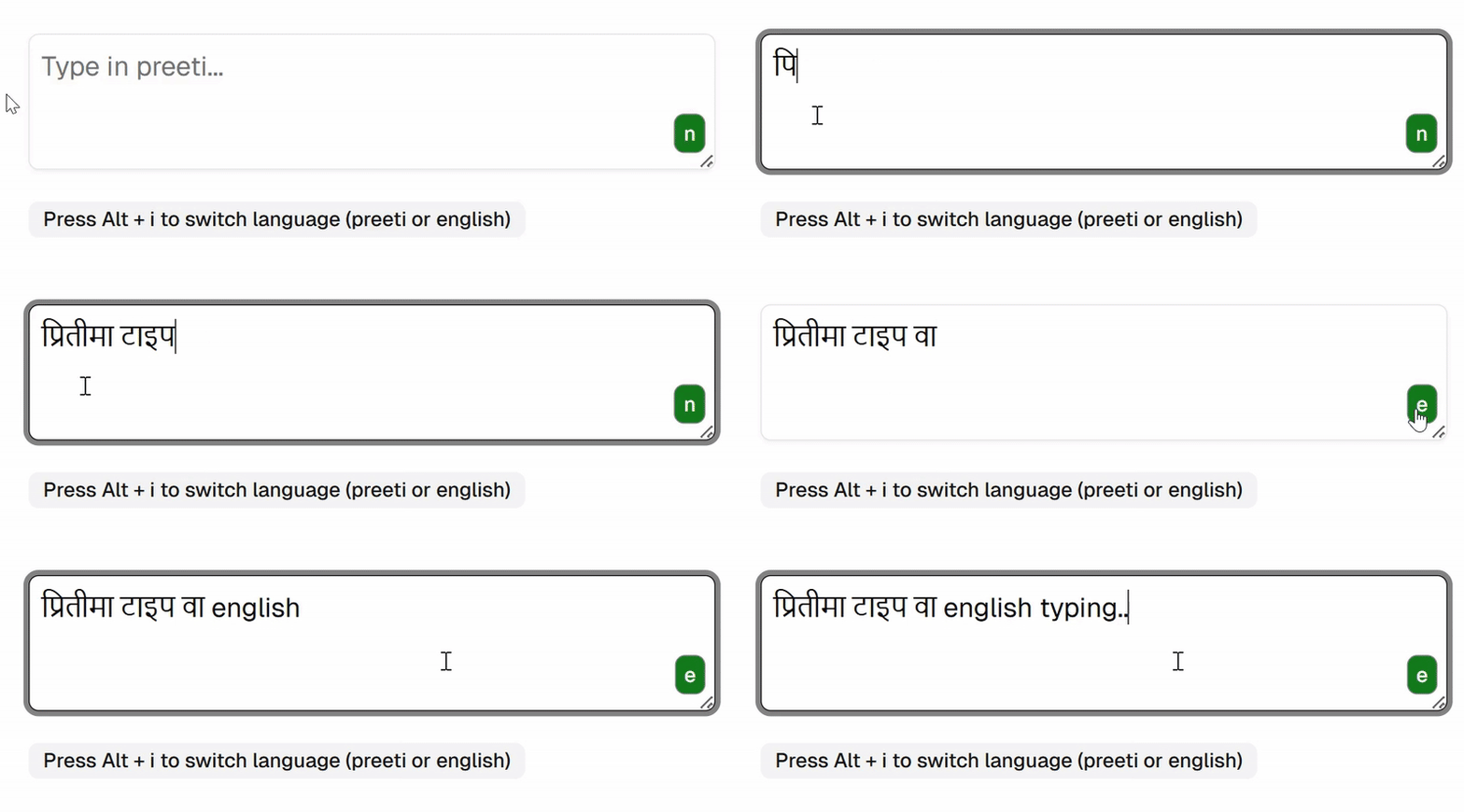
Usage/Examples
import { PreetiToUnicodeInput } from "preeti-to-unicode-input";
import { useState } from "react";

const MyForm = () => {
  const [inputValue, setInputValue] = useState("");

  return (
    <form>
      <PreetiToUnicodeInput
        inputElement={
          <input
            value={inputValue}
            onChange={(event) => setInputValue(event.target.value)}
          />
        }
      />
    </form>
  );
};
Props
| Props | Description |
| :---------------------------- | :------------------------------------------------------------------------------------------------------------------------------------------------------------------------------ |
| inputElement | Provide input element of type input or textarea as props for which preeti to unicode feature is to be enabled.You can provide shadcn component Input or Textarea component too. |
| enableEnglishLanguageToggle | Set this to true you want user to enable switching english and preeti unicode in same input box using Alt + i keyboard shortcut. |
More Examples
Example 1 Basic javascript function to convert preeti text to unicode
import { preetiToUnicode } from "preeti-to-unicode-input";
const preetiText = "lk|tLnfO{ o'lgsf]8df nfg]";
const unicodeText = preetiToUnicode(preetiText);
console.log(unicodeText);
//output: प्रितीलाई युनिकोडमा लाने
Example 2 Working with zod validation, zod resolver, react-hook-form and shadcn components
import { useForm } from "react-hook-form";
import { z } from "zod";
import { zodResolver } from "@hookform/resolvers/zod";
import { PreetiToUnicodeInput } from "preeti-to-unicode-input";
// Import Shadcn form components
import {
  Form,
  FormField,
  FormItem,
  FormControl,
  FormLabel,
  FormMessage,
} from "./components/ui/form";
import { Input } from "./components/ui/input";

// Define Zod schema for validation
const formSchema = z.object({
  normalInput: z
    .string()
    .min(4, { message: "Input must be at least 4 character" }),
  preetiInput: z
    .string()
    .min(3, { message: "Input must be at least 3 characters" })
    .max(50, { message: "Input must be less than 50 characters" }),
});

const MyForm = () => {
  // Initialize react-hook-form with Zod resolver
  const form = useForm({
    resolver: zodResolver(formSchema),
    defaultValues: {
      normalInput: "",
      preetiInput: "", // Default form value for the input
    },
  });

  const onSubmit = (data: any) => {
    console.log("Form Data:", data); // Log submitted form data
  };

  return (
    <Form {...form}>
      <form onSubmit={form.handleSubmit(onSubmit)}>
        <FormField
          name="normalInput"
          control={form.control}
          render={({ field }) => (
            <FormItem>
              <FormLabel>Normal Input</FormLabel>
              <FormControl>
                <Input placeholder="shadcn" {...field} />
              </FormControl>
              <FormMessage />
            </FormItem>
          )}
        />

        <FormField
          name="preetiInput"
          render={({ field }) => (
            <FormItem>
              <FormLabel>Preeti to Unicode Input</FormLabel>
              <FormControl>
                <PreetiToUnicodeInput
                  enableEnglishLanguageToggle={true}
                  inputElement={
                    <Input
                      value={field.value}
                      onChange={(event) => field.onChange(event.target.value)}
                      placeholder="Type in Preeti here"
                      className="custom-classname"
                    />
                  }
                />
              </FormControl>
              <FormMessage />
            </FormItem>
          )}
        />

        <button type="submit">Submit</button>
      </form>
    </Form>
  );
};

export default MyForm;