
prisma-trpc-generator
v3.1.0
Published
Prisma 2+ generator to emit fully implemented tRPC routers
Downloads
1,309

Maintainers
 omar-dulaimi
Readme
⚡ Prisma tRPC Generator
Automatically generate fully implemented, type-safe tRPC routers from your Prisma schema.
🎯 Zero‑config • 🛡️ Type‑safe • ⚡ Fast • 🔧 Customizable
✨ Key features
- 🚀 Zero configuration defaults
- 🔄 Always in sync with your Prisma schema
- 🛡️ 100% TypeScript type-safety
- 🎯 Complete CRUD coverage for all Prisma operations
- ⚙️ Highly configurable: paths, middleware, shield, options
- 📦 Lightweight and fast generation
- 🔗 Integrates with Zod, tRPC Shield, and custom middleware
📚 Table of contents
- 🚀 Quick start
- ⚙️ Configuration
- 🔎 Feature guide
- 📋 Generated output
- 🛠️ Advanced usage
- 🧪 Troubleshooting, performance, FAQ
- 🤝 Contributing
- 📄 License
- 🔗 Related projects
- 🙏 Acknowledgments
🚀 Quick start
Requirements
| Component | Minimum | Recommended | | ---------- | ------- | ----------- | | Node.js | 20.19.0 | 22.x | | Prisma | 7.0.0 | Latest 7.x | | TypeScript | 5.4.0 | 5.9.x |
Install
# npm
npm install prisma-trpc-generator

# yarn
yarn add prisma-trpc-generator

# pnpm
pnpm add prisma-trpc-generator
Configure Prisma 7
Create
prisma.config.tsat the repo root:import 'dotenv/config'; import { defineConfig, env } from 'prisma/config'; export default defineConfig({ schema: 'prisma/schema.prisma', migrations: { path: 'prisma/migrations', seed: 'tsx prisma/seed.ts', }, datasource: { url: env('DATABASE_URL'), }, });Update your
generator clientblock:generator client { provider = "prisma-client" output = "../node_modules/.prisma/client" }Set
DATABASE_URL(e.g.,file:./prisma/dev.db) in.envand instantiatePrismaClientwith the adapter that matches your database (SQLite →@prisma/adapter-better-sqlite3, Postgres →@prisma/adapter-pg, etc.).
Minimal setup
Add the generator to your Prisma schema and point to your JSON config file:
generator trpc {
  provider = "prisma-trpc-generator"
  output   = "./generated"
  config   = "./trpc.config.json"
}
Both output and config are resolved relative to the schema file, the way Prisma resolves
generator paths. With the schema at prisma/schema.prisma, the block above reads
prisma/trpc.config.json and writes to prisma/generated.
Create that config file (see Feature guide for options), enable "strict": true in tsconfig.json, then generate:
npx prisma generate⚙️ Configuration
As of v2.x, configuration is unified via a single JSON file. Your Prisma generator block should only specify output and config.
Example prisma/trpc.config.json:
{
  "withZod": true,
  "withMiddleware": true,
  "withShield": "./shield",
  "contextPath": "./context",
  "trpcOptionsPath": "./trpcOptions",
  "dateTimeStrategy": "date",
  "withMeta": false,
  "postman": true,
  "postmanExamples": "skeleton",
  "openapi": true,
  "withRequestId": false,
  "withLogging": false,
  "withServices": false,
  "showModelNameInProcedure": true
}
Notes
- The config path is resolved relative to the Prisma schema file.
showModelNameInProcedurecontrols whether the model name is appended to each procedure. It defaults totrue, givingcreateOneUserandaggregateUser. Set it tofalseforcreateOneandaggregate, which reads better when the procedures already sit under a per-model router.- Aliases
configPathandconfigFileare also accepted. - If a config file is provided, any inline options in the generator block are ignored with a warning.
- Inline options without a config file still work for now but are deprecated and will be removed in a future major release.
🔎 Feature guide
Each feature is opt‑in via the JSON config. Below are concise how‑tos and the exact keys to set.
1) Zod validation (inputs)
- Key:
withZod: true - Emits
schemas/with Zod types for procedure inputs; routers wire.input()automatically. - Date handling: Set
dateTimeStrategyto control DateTime field validation:"date"(default):z.date()- accepts only Date objects"coerce":z.coerce.date()- accepts both Date objects and ISO strings"isoString": ISO string validation with transformation
Extending Zod schemas with Prisma comments
You can add additional Zod validation constraints using special comments in your Prisma schema:
model User {
  id    Int     @id @default(autoincrement()) /// @zod.number.int()
  email String  @unique /// @zod.string.email()
  name  String? /// @zod.string.min(1).max(100)
  age   Int?    /// @zod.number.int().min(0).max(120)

  posts Post[]
}

model Post {
  id        Int      @id @default(autoincrement()) /// @zod.number.int()
  title     String   /// @zod.string.min(1).max(255, { message: "Title must be shorter than 256 characters" })
  content   String?  /// @zod.string.max(10000)
  published Boolean  @default(false)

  author   User? @relation(fields: [authorId], references: [id])
  authorId Int?
}
This generates Zod schemas with the specified validations:
export const UserCreateInput = z.object({
  id: z.number().int(),
  email: z.string().email(),
  name: z.string().min(1).max(100).nullish(),
  age: z.number().int().min(0).max(120).nullish(),
  // ...
});
For more advanced Zod validation options and syntax, see the prisma-zod-generator documentation.
2) Middleware & Shield
- Keys:
withMiddleware: boolean | string,withShield: boolean | string - When
withMiddleware: true, a basic middleware scaffold is included; or point to your own path string. - When
withShieldis truthy, the generator imports yourpermissionsand exposesshieldedProcedureincreateRouter.ts.
3) Auth (session / JWT / custom)
- Key:
auth: boolean | { strategy?: 'session'|'jwt'|'custom'; rolesField?: string; jwt?: {...}; session?: {...}; custom?: {...} } - When enabled, generator emits:
routers/helpers/auth-strategy.ts(stubs + default HS256 JWT verifier)routers/helpers/auth.tswithensureAuthandensureRolecreateRouter.tswiresauthMiddleware,publicProcedure,protectedProcedure,roleProcedure(roles)
- See
docs/usage/auth.mdfor strategy hooks and examples.
4) Request ID + logging
- Keys:
withRequestId: boolean,withLogging: boolean - Adds a small requestId middleware and optional structured log line around every procedure.
- To propagate requestId into errors, return it in your
trpcOptions.errorFormatter.
5) tRPC Metadata Support
- Key:
withMeta: boolean | { openapi?: boolean; auth?: boolean; description?: boolean; defaultMeta?: object } - When enabled, adds
.meta()calls to generated procedures with:- OpenAPI-compatible metadata (HTTP methods, paths, tags, descriptions)
- Authentication metadata for middleware integration
- Custom metadata via
defaultMetaconfiguration
- Perfect for OpenAPI documentation, conditional auth, and enhanced middleware
6) OpenAPI (MVP)
- Key:
openapi: boolean | { enabled?: boolean; title?: string; version?: string; baseUrl?: string; pathPrefix?: string; pathStyle?: 'slash'|'dot'; includeExamples?: boolean } - Emits
openapi/openapi.jsonandrouters/adapters/openapi.tswith a tagged document. - Paths map to tRPC endpoints (POST) with a
{ input: {} }request body schema and optional skeleton examples.
7) Postman collection
- Key:
postman: boolean | { endpoint?: string; envName?: string; fromOpenApi?: boolean; examples?: 'none'|'skeleton' } - Emits
postman/collection.json. WhenfromOpenApi: true, the collection is derived from OpenAPI. - Set
examples: 'skeleton'to include sample bodies for common operations.
8) DDD services (optional)
- Keys:
withServices,serviceStyle,serviceDir,withListMethod,serviceImports - Emits a BaseService and per‑model service stubs; routers can delegate to services when enabled.
- Tenancy/soft‑delete helpers are included in the service layer if you choose to use it.
Migration from inline config
- Create
prisma/trpc.config.jsonand move all previous inline keys into it. - Replace keys in
generator trpcso it only containsoutputandconfig. - Run generation. If you still have inline keys, the generator will ignore them and warn.
📋 Generated output
For the following schema:
model User {
  id    Int     @id @default(autoincrement())
  email String  @unique
  name  String?
  posts Post[]
}

model Post {
  id        Int      @id @default(autoincrement())
  createdAt DateTime @default(now())
  updatedAt DateTime @updatedAt
  title     String
  content   String?
  published Boolean  @default(false)
  viewCount Int      @default(0)
  author    User?    @relation(fields: [authorId], references: [id])
  authorId  Int?
}
The generator creates:
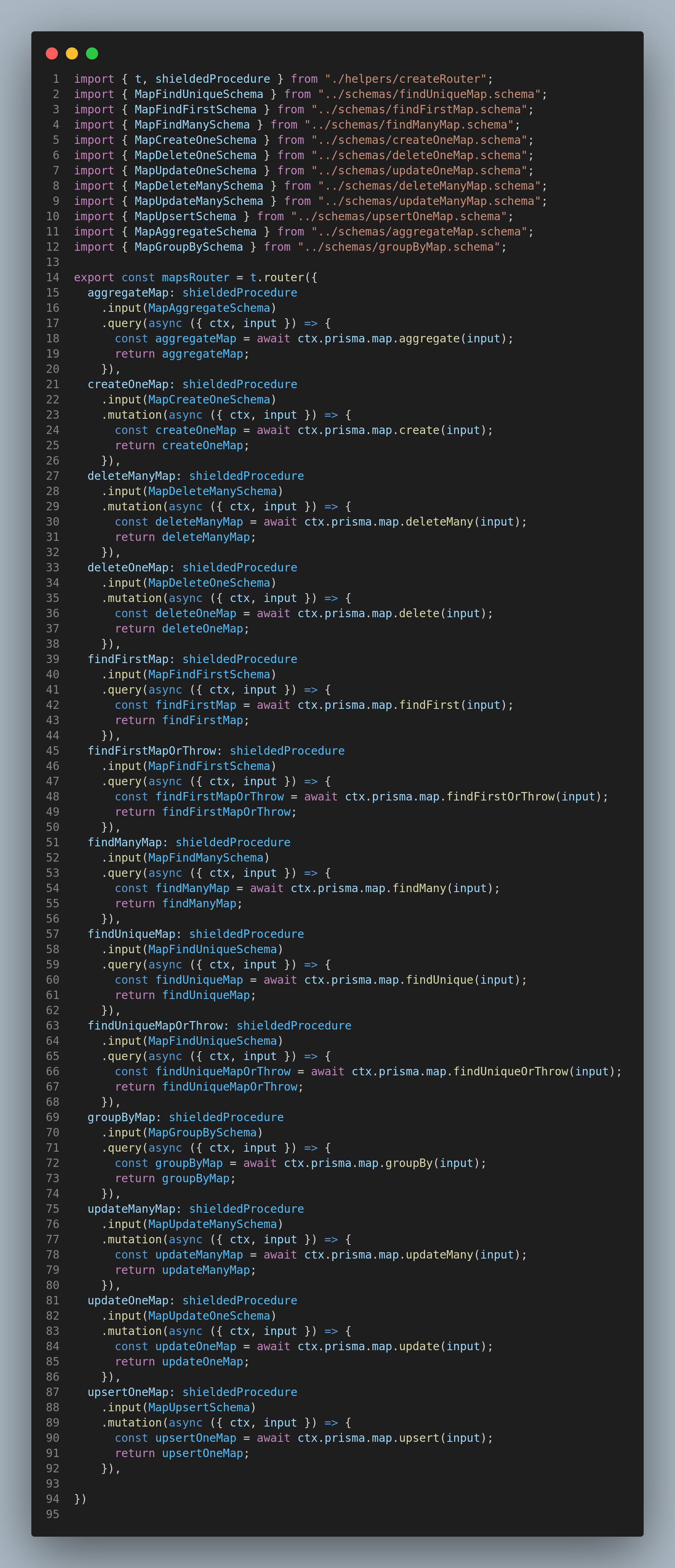
generated/
├── routers/
│   ├── index.ts              # Main app router combining all model routers
│   ├── helpers/
│   │   └── createRouter.ts   # Base router factory with middleware/shield setup
│   ├── User.router.ts        # User CRUD operations
│   └── Post.router.ts        # Post CRUD operations
└── schemas/                  # Zod validation schemas (if withZod: true)
    ├── objects/              # Input type schemas
    ├── findManyUser.schema.ts
    ├── createOneUser.schema.ts
    └── index.ts              # Barrel exports
🛠️ Advanced usage
Custom middleware
// src/middleware.ts
import { TRPCError } from '@trpc/server';
import { t } from './trpc';

export const authMiddleware = t.middleware(async ({ ctx, next }) => {
  if (!ctx.user) {
    throw new TRPCError({ code: 'UNAUTHORIZED' });
  }
  return next({
    ctx: {
      ...ctx,
      user: ctx.user,
    },
  });
});

export const loggingMiddleware = t.middleware(async ({ path, type, next }) => {
  console.log(`tRPC ${type} ${path}`);
  return next();
});
Integration with tRPC Shield
// src/permissions.ts
import { shield, rule, and } from 'trpc-shield';

const isAuthenticated = rule()(async (_parent, _args, ctx) => !!ctx.user);

const isOwner = rule()(async (_parent, args, ctx) => {
  if (!args.where?.id) return false;
  const post = await ctx.prisma.post.findUnique({
    where: { id: args.where.id },
    select: { authorId: true },
  });
  return post?.authorId === ctx.user?.id;
});

export const permissions = shield({
  query: {
    findManyPost: true, // Public
    findUniqueUser: isAuthenticated,
  },
  mutation: {
    createOnePost: isAuthenticated,
    updateOnePost: and(isAuthenticated, isOwner),
    deleteOnePost: and(isAuthenticated, isOwner),
  },
});
Custom tRPC options
// src/trpcOptions.ts
import { ZodError } from 'zod';
import superjson from 'superjson';

export default {
  transformer: superjson,
  errorFormatter({ shape, error }) {
    return {
      ...shape,
      data: {
        ...shape.data,
        zodError:
          error.code === 'BAD_REQUEST' && error.cause instanceof ZodError
            ? error.cause.flatten()
            : null,
      },
    };
  },
};
🎨 Customizations
Skipping models
/// @@Gen.model(hide: true)
model InternalLog {
  id        Int      @id @default(autoincrement())
  message   String
  createdAt DateTime @default(now())
}
Custom context
// src/context.ts
import 'dotenv/config';
import { PrismaClient } from '@prisma/client';
import { PrismaBetterSqlite3 } from '@prisma/adapter-better-sqlite3';

const adapter = new PrismaBetterSqlite3({
  url: process.env.DATABASE_URL as ':memory:' | (string & {}),
});
const prisma = new PrismaClient({ adapter });

export interface Context {
  prisma: PrismaClient;
  user?: { id: string; email: string; role: string };
}

export const createContext = async ({ req }): Promise<Context> => {
  const user = await getUserFromRequest(req);
  return { prisma, user };
};
📚 Examples
Basic CRUD with authentication
// src/server/routers/posts.ts
import { z } from 'zod';
import { createTRPCRouter, protectedProcedure, publicProcedure } from '../trpc';

export const postsRouter = createTRPCRouter({
  getAll: publicProcedure.query(({ ctx }) =>
    ctx.prisma.post.findMany({
      where: { published: true },
      include: { author: { select: { name: true } } },
    }),
  ),

  create: protectedProcedure
    .input(
      z.object({ title: z.string().min(1), content: z.string().optional() }),
    )
    .mutation(({ ctx, input }) =>
      ctx.prisma.post.create({ data: { ...input, authorId: ctx.user.id } }),
    ),

  update: protectedProcedure
    .input(
      z.object({
        id: z.number(),
        title: z.string().min(1).optional(),
        content: z.string().optional(),
      }),
    )
    .mutation(async ({ ctx, input }) => {
      const { id, ...data } = input;
      const post = await ctx.prisma.post.findFirst({
        where: { id, authorId: ctx.user.id },
      });
      if (!post) throw new TRPCError({ code: 'FORBIDDEN' });
      return ctx.prisma.post.update({ where: { id }, data });
    }),
});
Next.js App Router integration
// src/app/api/trpc/[trpc]/route.ts
import { fetchRequestHandler } from '@trpc/server/adapters/fetch';
import { appRouter } from '@/server/api/root';
import { createContext } from '@/server/api/context';

const handler = (req: Request) =>
  fetchRequestHandler({
    endpoint: '/api/trpc',
    req,
    router: appRouter,
    createContext,
  });

export { handler as GET, handler as POST };
Client-side usage
// src/lib/trpc.ts
import { createTRPCReact } from '@trpc/react-query';
import type { AppRouter } from '@/server/api/root';

export const trpc = createTRPCReact<AppRouter>();

const PostList = () => {
  const { data: posts, isLoading } = trpc.post.findMany.useQuery();
  const createPost = trpc.post.createOne.useMutation();
  if (isLoading) return <div>Loading...</div>;
  return (
    <div>
      {posts?.map((post) => (
        <div key={post.id}>{post.title}</div>
      ))}
    </div>
  );
};
🔍 Troubleshooting, performance, FAQ
Common issues
Error: Cannot find module '../context'
- Ensure your
contextPathis correct relative to the output directory. - Check that your context file exports a
Contexttype.
TypeScript errors in generated routers
- Ensure dependencies are installed and up to date.
- Verify your tRPC context is properly typed.
- Ensure
strict: trueis enabled intsconfig.json.
Generated routers not updating
- Run
npx prisma generateafter modifying your schema. - Check that the generator is properly configured in
schema.prisma. - Clear your build cache and regenerate.
Zod validation errors
- Ensure Zod 4.0+ is installed.
- Check that input schemas match your Prisma model types.
- For DateTime validation errors with JSON APIs, set
dateTimeStrategy: "coerce"to accept date strings.
Performance considerations
For large schemas (50+ models):
- Use selective generation with model hiding.
- Split routers into multiple files.
- Consider lazy loading routers.
Build times:
- Add generated files to
.gitignore. - Use parallel builds where possible.
- Cache dependencies in CI.
FAQ
Q: Can I customize the generated router validation rules? A: Routers are generated based on your Prisma schema constraints; change your Prisma model definitions to affect validation.
Q: Does this work with Prisma Edge Runtime? A: Yes.
Q: What databases are supported? A: All Prisma‑compatible databases.
Q: How are enums handled? A: Enums are converted to Zod enums and included in validation.
Q: Can I exclude fields from validation?
A: Use Prisma's @ignore or @@Gen.model(hide: true).
Getting help
- 🐛 Bug reports: https://github.com/omar-dulaimi/prisma-trpc-generator/issues/new
- 💡 Feature requests: https://github.com/omar-dulaimi/prisma-trpc-generator/issues/new
- 💬 Discussions: https://github.com/omar-dulaimi/prisma-trpc-generator/discussions
🤝 Contributing
Development setup
- Fork and clone the repository
git clone https://github.com/your-username/prisma-trpc-generator.git
cd prisma-trpc-generator- Install dependencies (requires Node.js 20.19.0+; 22.x recommended, this repo uses pnpm)
pnpm install- Create your
.env
prisma.config.ts reads DATABASE_URL, and .env is not committed, so a fresh clone has to
create it before anything can run Prisma.
cp .env.example .env- Build/generate
pnpm run generate- Run tests
pnpm testTesting
The suite lives in tests/ and is organised by feature: routers, Zod schemas, middleware and
shield, auth, OpenAPI, Postman, tenancy and soft delete, and custom client paths. Every one of
them generates from a real Prisma schema and asserts against the emitted files, so pnpm run generate
must have run first.
Run specific test suites
# everything, quietly
pnpm test --silent

# one file
pnpm test tests/feature-zod-schemas.test.ts

# with coverage (a Vitest flag; there is no separate coverage script)
pnpm test --coverage
Coverage of src/ reads 0 because each suite shells out to prisma generate, which runs the
generator in a child process that the coverage provider does not instrument. The numbers to read
are the ones for the generated routers.
Packaging checks
The suites above run the built lib/ from inside this repo, where node_modules already holds
every devDependency, so they pass even when the published manifest under-declares its runtime
dependencies. This packs the tarball, installs it into an empty project outside the repo, and
loads the generator from there:
pnpm run test:packagingContribution guidelines
- Create an issue for bugs or feature requests.
- Follow the existing code style (ESLint + Prettier).
- Add tests for new functionality.
- Update documentation as needed.
- Submit a PR with a clear description.
Code style
pnpm run lint
pnpm run format
Release process
Semantic versioning
- Patch: bug fixes and small improvements
- Minor: new features and enhancements
- Major: breaking changes
📄 License
This project is licensed under the MIT License. See the LICENSE file for details.
🔗 Related projects
- prisma-zod-generator: Generate Zod schemas from Prisma schema
- prisma-trpc-shield-generator: Generate tRPC Shield permissions from Prisma schema
- tRPC Shield: Permission system for tRPC
- Prisma: Database toolkit and ORM
- tRPC: End‑to‑end typesafe APIs made easy
🙏 Acknowledgments
- Prisma: Modern database toolkit
- tRPC: End‑to‑end typesafe APIs
- Zod: TypeScript‑first schema validation
- All contributors