
procdeck
v2.0.1
Published
Dev-process multiplexer with a web UI: terminal panes in a browser tab, declarative dependencies, assigned ports, a *.localhost proxy and captured HTTP traffic. One native binary.

Maintainers
 kondaurovdev
Readme
procdeck


Run your whole dev stack with one command — and actually see what it's doing.
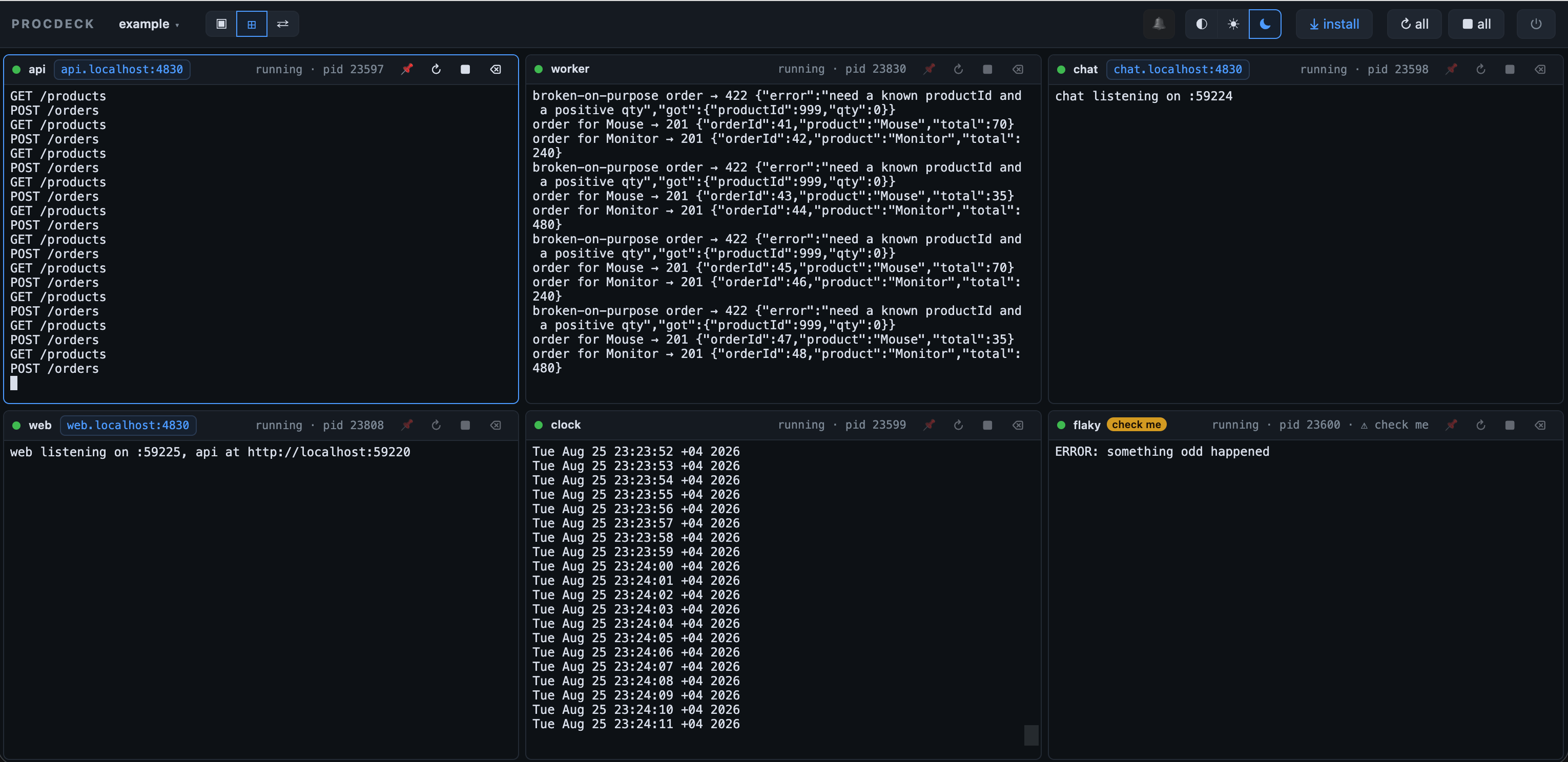
procdeck is four tools in one binary — the process runner, the port allocator, the log viewer and the network tab of your dev environment:
- Runs everything. Every proc is a real terminal in a browser tab — and your own terminal is free again.
- Hands out ports.
${port}is a free port, wired to whoever needs it — no hardcoded numbers, no collisions — andapi.localhost:4820always reaches the right one. - Sees the traffic. The HTTP and WebSocket requests between your services — the half a browser's DevTools never shows.
- Answers from the CLI.
procdeck logs --since-mark fix,http --digest,status --json— for you, or for a coding agent over MCP.
Quick start
npx procdeck init     # writes procdeck.config.json from your workspace's dev scripts
npx procdeck          # starts the deck in the background and opens the UI
The UI opens at http://localhost:4820 and your terminal is free again.
procdeck down stops everything. macOS or Linux.
Install
procdeck is a single native binary with the web UI inside — nothing else to install, no runtime to match. Pick the channel that fits:
brew install kondaurovDev/tap/procdeck    # macOS, with shell completions
curl -fsSL https://raw.githubusercontent.com/kondaurovDev/procdeck/main/install.sh | sh
pnpm add -D procdeck    # npm i -D procdeck · bun add -d procdeck — pins the version for the whole team
go install github.com/kondaurovDev/procdeck@latest
or a tarball, .deb or .rpm for your platform from the
releases. On Windows,
install inside WSL.
What npm installs. A small launcher, plus exactly one
@procdeck/<os>-<arch>package with the binary for your machine — picked by the package manager throughoptionalDependencies. No install script runs, so there is nopnpm approve-buildsdetour and nothing compiles. Node runs the launcher; the deck itself does not need it.
What you get
- Terminal panes in the browser. Every process runs in a real PTY and renders in xterm.js — colours, spinners, cursor redraws and interactive hotkeys all work. Single pane with a sidebar, or every pane tiled (⌥G); pin the ones you watch and the rest collapse into a tray.
- Ports that never collide. Write
${port}in a command, env value or url and procdeck assigns a free port before spawning.${port:api}is another proc's port, so dependents get wired —API_URL=http://localhost:${port:api}— with no hardcoded numbers anywhere. And when the world already knows the address,port: 8787pins the public side to that exact number — dotenv files and simulators keep working, the observer stays in front. - A memorable address for each service.
api.localhost:4820,web.localhost:4820— whatever port the process actually got. Browsers resolve*.localhostthemselves, so there is zero system setup, and WebSocket upgrades (vite HMR) pass through. - Dependencies that mean something.
needs: ["api"]parks a proc until the API is actually listening — detected from the OS, with no cooperation from the process.preflightgates a proc behind a check that must pass first (wrangler whoami), so interactive logins stay out of supervised panes. - It tells you when something breaks. Crashes, blocked procs and alert patterns raise a badge, count into the tab title and can fire a system notification while the tab is hidden.
- Clean restarts.
pnpm→wrangler→workerd: procdeck signals the whole process group, escalating SIGTERM → SIGKILL, so nothing is left holding a port. - Out of your terminal's way.
procdeck upruns detached;down,status,logs,restartandopenwork from any subdirectory of the project.procdeck lslists every deck on the machine. - Installable as an app. The UI ships a web-app manifest named after the deck, so "⤓ install" gives each project its own window and Dock icon.
Traffic, not just logs
Procs that use ${port} get an HTTP observer on their assigned port, so
procdeck sees the requests between your services — the half a browser's
DevTools never shows:
procdeck http --digest        # 4xx/5xx grouped by route, with counts
procdeck http api --body      # bodies (text only, auth headers redacted)
WebSocket messages land in the same view, and ⇄ in the UI is the network tab for your processes:
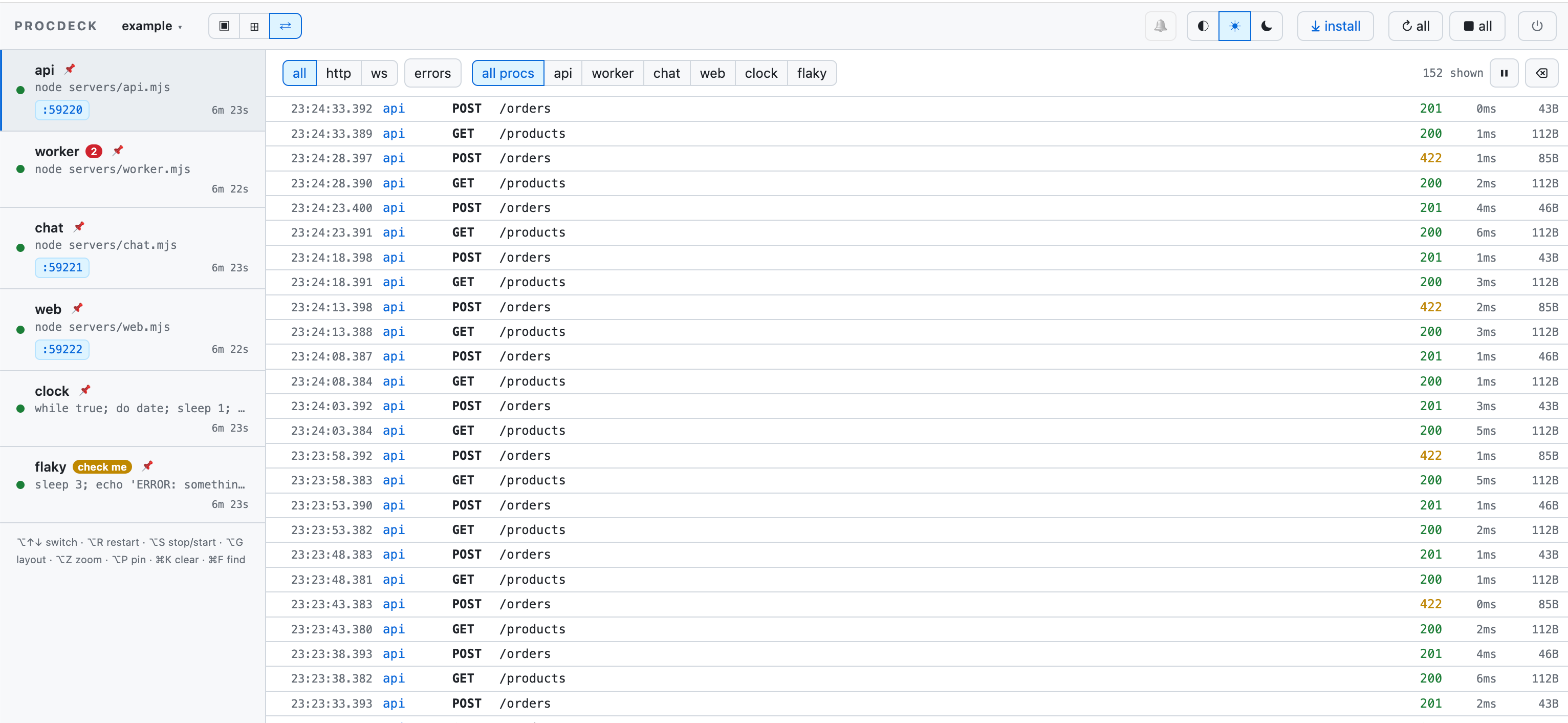
See docs/traffic.md.
For coding agents
An agent edits code, but the consequences land in processes it cannot see. procdeck already owns those processes, so it can answer:
procdeck mark before-fix              # a marker at "now"
procdeck restart api && procdeck wait-for api
procdeck logs --since-mark before-fix # only what the change caused
procdeck http --since-mark before-fix # only the requests it caused
Everything takes --json and is bounded by default. The same verbs are served
over MCP — claude mcp add procdeck -- procdeck mcp, once, globally: the
instance registry finds the right deck per project. procdeck agents writes
the discovery section into CLAUDE.md / AGENTS.md.
See docs/agents.md.
Commands
procdeck init               # write procdeck.config.json from what the project already says
procdeck up [config]        # start (detached) and open the UI — idempotent
procdeck down               # stop: every process tree is terminated
procdeck restart [proc]     # one proc, or the whole deck; --all for every deck on this machine
procdeck status             # address, uptime, every proc's state (--json for agents)
procdeck ls                 # every running deck on this machine
procdeck open               # open the UI — no port to remember
procdeck logs [proc]        # pane output as plain lines; --grep, --since, --since-mark
procdeck http [proc]        # captured HTTP and WebSocket traffic
procdeck errors [proc]      # stack traces, deduplicated
procdeck up --fg            # foreground instead: Ctrl-C stops the deck
procdeck alone is procdeck up. Without a config path, the nearest
procdeck.config.{json,ts,js,mjs} above the current directory is used.
Running decks register in ~/.procdeck/instances/ (one JSON per deck, pruned
by pid) and a detached deck's own output goes to ~/.procdeck/logs/. Updating
procdeck needs a procdeck restart — the running deck keeps the old code until
then, and status says so out loud when the versions differ.
The server binds 127.0.0.1 only: the UI types into real terminals, so it is
not something to put on the LAN by accident. "host": "0.0.0.0" opens it up
for a devcontainer or a VM. No telemetry, no service worker.
Config
{
  "$schema": "https://unpkg.com/procdeck/schema.json",
  "procs": [
    { "id": "api", "shell": "pnpm --filter api dev", "env": { "PORT": "${port}" } },
    {
      "id": "web",
      "shell": "pnpm --filter web dev",
      "env": { "PORT": "${port}", "API_URL": "http://localhost:${port:api}" },
      "needs": ["api"]
    }
  ]
}
Comments and trailing commas are welcome — name the file
procdeck.config.jsonc if your editor wants a hint. Unknown keys are errors,
so a typo never silently does nothing. "envFile": ".env" hands every proc the
variables of a dotenv file. Full field reference:
docs/config.md.
Upgrading from 1.x
2.0 is the same tool rewritten in Go — the CLI verbs, their flags and --json
shapes, the MCP tools and the addresses stay. What changes:
- Configs are JSON. A
procdeck.config.tsbecomesprocdeck.config.jsonc: quote the keys, drop theimportanddefineConfig(…), keep the comments. - Regexes are RE2 (Go's): no lookaround or backreferences.
- Unknown config keys are errors.
- No
node --env-filewrapper needed — useenvFilein the config.
A 1.x deck and the 2.0 CLI understand each other (same registry, same API), so
procdeck restart moves a running deck over.
Try the example
In a clone of this repo, with Go ≥ 1.26 and pnpm:
pnpm install
pnpm dev          # builds the UI, embeds it, runs the example stack on the Go procdeck
Then open http://localhost:4840 for the panes, and
http://web.localhost:4840 / http://api.localhost:4840 — the example's
servers found each other, and their own ports, entirely through ${port}
templates. See example/.
Docs
| Doc | What | | ------------------------------------------------------------------------------------------ | ------------------------------------------------------ | | config.md | Every config field, port templating, readiness, gates. | | agents.md | The verify loop, the CLI verbs, the MCP tools. | | traffic.md | What the HTTP observer captures, and what it cannot. | | architecture.md | How the code is put together. | | design/ | Engineering notes behind the bigger features. |
Status
macOS and Linux. Port discovery asks the OS through ps + lsof, and
a whole-tree restart signals the process group (kill(-pid)) — both POSIX.
Windows works through WSL, not natively.
Missing on purpose. A dependency dying does not cascade to its dependents: procdeck tells you and leaves the decision to you. And nothing is injected into the apps you develop — no overlay, no script tag, no agent in your page.
Patches welcome — see contributing.md. The UI types into real terminals, so it is worth knowing what that implies and what the traffic observer keeps: security.md.
MIT.