
project-compass
v5.4.2
Published
🧭 High-fidelity TUI & Web workspace navigator - Agentic AI project intelligence for polyglot stacks

Maintainers
 crimsondevil007
Readme
🧭 Project Compass
Production-Grade Project Navigator & Runner for the Modern Developer
Project Compass is a high-performance, TUI (Terminal User Interface) workspace orchestrator built with Ink and React. It transforms your terminal into a command center for managing complex, multi-stack environments with a focus on speed, safety, and visual clarity.
🛠️ Installation
# Install globally via npm
npm install -g project-compass

# Or install from source
git clone https://github.com/CrimsonDevil333333/project-compass.git
cd project-compass
npm install
npm start
🛰️ v5.4.2: Ink 7 + React 19 + PackageRegistry Overhaul
This release upgrades the core rendering stack to Ink 7 + React 19 for better performance, overhauls the PackageRegistry with pagination/search/dep info, adds TaskManager pagination, and fixes several input handling edge cases.
What's New in v5.4.2:
- ⬆️ Ink 7 + React 19:
inkupgraded^5.1.0→^7.0.3,reactupgraded^18.2.0→^19.2.6for betteruseInputevent handling and concurrent features. - 📦 PackageRegistry Overhaul (156→359 lines): Scrollable paginated dep list (15/page), selective remove via X/D (no typing), search/filter via
/, dep info view via I, upgrade via G, column-aligned layout with prod/dev/peer counts. - 📄 TaskManager Pagination: Default 4 tasks per page, PgUp/PgDn jumps full pages, page indicator, configurable via Settings (
maxVisibleTasks, range 2–20). - 🎨 Studio Display Refinements: Clean version strings (no redundant tool name prefixes), consistent column widths with
Box+cleanVersion(), redesigned checkmark layout. - 🔄 Auto-Show Task Output: Output panel appears automatically when a new task starts — no more manual toggling.
- 🔧 Escape Trap Fixed: Sub-views (Registry, Architect, AI, Settings) now handle their own Escape for internal back-navigation.
- 🛡️ BRTI Re-run Guard: Build/Run/Test/Install shortcuts blocked when a task is running with visible output; re-enabled when output hidden or no task running.
- 🗑️ Delete Task Support: Shift+X in Task Manager deletes finished/stale tasks (kills process + removes from list).
- 🔄 Reattach Status Fix: Always performs PID liveness check — no stale "detached" status.
- 🧩 Removed
memofrom Sub-Views: Resolves Ink 7 + React 19useInputinteraction issue in PackageRegistry and ProjectArchitect. - 🚪 Shift+Q from Any Screen: Quit now works from Registry, Architect, AI, and Settings — not just Navigator.
- ⚡ Flickering Mitigation Reverted: Removed navigation throttle, emit throttle, and ArtBoard debounce — small frequent deltas (1–2 lines per 100ms) perceived as smoothest.
- 🏗️ ProjectArchitect Non-Blocking: Scaffolding commands run in the background via Orbit — no more interactive step freezing the TUI.
🛰️ v5.4.1: Nested Borders & Responsive Layout
What's New in v5.4.1:
- Nested Border Design System: Help Cards and Help Overlay now use structured outer + inner borders for visual hierarchy
- Responsive Layout: All panels wrap gracefully on small terminals using
flexWrap: 'wrap' - Default Projects: Changed from 3 → 2 per page for better visual breathing room
- Navigator Card Fix: Project name and icon split into separate Text elements — no more overflow
- Studio Cleaned Up: Removed LANG_ICONS map — clean colored text without emoji icons
- StructureGuide Alignment: Removed fixed-width icon column for variable-width unicode characters
- ArtBoard Wrapping: Tiles wrap to multiple rows on narrow terminals instead of breaking layout
- Missing Shortcuts: Added Ctrl+C, Shift+Z, Shift+U, Shift+R to HelpOverlay
🛰️ v5.3.0: TUI Refactoring & Windows Support
This release is a major internal overhaul: the monolithic cli.js was split into 4 custom hooks and 10 focused components, reducing it from 1411 to 290 lines. Plus, full Windows support for process management and path handling.
What's New in v5.3.0:
- 🧩 TUI Architecture Refactored: Extracted
Compass.js(main coordinator),useConfigState,useProjectState,useTaskState,useInputStatehooks, and 8 inline components (CursorText,OutputPanel,QuitModal,SessionRestoreBanner,Splash,ArtBoard,HelpOverlay,StructureGuide).cli.jsreduced from 1411 → 290 lines of pure orchestration. - 🪟 Windows Support: Cross-platform
killTaskviataskkill.exe, conditionaldetachedspawn (skipped on Windows),pathToFileURLfor Windows path normalization, andmkdir -preplaced withfs.mkdirSync({ recursive: true })for scaffold templates. - ✅ Full Test Suite: 29 test files with 594 tests covering all detectors, Orchestrator, TaskPersistence, CLI parsing, framework plugins, AI horizon, server API, and integration tests.
- 🛡️ Memory-Safe Log Tailing: OOM-proof log reading using buffered chunk-reads (max 256KB) for rehydrating massive log files.
- ⚡ React.memo Optimizations: Navigator, Header, Footer, TaskManager, OutputPanel are now memo'd for smoother rendering.
🛰️ v5.2.0: Task Persistence Engine
This major release completely overhauls how background processes are managed, introducing True Task Persistence. Your commands now outlive both the Terminal User Interface (TUI) and the Web Server.
What's New in Task Persistence:
- 🛡️ Bulletproof Process Detachment: Processes are no longer bound to the Node.js parent process. Using native OS
spawnwithdetached: true, background tasks (likenpm run devorcargo build) become fully independent daemon-like processes. You can now close the TUI, log out of your SSH session, or crash the Web Server—your tasks will keep running flawlessly. - 📜 File-Descriptor Log Streaming: Task stdout/stderr are now piped directly to OS-level file descriptors (
~/.project-compass/tasks/*.log). This zero-overhead approach ensures logs are safely written to disk entirely outside of the Node.js event loop. - 🔄 Intelligent Session Rehydration: When you launch Project Compass, the orchestrator instantly parses your
tasks.jsonmanifest, performs OS-level PID liveness checks, and presents a "📦 Session Restored" banner for any tasks that were running while you were away. - ⚡ Seamless Re-attachment: Press
Shift+Ato re-attach to any orphaned task. Compass instantly loads the historical logs (generated while the UI was closed) and effortlessly transitions back into a real-time WebSocket / UI live tail. - 🧠 OOM (Out of Memory) Protection: Massively bloated log files no longer crash the UI. The rehydration engine safely tails huge files by strictly buffering only the final 256KB of data directly from the disk.
- 🌐 Web API Parity: The Web Dashboard operates in perfect sync with the TUI. Added
/api/detachand/api/reattachendpoints so web clients can trigger persistence workflows and receive live-streamed historical logs via WebSockets.
🛰️ v5.1.0: The Neural Convergence
This version transforms Project Compass into a Single-Brain Architecture, unifying the terminal, browser, and CLI into a single high-fidelity workspace engine.
- 🧠 Universal Orchestrator: Centralized task management and cross-interface log streaming.
- 🌐 Synchronized Web Dashboard: A premium, real-time web interface that stays in perfect sync with your TUI.
- 🛡️ Zero-Mock Engineering: Real-world scaffolding and manifest-driven AI DNA analysis—no placeholders.
- 🔍 Omni-Studio Diagnostic: Unified runtime audit for system health across all interfaces.
- 🚀 Omni-Updater: Automated self-updates directly from the CLI (
--update). - ✨ High-Fidelity TUI: Refined terminal UI with stabilized event-driven state management.
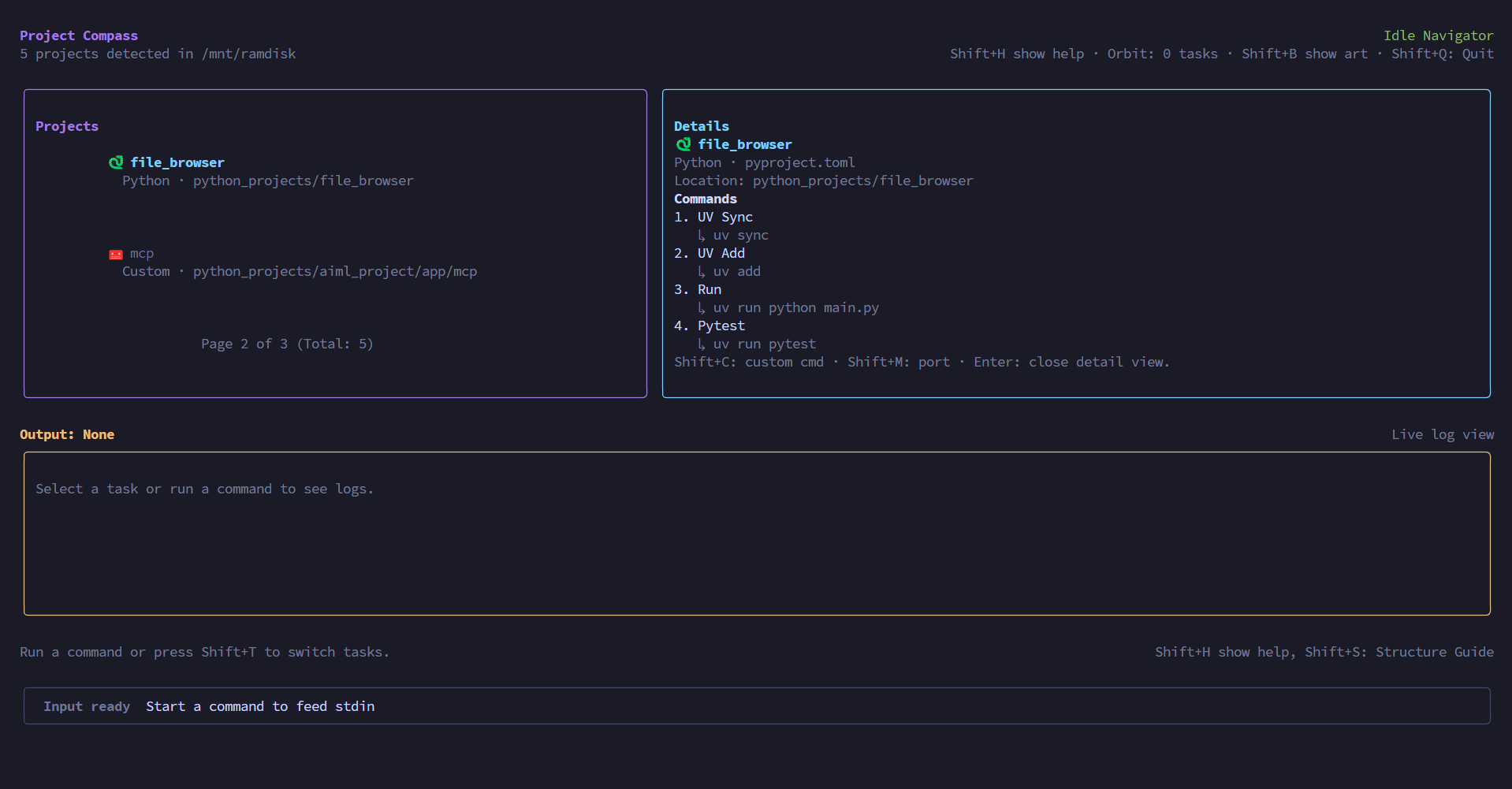
📸 Screenshot
🔗 Links
- NPM Package: npmjs.com/package/project-compass
- GitHub Repository: github.com/CrimsonDevil333333/project-compass
- Bug Reports: github.com/CrimsonDevil333333/project-compass/issues
🌌 The Navigator (Main Interface)
Features
- Automatic Discovery: Instantly identifies Node.js, Python, Rust, Go, Java, PHP, Ruby, .NET projects.
- Deep Scan Mode: Use
--deepto search your entire workspace without depth limits. - Git Context: See active branch and changes directly in the project list.
- Accurate Framework Detection: No hallucinations - only detects frameworks with actual dependencies.
- Paginated Control: Optimized for massive workspaces. View projects in clean, manageable pages with Page Up / Page Down support.
- Configurable UI: Customize your view with
maxVisibleProjectsand toggleable Art Boards and Help Cards.
Supported Languages & Detection
| Language | Manifest Files | Package Managers | Priority |
|----------|----------------|-------------------|----------|
| Node.js | package.json | npm, pnpm, yarn, bun | 100 |
| Python | pyproject.toml, requirements.txt, setup.py, Pipfile, manage.py | uv, poetry, pipenv, pip | 95 |
| Rust | Cargo.toml | cargo | 90 |
| Go | go.mod | go | 85 |
| Java | pom.xml, build.gradle, build.gradle.kts | maven, gradle | 80 |
| PHP | composer.json | composer | 75 |
| Ruby | Gemfile | bundler | 70 |
| .NET | *.csproj, *.fsproj | dotnet | 65 |
🤖 AI Horizon (Shift+O)
Features
- Contextual Chat: Ask open-ended questions about your project. The AI understands your README, dependencies, and file structure.
- Error Analysis (
A): One-key diagnostic for failed tasks. Pass logs directly to the AI for a fix suggestion. - DNA Mapping: Automated command discovery for any project stack.
- AbortController Support: Safe, cancellable requests with no state race conditions.
- Multi-Provider: Support for OpenRouter, Gemini, Claude, and Ollama.
🛰️ Orbit Task Manager (Shift+T)
Features
- Background Orchestration: Keep tasks running while you navigate.
- Paginated View: Navigate tasks with ↑/↓ and Page Up/Down (4 per page, configurable).
- Status-Coded UI: Borders reflect task health (Yellow = Running, Green = Done, Red = Error).
- Process Management: Kill (
Shift+K), Delete (Shift+X), or Rename (Shift+R) tasks on the fly. - Live Log Streaming: Real-time output with scroll support and "SCROLLED" indicator.
- Log Management: Clear logs (
Shift+X) or export to file (Shift+E).
📦 Package Registry (Shift+P)
Features
- Native Logic: Automatically uses your project's preferred package manager.
- Node.js: npm, pnpm, yarn, bun
- Python: uv, poetry, pipenv, pip
- Rust: cargo
- Go: go
- Java: maven, gradle
- PHP: composer
- Ruby: bundler
- .NET: dotnet
- Internal Switcher: Quick-swap between detected projects directly inside the registry.
- Paginated Dependency List: Scrollable view of deps (15 per page) with search/filter (
/key). - Add/Remove Packages: Interactive package management with selective remove via X/D.
- Dependency Info: View version, description, and license via I key.
- Upgrade Packages: Upgrade individual dependencies via G key.
- Python Virtual Environments: Create venv with
Vkey.
🏗️ Project Architect (Shift+N)
Features
- Modern Templates: Scaffold high-performance projects with built-in support for:
- Next.js (npm or Bun)
- React (Vite with pnpm or npm)
- Vue (Vite)
- Rust (Cargo binary)
- Django (startproject)
- Python (Basic directory)
- Go (mod init)
CLI Alternative (Non-TUI)
project-compass --scaffold nextjs --name my-app --dir /path/to/output
project-compass --scaffold python-basic --name my-script --dir /tmp
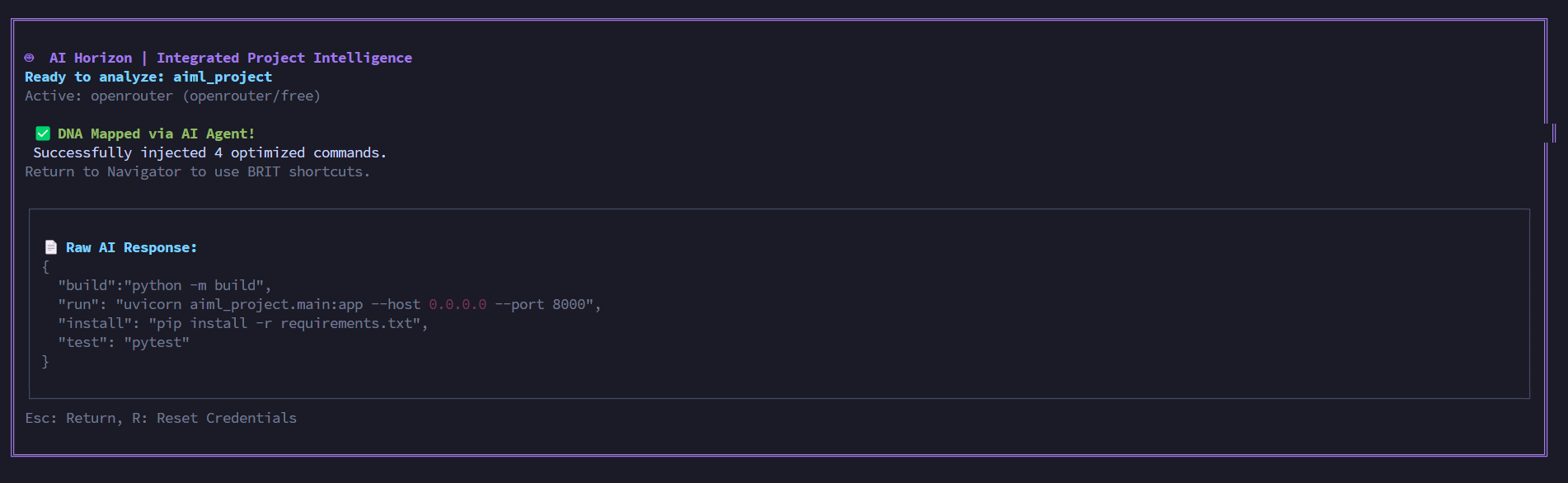
🤖 AI Horizon (Shift+O or 0 in Detail View)
Features
- Agentic Intelligence: Real-world integration with OpenRouter, Gemini, Claude, and Ollama
- DNA Mapping: Analyzes your project structure and injects optimized BRIT commands (Build, Run, Install, Test) into your config
- Raw AI Output: View actual AI responses before applying
- Persistent Auth: Save your API tokens once; Compass handles the secure handshake thereafter
- Project-Specific Config: Loads
compass.config.jsfrom project directories - Editable Suggestions: Review and edit AI suggestions before saving (
Eto edit) - Manual Save: Press
Sto save reviewed suggestions to config
Supported AI Providers
| Provider | Endpoint | Configuration |
|----------|----------|----------------|
| OpenRouter | https://openrouter.ai/api/v1/chat/completions | Default provider |
| Google Gemini | https://generativelanguage.googleapis.com/v1beta/models/{model}:generateContent | Requires API key |
| Anthropic Claude | https://api.anthropic.com/v1/messages | Requires API key |
| Ollama (Local) | http://localhost:11434/api/generate | Local installation required |
🔌 Infrastructure Control (Shift+R)
Features
- Manual Port Mapping: Directly assign specific ports to projects
- Metadata Awareness: AI Horizon uses your manual port settings to suggest smarter deployment scripts
- Config Persistence: Settings saved to
~/.project-compass/config.json
🎨 Omni-Studio & Art Board
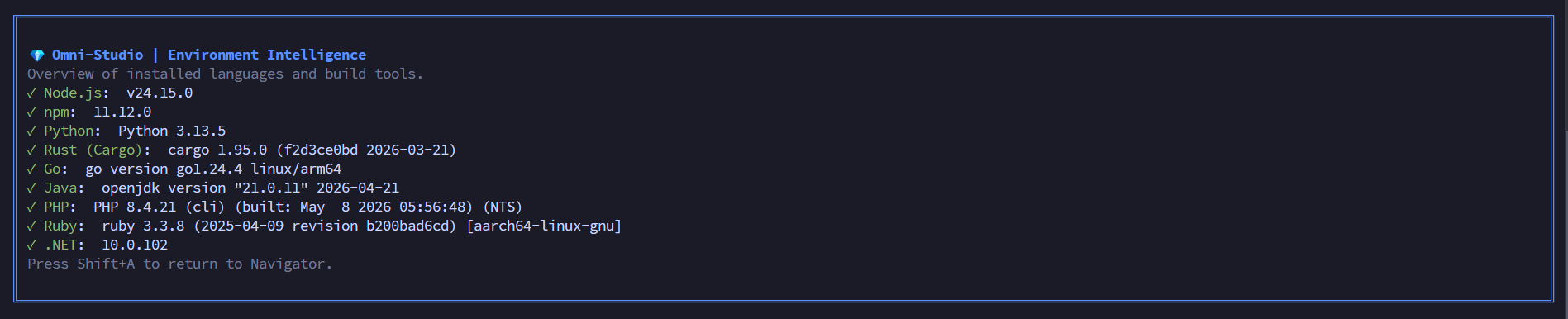
Omni-Studio (Shift+A)
- Runtime Health Check: Scans for installed languages and versions
- Environment Audit: Quick overview of available build tools
- CLI Alternative:
project-compass --studio-check
Art Board (Shift+B)
- Build Atlas: Visual representation of your workspace
- Toggle Visibility: Saved to config (
showArtBoard)

⌨️ Complete Command Reference
Navigation (All Modes)
| Key | Action | Context |
|-----|--------|---------|
| ↑ / ↓ | Move project focus | Navigator |
| PgUp / PgDn | Jump full project page | Navigator |
| Enter | Toggle project Detail View / Switch back from sub-views | Navigator |
| Esc | Global Back: Return to Main Navigator from any view | Global |
| ? | Toggle help overlay | Navigator |
| Shift+Q | Quit application (confirms if tasks are running) | Global (any screen) |
| Ctrl+C | Interrupt running command | When process running |
Quick Actions (Detail View Only)
| Key | Action | Description |
|-----|--------|-------------|
| 0 | Quick AI Analysis | Switches to AI Horizon for selected project |
| B / b | Build project | Runs build command |
| T / t | Test project | Runs test command |
| R / r | Run project | Runs run command (Shift+R configures port) |
| I / i | Install dependencies | Runs install command |
| 1-9 | Run numbered commands | Execute commands 1-9 from detail view |
| Shift+1-9 (A-Z) | Run commands 10+ | Execute commands 10+ (A=10, B=11, etc.) |
View Toggles
| Key | Action | Description |
|-----|--------|-------------|
| Shift+O | AI Horizon Dashboard | Workspace intelligence & analysis |
| Shift+T | Orbit Task Manager | Manage background processes |
| Shift+P | Package Registry | Dependency management |
| Shift+N | Project Architect | Scaffold new projects |
| Shift+A | Omni-Studio | Environment & runtime health |
UI Toggles (Saved to Config)
| Key | Action | Config Key |
|-----|--------|----------|
| Shift+B | Toggle Art Board visibility | showArtBoard |
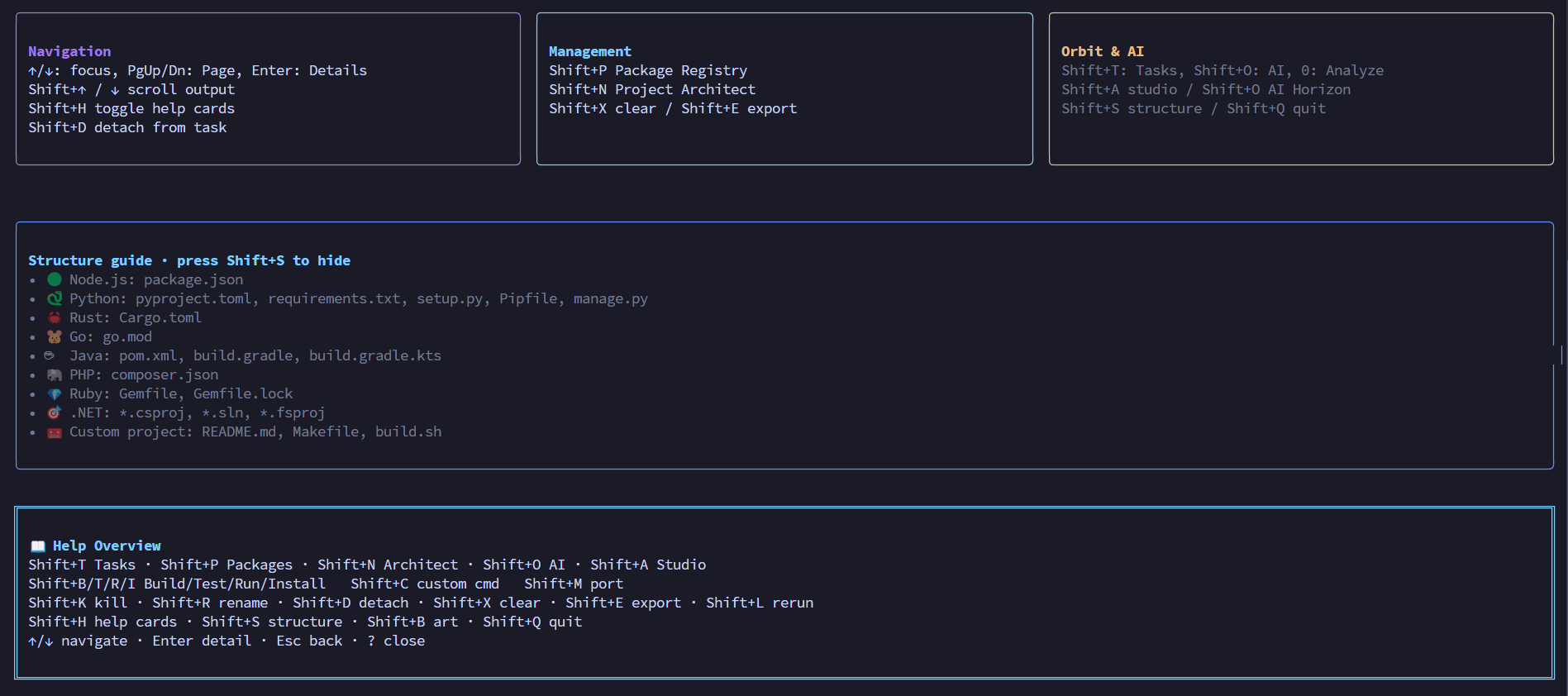
| Shift+H | Toggle Help Cards UI | showHelpCards |
| Shift+S | Toggle Structure Guide | showStructureGuide |
| Shift+U | Settings screen | (direct view) |
| Shift+Z | Dismiss restore banner | (one-time) |
Task Management
| Key | Action | Context |
|-----|--------|---------|
| Shift+K | Kill running process | Task Manager |
| Shift+R | Rename task | Task Manager |
| Ctrl+C | Interrupt running command | Task Manager |
| Shift+D | Detach from active task (runs independently in background) | Navigator |
| Shift+A | Re-attach to detached/orphaned task | Task Manager |
| Shift+X | Clear active task output logs / Delete task | Navigator / Task Manager |
| Shift+E | Export logs to a timestamped .txt file | Navigator |
| Shift+L | Rerun the last executed command | Navigator |
| ↑ / ↓ | Move focus between tasks | Task Manager |
| PgUp / PgDn | Jump full task page (pagination) | Task Manager |
| Enter | Select/deselect task | Task Manager |
Log Scrolling
| Key | Action |
|-----|--------|
| Shift+↑ | Scroll output logs up |
| Shift+↓ | Scroll output logs down |
Project Configuration
| Key | Action | Context |
|-----|--------|---------|
| Shift+R | Configure Port / Rename task | Detail View / Task Manager |
| Shift+C | Add Custom Command (label\|cmd) | Detail View |
💻 Complete CLI Reference (Non-TUI Mode)
Basic Usage
# Show help
project-compass --help
project-compass -h

# Show version
project-compass --version
project-compass -v

# Launch TUI (default: navigator view)
project-compass
project-compass --dir /path/to/workspace
Direct View Launch
# Launch directly into specific views
project-compass --studio          # Launch in Studio view
project-compass --ai               # Launch in AI Horizon view
project-compass --task             # Launch in Task Manager view
project-compass --tasks            # Alias for --task
Project Detection (No TUI)
# List detected projects with details
project-compass --mode test
project-compass --dir /path/to/workspace --mode test

# List projects with full details
project-compass --list-projects
project-compass --list-projects --dir /path/to/workspace

# Get project info by index
project-compass --project-info 0 --dir /path/to/workspace

# Output as JSON (for scripting/automation)
project-compass --list-projects --json
project-compass --project-info 0 --json
Run Commands Directly (No TUI)
# Run any command in a project directory
project-compass --run "npm install" --dir /path/to/project
project-compass --run "uv sync" --dir /path/to/python
project-compass --run "cargo build" --dir /path/to/rust
project-compass --run "go mod tidy" --dir /path/to/go
Package Management (No TUI)
# Add packages to project
project-compass --add-pkg "express" --dir /path/to/node-project
project-compass --add-pkg "fastapi" --dir /path/to/python-project

# Remove packages from project
project-compass --remove-pkg "lodash" --dir /path/to/node-project
project-compass --remove-pkg "requests" --dir /path/to/python-project
Project Scaffolding (No TUI)
# Create new projects from templates
project-compass --scaffold nextjs --name my-app --dir /path/to/output
project-compass --scaffold nextjs-bun --name my-app --dir /path/to/output
project-compass --scaffold react-vite --name my-app --dir /path/to/output
project-compass --scaffold react-vite-npm --name my-app --dir /path/to/output
project-compass --scaffold vue-vite --name my-app --dir /path/to/output
project-compass --scaffold rust --name my-app --dir /path/to/output
project-compass --scaffold django --name my-app --dir /path/to/output
project-compass --scaffold python-basic --name my-app --dir /path/to/output
project-compass --scaffold go --name my-app --dir /path/to/output
Available Templates:
nextjs- Next.js with npmnextjs-bun- Next.js with Bunreact-vite- React with Vite (pnpm)react-vite-npm- React with Vite (npm)vue-vite- Vue with Viterust- Rust Cargo binarydjango- Django projectpython-basic- Basic Python directorygo- Go module
Environment Health Check (No TUI)
# Check installed runtimes
project-compass --studio-check

# Output example:
# ✓ Node.js: v24.15.0
# ✓ npm: 11.12.1
# ✓ Python: Python 3.13.5
# ✗ Rust (Cargo): not installed
# ✓ Go: go version go1.24.4 linux/arm64
AI Analysis
# AI analysis requires interactive TUI mode for API configuration
project-compass --ai
project-compass --ai --dir /path/to/project

# Note: --ai-analyze flag shows message to use TUI mode
project-compass --ai-analyze  # Shows: "AI analysis requires interactive TUI mode"
🔧 Configuration
Main Config File: ~/.project-compass/config.json
{
  "customCommands": {
    "/path/to/project": [
      { "label": "My Command", "command": ["echo", "hello"], "source": "custom" }
    ]
  },
  "showArtBoard": true,
  "showHelpCards": false,
  "showStructureGuide": false,
  "maxVisibleProjects": 2,
  "maxVisibleTasks": 4,
  "aiProvider": "openrouter",
  "aiModel": "deepseek/deepseek-r1",
  "aiToken": "your-api-token-here",
  "projectMeta": {
    "/path/to/project": { "port": "7654" }
  }
}
Configuration Options
| Option | Type | Default | Description |
|--------|------|---------|-------------|
| customCommands | Object | {} | Per-project custom commands |
| showArtBoard | Boolean | true | Show/hide the art board |
| showHelpCards | Boolean | false | Show/hide help cards |
| showStructureGuide | Boolean | false | Show/hide structure guide |
| maxVisibleProjects | Number | 2 | Projects per page in navigator |
| maxVisibleTasks | Number | 4 | Tasks per page in task manager |
| aiProvider | String | "openrouter" | AI provider ID |
| aiModel | String | "deepseek/deepseek-r1" | AI model to use |
| aiToken | String | "" | API token for AI provider |
| projectMeta | Object | {} | Per-project metadata (ports, etc.) |
Project-Specific Config: compass.config.js
Create a compass.config.js in your project root:
export default {
  commands: {
    custom: {
      label: 'My Command',
      command: ['echo', 'hello'],
      source: 'config'
    }
  },
  frameworks: [
    { name: 'MyFramework', icon: '🚀' }
  ]
};
This file is automatically loaded during project detection and merged into project data.
Custom Framework Plugins: ~/.project-compass/plugins.json
{
  "plugins": [
    {
      "name": "My Framework",
      "icon": "🚀",
      "languages": ["Node.js"],
      "files": ["my-framework.config.js"],
      "dependencies": ["my-framework"],
      "priority": 100,
      "commands": {
        "dev": {
          "label": "Dev",
          "command": ["my-cli", "dev"]
        }
      }
    }
  ]
}
🏗️ Built-in Framework Intelligence
Node.js Frameworks (40+ detected)
| Framework | Icon | Commands | Auto-Detected | |-----------|------|----------|---------------| | Next.js | 🧭 | install, dev, build, test, start | ✓ | | React | ⚛️ | install, dev, build, test | ✓ | | Vue.js | 🟩 | install, dev, build, test | ✓ | | NestJS | 🛡️ | install, dev (start:dev), build, test | ✓ | | Nuxt | 🟢 | install, dev, build, generate | ✓ | | Express | 🚂 | install, start, dev | ✓ | | Svelte | 🧡 | install, dev, build, test | ✓ | | Astro | 🚀 | install, dev, build, preview | ✓ | | Fastify | ⚡ | install, start, dev | ✓ | | Koa | 🎋 | install, start | ✓ | | Vite | ⚡ | install, dev, build, preview | ✓ | | Tailwind CSS | 🎨 | init | ✓ | | Prisma | ◮ | install, generate, studio | ✓ | | tRPC | 🔌 | dev, build | ✓ | | GraphQL | ◼️ | start, dev | ✓ |
Python Frameworks
| Framework | Icon | Commands | Auto-Detected | |-----------|------|----------|---------------| | FastAPI | ⚡ | install, run (uvicorn), test | ✓ | | Flask | 🌶️ | install, run, test | ✓ | | Django | 🌿 | install, runserver, test, migrate | ✓ | | Sanic | 🚀 | run, test | ✓ | | AioHTTP | 🔄 | test | ✓ | | Tornado | 🌪️ | run, test | ✓ | | Pytest | ✅ | run, coverage | ✓ | | SQLAlchemy | 🗄️ | test | ✓ |
Rust Frameworks
| Framework | Icon | Commands | Auto-Detected | |-----------|------|----------|---------------| | Actix Web | 🎭 | fetch, run, test, build | ✓ | | Axum | 🗡️ | fetch, run, test | ✓ | | Rocket | 🚀 | fetch, run, test | ✓ | | Warp | 🌀 | run, test | ✓ | | Tokio | ⚡ | run, test | ✓ |
Go Frameworks
| Framework | Icon | Commands | Auto-Detected | |-----------|------|----------|---------------| | Gin | 🍸 | mod tidy, run, test, build | ✓ | | Fiber | 🔥 | run, test | ✓ | | Echo | 🔊 | run, test | ✓ | | Chi | 🤝 | run, test | ✓ |
Java Frameworks
| Framework | Icon | Commands | Auto-Detected | |-----------|------|----------|---------------| | Spring Boot | 🍃 | install, run, test, build | ✓ | | Quarkus | ⚡ | dev, build, test | ✓ | | Micronaut | 🚀 | run, test | ✓ |
PHP Frameworks
| Framework | Icon | Commands | Auto-Detected | |-----------|------|----------|---------------| | Laravel | 🧡 | install, serve, test, migrate | ✓ | | Symfony | 🎵 | install, server:start, test | ✓ | | CodeIgniter | 🔥 | test | ✓ |
Ruby Frameworks
| Framework | Icon | Commands | Auto-Detected | |-----------|------|----------|---------------| | Ruby on Rails | 🛤️ | install, server, test, migrate | ✓ | | Sinatra | 🎷 | install, rackup | ✓ |
.NET Frameworks
| Framework | Icon | Commands | Auto-Detected | |-----------|------|----------|---------------| | ASP.NET Core | 🔷 | restore, run, test, build | ✓ | | Blazor | 🌀 | run, build | ✓ |
🎯 Recent Fixes (v4.3.6)
1. Framework Hallucination Bug FIXED
Problem: Projects without frameworks were showing random frameworks (e.g., simple Python project with main.py was detected as FastAPI).
Root Cause: Framework matchers in frameworks.js used file existence (hasProjectFile) instead of dependency matching.
Fix Applied:
fastapimatcher: Removed|| hasProjectFile(project.path, 'main.py')djangomatcher: Removed|| hasProjectFile(project.path, 'manage.py')- Java/.NET/Ruby frameworks: Now use
dependencyMatches()instead of file checks
Result: Projects without explicit framework dependencies now correctly show Frameworks: none.
2. compass-config.js Integration
Problem: compass-config.js existed but was never integrated into project detection.
Fix Applied:
- Added import of
loadProjectConfiginprojectDetection.js - Integrated into
discoverProjects()function to loadcompass.config.jsfrom project directories - Project-specific commands and frameworks from
compass.config.jsare now merged into project data
3. AI Horizon Improvements
Problem: AI Horizon didn't properly show raw AI output and had poor JSON parsing.
Fix Applied:
- Added
rawAIResponsestate to store raw AI output - Improved JSON parsing to handle markdown code blocks (
json ...) - Raw AI response is now displayed in the UI during review step
- Better error messages showing partial AI response if JSON parsing fails
4. Node.js Detector Fixed
Problem: node.js detector was adding "Node.js" as a framework.
Fix Applied:
- Detector now only adds framework if it's not the generic "Node.js" type
- Projects using plain Node.js without frameworks now show
Frameworks: none
5. Framework Deduplication
Problem: applyFrameworkPlugins() could add duplicate frameworks.
Fix Applied:
- Added check to avoid adding duplicate frameworks
- Now preserves detector-detected frameworks and merges with plugin-detected ones
🎯 Recent Fixes (v4.3.7)
1. Python Binary Detection Bug FIXED
Problem: python.js checked if ALL of ['python3', 'python', 'uv'] binaries existed, causing false "Runtime missing" warnings when only python or python3 was available.
Root Cause: binaries.filter(b => !checkBinary(b)) treats alternate Python binary names as separate requirements.
Fix Applied:
- Now checks if AT LEAST ONE Python runtime exists
- Only shows "Runtime missing" when no Python runtime is found
2. Removed Unused Store
Problem: src/store/useProjectStore.js existed but was never imported anywhere.
Fix Applied:
- Removed dead code file
- Updated all documentation
4. Added Screenshots to README
Problem: README had no images, and package wouldn't show screenshots on npmjs.com because of relative paths.
Fix Applied:
- Added 6 screenshots using raw GitHub URLs
- Navigator Home, Task Manager, AI Horizon, Omni-Studio, Art Board, Help Structure
🧪 Test Suite
Project Compass ships with a comprehensive test suite:
- 29 test files, 594 tests — unit, integration, and detector tests
- Full detector coverage: Node.js, Python, Rust, Go, Java, PHP, Ruby, .NET, Docker, Generic
- 40+ framework plugin tests: Verifies no false-positive detections
- Orchestrator tests: Command execution, task lifecycle, kill/detach/reattach, scaffolding
- Windows-specific tests: 8 tests covering
_killPid,killTask,runCommand, and scaffold on Windows - CLI parsing tests: All argument combinations
- Server API tests: REST endpoints and WebSocket
- Test fixtures: Realistic project structures for all 8 supported languages
npm run test        # Run all 594 tests
npm run lint        # ESLint validation
🚀 Performance
- Fast Scanning: Uses
fast-globfor high-speed project discovery - Non-Blocking: Heavy operations (globbing, command execution) are offloaded from the main render loop
- Smart Caching: Framework plugins are cached after first load
- Memory Efficient: Log buffers capped at 500 lines per task; OOM-proof log reading (256KB max)
🔒 Security
- No Arbitrary Execution: Commands are only executed when explicitly requested by the user
- Local Storage: API tokens stored locally in
~/.project-compass/config.json - Workspace Boundaries: Project detection respects directory structure
- Process Isolation: Background tasks are managed via
execawith proper cleanup
🎓 Examples
Example 1: Navigate and Run
# Launch TUI
project-compass

# Use ↑/↓ to select project
# Press Enter to see details
# Press Alt+B/Alt+T/Alt+R/Alt+I to Build/Test/Run/Install
# Press 0 for AI analysis
Example 2: Quick CLI Usage
# Detect projects
project-compass --list-projects --dir ~/workspace

# Run command
project-compass --run "npm install" --dir ~/workspace/my-project

# Add package
project-compass --add-pkg "express" --dir ~/workspace/my-project
Example 3: JSON Output for Scripting
# Get project list as JSON
project-compass --list-projects --json --dir ~/workspace | jq '.[0].name'

# Get specific project info
project-compass --project-info 0 --json --dir ~/workspace
📦 NPM Scripts
# Start the TUI
npm start

# Run linting
npm run lint

# Test project detection
npm run test

# Run a command (uses --run flag)
npm run run -- "echo hello"
🎯 Recent Updates (v5.4.1 — Ink 7 + React 19 + Studio Polish)
Nested Border Design System
Every overlay panel now follows a consistent nested border architecture:
- Outer border (round/double) defines the panel boundary
- Inner bordered sections organize content by category
- Responsive wrapping stacks sections vertically on small terminals
Other Visual Refinements
- Cleaner Studio View: Removed emoji icons — runtimes display as clean colored text
- Structure Guide Alignment: Fixed Java ☕ misalignment by removing fixed-width icon column
- Navigator Card Fix: Project names with emoji no longer overflow card borders
- ArtBoard Responsive: Tiles wrap to next row on narrow terminals instead of breaking layout
- Default Projects: Changed from 3 → 2 per page for better visual breathing room
Updated Shortcuts
Ctrl+C— Interrupt running commandShift+Z— Dismiss session restore bannerShift+U— Settings screenShift+R— Rename task (Task Manager)
Crafted with ❤️ by Satyaa & Clawdy (AI Agent)
🎯 Recent Updates (v5.4.2 — Ink 7 + React 19 + PackageRegistry Overhaul)
This release upgrades the core rendering stack to Ink 7 + React 19 for better performance, overhauls the PackageRegistry with pagination/search/dep info, adds TaskManager pagination, and fixes several input handling edge cases.
What's New in v5.4.2:
- ⬆️ Ink 7 + React 19:
inkupgraded^5.1.0→^7.0.3,reactupgraded^18.2.0→^19.2.6for betteruseInputevent handling and concurrent features. - 📦 PackageRegistry Overhaul (156→359 lines): Scrollable paginated dep list (15/page), selective remove via X/D (no typing), search/filter via
/, dep info view via I, upgrade via G, column-aligned layout with prod/dev/peer counts frompackage.json. - 📄 TaskManager Pagination: Default 4 tasks per page, PgUp/PgDn jumps full pages, page indicator, configurable via Settings (
maxVisibleTasks, range 2–20). - 🎨 Studio Display Refinements: Clean version strings (no redundant tool name prefixes), consistent column widths with
Box+cleanVersion(), redesigned title layout with checkmark column. - 🔄 Auto-Show Task Output: Output panel appears automatically when a new task starts — no more manual toggling.
- 🔧 Escape Trap Fixed: Sub-views (Registry, Architect, AI, Settings) now handle their own Escape for internal back-navigation.
- 🛡️ BRTI Re-run Guard: Build/Run/Test/Install shortcuts blocked when a task is running with visible output; re-enabled when output hidden or no task running.
- 🗑️ Delete Task Support: Shift+X in Task Manager deletes finished/stale tasks (kills process + removes from list).
- 🔄 Reattach Status Fix: Always performs PID liveness check — no stale "detached" status.
- 🧩 Removed
memofrom Sub-Views: Resolves Ink 7 + React 19useInputinteraction issue in PackageRegistry and ProjectArchitect. - 🚪 Shift+Q from Any Screen: Quit now works from Registry, Architect, AI, and Settings — not just Navigator.
- ⚡ Flickering Mitigation Reverted: Removed navigation throttle, emit throttle, and ArtBoard debounce — small frequent deltas (1–2 lines per 100ms) perceived as smoothest.
- 🏗️ ProjectArchitect Non-Blocking: Scaffolding commands run in the background via Orbit — no more interactive step freezing the TUI.