
project-graph-mcp
v2.4.3
Published
MCP server for AI agents — project graph, code quality analysis, visual web explorer. JS, TS, Python, Go.

Maintainers
 head2dev
Readme



project-graph-mcp
Maximize your AI agent's context window. An MCP server that lets agents read and edit your codebase in compact mode — minified source with all variable names preserved. Code tokens drop ↓40%, and .ctx documentation is injected only in the focus zone. Fewer tokens per file → more files fit in context → deeper understanding of your codebase.
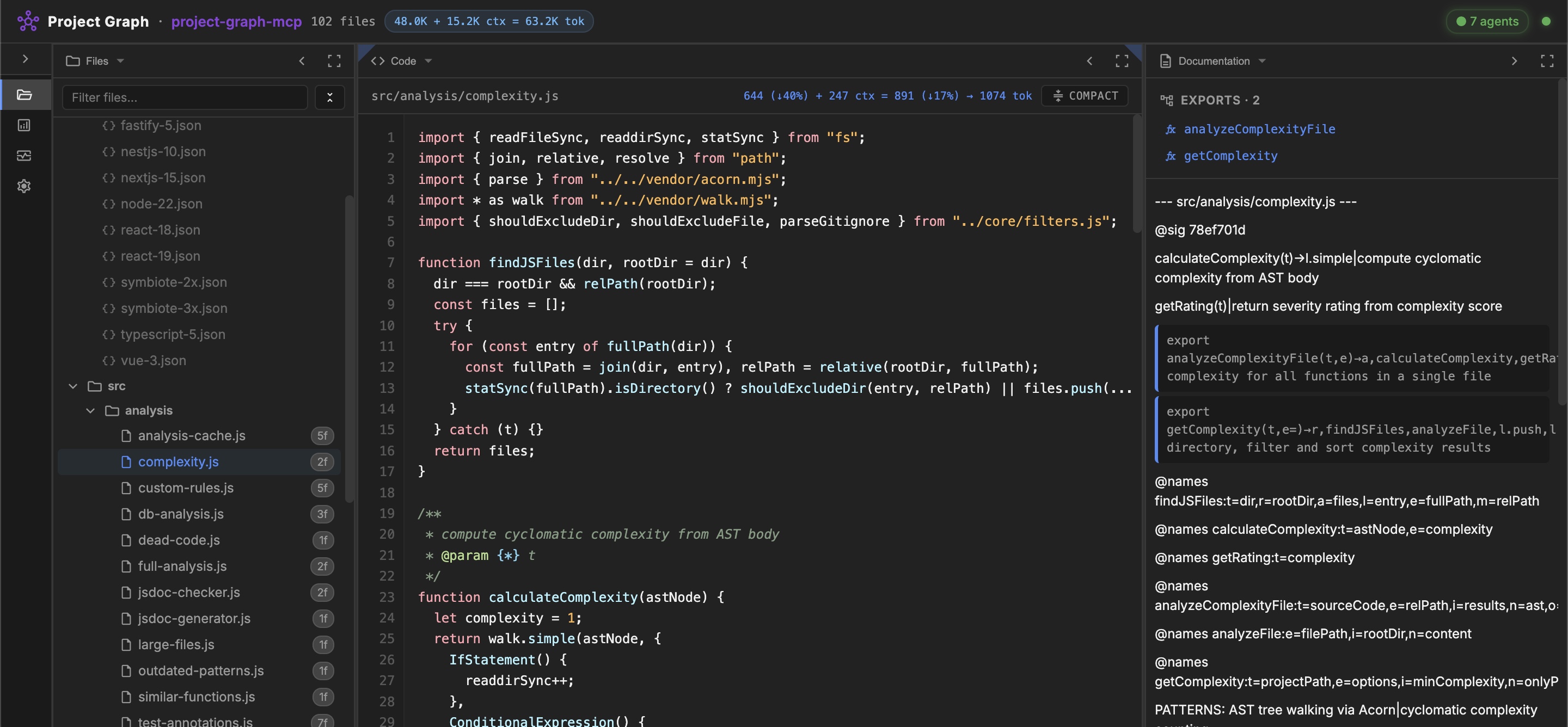
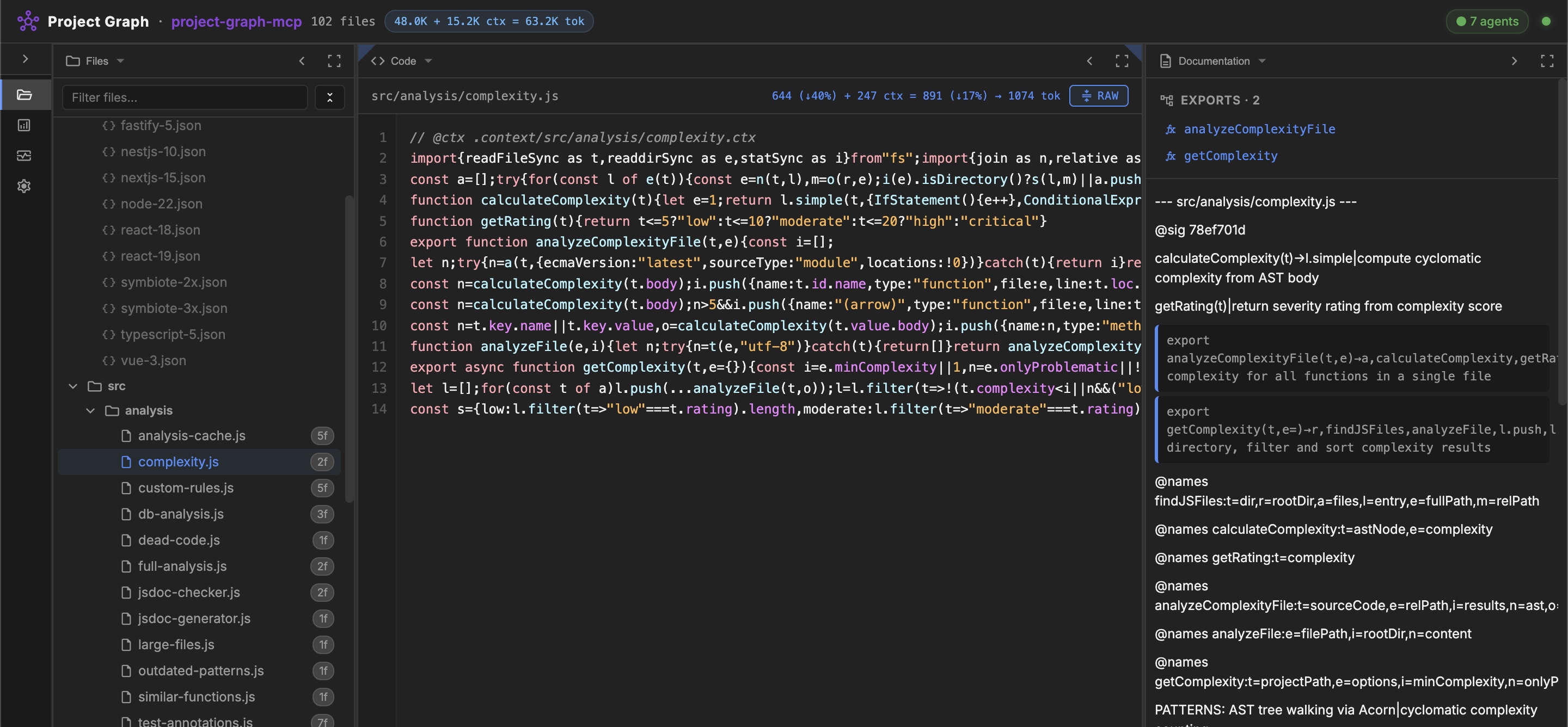
[!TIP] 18 MCP tools, zero config. Add one line to your MCP config and the server downloads itself on the next IDE restart.
Features
- Project Skeleton — AST-based graph with 10-50x compression, minified JSON representation of your entire codebase
- Compact Code Mode — project-wide
compact/beautify, agents read and edit minified source directly (↓40% tokens both ways) - AI Context Layer — one call loads skeleton + docs + compressed files; progressive loading (Overview → Focus)
- Code Quality Analysis — dead code, complexity, duplicates, large files, legacy patterns, JSDoc consistency, Health Score (0-100)
- Multi-Language Parsers — JavaScript (AST/Acorn), TypeScript, Python, Go (regex-based)
- Doc Dialect — auto-generated
.ctxdocumentation with AST signatures, staleness detection, self-enriching@enrichmarkers - Database Analysis — schema extraction from SQL migrations, table usage, dead tables
- Test Checklists — persistent test state in
.ctx.mdfiles, agent-drivenmark_test_passed - Monorepo Support — auto-discovery of sub-projects in
packages/,apps/,services/ - Framework Rules — 11 rulesets (86 rules) for React, Vue, Next.js, Express, NestJS, TypeScript, Node.js, Symbiote.js
- Security — path traversal protection on all operations
Quick Start
Generate the MCP config for your IDE (with correct paths):
npx -y project-graph-mcp configCopy the output JSON into your IDE's MCP config file, then restart.
| IDE | Config path |
|-----|------------|
| Antigravity | ~/.gemini/antigravity/mcp_config.json |
| Gemini CLI | ~/.gemini/settings.json |
| Cursor | .cursor/mcp.json |
| Windsurf | .windsurf/mcp.json |
| Claude Code | Run: claude mcp add project-graph npx -y project-graph-mcp |
See CONFIGURATION.md for all supported IDEs.
git clone --recursive https://github.com/rnd-pro/project-graph-mcp
cd project-graph-mcp
npm install
Note: The
--recursiveflag is required to fetch thevendor/symbiote-nodesubmodule.
CLI
npx project-graph-mcp skeleton src/       # Project skeleton
npx project-graph-mcp expand SN           # Expand minified symbol
npx project-graph-mcp deps SNG            # Get dependencies
npx project-graph-mcp deadcode src/       # Find unused code
npx project-graph-mcp complexity src/     # Cyclomatic complexity
npx project-graph-mcp analyze src/        # Full health analysis
npx project-graph-mcp compress src/f.js   # Compress file for AI
npx project-graph-mcp docs src/           # Project docs (doc-dialect)
npx project-graph-mcp generate-ctx src/   # Generate .context/ docs
npx project-graph-mcp compact src/ --dry-run  # Compact all files
npx project-graph-mcp mode .              # Show current editing mode
npx project-graph-mcp help                # All commands
Web Dashboard
[!NOTE] The web dashboard has moved to mcp-agent-portal. Install it with
npx mcp-agent-portalto get the full visual UI: file tree, code viewer, dependency graph, live monitoring, and marketplace.
MCP Ecosystem
Best used as part of mcp-agent-portal — a unified MCP aggregator that combines all RND-PRO servers behind a single config entry:
{
  "mcpServers": {
    "agent-portal": {
      "command": "npx",
      "args": ["-y", "mcp-agent-portal"]
    }
  }
}
[!TIP] One entry replaces separate configs for project-graph-mcp, agent-pool-mcp, and any other child servers.
Also works standalone or alongside agent-pool-mcp — multi-agent task delegation:
# Generate configs with correct paths for both servers:
npx -y project-graph-mcp config
npx -y agent-pool-mcp config
# Or use mcp-agent-portal which bundles both.
[!IMPORTANT] Each Gemini CLI worker can have its own project-graph-mcp instance — workers navigate the codebase independently, without blocking the primary agent.
Documentation
- CONFIGURATION.md — Setup for all supported IDEs
- GUIDE.md — Comprehensive usage guide with all tools
- ARCHITECTURE.md — Source code structure
- AGENT_ROLE.md — Full system prompt for agents
- ROADMAP.md — Feature roadmap and backlog
Related Projects
- mcp-agent-portal — Unified MCP aggregator + web dashboard + AI agent runtime
- agent-pool-mcp — Multi-agent orchestration via Gemini CLI
- Symbiote.js — Isomorphic Reactive Web Components framework
- JSDA-Kit — SSG/SSR toolkit for modern web applications
License
MIT © RND-PRO.com
Made with ❤️ by the RND-PRO team