
promfiler
v0.6.0
Published
Expose an http endpoint for exporting node.js v8 profiling

Maintainers
 samuelberthe
Readme
Live profiling exporter for Node.js, Prometheus and Grafana
About flame graphs
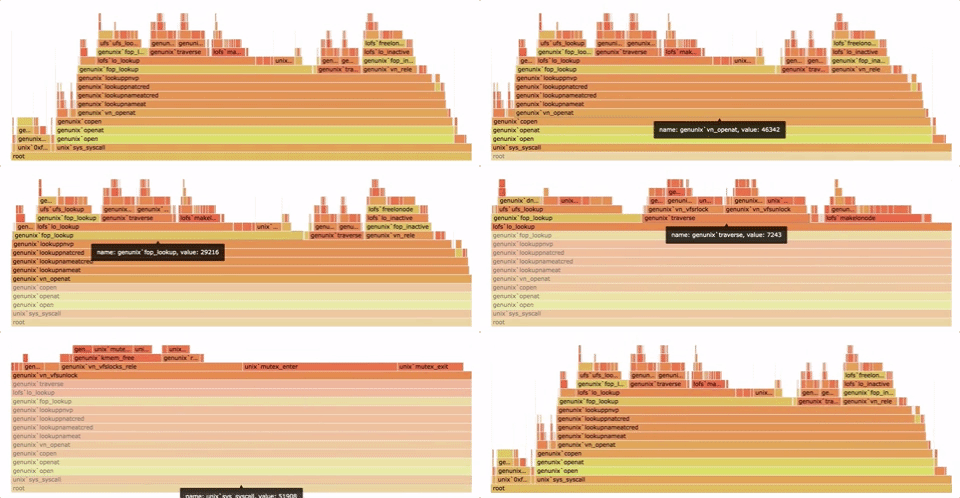
Please read Brendan Gregg's post
Flame graph are oriented graphs (like a tree).
Flame graph are useful for analysing the time spent on each node (or function execution, in case of program profiling).
Nodes have a "signature" (even if these are not exit nodes). This is the path from the <root> node to itself.
The signature describes only the depth dimension. Multiple signatures shape a graph.
Node value:
- Nodes in a flame graph have a virtual weight. This is usually the time spent on each local node.
- A node real weight is equal to the virtual weight, plus the sum of the children real weight (recursion).
- The virtual weight is equal to the real weight, minus all children real weight.
- We only export virtual weight. The real weight is implicit and can be computed easily.
Install
$ npm install -g promfilerRunning from the cli
This execution mode exposes a HTTP endpoint for Prometheus metric sraping (0.0.0.0:9142/metrics by default).
  Usage: node-promfiler [options] <app> [argv...]


  Options:

    -V, --version                                output the version number
    -h, --hostname <hostname>                    Address to listen for metric interface.
    -p, --port <port>                            Port to listen for metric interface.
    -P, --path <path>                            Path under which to expose metrics.
    -s, --sampling-interval <sampling interval>  Changes default CPU profiler sampling interval to the specified number of microseconds.
    -h, --help                                   output usage information

  Examples:

    $ promfiler ./app.js
    $ promfiler ./app.js foo bar
    $ promfiler --port 9090 ./app.js foo bar
Using Promfiler as a Node.JS library
Promfiler can start an external http server or let you reuse an existing Express/Hapi/Koa/... instance.
Using the provided HTTP server
const promfiler = require('promfiler');

promfiler.startServer({
  hostname: '0.0.0.0',                  // optional
  port: 9142,                           // optional
  path: '/metrics',                     // optional
}).then( (uri) => {
  promfiler.startProfiling({
    samplingInterval: 1000,             // optional
  });

  console.log("Profiler listening on %s", uri);

  // your code here
});
Using your Own HTTP server
const promfiler = require('promfiler');
const express = require('express');
const app = express();

app.get('/metrics', function (req, res) {
  res.send(promfiler.getMetrics());
});

app.listen(8080, function () {
  promfiler.startProfiling({
    samplingInterval: 1000,             // optional
  });
});
Configuring Promfiler
- Sampling interval: Changes default CPU profiler sampling interval to the specified number of microseconds. Default interval is 1000us. Decreasing this value may improve accuracy, but will also reduce speed of execution.
Configuring Prometheus
scrape_configs:
  - job_name: 'test'
    scrape_interval: 30s
    scrape_timeout: 3s
    static_configs:
     - targets: ['localhost:9142']
Visualizing flame graphs
Install grafana-flamegraph-panel into your Grafana instance.
Output format
$ promfiler demo/app.js

$ curl localhost:9142/metrics
# HELP promfiler_cpu_profile CPU stack trace samples
# TYPE promfiler_cpu_profile gauge
promfiler_cpu_profile{signature="(root)"} 0
promfiler_cpu_profile{signature="(root)#parserOnHeadersComplete"} 0
promfiler_cpu_profile{signature="(root)#parserOnHeadersComplete#parserOnIncoming"} 0
promfiler_cpu_profile{signature="(root)#parserOnHeadersComplete#parserOnIncoming#emit"} 0
promfiler_cpu_profile{signature="(root)#parserOnHeadersComplete#parserOnIncoming#emit#emitTwo"} 0
promfiler_cpu_profile{signature="(root)#parserOnHeadersComplete#parserOnIncoming#emit#emitTwo#http.createServer"} 0
promfiler_cpu_profile{signature="(root)#parserOnMessageComplete"} 1
promfiler_cpu_profile{signature="(root)#_tickCallback"} 0
promfiler_cpu_profile{signature="(root)#_tickCallback#_combinedTickCallback"} 0
promfiler_cpu_profile{signature="(root)#_tickCallback#_combinedTickCallback#onFinish"} 0
promfiler_cpu_profile{signature="(root)#_tickCallback#_combinedTickCallback#onFinish#emit"} 0
promfiler_cpu_profile{signature="(root)#_tickCallback#_combinedTickCallback#onFinish#emit#emitNone"} 0
promfiler_cpu_profile{signature="(root)#_tickCallback#_combinedTickCallback#onFinish#emit#emitNone#resOnFinish"} 1
promfiler_cpu_profile{signature="(root)#_tickCallback#_combinedTickCallback#afterWrite"} 1
promfiler_cpu_profile{signature="(root)#_tickCallback#_combinedTickCallback#endReadableNT"} 0
promfiler_cpu_profile{signature="(root)#_tickCallback#_combinedTickCallback#endReadableNT#emit"} 0
promfiler_cpu_profile{signature="(root)#_tickCallback#_combinedTickCallback#endReadableNT#emit#emitNone"} 0
promfiler_cpu_profile{signature="(root)#_tickCallback#_combinedTickCallback#endReadableNT#emit#emitNone#socketOnEnd"} 0
promfiler_cpu_profile{signature="(root)#_tickCallback#_combinedTickCallback#endReadableNT#emit#emitNone#socketOnEnd#Socket.end"} 0
promfiler_cpu_profile{signature="(root)#_tickCallback#_combinedTickCallback#endReadableNT#emit#emitNone#socketOnEnd#Socket.end#Writable.end"} 0
promfiler_cpu_profile{signature="(root)#_tickCallback#_combinedTickCallback#endReadableNT#emit#emitNone#socketOnEnd#Socket.end#Writable.end#endWritable"} 0
promfiler_cpu_profile{signature="(root)#_tickCallback#_combinedTickCallback#endReadableNT#emit#emitNone#socketOnEnd#Socket.end#Writable.end#endWritable#finishMaybe"} 0
promfiler_cpu_profile{signature="(root)#_tickCallback#_combinedTickCallback#endReadableNT#emit#emitNone#socketOnEnd#Socket.end#Writable.end#endWritable#finishMaybe#emit"} 0
promfiler_cpu_profile{signature="(root)#_tickCallback#_combinedTickCallback#endReadableNT#emit#emitNone#socketOnEnd#Socket.end#Writable.end#endWritable#finishMaybe#emit#emitNone"} 0
promfiler_cpu_profile{signature="(root)#_tickCallback#_combinedTickCallback#endReadableNT#emit#emitNone#socketOnEnd#Socket.end#Writable.end#endWritable#finishMaybe#emit#emitNone#onSocketFinish"} 1
promfiler_cpu_profile{signature="(root)#_handle.close"} 0
promfiler_cpu_profile{signature="(root)#_handle.close#emit"} 0
promfiler_cpu_profile{signature="(root)#_handle.close#emit#emitOne"} 0
promfiler_cpu_profile{signature="(root)#_handle.close#emit#emitOne#socketOnClose"} 0
promfiler_cpu_profile{signature="(root)#_handle.close#emit#emitOne#socketOnClose#freeParser"} 1
...Troubleshooting
I observed huge memory leaks, increasing over long running profling. This is due to v8-profiler library (and probably v8 :trollface:). You should not use it in production until it's fixed (or contribute !).