
property-syncer
v1.1.5
Published
高性能 Vue 3 响应式属性同步工具,用于在响应式对象与多个 ref 之间进行精准、可控的属性映射与更新。

Maintainers
 izcw
izcwReadme
Property Syncer
面向 Vue 3 的高性能响应式属性同步库,在源数据与多个 ref 之间建立精准、可控的映射关系。支持深层路径、transform / comparator、即时同步、深度监听,以及用户操作失败后的数据回滚(recover)。
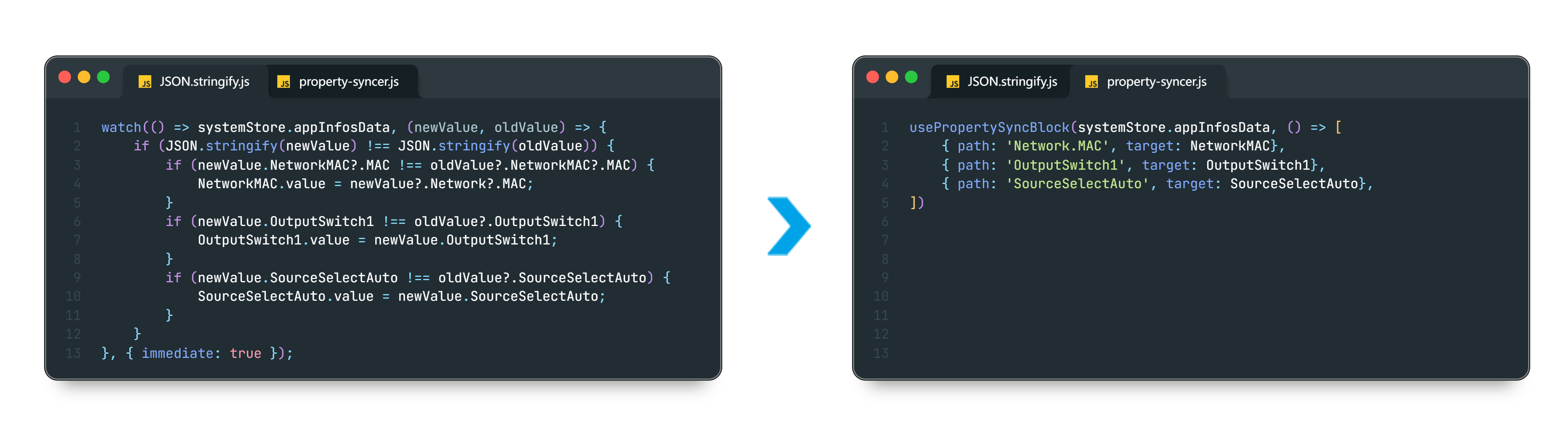
功能特性
- 精确路径同步:支持
Master[0].volume等深层路径,含路径检查与编译缓存。 - 按需监听:只监听配置的路径,避免对整个对象做深度
watch。 - 灵活配置:支持对象
{ path: ref }或数组[{ path, target, ... }]两种写法。 - 自定义转换:
transform在写入目标前预处理源值,失败时自动回退。 - 智能比较:
comparator控制是否更新;内置isDeepEqual,可防循环引用。 - 即时同步:默认
immediate: true,挂载时立即对齐源数据。 - 深度监听:全局或单项
deep,对象/数组变更可正确感知。 - 深拷贝控制:
copyData(默认true)避免引用污染。 - 数据回滚:配置
recover(毫秒)后,在用户改 UI、请求服务端失败或超时等场景下,可延迟从源数据恢复界面。 - 模块化管理:
usePropertySyncBlock支持多组映射,组件卸载时自动解绑。 - 防闪烁更新:数组逐项合并、保留元素引用,减少
v-for重建 DOM。 - 调试与容错:
debug输出路径警告;单项配置异常不影响其余映射。
性能对比
| 项目 | 传统深度监听 | Property Syncer |
| --- | --- | --- |
| 监听粒度 | 整个对象或子树 | 仅监听指定路径 |
| 触发次数 | 任意属性变化均触发 | 目标路径变化触发,支持 comparator 自定义过滤 |
| CPU 开销 | 高(递归 + 多次触发) | 浅监听极低;深监听经 isDeepEqual + WeakMap 优化 |
| 内存开销 | 高(大量中间副本) | 低(路径缓存 + 按需深比较) |
| 自动解绑 | 需手动处理 | usePropertySyncBlock 自动解绑 |
| 复杂对象 | 循环引用易出错 | 浅/深模式均可控,深比较有防护 |
| 列表渲染 | v-for 易整表重建 | 数组逐项更新,保留引用 |
API
usePropertySyncBlock(source, mappings, options?)
| 参数 | 类型 | 说明 |
| --- | --- | --- |
| source | object \| Ref | 源响应式对象或 ref |
| mappings | () => Array \| Object | 返回映射配置,支持动态配置 |
| options.immediate | boolean | 是否立即同步(默认 true) |
| options.deep | boolean | 是否全局深度比较(默认 false) |
| options.debug | boolean | 是否开启调试(默认 false) |
当
path指向数组或对象时,须对该映射项或全局开启deep。
返回值
| 属性 | 类型 | 说明 |
| --- | --- | --- |
| stop | () => void | 停止监听并清理回滚定时器;usePropertySyncBlock 在组件卸载时自动调用 |
| recovers | Map<Ref, object> | 数据回滚:以 target ref 为键的回滚控制器;仅当 recover > 0 时存在对应项 |
recovers回滚项提供:
| 方法 / 属性 | 说明 |
| --- | --- |
| schedule() | 启动回滚倒计时;到期后从源数据重新同步到 target |
| clear() | 取消倒计时 |
| active | 只读 ref;true 表示处于回滚等待期 |
映射项(mappings)字段
| 字段 | 类型 | 说明 |
| --- | --- | --- |
| path | string | 源属性路径,如 "Master[0].volume" |
| target | Ref | 目标 ref |
| transform? | (value) => any | 可选,写入前对源值进行加工 |
| comparator? | (newVal, oldVal) => boolean | 可选,自定义比较逻辑,返回 true 时才更新目标 |
| deep? | boolean | 可选,覆盖全局 deep(默认 false) |
| copyData? | boolean | 可选,是否深拷贝(默认 true) |
| recover? | number | 回滚延迟(毫秒);> 0 启用。须在业务中通过 recovers.get(target)?.schedule() 手动启动 |
使用指南
安装
pnpm i property-syncer导入
import { usePropertySyncBlock } from 'property-syncer'基础用法
const OutputSwitch1 = ref('0')
const OutputSwitch2 = ref('0')
const userName = ref('')

usePropertySyncBlock(store.data, () => [
  { path: 'OutputSwitch1', target: OutputSwitch1 },
  { path: 'OutputSwitch2', target: OutputSwitch2 },
  { path: 'users[0].profile.name', target: userName },
], { immediate: true })
高级用法
const temperature = ref(0)

const { stop: stopSync } = usePropertySyncBlock(store.data, () => [
  {
    path: 'weather.Temperature',
    target: temperature,
    transform: (v) => Number(v).toFixed(1), // 转换为 1 位小数
    comparator: (n, o) => Math.abs(n - o) > 0.01, // 变化超过 0.01 时更新
    deep: true, // 该字段可独立配置
    copyData: true, // 深拷贝数据(默认)
  },
], { debug: true }) // 开启调试模式

stopSync.stop() // 主动停止数据回滚(recover)
- 在映射项中设置
recover: 3000(毫秒),库会为该target注册回滚项到recovers。 - 用户操作(如
@change)后,在finally等逻辑中调用recovers.get(target)?.schedule()启动倒计时。 - 回滚等待期内,外部源数据不会经
comparator写回本地,避免与「待回滚」状态冲突。 - 倒计时结束且源数据仍未体现本次操作时,从
source[path]重新读取并写回target(经transform处理)。
示例:开关控制,请求失败后回滚 UI
<template>
  <el-switch
    v-model="lighting"
    active-text="On"
    inactive-text="Off"
    @change="onSwitchChange"
  />
</template>

<script setup>
import { ref } from 'vue'
import { usePropertySyncBlock } from 'property-syncer'

const lighting = ref('0')

// recovers 即数据回滚,可按业务自定义解构名称
const { recovers: rollbacks } = usePropertySyncBlock(store.data, () => [
  { path: 'Control.lamp', target: lighting, recover: 3000 }
])

const onSwitchChange = async () => {
  try {
    // ...
  } catch (error) {
    // ...
  } finally {
    // 启动回滚:超时内源数据未更新为本次操作结果,则恢复 UI
    rollbacks.get(lighting)?.schedule()
  }
}
</script>
recovers以映射配置中的targetref 为键,故通过rollbacks.get(lighting)获取对应回滚项。若服务端在recover时限内推送并成功同步了新值,则无需再回滚;回滚等待期内源数据若有变化,comparator会暂时阻止写入,直至等待期结束。
注意事项
recover仅提供「延迟从源回滚」能力;须在用户修改逻辑中(通常finally)手动调用schedule(),不会在target变化时自动启动。recover为0、负数或非有效数字时视为关闭,对应项不会出现在recovers中。- 发布 npm 版本后,请为对应版本创建 Git Tag,便于追溯与管理。
开发与发布
npm 包(推荐)
npm run build          # 构建
npm login              # 首次发布需登录
npm publish --access=public
本地联调
在包项目中:
pnpm link --global   # 创建本地软链接(在组件项目中执行)
pnpm run build:watch # 监听模式构建
pnpm unlink --global # 取消链接
在使用项目中:
pnpm link property-syncer # 链接到本地包本地引用
npm run build// 示例:从构建产物引入,或从源文件引入(需兼容构建配置)
import { xxx } from './xx/xx.js';私有仓库
适用于企业内网或私有化部署,具体流程请参考所用私有仓库文档。