
proto-annotation
v0.6.3
Published
Design review tool for prototypes. Annotate UI elements, generate agent prompts, paste into Cursor/Claude Code.

Maintainers
 simoneattanasio
Readme
proto-annotation
    ____             __
   / __ \_________  / /_____
  / /_/ / ___/ __ \/ __/ __ \
 / ____/ /  / /_/ / /_/ /_/ /
/_/   /_/   \____/\__/\____/

   ___                      __        __  _
  /   |  ____  ____  ____  / /_____ _/ /_(_)___  ____
 / /| | / __ \/ __ \/ __ \/ __/ __ `/ __/ / __ \/ __ \
/ ___ |/ / / / / / / /_/ / /_/ /_/ / /_/ / /_/ / / / /
/_/  |_/_/ /_/_/ /_/\____/\__/\__,_/\__/_/\____/_/ /_/
Design review tool for coded prototypes. Annotate UI elements, generate AI-ready prompts, paste into Cursor or Claude Code.
Quick Start
# Try the built-in demo (no setup needed)
npx proto-annotation

# Or point it at your prototype
npx proto-annotation http://localhost:3000
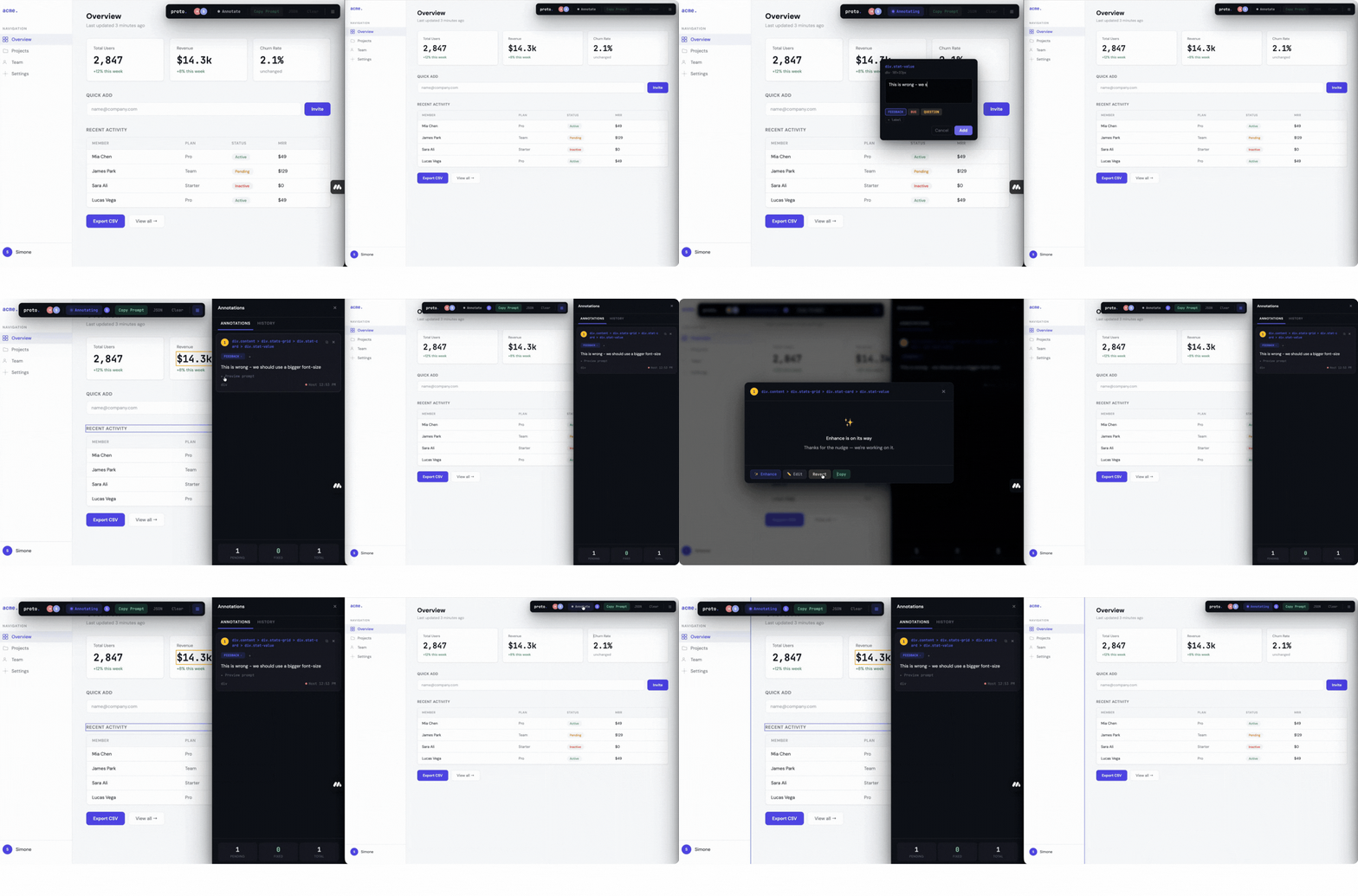
That's it. Your prototype opens full-screen with a floating annotation toolbar. Click elements, write feedback, copy the prompt, paste into your AI coding tool.
How It Works
You run your prototype (next dev, vite, etc.)
        |
npx proto-annotation http://localhost:3000
        |
Browser opens → your prototype with annotation overlay
        |
Press A → click any element → type your feedback → add labels
        |
Click "Preview prompt" → optionally ✨ Enhance with Claude
        |
Click "Copy Prompt" → paste into Cursor / Claude Code
        |
Prototype hot-reloads → review again → repeat
Why This Exists
Designers iterate on coded prototypes by spotting issues — a button too small, spacing that feels off, a colour that's wrong — then either hunting through code themselves or writing up notes that lose context along the way.
proto-annotation closes that gap. You click on the problem, describe what you want, and the tool captures everything an AI coding agent needs to make the fix — but only the metadata that's relevant to your feedback.
✨ Enhance with Claude
Each annotation has a Preview prompt button that opens the generated prompt. From there you can:
- ✨ Enhance — rewrites your vague note into a precise, specific instruction using Claude (e.g.
"make it bigger"→"Increase the font-size of .btn-primary from 14px to 20px and update padding from 8px 16px to 12px 24px") - ✏️ Edit — manually tweak the prompt directly
- Revert — go back to the original
- Copy — copy just this annotation's prompt
Enhance uses the element's actual CSS values, dimensions, and layout context to produce instructions a coding AI can execute without guessing.
Enhance is built in — no setup, no API key needed.
Real-Time Collaboration
Review prototypes together. One person hosts, teammates join with a link.
npx proto-annotation http://localhost:3000 --collabThe terminal prints a share URL:
    ____             __
   / __ \_________  / /_____
  / /_/ / ___/ __ \/ __/ __ \
 / ____/ /  / /_/ / /_/ /_/ /
/_/   /_/   \____/\__/\____/

   ___                      __        __  _
  /   |  ____  ____  ____  / /_____ _/ /_(_)___  ____
 / /| | / __ \/ __ \/ __ \/ __/ __ `/ __/ / __ \/ __ \
/ ___ |/ / / / / / / /_/ / /_/ /_/ / /_/ / /_/ / / / /
/_/  |_/_/ /_/_/ /_/\____/\__/\__,_/\__/_/\____/_/ /_/

  v0.4.0  ·  collab

  ─────────────────────────────────────

  Target   http://localhost:3000
  Local    http://localhost:4747

  Code     a3f7c2
  Share    http://192.168.1.5:4747/join?code=a3f7c2

  Share the link above with your team.

  Ctrl+C to stop
Send the Share link to your team. They click it, type their name, and they're in — no install, no account needed.
What you get:
- Participant avatars — colored dots in the toolbar show who's in the session
- Live presence — see colored rings around elements others are hovering over, with their name
- Author tracking — each annotation shows who created it
- Ownership — only the author (or host) can delete an annotation
- Invite-only — no one can join without the session code
Annotation Types + Labels
Each annotation has a type (one of three) and optional labels (as many as you want):
Types (mutually exclusive):
- Feedback — design changes, improvements, "make this bigger"
- Bug — something broken, wrong colour, layout issue
- Question — need clarification, "should this be 24px?"
Labels (additive tags):
- Add labels like
spacing,branding,typography,responsive,accessibility - Labels tell the AI what aspect of the element to focus on
- Click
+to add,xto remove — add as many as you need
Smart Prompts
proto-annotation generates contextual prompts, not data dumps. It reads your feedback and labels to include only what the AI needs:
- Feedback about spacing? → includes padding, margin, dimensions
- Labels include
branding? → includes colours, fonts, background - Feedback about text? → includes visible content
- Labels include
typography? → includes font-size, weight, line-height
# Design Review — localhost:3000

A designer reviewed this prototype and annotated 2 elements.
For each: find the element in the codebase, make the change,
state the file and what you did.

---

## 1. FIX: Text is getting cut off on smaller screens
Element: div.stat-value (search for stat-value)
Path: div.stats-grid > div.stat-card > div.stat-value
Labels: typography, responsive → Focus: font-size, font-weight,
  line-height, breakpoints, media queries, fluid sizing
Baseline: 202x37px | font-size: 28px | font-weight: 700
Parent: div.stat-card

---

## 2. CHANGE: Make this button bigger and more on-brand
Element: button.btn-primary (search for btn-primary)
Path: div.quick-add > button.btn-primary
Labels: spacing, branding → Focus: padding, margin, gap,
  dimensions, colors, fonts, brand consistency
Baseline: 75x38px | padding: 10px 20px | bg: rgb(79,70,229)
Parent: div.quick-add (flex row, gap: 10px)
Keyboard Shortcuts
| Key | Action |
|-----|--------|
| A | Toggle annotation mode |
| P | Toggle side panel |
| Esc | Stop annotating / close panel |
| Cmd+Shift+C | Copy agent prompt |
Options
npx proto-annotation <url>              # URL to review
npx proto-annotation                    # Demo mode (built-in test page)
  --port <port>                         # Server port (default: 4747)
  --no-open                             # Don't auto-open browser
  --demo                                # Explicitly use demo mode
  --collab                              # Enable collaborative review session
Works With
- Any framework — React, Next.js, Vue, Svelte, plain HTML
- Any dev server — Vite, Webpack, Turbopack, static files
- Any AI coding tool — Cursor, Claude Code, Windsurf, Copilot
Requirements
- Node.js 18+
Persistent Annotations
Annotations are automatically saved to .proto-annotation-data.json in the directory where you run the command. They survive server restarts — stop, restart, and everything is right where you left it.
In collab mode, all annotations from all participants are saved on the host's machine.
The file is plain JSON — you can back it up, share it, or check it into version control if you want a permanent record.
Roadmap
- [ ] MCP server for direct Cursor/Claude Code integration (no copy-paste)
- [ ] Figma link attachments ("should look like this frame")
- [ ] Screenshot capture (before/after per annotation)
- [ ] @mentions — tag teammates on specific annotations
License
MIT