
pseudo-l10n
v1.0.0
Published
Easy-to-use pseudo-localization generator for testing i18n implementations. Adds accented characters, text expansion, and visual markers to help identify localization issues.

Maintainers
 l10n.dev
Readme
pseudo-l10n


Easy-to-use pseudo-localization generator for testing i18n implementations.
Pseudo-localization helps QA engineers and developers identify internationalization (i18n) issues before actual translation. This package transforms your English JSON translation files into pseudo-localized versions that simulate real-world localization challenges.
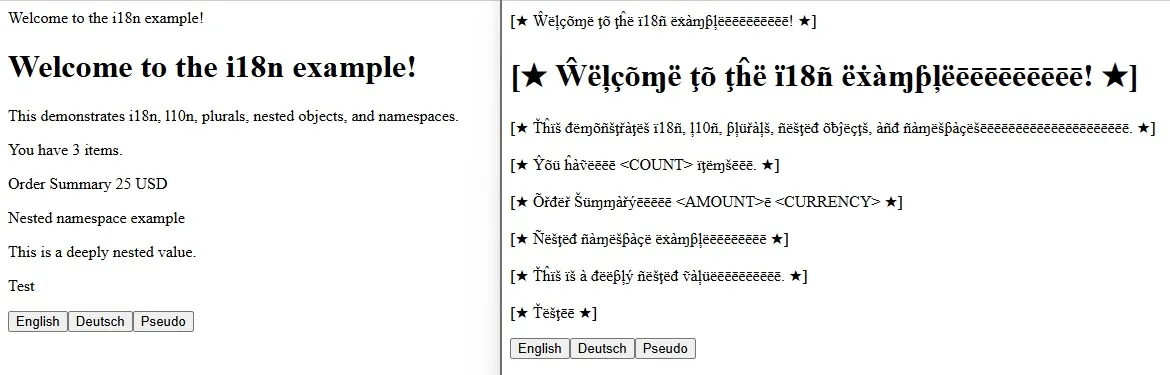
Why Pseudo-localization?
Pseudo-localization helps you catch i18n issues early:
- 🔍 Untranslated strings - Visual markers make them obvious
- 📏 Layout problems - Text expansion reveals truncation issues
- 🌍 Encoding issues - Accented characters test UTF-8 support
- 🔄 RTL problems - Simulate right-to-left languages
- 🎯 Placeholder handling - Verify dynamic content works correctly
Learn more: Read the comprehensive guide on i18n Testing: A Practical Guide for QA Engineers
Ready to Translate?
Once you've tested your i18n implementation with pseudo-localization, use l10n.dev service for AI-powered translation that preserves placeholders, respects formatting, and understands context—making professional localization effortless. Try JSON Translation or even other formats Translate i18n files
Installation
npm install -g pseudo-l10nOr as a development dependency:
npm install --save-dev pseudo-l10nQuick Start
Command Line Usage
# Basic usage
pseudo-l10n input.json output.json

# With custom options
pseudo-l10n en.json pseudo-en.json --expansion=30 --rtl
Programmatic Usage
const { generatePseudoLocaleSync, pseudoLocalize } = require('pseudo-l10n');

// Generate a pseudo-localized JSON file
generatePseudoLocaleSync('en.json', 'pseudo-en.json', {
  expansion: 40,
  rtl: false
});

// Pseudo-localize a single string
const result = pseudoLocalize('Hello, {{name}}!');
console.log(result);
// Output: ⟦Ĥëļļõēēēēēēēēēēēēēē, {{name}}!ēēēēē⟧
Features
1. Text Expansion
Simulates how translated text is often longer than English (typically 30-40% longer for European languages).
Example:
Input:  "Welcome"
Output: "⟦Ŵëļçõɱëēēē⟧"
2. Accented Characters
Replaces ASCII characters with accented equivalents to test UTF-8 encoding and font support.
3. Visual Markers
Wraps all strings with configurable markers (default: ⟦...⟧) to easily spot:
- Untranslated strings (missing markers)
- Truncated strings (cut-off markers)
- Concatenated strings (markers in the middle)
4. Placeholder Handling
Preserves placeholders like {{name}}, {count}, %key%, etc. with configurable formats.
5. RTL Simulation
Simulates Right-to-Left languages (Arabic, Hebrew) using Unicode control characters.
Note on RTL: By default, placeholders are reversed in RTL mode (e.g., {{name}} becomes {{eman}}). This helps detect placeholder issues when testing screenshots. For live HTML testing, you may want to disable this with --no-reverse-placeholders.
Configuration Options
CLI Options
pseudo-l10n <input.json> <output.json> [options]

Options:
  --expansion=<number>           Text expansion percentage (default: 40)
  --placeholder-format=<format>  Placeholder format (default: "{{key}}")
  --replace-placeholders         Replace placeholders with <UPPERCASE> format
  --start-marker=<string>        Start marker (default: "⟦")
  --end-marker=<string>          End marker (default: "⟧")
  --rtl                          Enable RTL simulation
  --no-reverse-placeholders      Don't reverse placeholders in RTL mode
  --expansion-char=<char>        Character for expansion (default: "ē")
  --help, -h                     Show help
Programmatic API Options
{
  expansion: 40,                    // Text expansion percentage
  placeholderFormat: "{{key}}",     // Placeholder format
  replacePlaceholders: false,       // Replace with <UPPERCASE> format
  startMarker: "⟦",               // Start marker
  endMarker: "⟧",                 // End marker
  rtl: false,                       // Enable RTL mode
  reversePlaceholders: true,        // Reverse placeholder content in RTL
  expansionChar: "ē",               // Character used for expansion
  accentMap: { ... }                // Custom accent character mapping
}
Placeholder Formats
The package supports various placeholder formats used by different i18n libraries:
| Framework | Format | Example |
|----------------|---------------------|------------------------------|
| i18next | {{key}} | "Hello {{name}}" |
| Angular | {key} | "Hello {name}" |
| React Intl | {key} | "Hello {name}" |
| sprintf | %key% | "Hello %name%" |
| ES6 Template | ${key} | "Hello ${name}" |
Configuring Placeholder Format
CLI:
# For Angular/React Intl
pseudo-l10n en.json pseudo-en.json --placeholder-format="{key}"

# For sprintf style
pseudo-l10n en.json pseudo-en.json --placeholder-format="%key%"
Programmatic:
generatePseudoLocaleSync('en.json', 'pseudo-en.json', {
  placeholderFormat: "{key}"  // or "%key%" or "${key}"
});
Examples
Example 1: Basic i18next JSON
Input (en.json):
{
  "welcome": "Welcome to our application",
  "greeting": "Hello, {{name}}!",
  "itemCount": "You have {{count}} items"
}
Command:
pseudo-l10n en.json pseudo-en.jsonOutput (pseudo-en.json):
{
  "welcome": "⟦Ŵëļçõɱë ţõ õür àƥƥļïçàţïõñēēēēēēēēēēēēēēēēēē⟧",
  "greeting": "⟦Ĥëļļõēēēēēē, {{name}}!ēēēēē⟧",
  "itemCount": "⟦Ŷõü ĥàṽë {{count}} ïţëɱšēēēēēēēēēēēēēēēē⟧"
}
Example 2: RTL Simulation
Command:
pseudo-l10n en.json pseudo-ar.json --rtlOutput:
Adds Unicode RTL control characters (U+202E ... U+202C) around text to simulate Arabic/Hebrew layout.
Example 3: Custom Markers and Expansion
Command:
pseudo-l10n en.json pseudo-en.json --expansion=30 --start-marker="[[ " --end-marker=" ]]"Output:
{
  "welcome": "[[ Ŵëļçõɱë ţõ õür àƥƥļïçàţïõñēēēēēēēēēē ]]"
}
Example 4: Replace Placeholders
Command:
pseudo-l10n en.json pseudo-en.json --replace-placeholdersInput:
{
  "greeting": "Hello, {{name}}!"
}
Output:
{
  "greeting": "⟦Ĥëļļõēēēēēē, <NAME>!ēēēēē⟧"
}
Accented Character Map
The package uses the following character mappings by default:
| Original | Accented | Original | Accented | |----------|----------|----------|----------| | a | à | A | À | | b | ƀ | B | ß | | c | ç | C | Ç | | d | đ | D | Đ | | e | ë | E | Ë | | f | ƒ | F | Ƒ | | g | ğ | G | Ğ | | h | ĥ | H | Ħ | | i | ï | I | Ï | | j | ĵ | J | Ĵ | | k | ķ | K | Ķ | | l | ļ | L | Ļ | | m | ɱ | M | Ṁ | | n | ñ | N | Ñ | | o | õ | O | Õ | | p | ƥ | P | Ƥ | | q | ɋ | Q | Ɋ | | r | ř | R | Ř | | s | š | S | Š | | t | ţ | T | Ť | | u | ü | U | Ü | | v | ṽ | V | Ṽ | | w | ŵ | W | Ŵ | | x | ẋ | X | Ẍ | | y | ý | Y | Ŷ | | z | ž | Z | Ž |
Custom Accent Map
You can provide your own accent map programmatically:
const { generatePseudoLocaleSync } = require('pseudo-l10n');

generatePseudoLocaleSync('en.json', 'pseudo-en.json', {
  accentMap: {
    a: 'α', b: 'β', c: 'ς',
    A: 'Α', B: 'Β', C: 'Σ',
    // ... add more mappings
  }
});
API Reference
pseudoLocalize(str, options)
Pseudo-localizes a single string.
Parameters:
str(string): The string to pseudo-localizeoptions(object): Configuration options
Returns: Pseudo-localized string
Example:
const { pseudoLocalize } = require('pseudo-l10n');

const result = pseudoLocalize('Hello World', {
  expansion: 30,
  startMarker: '[[',
  endMarker: ']]'
});
processObject(obj, options)
Recursively processes an object/array structure, pseudo-localizing all strings.
Parameters:
obj(any): Object, array, or primitive to processoptions(object): Configuration options
Returns: Processed structure with pseudo-localized strings
generatePseudoLocale(inputPath, outputPath, options)
Asynchronously generates a pseudo-localized JSON file.
Parameters:
inputPath(string): Path to input JSON fileoutputPath(string): Path to output JSON fileoptions(object): Configuration options
Returns: Promise
generatePseudoLocaleSync(inputPath, outputPath, options)
Synchronously generates a pseudo-localized JSON file.
Parameters:
inputPath(string): Path to input JSON fileoutputPath(string): Path to output JSON fileoptions(object): Configuration options
Integration Examples
npm scripts
Add to your package.json:
{
  "scripts": {
    "pseudo": "pseudo-l10n src/locales/en.json src/locales/pseudo-en.json",
    "pseudo:rtl": "pseudo-l10n src/locales/en.json src/locales/pseudo-ar.json --rtl"
  }
}
Build Process
// build.js
const { generatePseudoLocaleSync } = require('pseudo-l10n');

// Generate pseudo-locales as part of build
generatePseudoLocaleSync(
  './src/locales/en.json',
  './src/locales/pseudo-en.json',
  { expansion: 40 }
);

generatePseudoLocaleSync(
  './src/locales/en.json',
  './src/locales/pseudo-ar.json',
  { rtl: true }
);
CI/CD Pipeline
# .github/workflows/test.yml
- name: Generate pseudo-locales
  run: |
    npm install -g pseudo-l10n
    pseudo-l10n src/locales/en.json src/locales/pseudo-en.json

- name: Run i18n tests
  run: npm run test:i18n
Testing Strategy
- Generate pseudo-locale during build
- Add pseudo-locale to your app (e.g., language selector)
- Test your application with pseudo-locale enabled
- Look for issues:
- Missing
⟦⟧markers = untranslated strings - Cut-off markers = text truncation
- Broken layout = insufficient space for expansion
- Garbled text = encoding issues
- Wrong text direction = RTL problems
- Missing
FAQ
Q: Should I reverse placeholders in RTL mode?
A: It depends on your testing approach:
- Testing screenshots: Yes (default behavior). Helps detect placeholder issues visually.
- Testing live HTML: No. Use
--no-reverse-placeholderssince the browser handles RTL.
Q: Why use accented characters instead of random text?
A: Accented characters are still readable, making debugging easier while still testing encoding and font support.
Q: What expansion percentage should I use?
A: 40% is a good default for European languages. German can be 50%+, Romance languages 30-40%.
Q: Can I use this with other i18n libraries?
A: Yes! The package works with any JSON-based translation files. Just configure the placeholder format to match your library.
Contributing
Contributions are welcome! Please feel free to submit a Pull Request.
License
MIT © Anton Antonov
Related Resources
- i18n Testing: A Practical Guide for QA Engineers - Comprehensive guide on pseudo-localization testing
- GitHub Repository
Support
If you encounter any issues or have questions, please open an issue on GitHub.