
pte-interpolation-react
v1.5.0
Published
React components for rendering Portable Text with interpolated values

Maintainers
 jordanl17
Readme
pte-interpolation-react

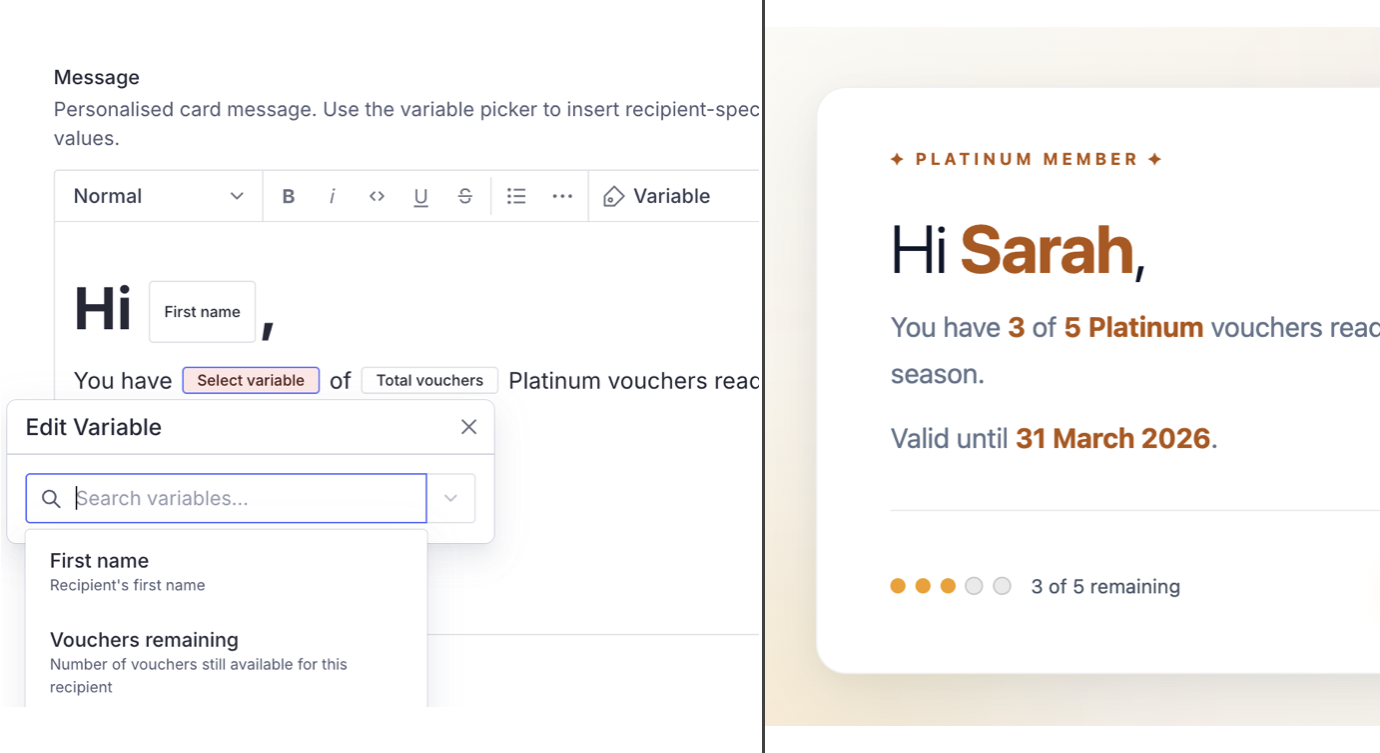
React rendering library that resolves dynamic variable inline blocks in Portable Text to actual values. Wraps @portabletext/react with automatic variable substitution.
Part of sanity-pte-interpolation. For adding variable picker inline blocks to Sanity Studio, see sanity-plugin-pte-interpolation.
Install
npm install pte-interpolation-react @portabletext/reactPeer dependencies
react ^18.0.0 || ^19.0.0
Usage
Drop-in component (recommended)
<InterpolatedPortableText> is a drop-in replacement for <PortableText> that handles variable resolution automatically:
import {InterpolatedPortableText} from 'pte-interpolation-react'

function PromoCard({message, recipient}) {
  return (
    <InterpolatedPortableText
      value={message}
      interpolationValues={{
        firstName: recipient.firstName,
        vouchersRemaining: String(recipient.vouchersRemaining),
        totalVouchers: String(recipient.totalVouchers),
        expiryDate: recipient.expiryDate,
      }}
    />
  )
}
Variables render as <span data-variable-key="firstName">Sarah</span>, making them easy to target with CSS for styling or highlighting.
With custom Portable Text components
Pass your own components prop and they will be merged with the interpolation types:
<InterpolatedPortableText
  value={body}
  interpolationValues={values}
  components={{
    marks: {
      link: ({children, value}) => <a href={value.href}>{children}</a>,
    },
  }}
/>
Custom fallback for missing values
By default, unresolved variables render as {variableKey} (e.g. {firstName}). Provide a fallback function to customise this:
<InterpolatedPortableText
  value={body}
  interpolationValues={values}
  fallback={(variableKey) => `[missing: ${variableKey}]`}
/>
Context provider
Use <InterpolationProvider> to supply interpolationValues (and optionally fallback) at a tree level, removing the need to thread these props through every <InterpolatedPortableText> instance:
import {InterpolationProvider, InterpolatedPortableText} from 'pte-interpolation-react'

function App({recipient}) {
  return (
    <InterpolationProvider
      interpolationValues={{
        firstName: recipient.firstName,
        email: recipient.email,
      }}
    >
      <PromoCard />
      <WelcomeMessage />
    </InterpolationProvider>
  )
}

function PromoCard() {
  return <InterpolatedPortableText value={promoContent} />
}
When interpolationValues is passed directly as a prop to <InterpolatedPortableText>, it overrides the provider entirely - the two objects are not merged. If you need to extend the provider's values, merge explicitly:
const contextValues = useInterpolationValues()
<InterpolatedPortableText
  interpolationValues={{...contextValues?.interpolationValues, firstName: 'Alex'}}
  value={body}
/>
Headless usage with useInterpolationValues
Access the current provider's values directly in your own components:
import {useInterpolationValues} from 'pte-interpolation-react'

function MyComponent() {
  const context = useInterpolationValues()
  // context is undefined when no provider exists
  // context.interpolationValues and context.fallback when a provider exists
}
Low-level API
If you need full control over component merging, use createInterpolationComponents directly with <PortableText> from @portabletext/react:
import {useMemo} from 'react'
import {PortableText} from '@portabletext/react'
import {createInterpolationComponents} from 'pte-interpolation-react'

function PromoCard({message, values, customComponents}) {
  const components = useMemo(() => {
    const interpolation = createInterpolationComponents(values)
    return {
      ...customComponents,
      types: {
        ...customComponents.types,
        ...interpolation.types,
      },
    }
  }, [values, customComponents])

  return <PortableText value={message} components={components} />
}
Detect missing variables
getMissingVariableKeys is re-exported from pte-interpolation-core and returns variable keys present in PTE content but absent from the provided values map. See the core package README for full documentation.
import {getMissingVariableKeys} from 'pte-interpolation-react'

const missing = getMissingVariableKeys(blocks, {firstName: 'Sarah'})
// ['vouchersRemaining']
Related Packages
This package handles the rendering side. To add the variable picker to Sanity Studio's Portable Text Editor, use sanity-plugin-pte-interpolation:
import {defineField} from 'sanity'
import {interpolationVariables} from 'sanity-plugin-pte-interpolation'

defineField({
  name: 'message',
  type: 'array',
  of: [
    interpolationVariables([
      {id: 'firstName', name: 'First name'},
      {id: 'vouchersRemaining', name: 'Vouchers remaining'},
      {id: 'totalVouchers', name: 'Total vouchers'},
      {id: 'expiryDate', name: 'Expiry date'},
    ]),
  ],
})
Data Shape
Variable blocks in stored Portable Text look like this:
{
  "_type": "block",
  "children": [
    {"_type": "span", "text": "Hi, "},
    {"_type": "pteInterpolationVariable", "variableKey": "firstName"},
    {"_type": "span", "text": ","}
  ]
}
The variableKey maps to the id defined in the Studio variable definitions and the keys in the interpolationValues record.
API Reference
<InterpolatedPortableText>
| Prop | Type | Description |
| --------------------- | --------------------------------- | ---------------------------------------------------------------------------------------------------- |
| value | PortableTextBlock[] | Portable Text content from Sanity |
| interpolationValues | Record<string, string> | Optional map of variable IDs to values. Required unless an <InterpolationProvider> is in the tree. |
| components | PortableTextComponents | Optional custom Portable Text components (merged with interpolation types) |
| fallback | (variableKey: string) => string | Optional function for unresolved variables (defaults to {variableKey}) |
Also accepts all other props from @portabletext/react's <PortableText>.
<InterpolationProvider>
| Prop | Type | Description |
| --------------------- | --------------------------------- | ------------------------------------------------------ |
| interpolationValues | Record<string, string> | Map of variable IDs to values, provided to the subtree |
| fallback | (variableKey: string) => string | Optional fallback for unresolved variables |
| children | ReactNode | React subtree |
useInterpolationValues()
Returns the current InterpolationProvider context value, or undefined when no provider exists in the tree.
{
  interpolationValues: Record<string, string>
  fallback?: (variableKey: string) => string
} | undefined
createInterpolationComponents(values, fallback?)
Returns a PortableTextComponents object with a types.pteInterpolationVariable renderer. Use this when you need manual control over component merging.
| Parameter | Type | Description |
| ---------- | --------------------------------- | ------------------------------------------ |
| values | Record<string, string> | Map of variable IDs to values |
| fallback | (variableKey: string) => string | Optional fallback for unresolved variables |
VARIABLE_TYPE_PREFIX
The constant 'pteInterpolationVariable' - the _type string used for variable inline blocks. Exported for advanced use cases.
License
MIT