
pug-i18n-postparse
v1.0.3
Published
pug i18n plugin

Maintainers
 sarkiroka
Readme
pug-i18n-postparse
Why
Because the international support is too difficult otherwise.
Not need to call always the t (translation) function everywhere. Just enjoy it :)
Install
npm i pug-i18n-postparse
Example
You can use pug without any special:
html
    head
        title Example
    body
        p This is a text
            a(href="/", title="Main page")  with link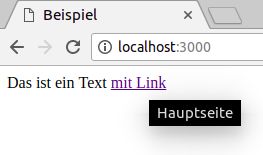
Define the translation json
{
    "de": {
        "Example": "Beispiel",
        "This is a text": "Das ist ein Text",
        "with link": "mit Link"
    },
    "hu": {
        "Example": "Példa",
        "This is a text": "Ez egy szöveg",
        "with link": "linkkel"
    }
}
...or if you want use different text in base language, you can specify that...
{
    "en": {
        "Example": "An example",
        "This is a text": "This is a text",
        "with link": "with link"
    },
    "de": {
        "Example": "Beispiel",
        "This is a text": "Das ist ein Text",
        "with link": "mit Link"
    },
    "hu": {
        "Example": "Példa",
        "This is a text": "Ez egy szöveg",
        "with link": "linkkel"
    }
}
After that, you can use it from express
const app = require('express')();
const pugI18nPostparse = require('pug-i18n-postparse');
const languageFilePath = __dirname + '/i18n.json';

app.set('view engine', 'pug');
app.set('views', __dirname); // or your views directory

app.use(pugI18nPostparse.express('en', languageFilePath)); // define the default language

app.get('/', function (req, res, next) {
    res.locals.language = 'de'; // you can pass the selected language in locals
    res.render('index');
});

app.listen(3000);
You can use your express middleware for language selection
const app = require('express')();
const pugI18nPostparse = require('pug-i18n-postparse');
const languageFilePath = __dirname + '/i18n.json';

app.set('view engine', 'pug');
app.set('views', __dirname); // or your views directory

app.use(pugI18nPostparse.express('en', languageFilePath)); // define the default language

app.use(function(req,res,next){
    // this is a place, where you get your user preferred language - for example from request header, or user settings
    res.locals.language = 'de'; // you can pass the selected language in locals
    next();
});

app.get('/', function (req, res, next) {
    res.render('index');
});

app.listen(3000);
You can use your own i18n implementation:
function myI18nImplementation(text, language){
    // your magic here
    let retValue = text.replace(/^(")?.*?(")?$/,'$1Marklar$2');
    return retValue;
}

const app = require('express')();
const pugI18nPostparse = require('pug-i18n-postparse');

app.set('view engine', 'pug');
app.set('views', __dirname); // or your views directory

app.use(pugI18nPostparse.express('en', myI18nImplementation));

app.get('/', function (req, res, next) {
    res.render('index');
});

app.listen(3000);
The result is:
<html>
    <head>
        <title>Marklar</title>
    </head>
    <body>
        <p>Marklar <a href="/" title="Marklar">Marklar</a></p>
    </body>
</html>
See the examples