
qtf
v0.4.0
Published
command for want to Quick use TensorFlow.js on cli.

Maintainers
 amanoese
Readme
Quick Tensorflow.js on CLI



This is the command that makes it easy on cli to take advantage of TensorFlow.js pre-trained models in tfjs-models.
If you want to use more features, I recommend using tfjs-models.
Table of Contents
Usage
Output JSON.
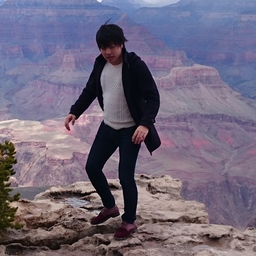
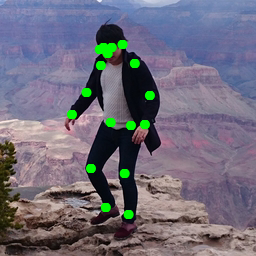
$ qtf posenet input.jpg
{"score":0.9647475901771995,"keypoints":[{"score":0.998931884765625,"part":"nose","position":{"x":107.73031675583658,"y":53.548239147616734}},{"score":0.9975152611732483,"part":"leftEye","position":{"x":111.77570221303502,"y":47.67420431055447}},{"score":0.998687207698822,"part":"rightEye","position":{"x":103.54239877188716,"y":47.98000136794747}},{"score":0.9890928268432617,"part":"leftEar","position":{"x":122.54736138132296,"y":44.82373616853113}},{"score":0.5303822755813599,"part":"rightEar","position":{"x":99.82809460116732,"y":49.01344008390078}},{"score":0.9975290298461914,"part":"leftShoulder","position":{"x":134.81771339980546,"y":63.107547270184824}},{"score":0.9952900409698486,"part":"rightShoulder","position":{"x":100.9243829036965,"y":65.03463187013618}},{"score":0.9982808828353882,"part":"leftElbow","position":{"x":149.92353173638134,"y":95.12142813715954}},{"score":0.9930793046951294,"part":"rightElbow","position":{"x":86.52606699902724,"y":92.96833201605058}},{"score":0.997657299041748,"part":"leftWrist","position":{"x":144.95117947470817,"y":124.01598218628405}},{"score":0.9944704174995422,"part":"rightWrist","position":{"x":71.984375,"y":114.08531432392996}},{"score":0.9985787868499756,"part":"leftHip","position":{"x":130.9595695525292,"y":125.98659411478599}},{"score":0.9968750476837158,"part":"rightHip","position":{"x":110.72067272616732,"y":122.94964433365759}},{"score":0.9941878318786621,"part":"leftKnee","position":{"x":124.67179140321012,"y":173.04322714007782}},{"score":0.9907618165016174,"part":"rightKnee","position":{"x":90.9666904790856,"y":168.4438837548638}},{"score":0.9824202060699463,"part":"leftAnkle","position":{"x":128.6217017266537,"y":214.41898711089493}},{"score":0.9469689130783081,"part":"rightAnkle","position":{"x":105.84379559824903,"y":207.76614178015564}}]}
Output image file.
$ qtf posenet input.jpg -o output.jpg| input.jpg | output.jpg |
| --- | --- |
|  |
|  |
|
Install (on Ubuntu)
$ npm i -g qtf
$ qtf save all
If you using node.js on volta or nodebrew. We have confirmed works on it.
from Repository
$ cd '<your any directory>'

$ git clone https://github.com/amanoese/qtf.git
$ cd qtf
$ npm install
$ npm link

## if you can not run 'npm link'.
$ echo "alias qtf=$PWD/src/index.js" >> ~/.bashrc
$ source ~/.bashrc
on Windows
support. but some features don't work.
Support models
Supports the following model now.
- posenet
- mobilenet
- blazeface
- BodyPix (Person segmentation)
- DeepLab v3
## check support model.
$ qtf --help
Result Example
posenet
$ qtf posenet input.jpg -o output.jpg| input.jpg | output.jpg |
| --- | --- |
| | |
mobilenet
Output is JSON only.
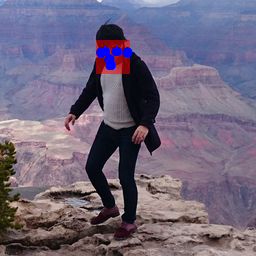
blazeface
$ qtf blazeface input.jpg -o output.jpg| input.jpg | output.jpg |
| --- | --- |
| |  |
|
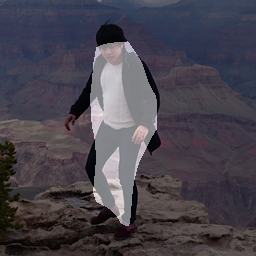
BodyPix
Person segmentation
$ qtf body-pix input.jpg -o output.jpg| input.jpg | output.jpg |
| --- | --- |
| |  |
|
Person body part segmentation
TBD
DeepLab v3
$ qtf deeplab input.jpg -o output.jpgIf you not set loadOption. output size fixed 513x513.
| input.jpg | output.jpg |
| --- | --- |
| | 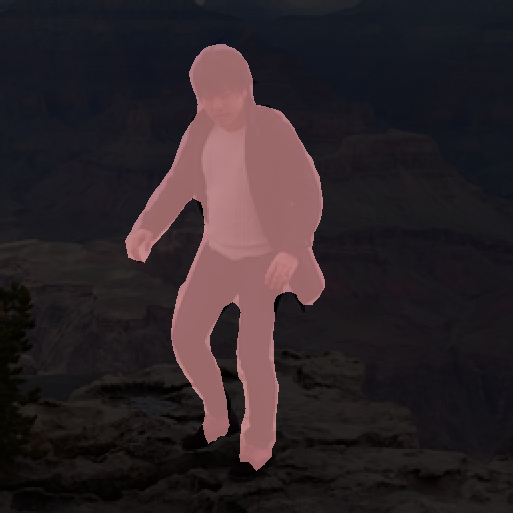 |
|
Save Models on Local
This command uses a trained model on the internet (Google Cloud Starage)...
If use offline or you use the command several times.
It's good idea to download trained model file to local.
$ qtf save allBut trained model data want to diskspace.
you can also choose the model to download.
See below for details.
$ qtf save --helpBackend
you can check suuport backend.
$ qtf backend
now      : tensorflow
supports : cpu,wasm,tensorflow
If you want to use the backend.set environment to 'QTF_BACKEND'
$ export QTF_BACKEND=wasm

$ qtf backend
now      : wasm
supports : cpu,wasm,tensorflow
This command support backends.
| name | project | personal opinion | | --- | --- | --- | | cpu | tfjs-backend-cpu | pureJS. slowly. but it's works in most environments. so cool. | | wasm | tfjs-backend-wasm | WebAssembly. fast. environment independent. But that power was beyond my skill. It probably only works with "blazeface". | | tensorflow | tfjs-node | C Library. fast. but It depends on node-gyp. if you want to install, please see this link.|
A backend that fails to install does not appear in support.
may be increased by a global installation, like npm -g @tensorflow/tfjs-node
I haven't checked. It probably works.
Develop
$ npm install
$ npm link
$ qtf --help
CI on Local
$ act -n
$ act push
On the roadmap, but still missing
- Support tfjs-models
- PoseNet
- Support ResNet50
- different model stride
- Coco SSD
- BodyPix
- segmentPersonParts
- handpose
- facemesh
- PoseNet
- Input Stream of UVC device.
Other
qtf is not Qtransformers.