
quackdiff
v0.1.5
Published
Review your AI's diff in the browser and ask about it in the same Claude Code session that wrote it.

Maintainers
 tannerwuster
Readme
quack


Review your AI's diff in the browser, and ask about it in the same Claude Code session that wrote it.
/quack from inside any Claude Code session opens a GitHub-style diff
viewer in your browser. Hover a line, click +, type a question. The
answer streams back inline — and because each ask resumes the same
Claude Code session that wrote the code, the model already remembers
the file, the conversation, and why it made the change.
No API key. No config. No diff pasted into a chat box.
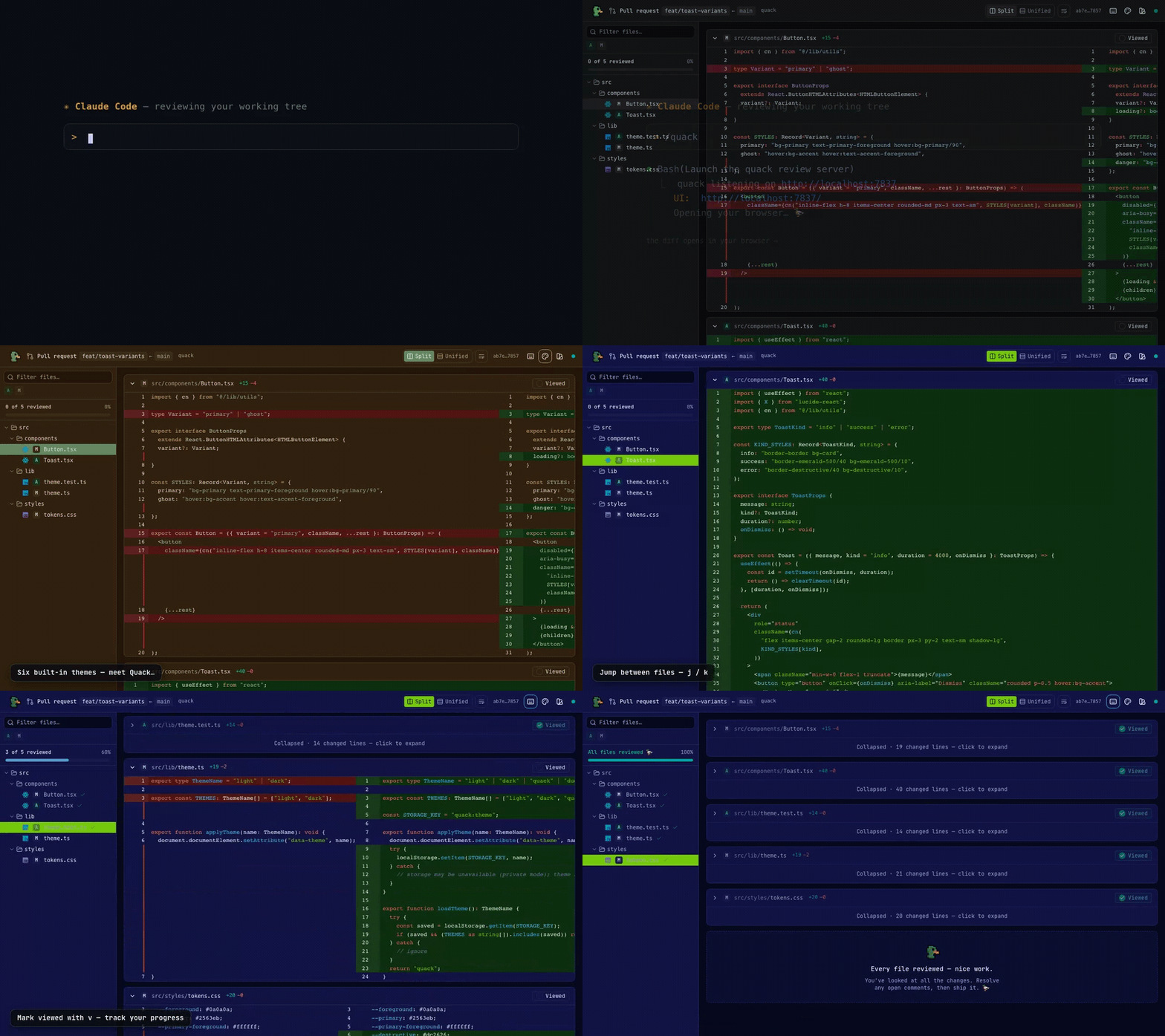
From
/quackin your session to a themeable, keyboard-driven diff review in the browser.
Why quack?
The usual loop is clumsy: you prompt an AI to write the code, and once the diff is big enough to need real review, you open a draft PR just to get a decent diff viewer. Then every question means copying context back into the terminal, re-explaining what you're looking at, and repeating.
Quack collapses that loop. The diff viewer and the Q&A surface are the same window, wired directly into the Claude Code session that wrote the code — so the model already knows the file, the conversation, and the reasoning behind every line. You review a coworker's work by asking the coworker, not by briefing a stranger.
Quickstart
1. One-time skill install (project-scoped — installs into <git-root>/.claude/):
cd /path/to/your/project
npx -y quackdiff install-skill

# Or, install user-level (available from any project):
npx -y quackdiff install-skill --global
2. From a Claude Code session in that project:
/quack                                                                # working-tree changes
/quack David's latest commit where he removed the xmpp integration    # author + content search
/quack last commit attached to the session where we discussed auth    # send asks to a different past session
That's it. The browser opens to a syntax-highlighted diff; answers stream back as the model thinks.
Requirements: Node >= 18 and the claude CLI, already authenticated.
Use cases
Review a past commit in the session that wrote it
/quack with a natural-language description of the diff (and
optionally the session) finds the right git invocation, captures the
output, and points the server at it. Asks flow into that past session,
so the model already wrote — or investigated — the code you're asking
about, even if you're currently in a different session.
Review code as you're writing it
/quack with no description shows the working-tree diff, all
uncommitted changes included. Best used in the same session that made
the changes, so it holds the full context of the edits.
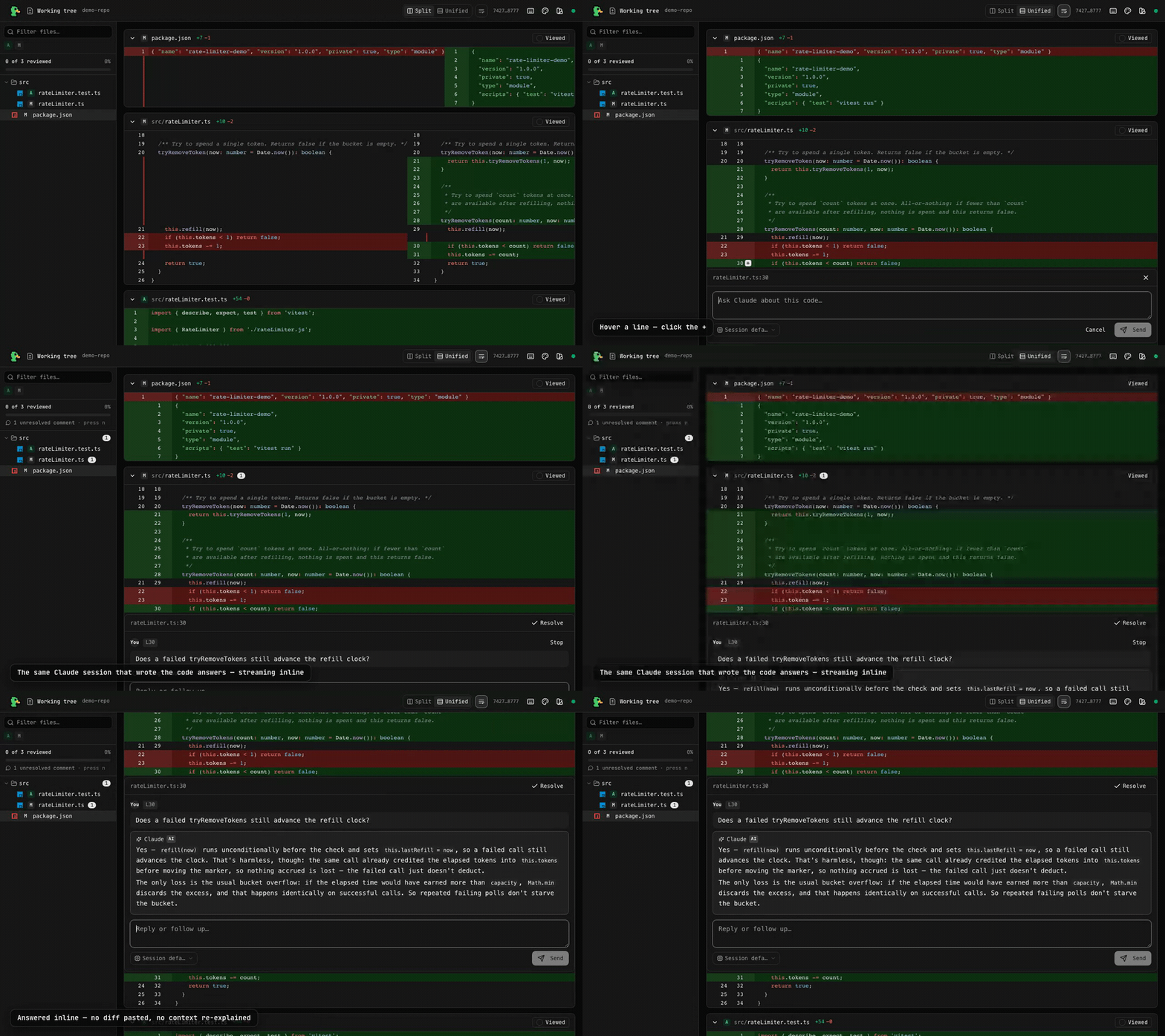
Reviewing uncommitted working-tree changes, then asking about them inline — the answer streams back from the session that wrote the code.
How it works
Each ask spawns the claude CLI with --resume <your-session-id>, so
your question becomes a real turn in that session's transcript:
- No diff sent to the model. The resumed session already has the context that wrote the code; the prompt is just your question.
- No Anthropic API key needed. Quack never talks to the API — it
shells out to the
claudeCLI you've already auth'd via subscription or API key. - Auto-cleanup. The server self-exits after 5 minutes of inactivity. Close the tab and forget about it.
The review UI
Inline comments
Hover any line in the diff and a + appears in the gutter. Click it for
a single-line question, or click and drag to range over several lines.
The comment widget opens below the selection; type and hit
Cmd/Ctrl+Enter (or click Send).
Streaming answers
Tokens stream in as the model generates them, usually starting within
about a second. Click Stop to abort mid-stream. Markdown renders live,
including syntax-highlighted code blocks in 30+ languages.
Threaded discussions
Each line holds multiple ask/answer pairs, rendered as a threaded conversation inline with the diff, so follow-ups keep their context. Threads can be marked resolved, and resolved state persists across re-runs.
Pick the model per question
The composer has a model selector, so a throwaway "what does this variable do?" can go to Haiku while the architectural questions stay on your session's model — no server restart:
| Option | Behaviour | |---|---| | Session default | Inherit the review session's model (no override) | | Opus | Most capable | | Sonnet | Balanced speed & quality | | Haiku | Fastest, lightest on tokens |
Keyboard-first navigation
Press ? in the viewer for the full list:
| Key | Action |
|---|---|
| ⌘B / Ctrl+B | Collapse / expand the file tree |
| j / ] | Next file |
| k / [ | Previous file |
| n | Next unresolved comment |
| p | Previous unresolved comment |
| v | Toggle viewed |
| e | Expand / collapse file |
| u | Toggle split / unified |
| w | Toggle line wrap |
| / | Filter files |
| ? | Toggle the settings menu |
Reading controls
Split and unified diff modes, line wrapping, and an IDE-style file tree —
resizable, collapsible with ⌘B (Ctrl+B on Windows/Linux) or the panel
button in the status bar, with file-type icons and a filter box. Plus
per-file "viewed" checkmarks and a review-progress indicator. Every one of
these persists across runs.
The layout follows an editor: the top bar carries what you're reviewing and
how it's laid out, and a status bar along the bottom carries everything
about the session — the file-tree toggle, the attached session id, a
settings menu (theme, shortcut reference and the running version) and the
connection state. Press ? to open the settings menu.
Themes
Six built-ins — light, dark, quack, duckhunt, dracula, and
cosmicgirl — pick one from the settings menu in the status bar, which
ticks the one in effect. Plus a custom theme editor. Give it two colors and it
derives a full palette, or paste raw tokens ({"background":"#0e1419"}
or --background: #0e1419;). You can also describe the theme you want
and have Claude generate it. Custom themes are saved locally and
selectable alongside the built-ins.
Usage
Diff selection
Anything after /quack is a description — Claude figures out the right
git diff invocation, writes the result to a temp file, and points the
server at it:
| You type | What you'll review |
|---|---|
| /quack | working-tree changes (uncommitted + untracked) |
| /quack last commit | HEAD~1..HEAD |
| /quack last 3 commits | HEAD~3..HEAD |
| /quack the 5th latest commit | the single commit at HEAD~4 |
| /quack main vs feature/x | main…HEAD (three-dot, PR-style) |
| /quack abc123 vs def456 | abc123..def456 |
| /quack staged | git diff --cached |
| /quack the commit where I added the favicon | Claude searches commit messages, diff content, or file history to find it |
Defaults when ambiguous:
- "branch X against branch Y" between named refs ⇒ three-dot (PR semantics).
- Two arbitrary commits ⇒ two-dot (literal tree diff).
- "Nth latest commit" ⇒ that single commit's changes.
The top bar shows what you're reviewing as a small label
(e.g. Working tree, HEAD~1..HEAD, main…feature/x).
Re-invoking refreshes. Run /quack again from the same session and
the previous server is killed, the diff recomputed, and the existing
browser tab auto-reconnects on the same port. For working-tree diffs, an
amber banner appears if a reviewed file changed since the diff was
captured, prompting a re-run.
Session selection
By default /quack attaches to the invoking session — the one
running the skill. Asks become real turns in that session's transcript.
If the diff you're reviewing was written (or investigated) in a different past session, describe that session in natural language and asks flow there instead. The "ask in the session that wrote the code" promise still holds; it's just that the session that wrote the code might not be the one you're sitting in:
| You type | What attaches |
|---|---|
| /quack last commit | invoking session (the default) |
| /quack last commit in our session about pricing rules | searches this project's sessions for "pricing rules"; the dominant match attaches |
| /quack abc123 vs def456 attached to the session that authored it | Claude builds keyword needles from the diff and matches them to a past session |
| /quack session 322bc90a | exact UUID prefix |
| /quack in session 322bc90a-714f-41b7-914e-109404e46072 | full UUID |
Search is bounded: sessions touched in the last 30 days, top 5
candidates by hit count, and command grep -Ff over the JSONL
transcripts, so it stays fast and costs zero LLM tokens. If several
sessions match comparably, Quack asks which to use rather than guessing.
If nothing matches, it falls back to the invoking session.
Updates
After launching, the skill asynchronously checks npm for a newer version and prints a passive upgrade notice if one exists. Run the printed command at the scope you originally installed:
npx -y quackdiff@latest install-skill --force            # project-local
npx -y quackdiff@latest install-skill --global --force   # user-level
Set QUACK_SKIP_UPDATE_CHECK=1 to suppress the network call.
Uninstalling
Uninstall is a single rm — there's intentionally no uninstall-skill
command. Delete whichever scope you installed:
rm -rf <git-root>/.claude/skills/quack   # project-local (the default)
rm -rf ~/.claude/skills/quack            # user-level (--global)
Quack keeps no other state under ~/.claude or your project. Anything
left in /tmp/quack* is session-scoped scratch and clears itself within
the server's idle-shutdown window.
Help & contributing
- Hitting a bug? See SUPPORT.md for common issues and how to file a useful report.
- Hacking on Quack? See CONTRIBUTING.md for the dev
loop, architecture, and the in-repo
/quack-devskill.
Credits
Quack is a fork of askdiff by Narek Ghevandiani, which contributed the original diff viewer, WebSocket server, and session-resume design. This fork adds the themed UI, keyboard navigation, per-ask model selection, and view controls. Both are MIT licensed.
License
MIT — © 2026 Narek Ghevandiani (original work), © 2026 Tanner A. Wuster (modifications).