
qualixar-os
v2.2.3
Published
Qualixar OS: The Universal OS for AI Agents. One platform, every model, every framework, every transport.

Maintainers
 varun369
Readme






Qualixar OS
The Universal OS for AI Agents
One platform. Every model. Every framework. Every transport.
Qualixar OS is the operating system that runs AI agents — yours and everyone else's. It doesn't replace your agent framework. It powers it. Import agents from OpenClaw, NemoClaw, DeerFlow, CrewAI, LangGraph, or build native. Run them all through one dashboard, one config, one runtime.
What Makes This Unique
To our knowledge, no other agent platform combines all of these:
| Capability | Why It Matters |
|---|---|
| Forge AI auto-designs agent teams | Describe what you need in one sentence. Forge picks the agents, tools, topology, and budget. No manual team assembly. |
| Judge pipeline with consensus | Adversarial quality assurance built on AgentAssert research (arXiv:2602.22302). Multi-judge consensus, few-shot calibration, reliability scoring. |
| 13 topologies including Hybrid | PII-safe local/cloud split. Your sensitive data stays on your machine while cloud handles the rest. |
| Native A2A protocol | Agents talk to agents — internally and externally. Agent card discovery at /.well-known/agent-card. Among the first agent runtimes to support both MCP and A2A natively. |
| 25 CLI commands | Full native CLI, not just a wrapper. Task execution, marketplace, diagnostics, config, server management — all from your terminal. |
| SLM-Lite memory | Learns from every task. 4-layer memory store powered by SuperLocalMemory — backed by 3 peer-reviewed papers (arXiv:2604.04514, arXiv:2603.14588, arXiv:2603.02240). |
| Real file output | Agents create runnable code on disk, not just text in a chat window. Universal Type-C protocol writes real artifacts. |
| Marketplace with one-click install | Browse, search, install tools. Forge auto-discovers new tools the moment you install them. |
| Universal compatibility | Import agents from OpenClaw, NemoClaw, DeerFlow, and GitAgent natively. LangChain, CrewAI, and AutoGen integrate via the HTTP API. |
Demo
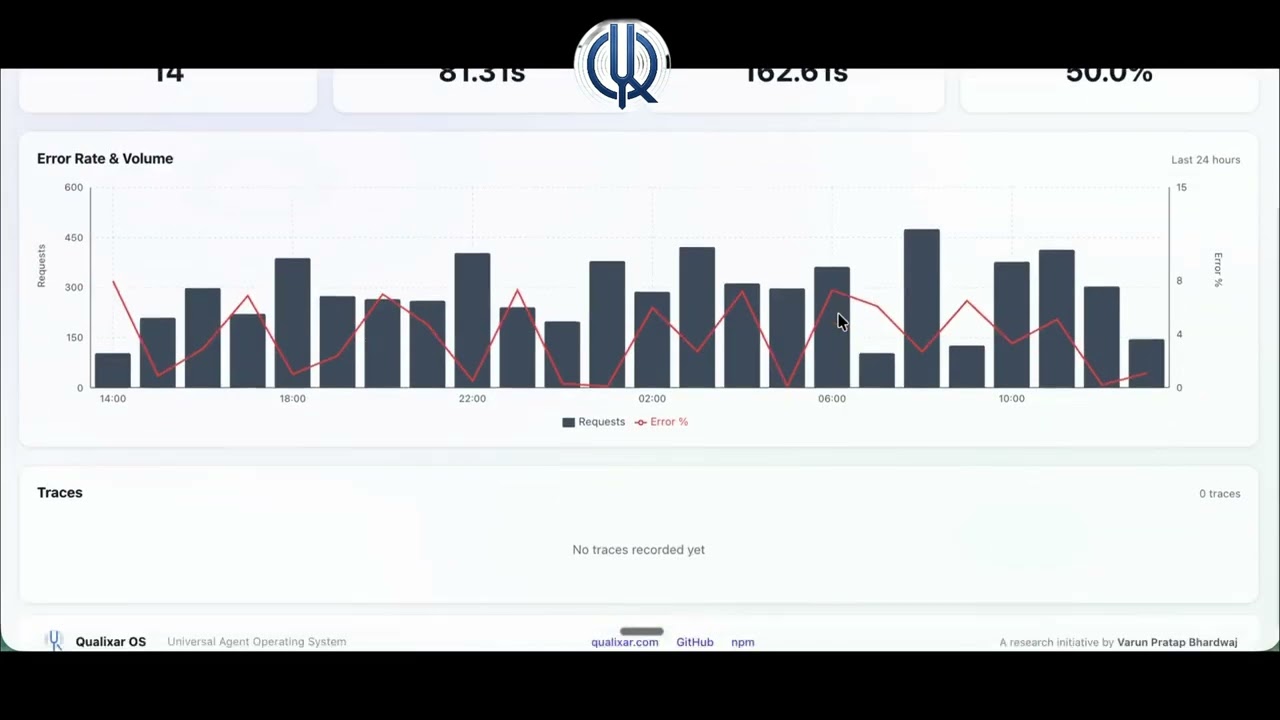
Watch the full dashboard demo (1:48) — 24 tabs, task execution, topology selection, cost tracking, Forge AI, marketplace, and more.
Install in 30 Seconds
npx qualixar-osThat's it. Dashboard opens. Start chatting with AI, or design a multi-agent team.
# Or install globally
npm install -g qualixar-os

# Start the server with dashboard
qos serve --dashboard --port 3000

# Open your browser
open http://localhost:3000/dashboard/
Why an OS?
Agent frameworks give you building blocks. Qualixar OS gives you the complete runtime:
| What You Need | Framework Approach | Qualixar OS | |---|---|---| | Route to the right model | Write custom logic | Built-in (15 providers, cost/quality/latency routing) | | Run multi-agent teams | Build from scratch | 13 topologies, auto-designed by Forge AI | | Quality assurance | Hope for the best | Judge pipeline with consensus protocols (built on AgentAssert research) | | Persistent memory | Add a vector DB | 4-layer memory store powered by SuperLocalMemory (local, 3 papers) | | Monitor costs | Check your bill later | Real-time budget tracking per agent | | Manage tools | Hardcode per agent | Marketplace with categories, one-click install | | Dashboard | Build your own | 24 tabs, production-ready | | Security | DIY | Hardened sandbox (51 denied commands), RBAC, credential vault, Docker isolation | | Human Review Gate | Build your own | Dashboard workflow for human approval of agent output, integrated with the 4-tier degradation engine | | Token-level streaming | Varies | Real-time AsyncIterable streaming for all 6 LLM providers (Anthropic, OpenAI, Google, Ollama, Azure OpenAI, Bedrock) | | File execution | Text only | Real files on disk — agents create runnable code via Universal Type-C |
The Soul — How Qualixar OS Works
Every task follows this pipeline. No shortcuts. No half-measures.
                          ┌──────────────────────────────────┐
                          │                                  │
  User Prompt ──→ Memory ──→ Forge (designs agent team)     │
                              │                              │
                              ▼                              │
                          Agents Execute                     │
                          (real files on disk)                │
                              │                              │
                              ▼                              │
                          Judge Evaluates                    │
                              │                              │
                    ┌─────────┴─────────┐                    │
                    │                   │                    │
                Approved            Rejected                 │
                    │                   │                    │
                    ▼                   ▼                    │
                Output           Forge Redesigns ────────────┘
                (done)           (new team, retry)
Up to 5 rounds- Memory — Recalls relevant context from previous tasks
- Forge — AI meta-agent designs the optimal team (roles, models, tools, topology)
- Agents — Execute the task, creating real files in the workspace directory
- Judge — Adversarial evaluation with consensus protocols
- If rejected — Forge redesigns the team and agents retry with the judge's feedback
- If approved — Output saved, task complete
The judge doesn't just say pass/fail. It provides structured feedback — specific issues, severity ratings, improvement suggestions. The next team gets this feedback in their prompt. Each redesign cycle gets smarter.
Safeguards: 5 redesign max, 3x budget cap, human escalation if stuck.
Universal Compatibility — The Claw Bridge
Qualixar OS doesn't compete with agent frameworks. It runs them.
# Import agents from any framework
qos import ./my-openclaw-agent.yaml       # OpenClaw
qos import ./nemoclaw-config.json          # NemoClaw (NVIDIA)
qos import ./deerflow-workflow.json         # DeerFlow (ByteDance)
qos import ./gitagent-spec.yaml             # GitAgent (Microsoft)

# Or use native Qualixar agents — designed by Forge AI
qos run "Build me a code review pipeline"
# → Forge auto-designs a team of 4 agents with the right tools
| Framework | Import | Run | Manage from Dashboard | |-----------|--------|-----|----------------------| | OpenClaw | Yes | Yes | Yes | | NemoClaw (NVIDIA) | Yes | Yes | Yes | | DeerFlow (ByteDance) | Yes | Yes | Yes | | GitAgent (Microsoft) | Yes | Yes | Yes | | LangChain / LangGraph | Via HTTP API (guide) | Yes | Yes | | CrewAI | Via HTTP API (guide) | Yes | Yes | | AutoGen | Via HTTP API (guide) | Yes | Yes | | MCP Servers | Native | Yes | Yes | | A2A Protocol | Native | Yes | Yes | | Custom Agents | skill.json manifest | Yes | Yes |
Protocols — MCP + A2A
Qualixar OS speaks two standard protocols natively. No plugins, no adapters — built into the core.
MCP (Model Context Protocol)
25 MCP tools expose the full Qualixar OS API to any MCP-compatible client. Your IDE becomes the dashboard.
| Client | Integration |
|--------|-------------|
| Claude Code | Auto-discovered via ~/.claude.json config |
| VS Code | MCP extension with tool palette |
| Cursor | Native MCP support |
| Windsurf | Native MCP support |
# Add Qualixar OS as an MCP server in your IDE
qos serve --mcp
# → 25 tools available: task execution, agent management, marketplace, memory, cost tracking
A2A (Agent-to-Agent Protocol)
v0.3 implementation with agent card discovery. Internal agents communicate via A2A. External agents federate via A2A. Among the first agent runtimes to support both MCP and A2A natively.
GET /.well-known/agent-card
→ Returns capabilities, supported tasks, authentication methods

POST /a2a/tasks
→ External agents submit tasks directly to Qualixar OS agents
What this enables: Your Qualixar OS agents can discover and collaborate with any A2A-compatible agent on the network — Google's agent ecosystem, other Qualixar OS instances, or custom A2A servers.
Memory System — SLM-Lite
Powered by SuperLocalMemory Lite — the same cognitive memory engine backed by 3 peer-reviewed papers (V3.3, V3, V2). Every task makes Qualixar OS smarter.
| Layer | What It Does | |-------|-------------| | Episodic | Stores task history — what was asked, what worked, what failed | | Semantic | Stores knowledge from task outputs with full-text search (FTS5) | | Procedural | Learns patterns — which topologies work best for which task types | | Behavioral | Captures outcomes — Forge uses this to design better teams over time |
Auto-invoke retrieves relevant context before every task. No manual search needed — agents start with the right context.
Compatible with full SuperLocalMemory for cross-session, cross-product memory sharing.
The Dashboard — Everything in Your Browser
24 interactive tabs. No CLI required for daily use.
| Tab | What It Does | |-----|-------------| | Chat | Talk to AI with streaming, file upload, model selection | | Forge | AI auto-designs specialized agent teams from your prompt | | Builder | Visual workflow editor — drag, connect, run | | Marketplace | Browse, search, install skills and tools with one click | | Agents | Monitor running agents, view stats, kill/restart | | Swarms | Watch multi-agent execution in real-time | | Judges | Quality verdicts, consensus scores, approval/rejection | | Cost | Per-model, per-agent, per-task cost breakdown | | Memory | Persistent agent memory — search, inspect, manage | | Pipelines | Multi-step task orchestration with checkpoints | | Tools | Tool palette with 6 categories, drag onto agents | | Traces | OpenTelemetry spans for every agent action | | Settings | Providers, models, budget, security, connectors | | ...and 11 more | Flows, Connectors, Logs, Gate, Datasets, Vectors, Blueprints, Brain, Audit, Lab, Marketplace |
Forge — AI Designs Your Agent Teams
Tell Forge what you need. It designs the team.
qos run "Review my GitHub PRs for security issues"Forge responds:
- Creates 3 agents: Security Analyst, Code Reviewer, Report Writer
- Assigns tools:
github_pr_read,code_search,file_write - Picks topology: Sequential (analyze → review → report)
- Sets budget: $0.05 estimated cost
- Runs the team. Returns results.
No manual configuration. No YAML files. One sentence, full team.
Marketplace — One-Click Tool Installation
Browse the global skill registry from your dashboard. Install with one click. Forge auto-discovers new tools.
Dashboard → Marketplace → Search "GitHub" → Install → Done
Your agents now have GitHub tools. Forge uses them automatically.
6 Tool Categories:
| Category | Tools | |----------|-------| | Web & Data | Web search, crawl, scrape, RSS, API connectors | | Code & Dev | GitHub, file I/O, shell, linter, test runner | | Communication | Slack, email, Discord, webhook | | Knowledge | Vector search, document reader, database, RAG | | Creative | Image gen, video gen, TTS, diagrams | | Enterprise | CRM, project management, analytics, cloud |
18 built-in plugins (agents, skills, tools, and topologies) ship with the product. Community plugins available via the global registry.
Self-Evolving Skills (Roadmap)
Planned capabilities for a future release. Not yet implemented.
| Capability | What It Will Do | |-----------|-------------| | SkillEvolver | Judge verdict triggers automatic skill mutation — failed skills evolve into better versions | | Blind Verification | Information-isolated verification — generator and verifier can't see each other's work, eliminating confirmation bias | | Skill Lineage | Full version history — trace how any skill evolved, what triggered each mutation, rollback to any ancestor | | Living Marketplace | Evolved skills auto-publish to marketplace with lineage metadata. Community skills improve across all users |
13 Execution Topologies
| Topology | Pattern | Use Case | |----------|---------|----------| | Sequential | A → B → C | Pipelines, step-by-step tasks | | Parallel | A ‖ B ‖ C → merge | Independent analysis, speed | | Hierarchical | Boss → Workers | Task decomposition | | DAG | Directed graph | Complex dependencies | | Debate | Pro vs Con → Judge | Quality decisions | | Mesh | All-to-all | Collaboration | | Star | Hub ↔ Spokes | Central coordinator | | Grid | Matrix communication | Structured teams | | Forest | Multiple trees | Parallel hierarchies | | Circular | Round-robin | Iterative refinement | | Mixture-of-Agents | Ensemble → Synthesize | Best-of-N outputs | | Maker | Build → Test → Ship | Engineering workflows | | Hybrid | Local ↔ Cloud split | PII-safe cloud offloading |
Claude Management Integration
Qualixar OS ships with first-class support for Claude's agent ecosystem — managed agents, agent teams, and quality gate hooks.
Hybrid Topology (13th topology)
Splits agent execution between local and cloud. A 7-phase algorithm with keyword + regex PII detection routes sensitive work to local models and offloads the rest to cloud providers. To our knowledge, among the first agent runtimes with built-in PII-aware local/cloud routing.
qos run "Analyze customer data" --topology hybrid
# → PII detected in 2 fields → routed to local Ollama
# → Summary + report → routed to Claude cloud
Claude Managed Agents Adapter
Python and TypeScript adapter for Claude's Managed Agents API. SSE streaming, dual cost tracking (local + cloud), drop-in provider integration.
providers:
  claude-managed:
    type: claude-managed
    api_key_env: ANTHROPIC_API_KEY
Claude Agent Teams Subagents
6 pre-built agent definitions optimized for Claude Code Agent Teams:
| Agent | Model | Role |
|-------|-------|------|
| qos-forge-architect | opus | Team design and orchestration |
| qos-code-reviewer | sonnet | Multi-judge code review |
| qos-cost-optimizer | haiku | Budget-aware model routing |
| qos-topology-designer | sonnet | Topology selection for tasks |
| qos-research-agent | opus | Deep research with full arsenal |
| qos-quality-judge | opus | Quality gating and consensus |
Quality Gate Hooks
3 hooks for Claude Code Agent Teams that enforce quality at every stage:
- TeammateIdle — detects idle teammates and reassigns or escalates
- TaskCreated — validates task structure, budget, and topology before execution
- TaskCompleted — runs judge pipeline on output before marking done
Agent Teams Skill
Interactive design guide for assembling optimal agent teams. Invoke with:
/agent-teamsWalks through team composition, model selection, topology, and budget — then generates the full configuration.
Configuration
Zero-config start: Qualixar OS works out of the box with Ollama (free, local, private).
# 1. Install Ollama (if you haven't already)
brew install ollama && ollama pull llama3.1

# 2. Start Qualixar OS — it auto-detects Ollama
npx qualixar-os
That's it. No API keys, no YAML editing, no cloud accounts. Your data stays on your machine.
Add a cloud provider when you want more power:
- Open the Dashboard → Settings tab → Providers
- Click Add Provider → pick OpenRouter, Anthropic, OpenAI, Azure, or any of the 15 supported providers
- Paste your API key → Save
All provider configuration happens in the Settings UI. No config files to edit.
15 providers supported: Ollama, OpenRouter, Anthropic, OpenAI, Azure OpenAI, Google AI, AWS Bedrock, Groq, Together AI, Fireworks AI, Mistral AI, Cohere, DeepSeek, Cerebras, and custom OpenAI-compatible endpoints.
CLI — 25 Commands
Full native CLI. Every feature accessible from your terminal.
| Category | Commands |
|----------|----------|
| Server | qos serve, qos dashboard, qos mcp |
| Tasks | qos run <prompt>, qos status <id>, qos output <id>, qos pause <id>, qos resume <id>, qos cancel <id> |
| Design | qos forge [taskType], qos models |
| Agents | qos agents [taskId], qos judges [taskId] |
| Import/Export | qos import <path>, qos export <agentId> |
| Config | qos config [key] [value] |
| Memory | qos memory <query> |
| Diagnostics | qos cost [taskId], qos doctor, qos version |
| Setup | qos init, qos new <project> |
| Universal Commands | qos cmd <command>, qos cmd-list, qos dispatch <command> |
# Quick examples
qos serve --dashboard --port 3000        # Start server + dashboard
qos run "Build a REST API for todos"    # Forge designs team, agents execute
qos dashboard                            # Open the web dashboard
qos cmd marketplace.install -i '{"id":"github-tools"}'  # Install a tool
qos cost                                 # See what you've spent
Full reference: docs/cli/overview.md
API
27+ REST endpoints. Full OpenAPI documentation at /api/docs.
| Method | Path | Description |
|--------|------|-------------|
| POST | /api/tasks | Submit a task (Forge auto-designs team) |
| GET | /api/tasks | List tasks with status |
| GET | /api/agents | Active agents |
| GET | /api/cost | Cost breakdown |
| GET | /api/tools | Tool catalog with categories |
| GET | /api/skill-store/browse | Browse marketplace |
| POST | /api/chat/conversations/:id/messages | Chat (streams via WebSocket) |
| GET | /.well-known/agent-card | A2A discovery |
Tech Stack
| Layer | Technology | |-------|-----------| | Runtime | Node.js 22+ (ESM) | | Language | TypeScript 5.7 | | HTTP | Hono | | Database | better-sqlite3 (49 tables) | | Dashboard | React 19 + Vite | | AI SDKs | Anthropic (incl. Managed Agents), OpenAI, Azure, Ollama | | Testing | Vitest (2,936 tests, 213 files) | | Protocols | MCP, A2A, HTTP, WebSocket, CLI |
Development
git clone https://github.com/qualixar/qualixar-os.git
cd qualixar-os
npm install
npm run build
npm test              # 2,936 tests
npm run typecheck     # 0 errors
Research Ecosystem — 7 Peer-Reviewed Papers
Qualixar OS is not a standalone project. Every major component is backed by peer-reviewed research. To our knowledge, no other agent runtime ships with this level of academic rigor across its subsystems.
How the Research Maps to the Product
| QOS Component | Powered By | Research | |---|---|---| | Judge Pipeline | AgentAssert — contract-based reliability testing, LLM-as-Judge evaluation, SPRT statistical certification, reliability index Theta | arXiv:2602.22302 | | SLM-Lite Memory | SuperLocalMemory — 4-layer cognitive memory with information-geometric retrieval and privacy-preserving local storage | arXiv:2604.04514, arXiv:2603.14588, arXiv:2603.02240 | | Quality Evaluation | AgentAssay — standardized evaluation adapters for 10+ agent frameworks | arXiv:2603.02601 | | Skill Verification | SkillFortify — 22 testing frameworks for agent skills, 100% precision | arXiv:2603.00195 | | Forge AI + Topologies | Qualixar OS native — POMDP-based team design, 13 formally specified topologies | arXiv:2604.06392 |
All 7 Papers
| # | Paper | Focus | arXiv | |---|-------|-------|-------| | 1 | Qualixar OS — A Protocol-Unified Operating System for AI Agent Orchestration | Topology semantics, Forge AI, agent runtime architecture | 2604.06392 | | 2 | SuperLocalMemory V3.3 — The Living Brain | Unified memory + learning, pattern extraction, behavioral assertions | 2604.04514 | | 3 | SuperLocalMemory V3 — Information-Geometric Memory | Fisher-Rao distance, multi-channel retrieval, graph-enhanced recall | 2603.14588 | | 4 | SuperLocalMemory V2 — Privacy-Preserving Local Memory | Local-first cognitive memory, SQLite, semantic indexing | 2603.02240 | | 5 | AgentAssert — Contract-Based Reliability Testing for AI Agents | ContractSpec DSL, drift detection, SPRT certification, LLM-as-Judge | 2602.22302 | | 6 | AgentAssay — Standardized Agent Evaluation | 10 framework adapters, unified evaluation protocol | 2603.02601 | | 7 | SkillFortify — Testing Frameworks for Agent Skills | 22 test frameworks, mutation testing, 100% precision | 2603.00195 |
Cite
If you use Qualixar OS in your research, please cite:
@article{bhardwaj2026qualixaros,
  title={Qualixar OS: A Protocol-Unified Operating System for AI Agent Orchestration},
  author={Bhardwaj, Varun Pratap},
  year={2026},
  eprint={2604.06392},
  archivePrefix={arXiv},
  primaryClass={cs.AI},
  doi={10.5281/zenodo.19454219}
}
Documentation
| Topic | Path | |-------|------| | Getting Started | docs/getting-started.md | | Dashboard (24 tabs) | docs/dashboard/ | | CLI Reference (25 commands) | docs/cli/ | | Protocols (MCP + A2A) | docs/protocols/ | | Providers (15 providers) | docs/providers/ | | Frameworks (4 native readers + adapters) | docs/frameworks/ | | Claude CLI Integration | docs/claude-cli/ | | IDE Integration | docs/ide-integration/ | | Memory System | docs/memory/ | | Guides | docs/guides/ | | API Reference | docs/reference/ |
License
Functional Source License, Version 1.1, ALv2 Future License (FSL-1.1-ALv2). See LICENSE.
This means you can use, modify, and redistribute Qualixar OS for any purpose except creating a competing product or service. After two years from each release, the code converts to Apache License 2.0.
For commercial licensing, see COMMERCIAL-LICENSE.md or contact [email protected].
Copyright (c) 2026 Varun Pratap Bhardwaj / Qualixar.
Built By
Qualixar — AI Agent Reliability Engineering.
7 published papers. 6 live products. One mission: make AI agents trustworthy.
| Product | What It Does | Links | |---------|-------------|-------| | Qualixar OS | Agent operating system — this repo | GitHub · npm | | SuperLocalMemory | Cognitive memory for AI agents | GitHub · npm · superlocalmemory.com | | AgentAssert | Contract-based reliability testing | GitHub · PyPI · agentassert.com | | AgentAssay | Standardized agent evaluation | GitHub · PyPI | | SkillFortify | Agent skill testing frameworks | GitHub · PyPI | | SLM Mesh | P2P agent communication | GitHub · npm |
⭐ Support This Project
If this project solves a real problem for you, please star the repo — it helps other developers discover Qualixar and signals that the AI agent reliability community is growing. Every star matters.
Part of the Qualixar AI Agent Reliability Platform
Qualixar is building the open-source infrastructure for AI agent reliability engineering. Seven products, seven peer-reviewed papers, one coherent platform. Each tool solves one reliability pillar:
| Product | Purpose | Install | Paper |
|---------|---------|---------|-------|
| SuperLocalMemory | Persistent memory + learning for AI agents | npx superlocalmemory | arXiv:2604.04514 |
| Qualixar OS | Universal agent runtime (13 execution topologies) | npx qualixar-os | arXiv:2604.06392 |
| SLM Mesh | P2P coordination across AI agent sessions | npm i slm-mesh | — |
| SLM MCP Hub | Federate 430+ MCP tools through one gateway | pip install slm-mcp-hub | — |
| AgentAssay | Token-efficient AI agent testing | pip install agentassay | arXiv:2603.02601 |
| AgentAssert | Behavioral contracts + drift detection | pip install agentassert-abc | arXiv:2602.22302 |
| SkillFortify | Formal verification for AI agent skills | pip install skillfortify | arXiv:2603.00195 |
Zero cloud dependency. Local-first. EU AI Act compliant.
Start here → qualixar.com · All papers on Qualixar HuggingFace